Solved Office 2010 Repair

pregiecaaski

New member
Local time
5:13 PM
Messages
3
Hello,

I seem to be having issues on multiple machine lately trying to repair Office 2010 installations. I am running the repair from the Control Panel > Programs and Features. The repair starts to run, but a few seconds afterward the windows disappears and nothing happens. I have researched this issue a bit and was not able to find anything. Previous versions of office had an office diagnostics utility which usually resolved the issue, however, Office 2010 does not have this feature. Any ideas what could be causing this and how to go about fixing it?
 

My Computer

Computer type
PC/Desktop
OS
Windows 7
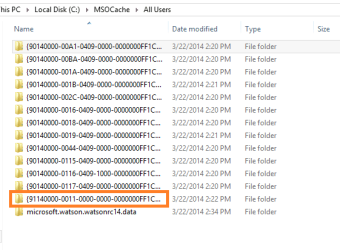
pregiecaaski, welcome to seven forums. Office can be difficult with repairs sometimes. Go an a good machine and go to c, and copy the MSO cache file(It's hidden) to C Temp on the machines that need repaired.

MSO Cache all users.PNG


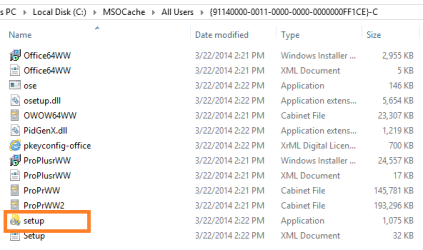
Drill down then look for the one where the second set of numbers is -0011. Run the setup as admin and the repair will run for you.

mso cache office files.PNG
 
Last edited:

My Computer

Computer type
PC/Desktop
Computer Manufacturer/Model Number
Dude Build
OS
Windows 10 Pro X64
CPU
Intel(R) Core(TM) i5-3570K CPU OC@ 4.5GHZ Turbo
Motherboard
MSI Z77A-G45 Gaming
Memory
8.00 GB DDR3 1600Mhz
Graphics Card(s)
MSI Gaming X GTX 1070
Sound Card
Realtek High Definition
Monitor(s) Displays
Dell S23O9W, HP L1710
Screen Resolution
DELL-1920 x 1080 HP-1280 x1024
Hard Drives
Crucial m4 256 SSD, WD 7200RPM 500GB WD 1TB
PSU
Seasonic X650 GOLD
Case
Zalman Z12
Cooling
Antec Kuhler 920
Keyboard
Logitech
Mouse
MSI DS100 Interceptor
Internet Speed
50 down and 5 up
Antivirus
MSE
Browser
Chrome, IE 11
Other Info
Logitech X-620 Speakers
So I was able to resolve the issue after looking at some of the event logs pointing to a file it couldn't find. It seems the the following file was missing from some of my machines:

C:\Program Files (x86)\Common Files\microsoft shared\Source Engine\OSE.EXE

I was able to copy this file over from a machine that had the file in place. I then ran the repair from the control panel and it worked. It seems the we often get permission issues with the Source Engine directory, despite users being administrators. The only way to go around the issue is to reboot the machine to access the folder.
 

My Computer

Computer type
PC/Desktop
OS
Windows 7
Good news, thanks for sharing your resolution.
 

My Computer

Computer type
PC/Desktop
Computer Manufacturer/Model Number
Dude Build
OS
Windows 10 Pro X64
CPU
Intel(R) Core(TM) i5-3570K CPU OC@ 4.5GHZ Turbo
Motherboard
MSI Z77A-G45 Gaming
Memory
8.00 GB DDR3 1600Mhz
Graphics Card(s)
MSI Gaming X GTX 1070
Sound Card
Realtek High Definition
Monitor(s) Displays
Dell S23O9W, HP L1710
Screen Resolution
DELL-1920 x 1080 HP-1280 x1024
Hard Drives
Crucial m4 256 SSD, WD 7200RPM 500GB WD 1TB
PSU
Seasonic X650 GOLD
Case
Zalman Z12
Cooling
Antec Kuhler 920
Keyboard
Logitech
Mouse
MSI DS100 Interceptor
Internet Speed
50 down and 5 up
Antivirus
MSE
Browser
Chrome, IE 11
Other Info
Logitech X-620 Speakers
Back
Top