
Old Drafting Software Won't Load

asallwey

New member
Local time
7:35 PM
Messages
28
Location
N. VA
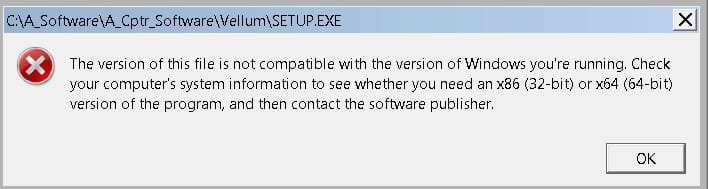
I've been using a 2D drafting packing I first purchased in 1998. Ran well on XP, but I've just moved to 7 and it won't load. Attached is the error popup. Any suggestions on how I could run this? The software has evolved into a modern 3D cad program, and very expensive. My version hasn't been supported for upteen years. I am long retired and have been using this for hobby projects. I really don't want to learn another package as this one met my limited needs.

Thanks for any ideas! (PS software called Vellum Draft)
 

Attachments
  • Vellum1.jpg
    Vellum1.jpg
    43.5 KB · Views: 1

My Computer

Computer type
Laptop
OS
XP - 32bit
I have several programs that I used with XP but will not run on Win 7 and not nearly as old as yours. Something from 1998 is pretty hopeless. It is time to get a new program, sorry.
 

My Computer

Computer type
PC/Desktop
Computer Manufacturer/Model Number
Custom Build
OS
Windows 7 Home Premium 32-Bit - Build 7600 SP1
CPU
Intel Core i3-2120 3.30Ghz
Motherboard
Asus P8Z68-V LX Intel Z68 Socket H2 ATX
Memory
Kingston 4 GB DDR3 1333 mhz
Graphics Card(s)
AMD Radeon HD6670
Sound Card
Sound Blaster Audigy SE 24-Bit
Monitor(s) Displays
Asus VE228
Screen Resolution
1440 X 900
Hard Drives
OCZ Vertex 3 120 GB Sata 3 SSD ==
Kingston SH103/S3 120 G Hyper X 120 GB SSD ==
Western Digital 500 GB Caviar Green 7200 RPM ==
PSU
Corsair CX600M == 600 Watt
Case
NZXT Apollo - Silver with Clear Side Panel
Cooling
Three 120 mm Fans
Keyboard
Microsoft Natural 4000
Mouse
Microsoft Custom Optical 3000
Internet Speed
AT&T Fiber Optic Wireless Network
Antivirus
Microsoft Security Essentials
Browser
Chrome
Other Info
120 mm Blue LED Fan -- Three Blue LED Lazer Light Sticks
Bummer! Thought because some other programs ran there might be hope for it. Thanks!
 

My Computer

Computer type
Laptop
OS
XP - 32bit
Is the Windows 7 OS 32 or 64 bit? It appears that the software is 16 bit and if that is the case there is no hope of running it on a 64 bit OS outside of a virtual machine.
 

My Computer

Computer type
PC/Desktop
Computer Manufacturer/Model Number
HP
OS
Windows 7 Pro 64 bit
CPU
Xeon W3520
Memory
8 GB
Graphics Card(s)
Nvidia Geforce 210

My Computer

Computer type
PC/Desktop
Computer Manufacturer/Model Number
Custom Build
OS
Windows 7 Home Premium 32-Bit - Build 7600 SP1
CPU
Intel Core i3-2120 3.30Ghz
Motherboard
Asus P8Z68-V LX Intel Z68 Socket H2 ATX
Memory
Kingston 4 GB DDR3 1333 mhz
Graphics Card(s)
AMD Radeon HD6670
Sound Card
Sound Blaster Audigy SE 24-Bit
Monitor(s) Displays
Asus VE228
Screen Resolution
1440 X 900
Hard Drives
OCZ Vertex 3 120 GB Sata 3 SSD ==
Kingston SH103/S3 120 G Hyper X 120 GB SSD ==
Western Digital 500 GB Caviar Green 7200 RPM ==
PSU
Corsair CX600M == 600 Watt
Case
NZXT Apollo - Silver with Clear Side Panel
Cooling
Three 120 mm Fans
Keyboard
Microsoft Natural 4000
Mouse
Microsoft Custom Optical 3000
Internet Speed
AT&T Fiber Optic Wireless Network
Antivirus
Microsoft Security Essentials
Browser
Chrome
Other Info
120 mm Blue LED Fan -- Three Blue LED Lazer Light Sticks
If you have the XP install disc you may be able to set up a dual boot to run the program under native XP. Adding XP to a system already running W7 isn't that difficult. The main thing would be to have a complete image backup using something like Macrium Reflect Free to bail you out if you messed up the set up.

If you have 100GB or so at the end of C: that could be sliced off that would be plenty to run XP and a bunch of programs. You could try the program in an XP VM first as that is safer. But chances are it may run pretty slow in a software VM. Booting real XP it would run nearly as fast as before(it could be just a tad slower because it would be installed at the far end of the HD in most cases.)

If you try the dual boot scenario plan it out and make sure you can recover your current system from an image backup before risking it. But multi-boot on MBR type simple volumes is not that difficult. There are one or two gotcha's to watch out for in the main.
 

My Computer

Computer Manufacturer/Model Number
HP Media Center
OS
Windows 7 32 bit
CPU
AMD 5200+ dual core
Memory
2 GB
Graphics Card(s)
NVidia GeForce 6150SE 128 MB
Monitor(s) Displays
CRT
Screen Resolution
1280x1024
Hard Drives
500 GB Sata internal :

SIIG USB 3.0 docking stations w/WD Caviar Black 6 Gb/s drives
Keyboard
PS/2
Mouse
PS/2 Wheel Mouse
Other Info
SIIG USB 3.0 PCIexpress card.
LMiller7 -- I have 64 bit Win 7, and given the age of my Vellum it probably is 16 bit. I've read how that is sort of 'fatal'.

bigmck -- Not quite the same. Mine was made by Ashlar and has continuously evolved into a 3D professional cad package that costs in the thousands I believe.

MilesAhead -- Your idea is interesting. I have cloned a couple of drives with Macrium, but it was a 'follow-the-numbers' process. I'm not quite ready to go further, and my current drive is 120g with about 50g free. I'll keep your idea and build some notes around it, maybe I'll get brave.

Right now I think I can get a friend's XP laptop that they no longer use. It would be a good interm solution for me.

Thanks all for the replies,

Alex
 

My Computer

Computer type
Laptop
OS
XP - 32bit
I have an old program "Sew Ware" that is used to transfer embroidery patterns to my wife's Singer Embroidery machine. I had to install and run it in a Win 98/ME compatibility mode. It uses RS232C interface with the Embroidery machine. I have this running in both Win 7 64 bit and Win 10 64 bit on my dual boot system.

I wonder if this one will install/run in a compatibility mode?
 

My Computer

Computer type
PC/Desktop
Computer Manufacturer/Model Number
My Own Build
OS
Windows 10 64 bit
CPU
Intel i7 6700K
Motherboard
ASUS ROG Maximus VIII Hero
Memory
16GB Corsair Dominator
Graphics Card(s)
Intel CPU Graphics
Sound Card
RealTek
Monitor(s) Displays
27" Dell S2719dgf
Screen Resolution
2560X1440
Hard Drives
1 TB Samsung 850 EVO SSD for Win 10 Pro
500GB Samsung 850 EVO SSD for Win 10 Insider
2 TB drive for backup
PSU
EVGA Supernova 750G2
Case
BeQuiet Silent Base 600
Cooling
Deepcool Captain 120EX
Keyboard
Microsoft Wireless 2000
Mouse
Microsoft wireless
Internet Speed
100 MB/sec (Cable)
Antivirus
Microsoft Defender and Malwarebytes
Browser
Edge/Firefox
Other Info
Cakewalk (Sonar) by BandLab and Studio One 4.1 Pro recording studio software. MOTU 896Mk3 Hybrid recording interface, Frontier Tranzport wireless control unit, Behringer X-Touch Control Surface.
Five USB connected optical drives for CD Audio production using Nero BurningROM
Also if it is 16 bit there is a chance it may run under DosBox

That would be much simpler than setting up a dual boot. Since it is often used to run Dos games it likely has low latency compared to other VM solutions.
 

My Computer

Computer Manufacturer/Model Number
HP Media Center
OS
Windows 7 32 bit
CPU
AMD 5200+ dual core
Memory
2 GB
Graphics Card(s)
NVidia GeForce 6150SE 128 MB
Monitor(s) Displays
CRT
Screen Resolution
1280x1024
Hard Drives
500 GB Sata internal :

SIIG USB 3.0 docking stations w/WD Caviar Black 6 Gb/s drives
Keyboard
PS/2
Mouse
PS/2 Wheel Mouse
Other Info
SIIG USB 3.0 PCIexpress card.
fireberd -- Compatibility mode is a bit more technical that I want to get at this point. My friends laptop should be easier.

MilesAhead -- DosBox looks interesting, I'll check it out some more tonight.
 

My Computer

Computer type
Laptop
OS
XP - 32bit
Windows 7 64 bit supports Microsoft XP Mode and Virtual PC. This is an excellent solution for me as the program I have to run this way is no longer supported. You will find the install very easy. You must download both elements from the M$ website using IE, as your browser (yuck). Install XP Mode first then Virtual PC. Once done you can install your Vellum package. To shut down the Virtual PC/XP Mode be sure to use Control+Alt+Delete as shown in the various articles about this online. Resource usage will remain minimal and you will have a fully functional and legal copy of XP.
Good Luck
 

My Computer

Computer type
PC/Desktop
Computer Manufacturer/Model Number
Custom Desktop (2 alike) Dell inspiron 13" W10 Laptop Dell Inspiron 17 5759
OS
Windows 7 Enterprise 64bit Desktops; Windows 7 Professional 64Bit 17"Laptop
CPU
AMD Athlon 2 X3; I5-6200 6th gen (Dell)
Motherboard
Gigabyte GA 78LMT-USB3 (2 Desktops)
Memory
8 Gig Desktop, 8Gig Laptop, 16Gig Laptop
Graphics Card(s)
Radeon R5450 1Gig
Sound Card
Creative SB X-Fi Titanium Extreme Audio Desktop 1
Monitor(s) Displays
Dell 2419
Screen Resolution
1920x1080
Hard Drives
Crucial M500 500GB SSD Desktop 1 and Laptops
Samsung 850EVO 250GB - Desktop 2
PSU
Thermaltake 600watt
Case
Rosewill
Cooling
Scythe Typhoon 120mm
Keyboard
Kensington
Mouse
Logitech M310
Internet Speed
50/50
Antivirus
Avast
Browser
Firefox 68
To use XP mode you must be running Windows 7 Professional or Ultimate versions.
 

My Computer

Computer type
PC/Desktop
Computer Manufacturer/Model Number
HP
OS
Windows 7 Pro 64 bit
CPU
Xeon W3520
Memory
8 GB
Graphics Card(s)
Nvidia Geforce 210

My Computer

Computer type
PC/Desktop
Computer Manufacturer/Model Number
My Own Build
OS
Windows 10 64 bit
CPU
Intel i7 6700K
Motherboard
ASUS ROG Maximus VIII Hero
Memory
16GB Corsair Dominator
Graphics Card(s)
Intel CPU Graphics
Sound Card
RealTek
Monitor(s) Displays
27" Dell S2719dgf
Screen Resolution
2560X1440
Hard Drives
1 TB Samsung 850 EVO SSD for Win 10 Pro
500GB Samsung 850 EVO SSD for Win 10 Insider
2 TB drive for backup
PSU
EVGA Supernova 750G2
Case
BeQuiet Silent Base 600
Cooling
Deepcool Captain 120EX
Keyboard
Microsoft Wireless 2000
Mouse
Microsoft wireless
Internet Speed
100 MB/sec (Cable)
Antivirus
Microsoft Defender and Malwarebytes
Browser
Edge/Firefox
Other Info
Cakewalk (Sonar) by BandLab and Studio One 4.1 Pro recording studio software. MOTU 896Mk3 Hybrid recording interface, Frontier Tranzport wireless control unit, Behringer X-Touch Control Surface.
Five USB connected optical drives for CD Audio production using Nero BurningROM
LMiller7- Thanks for correcting my oversight. I am simply used to using Pro and nothing else :)
 

My Computer

Computer type
PC/Desktop
Computer Manufacturer/Model Number
Custom Desktop (2 alike) Dell inspiron 13" W10 Laptop Dell Inspiron 17 5759
OS
Windows 7 Enterprise 64bit Desktops; Windows 7 Professional 64Bit 17"Laptop
CPU
AMD Athlon 2 X3; I5-6200 6th gen (Dell)
Motherboard
Gigabyte GA 78LMT-USB3 (2 Desktops)
Memory
8 Gig Desktop, 8Gig Laptop, 16Gig Laptop
Graphics Card(s)
Radeon R5450 1Gig
Sound Card
Creative SB X-Fi Titanium Extreme Audio Desktop 1
Monitor(s) Displays
Dell 2419
Screen Resolution
1920x1080
Hard Drives
Crucial M500 500GB SSD Desktop 1 and Laptops
Samsung 850EVO 250GB - Desktop 2
PSU
Thermaltake 600watt
Case
Rosewill
Cooling
Scythe Typhoon 120mm
Keyboard
Kensington
Mouse
Logitech M310
Internet Speed
50/50
Antivirus
Avast
Browser
Firefox 68
I'm running Home Premium so it looks like XP Mode is out.

fireberd -- OK, compatibility mode isn't as complex as i thought. I changed compatibility to XP sp3 then clicked on the setup file and got the same popup as in my original post. Then I used the Troubleshooting wizard, and it recommended XP sp2 but when I tried to save the configuration it said it was incompatible. So no luck.

I looked at DosBox but haven't tried it yet. That may the way to go, probably try ti tomorrow.
 

My Computer

Computer type
Laptop
OS
XP - 32bit
fireberd -- I tried compatibility setings for 98, NT, 2000, XP sp2, and XP sp3. Each time I try to run setup I get the error popup I described at the beginning.

milesahead -- I tried Dosbox and it loaded fine. However I was not able to find a way to load my software. I pointed to the cdrom, it saw it along with the directory. But when I tried to run setup it gave me an error, something about it being windows (I forgot to write it down).

I think I'm left with my buddy's XP laptop. Not the end of the world, but not the most convenient. I'm not ready to try setting up a dual boot. That may be the only option. I'll have to do some reading about it.

Thanks for helping, learned quite a bit even if I didn't solve my problem, so a partial win.
 

My Computer

Computer type
Laptop
OS
XP - 32bit
It appears that the software is a 16 bit Windows application. DosBox will only run DOS applications, not Windows. There are no compatibility settings that will run a 16 bit application on a 64 bit OS.
 

My Computer

Computer type
PC/Desktop
Computer Manufacturer/Model Number
HP
OS
Windows 7 Pro 64 bit
CPU
Xeon W3520
Memory
8 GB
Graphics Card(s)
Nvidia Geforce 210
Yes it does seem to be an almost fatal situation. I did some reading on dual booting and for an occasional use software it would be a bit cumbersome. So I guess I will begin exploring some of the freeware drawing programs. Until I change, I will use mine on an old XP laptop. It works fine and I can use wifi to send print jobs to my network. Still a glitch or 2, but workable.

Thanks all!
 

My Computer

Computer type
Laptop
OS
XP - 32bit
Back
Top