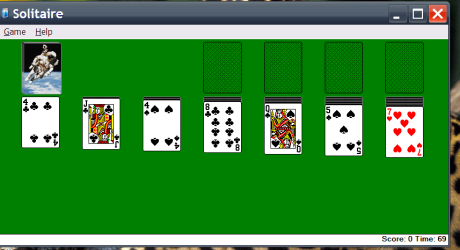
Old style Solitaire

macnab

New member
Member
VIP
Local time
9:58 PM
Messages
158
Location
Roodepoort
Is there any way of getting the old (XP and earlier) style of Solitaire? This version is pretty awful.
 

My Computer

Computer type
PC/Desktop
Computer Manufacturer/Model Number
Built-up
OS
Windows 7 Professional SP1 64-bit
CPU
Intel i3-3220 3.3GHz
Motherboard
Gigabyte
Memory
4GB
Graphics Card(s)
NVIDIA GeForce GTX650 1GB
Sound Card
On-board Realtek
Monitor(s) Displays
LGL1719S
Screen Resolution
1280 x 1024
Hard Drives
Samsung HD321HJ, Samsung HD103SI, Seagate ST2000DL, Seagate ST3100524AS
PSU
450W
Case
AOpen
Cooling
Case fan, CPU fan, PSU fanf.
Keyboard
Microsoft
Mouse
AOpen
Internet Speed
1Mb/s
Antivirus
MSSE
Browser
Firefox
I have played it on and off for 6 or 8 years and don't recall the XP version.

How was it different? It's the same game as far as I know--the game I played as a child.
 

My Computer

Computer type
PC/Desktop
Computer Manufacturer/Model Number
Ignatz Special; 4 speed manual gearbox; factory air conditioning; one of one
OS
Windows 7 Home Premium SP1, 64-bit
CPU
Intel Skylake i5-6600K, not overclocked
Motherboard
AsRock Z170M Extreme 4, micro ATX
Memory
8 GB HyperX DDR4-2666 (2 x 4 GB)
Graphics Card(s)
none; graphics are integrated on CPU
Sound Card
onboard: Realtek ALC1150; external: USB Behringer UF0-202
Monitor(s) Displays
Dell S2340M 23 inch IPS
Screen Resolution
1600 x 900
Hard Drives
System: Crucial MX100 series SSD, 128 GB;
Data: Samsung Spinpoint 103SJ, 1 TB;
Backup: WD Caviar Green WD30EZRX-00D8PB0, 3 TB
PSU
Rosewill SilentNight 500 watt fanless, semi-modular
Case
Antec Solo II
Cooling
Noctua NH-U12S; Noctua F12 intake, Noctua S12A exhaust
Keyboard
Microsoft 200 6JH-00001 USB
Mouse
Dell or Microsoft optical wired; USB
Antivirus
Microsoft Security Essentials and Malwarebytes Premium
Browser
Pale Moon
Other Info
All fans PWM; speeds at idle: CPU circa 500 rpm; intake circa 600 rpm; exhaust circa 600 rpm; CPU temps 27 idle and 47 C load in a warm room (27 C/81 F) when running Intel Extreme Tuning Utility stress test.
Well, if you've played it for the last 8 years you will remember that there was a king's head in the middle which looked in whichever direction you were using your mouse, and the cards themselves were crisp objects that actually looked like plaing cards.

With Win 7 version, there is no king at the top in the middle (not important) but the cards look terrible and, when selected, get an "aura". You can't properly see what you have selected, and so it is more difficult to play.

To me, it looks as though someone said "Let's see what pretty visual effects we can add, the more the merrier" instead of saying "Let's make it look clean and crisp and a pleasure to play."
 

My Computer

Computer type
PC/Desktop
Computer Manufacturer/Model Number
Built-up
OS
Windows 7 Professional SP1 64-bit
CPU
Intel i3-3220 3.3GHz
Motherboard
Gigabyte
Memory
4GB
Graphics Card(s)
NVIDIA GeForce GTX650 1GB
Sound Card
On-board Realtek
Monitor(s) Displays
LGL1719S
Screen Resolution
1280 x 1024
Hard Drives
Samsung HD321HJ, Samsung HD103SI, Seagate ST2000DL, Seagate ST3100524AS
PSU
450W
Case
AOpen
Cooling
Case fan, CPU fan, PSU fanf.
Keyboard
Microsoft
Mouse
AOpen
Internet Speed
1Mb/s
Antivirus
MSSE
Browser
Firefox
I don't remember the King.

Yeah, I see that aura thing. More unnecessary eye candy, but it doesn't bother me. Maybe if you turn off a particular control somewhere in Win 7 generally, it would go away?

For all I know, you could replace the Win 7 version with an earlier version and it might work?

Incidentally--I recently read that the best strategy is to play ONLY from the dealt cards (3 at a time, turning them over) for as long as you possibly can, and only then start making plays down on the stacks. First time I ever even tried to research solitaire strategy. I think I read that over 50% of games can be won?
 

My Computer

Computer type
PC/Desktop
Computer Manufacturer/Model Number
Ignatz Special; 4 speed manual gearbox; factory air conditioning; one of one
OS
Windows 7 Home Premium SP1, 64-bit
CPU
Intel Skylake i5-6600K, not overclocked
Motherboard
AsRock Z170M Extreme 4, micro ATX
Memory
8 GB HyperX DDR4-2666 (2 x 4 GB)
Graphics Card(s)
none; graphics are integrated on CPU
Sound Card
onboard: Realtek ALC1150; external: USB Behringer UF0-202
Monitor(s) Displays
Dell S2340M 23 inch IPS
Screen Resolution
1600 x 900
Hard Drives
System: Crucial MX100 series SSD, 128 GB;
Data: Samsung Spinpoint 103SJ, 1 TB;
Backup: WD Caviar Green WD30EZRX-00D8PB0, 3 TB
PSU
Rosewill SilentNight 500 watt fanless, semi-modular
Case
Antec Solo II
Cooling
Noctua NH-U12S; Noctua F12 intake, Noctua S12A exhaust
Keyboard
Microsoft 200 6JH-00001 USB
Mouse
Dell or Microsoft optical wired; USB
Antivirus
Microsoft Security Essentials and Malwarebytes Premium
Browser
Pale Moon
Other Info
All fans PWM; speeds at idle: CPU circa 500 rpm; intake circa 600 rpm; exhaust circa 600 rpm; CPU temps 27 idle and 47 C load in a warm room (27 C/81 F) when running Intel Extreme Tuning Utility stress test.
The whole problem revolves around the fact that I was talking about FreeCell not Solitaire!!! I even searched on Solitaire, instead of FreeCell - will start again :D
 

My Computer

Computer type
PC/Desktop
Computer Manufacturer/Model Number
Built-up
OS
Windows 7 Professional SP1 64-bit
CPU
Intel i3-3220 3.3GHz
Motherboard
Gigabyte
Memory
4GB
Graphics Card(s)
NVIDIA GeForce GTX650 1GB
Sound Card
On-board Realtek
Monitor(s) Displays
LGL1719S
Screen Resolution
1280 x 1024
Hard Drives
Samsung HD321HJ, Samsung HD103SI, Seagate ST2000DL, Seagate ST3100524AS
PSU
450W
Case
AOpen
Cooling
Case fan, CPU fan, PSU fanf.
Keyboard
Microsoft
Mouse
AOpen
Internet Speed
1Mb/s
Antivirus
MSSE
Browser
Firefox
Solitaire does look bad too.

I don't like the look of Win 7 Solitaire either, and much prefer the cleaner look of the XP one. I tried placing the sol.exe and cards.dll files from the System32 folder of XP into the System32 folder in Win 7 but it didn't work. I don't think I'll be playing Solitaire any more to kill time (while waiting for something) unless there's a way to get the look of the old one back.
 

My Computer

OS
windows 7
The awful, stiff and looking like it has been bleached Solitaire of XP? lol
 

My Computer

Computer type
Laptop
Computer Manufacturer/Model Number
Custom
OS
Windows 7 Home Premium x64
CPU
Intel Core i5 2500K
Motherboard
MSI MS-7750
Memory
8GB DDR3
Graphics Card(s)
nVidia GeForce GTX650 Ti BOOST
Sound Card
Realtek
Monitor(s) Displays
21' Philips
Screen Resolution
Full HD
Hard Drives
1TB
PSU
500W
Fixed

That's the one! Clean looking too.

After reading another post I found that the XP Solitaire works OK if you copy those two files to the desktop, or any folder other than System32 (and run sol.exe)
 

My Computer

OS
windows 7
lose the aura!

That fuzzy, yellow "aura" thing is awful - it actually hurts my eyes, and is very distracting.

I do not need a 'cutting-edge' (and cartoonish) "visual experience" when I'm just killing time
playing Solitaire, while waiting for an eBay auction to end, or while I'm waiting for a download
to finish, etc.

WHY do people always have to "fix" things?

And if they must do so, why not at least provide an option to use the older, simpler, cleaner
no-frills version?


Or an option to turn off the effects, at the very least.

JG

:)
 
Last edited:

My Computer

Computer Manufacturer/Model Number
DELL Inspiron 560 Minitower w/ Black Bezel
OS
Windows 7
CPU
Inspiron Mini-Tower, Intel Celeron 450 (2.2GHz, 512K)
Motherboard
don't know
Memory
2GB DDR3 SDRAM,1066MHZ- 2X1GB
Graphics Card(s)
Integrated Intel Graphics Media Accelerator X4500
Sound Card
don't know
Monitor(s) Displays
18.5" Dell IN1910N HD Monitor with VGA cable
Hard Drives
320GB NCQ Serial ATA Hard Drive (7200 RPM) w/ 16MB DataBurst Cache
PSU
eh?
Case
Black Bezel
Cooling
yes
Don't forget the bug

There was a delightful bug in the old XP solitaire.
Drag a card to any valid position, don't let go of the mouse-click, press ESC and the cards return to their original place. However, the 'valid-move' bit has now been set and so a click on any other card will move it to the place you were when you pressed ESC.
 

My Computer

OS
windows 7
If you msg me, I can email it to you or if you can get your hands on an XP machine just copy sol.exe and cards.dll to a folder on your windows 7 machine then just double click and bam... xp sol all over again.
 

My Computer

Computer Manufacturer/Model Number
Home Built
OS
Windows 7; Server 08; Window Home Server; Vista; XP
CPU
Intel E8400 @ 3.4Ghz
Motherboard
Gigabyte P35 DS3L
Memory
8 Gb Patriot DDr2 800
Graphics Card(s)
NVidia GTX460 OC
Sound Card
Onboard
Monitor(s) Displays
Samsung 21"
Screen Resolution
1920x1080
Hard Drives
Seagate 160Gb x2
Samsung 250Gb
PSU
Cooler Master 650w 52a on 12v
Case
Antec 300
Cooling
Stock
Keyboard
HP Standard USB
Mouse
Logitech 518
Internet Speed
25Mbit Down 1.5Mbit up
Other Info
http://www.speedtest.net/result/723924362.png
I don't know you, but Solitaire in windows 7 has a glitch in the generator. You might notice that numbers almost always come up in sequences of 4.... Example. The board my deal three sixes....then you turn a fourth. OR four Kings....Jacks etc. The random generator is flawd. See if you notice while playing. The Old Version is heads above this New Windows 7 version.
 

My Computer

OS
window 7 64 HomeP

My Computer

Computer type
PC/Desktop
Computer Manufacturer/Model Number
Novatech iRush Pro
OS
Windows 7 Ultimate SP1 - 64 Bit
CPU
Intel Core i5 2500k
Motherboard
Foxconn H67M-S/H67M-V/H67
Memory
2x4GB DDR3 1333Hz
Graphics Card(s)
Ati Radeon 6770
Sound Card
None
Monitor(s) Displays
Samsung S22B150
Screen Resolution
1920x1080
Hard Drives
2x500GB
PSU
500W
Cooling
Fan
Keyboard
HP KU0316
Mouse
Wireless Logitech M185
Internet Speed
20MB/s
Antivirus
Avast Free
Browser
Google Chrome
Other Info
Logitech M185 Mouse
KU-M316 Keyboard
Hi there
do you mean this one --can't find any "King" thing though

Cheers
jimbo
 

Attachments

  • xpsolitaire.png
    xpsolitaire.png
    19.3 KB · Views: 15

My Computer

Computer type
PC/Desktop
Computer Manufacturer/Model Number
Custom built, several laptops HP/ASUS
OS
Linux CENTOS 7 / various Windows OS'es and servers
CPU
Intel i7 Intel i5
Memory
8GB, 16GB
Graphics Card(s)
On Motherboard
Sound Card
Realtek HD audio
Monitor(s) Displays
Apple Cinema display, Samsung LCD
Screen Resolution
1920 X 1080
Hard Drives
4 X 1TB SATA
Mouse
Toshiba wireless laser
Internet Speed
> 20MB up
Back
Top