One click cd burning files

Korazy

New member
Local time
9:09 PM
Messages
2
Is there a recommended product to burn data to cd/DVD? I'm looking for something that once setup, I can have a shortcut on my desktop that when I double click, it burn all the files in a folder to a new cd/DVD without any prompts? I have files in a folder that I need to routinely burn to cd and I want this routine task to be as simple as possible. It needs to burn the files to the disc and not a backup archive. The files need to be read from the disc.

Thanks
 

My Computer

OS
Home premium 64bit
If there are hundreds of small files in the folder, like in a source code tree, burning while creating the image on the fly can cause buffer under run even with burn proof enabled. In that case what I do is create an .iso image first. Then burn the image with Imgburn. You can use Imgburn to create the image or some other ISO utility such as Folder2Iso, ISO Buster etc..

If there are only a few files then just use Imgburn "build mode" (or the icon at top right that says "burn files/folders to disc".)

The nice thing about Imgburn is it will usually select the correct file system type and ask you if you want to use it.
 

My Computer

Computer Manufacturer/Model Number
HP Media Center
OS
Windows 7 32 bit
CPU
AMD 5200+ dual core
Memory
2 GB
Graphics Card(s)
NVidia GeForce 6150SE 128 MB
Monitor(s) Displays
CRT
Screen Resolution
1280x1024
Hard Drives
500 GB Sata internal :

SIIG USB 3.0 docking stations w/WD Caviar Black 6 Gb/s drives
Keyboard
PS/2
Mouse
PS/2 Wheel Mouse
Other Info
SIIG USB 3.0 PCIexpress card.
There are not a lot of files, 20 - 30 or so. Mostly small PDF and excel. I just want to be able to burn them to cd/DVD daily as quick and easily as possible with the least number of steps.
 

My Computer

OS
Home premium 64bit
you use to be able to "send to" CD through XP which was very easy. if its for a OAP just write a set of instructions.
 

My Computer

Computer Manufacturer/Model Number
Windows 7 Ultimate 64-bit
OS
Windows 7 Ultimate N 64-bit
CPU
AMD Black Edition - AMD Phenom X4 2.5 GHz Processor
Motherboard
Bio Star
Memory
8GB DDR2 800MHZ BRANDED
Graphics Card(s)
Palti NVIDIA GeForce GTX 460
Monitor(s) Displays
3D 23.6" & 22"
Screen Resolution
1920x1080@120Hz
Hard Drives
313GB SAMSUNG SAMSUNG HD321KJ
PSU
OCZ 600W StealthXStream PSU, PowerWhisper, Active PFC
Internet Speed
22793
There are not a lot of files, 20 - 30 or so. Mostly small PDF and excel. I just want to be able to burn them to cd/DVD daily as quick and easily as possible with the least number of steps.

That should be no sweat. Click on the Imgburn icon to get Build Mode, then drag & drop the folder onto Imgburn. It should suggest a good file system for "data" CD/DVD if it doesn't see any typical video folders such as VIDEO_TS etc..

If you want to take total control you can go into advanced settings for max file name lengths for each file system etc.. but the defaults usually work well.
 

My Computer

Computer Manufacturer/Model Number
HP Media Center
OS
Windows 7 32 bit
CPU
AMD 5200+ dual core
Memory
2 GB
Graphics Card(s)
NVidia GeForce 6150SE 128 MB
Monitor(s) Displays
CRT
Screen Resolution
1280x1024
Hard Drives
500 GB Sata internal :

SIIG USB 3.0 docking stations w/WD Caviar Black 6 Gb/s drives
Keyboard
PS/2
Mouse
PS/2 Wheel Mouse
Other Info
SIIG USB 3.0 PCIexpress card.
Check out whether ISO Recorder v3.1 suits your as simple as posssible need. Download from ISO Recorder.

After installation, just right click on the folder containing your files and click on Create ISO image file.

1ISO Image.jpg

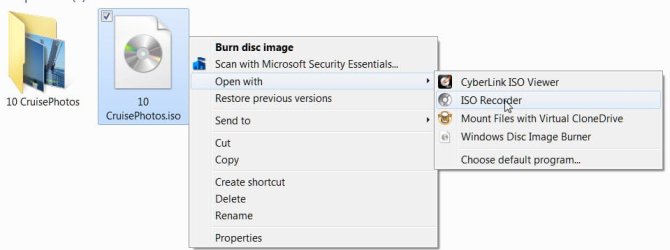
To burn it to CD/DVD, right click on the ISO file. You may now either click on Burn Disk Image to use the Windows Image Burner or Open with > ISO Recorder to burn it with ISO Recorder.

2Burntodisk.jpg

As simple as A,B,C.....(I.M.O.....)

(Of course you will get the appropriate dialog boxes to create the ISO image and in the next step to burn it, which I haven't put out here since those are intuitive.)
 

My Computer

Computer Manufacturer/Model Number
self-assembled
OS
Windows 7 Ultimate 32bit
CPU
AMD Phenom II X3 720 Processor
Motherboard
Gigabyte GA-MA78GM-S2H Revision 1.0
Memory
Transcend DDR2 (PC2 6400) 4 X 1GB
Graphics Card(s)
Integrated + ATI Radeon 4550
Sound Card
Integrated Realtek ALC 889A
Monitor(s) Displays
DELL 1704 FPT
Screen Resolution
1280 x 1024
Hard Drives
Western Digital Caviar SE16 250 GB x2 in RAID 0
PSU
Coolermaster 400 W
Case
Zebronics Cube
Cooling
stock
Keyboard
Microsoft - wired
Mouse
Microsoft - wired
Internet Speed
ADSL 256-512Kbps
Back
Top