AmazingWeasel
New member
My Computer
- Computer Manufacturer/Model Number
- Dell Studio 1557
- OS
- Winodws 7 Ultimate x64
- CPU
- Intel Core i7 720m
- Memory
- 4GB DDR3
- Graphics Card(s)
- ATI RadeonHD 4570
- Monitor(s) Displays
- Full HD WLED
- Hard Drives
- 500GB HDD
This may help:
Download details: System Update Readiness Tool for Windows 7 for x64-based Systems (KB947821) [August 2010]
Unless you have a program that specifically requires NET Framework 4 why do you want it installed?
And welcome to the Forum.
You can try what is posted in pictures. Open Windows update then View Update history. Trouble shoot problems in left picture. Click where marked in right picture.
Trouble shooter opens and follow. If that doesn't work try the link below.
http://www.sevenforums.com/tutorials/91738-windows-update-reset.html
Mike
Try the following steps, please:
1. Go to Program and Features, click it.
2. Scroll down to Microsoft.Net Framework 4 Client Profile, right click it.
3. It will give you a choice of Uninstall/Change, click it.
4. Then, it will give a choice to Repair it, pick Repair it. It will take about 4-10 minutes to repair (with my PC) your experience may vary.
5. When completed, go to your update center, and update it again.
Try the following steps, please:
1. Go to Program and Features, click it.
2. Scroll down to Microsoft.Net Framework 4 Client Profile, right click it.
3. It will give you a choice of Uninstall/Change, click it.
4. Then, it will give a choice to Repair it, pick Repair it. It will take about 4-10 minutes to repair (with my PC) your experience may vary.
5. When completed, go to your update center, and update it again.
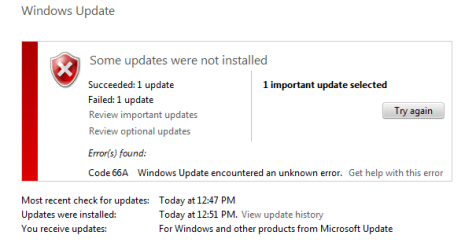
Can't install KB2160841
Step1 should be Start>Control Panel> Programs and Features.
I checked the steps and the repair option is there. It may have been damaged by update.
You can check the link info for yourself.
You can also delete and reinstall .Net if necessary this way.
Borrowed from MS
Mike