OneNote 2010 search strange behavior

usernamename

New member
Local time
3:56 AM
Messages
15
Hi everyone,
I was wondering if there is a setting I’m missing in OneNote2010. The 2007 version used to search very well and I need to make sure 2010 does the same thing reliably. I may have “found it” by changing the setting allowing 0% of files to not be optimized. However, I can never be sure, because the times I’ve had trouble it has sporadically quits on me. So I can't instantly tell with in a few days of searching if it's ok. Like it may get stuck on finding one phrase and not move on. So even typing “the” in the search box gives no results.
I know also to search you have to type in the phrase and then hit alt-o or it won’t scroll though them, if you don’t do alt-o it searches once and makes you do it again.

Also does anyone know any third party add-ons to make the search features of 2010 behave as reliably as the 2007 version?
 

My Computer My Computer

At a glance

Windows 7 Home Premium 64bit
OS
Windows 7 Home Premium 64bit
Is there anything here which might help? :
10 ways OneNote 2010 can make you more productive | TechRepublic
.
.

Find your notes quickly

Of course, once you capture all this information, you need an easy way to find it later. Otherwise, what good is taking all those notes? Luckily, OneNote 2010 includes a powerful indexed search feature that enables you to search your notebooks using a word or a phrase. You can also search notes added by specific authors (when you’re working with a shared notebook). Simply click in the Search All Notebooks box just below the Ribbon on the right side of the screen and begin typing your search word. The search engine will instantly locate all the notes with the letters you enter. You can choose to search by notebook, by information type, or by topic or page.

OneNote makes it easy to search quickly for content in your notebooks.
 

My Computer My Computer

At a glance

Windows 7 Home Premium 64bitIntel(R) Core(TM) i3-2120 CPU @ 3.30GHz3.00 GB(1) Intel(R) HD Graphics (2) VNC Mirror Driver
Computer type
PC/Desktop
Computer Manufacturer/Model Number
Packard Bell
OS
Windows 7 Home Premium 64bit
CPU
Intel(R) Core(TM) i3-2120 CPU @ 3.30GHz
Motherboard
Packard Bell IPISB-AG
Memory
3.00 GB
Graphics Card(s)
(1) Intel(R) HD Graphics (2) VNC Mirror Driver
Sound Card
Realtek High Definition Audio
Monitor(s) Displays
AIO LCD
Screen Resolution
1920 x 1080
Hard Drives
WDC WD10EADX-22TDHB0 ATA Device
Fixed hard disk media
4 partitions
931.51 GB
Keyboard
Wireless
Mouse
Wireless
Antivirus
Microsoft Security Essentials
Browser
IE; Firefox
Other Info
Also:
Samsung N220 Plus Netbook - Windows 7 Home
HP laptop
iPad 5
Thank you for the link to Microsoft Answers.

Did you read through to the 3rd page where there is an update provided:
Description of the OneNote 2010 update: March 8, 2011
.
.

Today we released a non-security update for OneNote 2010, here are the details from the Microsoft Office SE blog:
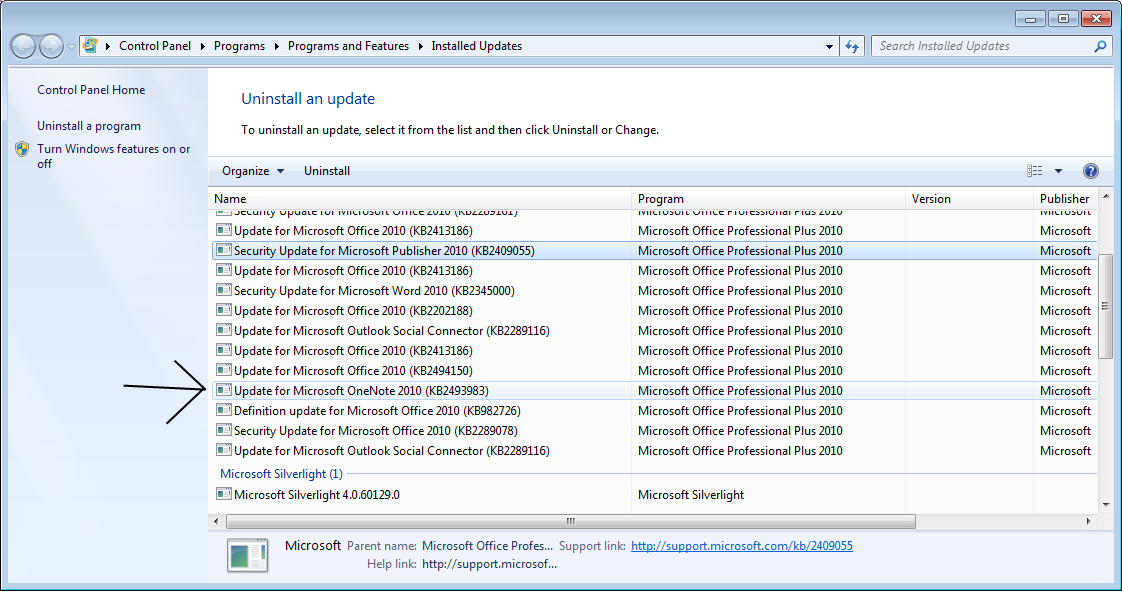
A non-security update for OneNote 2010 32-bit/64-bit Editions was also released. This update provides fixes associated with displaying search results, fixes to optical character recognition (OCR), indexing, and displaying of inserted documents. Additional information can be found in the Microsoft Knowledge Base article Update for Microsoft OneNote 2010 (KB2493983).
Thanks all for your patience - apologies for the delay. By doing this through a public update we can reach a lot more users. Please let us know if you have other concerns/issues!
Please let us know how successful your update proves to be. :)
 

My Computer My Computer

At a glance

Windows 7 Home Premium 64bitIntel(R) Core(TM) i3-2120 CPU @ 3.30GHz3.00 GB(1) Intel(R) HD Graphics (2) VNC Mirror Driver
Computer type
PC/Desktop
Computer Manufacturer/Model Number
Packard Bell
OS
Windows 7 Home Premium 64bit
CPU
Intel(R) Core(TM) i3-2120 CPU @ 3.30GHz
Motherboard
Packard Bell IPISB-AG
Memory
3.00 GB
Graphics Card(s)
(1) Intel(R) HD Graphics (2) VNC Mirror Driver
Sound Card
Realtek High Definition Audio
Monitor(s) Displays
AIO LCD
Screen Resolution
1920 x 1080
Hard Drives
WDC WD10EADX-22TDHB0 ATA Device
Fixed hard disk media
4 partitions
931.51 GB
Keyboard
Wireless
Mouse
Wireless
Antivirus
Microsoft Security Essentials
Browser
IE; Firefox
Other Info
Also:
Samsung N220 Plus Netbook - Windows 7 Home
HP laptop
iPad 5
PAweY.png
-
I seem to have this update. I think it may be a problem with the amount of information I am indexing. I am using the 32 bit version on a 64 bit operating system because they suggested that was a smart idea. Now I am not sure, it is unresponsive at times. The real problem is I would like to have the 32 bit version of excel in case I need to install any third party add-ons, (I currently only use the "data analysis toolpack but that Comes with excel, I was worried it didn't come with the 64 bit version) but all the rest of the programs I use, and will probably never use any add-ons at all.

Is there a way now to install one 32 bit office program and the rest 64 or is it still restricted?
 

My Computer My Computer

At a glance

Windows 7 Home Premium 64bit
OS
Windows 7 Home Premium 64bit
I don't believe that you can have 32 and 64-bit installed at the same time, but I will ask for further help in that expertise. :)
 

My Computer My Computer

At a glance

Windows 7 Home Premium 64bitIntel(R) Core(TM) i3-2120 CPU @ 3.30GHz3.00 GB(1) Intel(R) HD Graphics (2) VNC Mirror Driver
Computer type
PC/Desktop
Computer Manufacturer/Model Number
Packard Bell
OS
Windows 7 Home Premium 64bit
CPU
Intel(R) Core(TM) i3-2120 CPU @ 3.30GHz
Motherboard
Packard Bell IPISB-AG
Memory
3.00 GB
Graphics Card(s)
(1) Intel(R) HD Graphics (2) VNC Mirror Driver
Sound Card
Realtek High Definition Audio
Monitor(s) Displays
AIO LCD
Screen Resolution
1920 x 1080
Hard Drives
WDC WD10EADX-22TDHB0 ATA Device
Fixed hard disk media
4 partitions
931.51 GB
Keyboard
Wireless
Mouse
Wireless
Antivirus
Microsoft Security Essentials
Browser
IE; Firefox
Other Info
Also:
Samsung N220 Plus Netbook - Windows 7 Home
HP laptop
iPad 5
I don't believe that you can have 32 and 64-bit installed at the same time, but I will ask for further help in that expertise. :)

Hi,

I believe that is correct : all the Office programs must either be x86 or x64. As far as I know, its not possible to mix-and-match.

Regards,
Golden
 

My Computer My Computer

At a glance

Windows 10 Pro x64 ; Xubuntu x64Intel i7 860 @ 2.80 GHz O/C'ed to 4.0GHz16GB Corsair Vengance DDR3 @ 661 MHz Dual Cha...EVGA NVidia GTX 560 1024MB
Computer type
PC/Desktop
Computer Manufacturer/Model Number
Golden Mk. I.4
OS
Windows 10 Pro x64 ; Xubuntu x64
CPU
Intel i7 860 @ 2.80 GHz O/C'ed to 4.0GHz
Motherboard
Gigabyte P55A-UD3R Rev.1. Award BIOS F13
Memory
16GB Corsair Vengance DDR3 @ 661 MHz Dual Channel (9-9-9-24)
Graphics Card(s)
EVGA NVidia GTX 560 1024MB
Sound Card
Realtek Integrated
Monitor(s) Displays
Dual Samsung SyncMaster 2494HS
Screen Resolution
1920*1080 and 1920*1080
Hard Drives
1*Samsung 840 EVO 120GB SSD;
1*OCZ Vertex 2 60GB SSD;
2*Samsung F3 SpinPoint 1TB in RAID0;
1*Samsung F1 SpinPoint 1TB;
2*Western Digital 1TB External USB 3.0
1*Western Digital 500GB External USB 3.0
1*Seagate 500GB External USB 2.0
PSU
Thermaltake ToughPower QFan 750W
Case
Thermaltake Element S VK60001W2Z
Cooling
Corsair H60 Water Cooling, 2*230mm and 2*80mm case fans
Keyboard
Logitech G110
Mouse
Logitech MX518
Good explanation and some useful information here:
32-bit (x86) or 64-bit (x64) of Office 2010? » My Digital Life

Extract from the link:

Office 2010 marks the first version of Office productivity suite of which the popular applications will be available in both 32-bit and 64-bit versions. And with the availability two system architecture flavors of Office 2010, here’s come the dilemma of which editions, x86 or x64 of Office 2010 to install (check out the leaked Office 2010 official ISO).

To make the decision easier, end-user only need to consider whether 64-bit Office 2010 only if the system has already running 64-bit (x64) OS, such as 64-bit Windows 7. To install a 64-bit version of Office 2010 product, users must have a 64-bit supported operating system on the PC. For 32-bit (x86) OS, the 64-bit Office 2010 option is definitely out.
 

My Computer My Computer

At a glance

Windows 7 Home Premium 64bitIntel(R) Core(TM) i3-2120 CPU @ 3.30GHz3.00 GB(1) Intel(R) HD Graphics (2) VNC Mirror Driver
Computer type
PC/Desktop
Computer Manufacturer/Model Number
Packard Bell
OS
Windows 7 Home Premium 64bit
CPU
Intel(R) Core(TM) i3-2120 CPU @ 3.30GHz
Motherboard
Packard Bell IPISB-AG
Memory
3.00 GB
Graphics Card(s)
(1) Intel(R) HD Graphics (2) VNC Mirror Driver
Sound Card
Realtek High Definition Audio
Monitor(s) Displays
AIO LCD
Screen Resolution
1920 x 1080
Hard Drives
WDC WD10EADX-22TDHB0 ATA Device
Fixed hard disk media
4 partitions
931.51 GB
Keyboard
Wireless
Mouse
Wireless
Antivirus
Microsoft Security Essentials
Browser
IE; Firefox
Other Info
Also:
Samsung N220 Plus Netbook - Windows 7 Home
HP laptop
iPad 5
I am dealing with gb and gb of data in Onenote. I realize now that some files are over 500mb per notebook. I think this is very taxing on one note especially after reading this 64-bit Office - is it worth the trouble? - Office Watch and remembering it has to basically be emulate to work.
I'm still deciding if I need to switch over I may have to in a few months when it becomes unmanageable by the 32 bit version. I can't up and go switch over yet right now I have far to much need even for a partially functioning system to risk messing it up.
I didn't notice an option when I installed it I'll have to google and see if my install disks have it hiden on them somewhere
 

My Computer My Computer

At a glance

Windows 7 Home Premium 64bit
OS
Windows 7 Home Premium 64bit
Update, I have to install 64 bit version, powerpoint is unresponsive when trying to imbed multiple hd videos in half the slides, sounds and flull res pictures in the rest.
I have the presentation tomorrow and it looks extremely unprofessional to have to switch over to a video player when it's time to play videos. I'm going to back up my files and hope for the best. I would like to look professional when I plug in my laptop, everything needs to run as seamless as possible. I am very nervous about changing it over, but I don't want to downmix the video for no reason if the 64 bit version can handle the data
 

My Computer My Computer

At a glance

Windows 7 Home Premium 64bit
OS
Windows 7 Home Premium 64bit
Update, I have to install 64 bit version, powerpoint is unresponsive when trying to imbed multiple hd videos in half the slides, sounds and flull res pictures in the rest.
I have the presentation tomorrow and it looks extremely unprofessional to have to switch over to a video player when it's time to play videos. I'm going to back up my files and hope for the best. I would like to look professional when I plug in my laptop, everything needs to run as seamless as possible. I am very nervous about changing it over, but I don't want to downmix the video for no reason if the 64 bit version can handle the data

Good luck, I hope all goes well with the changeover and the presentation. :)
 

My Computer My Computer

At a glance

Windows 7 Home Premium 64bitIntel(R) Core(TM) i3-2120 CPU @ 3.30GHz3.00 GB(1) Intel(R) HD Graphics (2) VNC Mirror Driver
Computer type
PC/Desktop
Computer Manufacturer/Model Number
Packard Bell
OS
Windows 7 Home Premium 64bit
CPU
Intel(R) Core(TM) i3-2120 CPU @ 3.30GHz
Motherboard
Packard Bell IPISB-AG
Memory
3.00 GB
Graphics Card(s)
(1) Intel(R) HD Graphics (2) VNC Mirror Driver
Sound Card
Realtek High Definition Audio
Monitor(s) Displays
AIO LCD
Screen Resolution
1920 x 1080
Hard Drives
WDC WD10EADX-22TDHB0 ATA Device
Fixed hard disk media
4 partitions
931.51 GB
Keyboard
Wireless
Mouse
Wireless
Antivirus
Microsoft Security Essentials
Browser
IE; Firefox
Other Info
Also:
Samsung N220 Plus Netbook - Windows 7 Home
HP laptop
iPad 5
I did change it over, and for anyone who wants to know, there is no performance difference with small data. Like zero. The difference is that large data doesn't make it crash with 64 bit. So I was able to open and edit a 240mb powerpoint file as if it was a regular power point file.

As for the presentation they didn't like it, but it had nothing to do with the software I was running
 

My Computer My Computer

At a glance

Windows 7 Home Premium 64bit
OS
Windows 7 Home Premium 64bit
Back
Top