Online banking and Browsers...

Myros

New member
Local time
4:20 PM
Messages
7
Okay, this is the strangest issue I've ever encountered.. First things first, I'm on Windows 7 32-bit.

Browsers: Firefox 3.6.3, Internet Explorer 8, Google Chrome 5.0.375

My issue mainly revolves around bank websites. Firefox, loads the main page just fine, but Google Chrome and Internet Explorer fail to do even that!!!

Firefox does not allow me to get to online banking addresses (User ID and password page), though I distinctly remember accessing it just fine for my friend 2 weeks ago.

When things didn't work with IE 8, I downloaded Chrome, and its producing similar results to IE.

Just to make it clear, IE and Chrome failed to load TWO bank main pages, FF loads both but doesn't load the online banking log-in page, it shows a white page that loads forever.

Anyone got any ideas? :( I'm desperate!
 

My Computer My Computer

OS
Windows 7
CPU
Core 2 Duo 2.4ghz
Memory
2 GB
Graphics Card(s)
Nvidia 9600GT
Sound Card
Realtek
Monitor(s) Displays
19" inch BenQ
PSU
FSP 550W

My Computer My Computer

Computer type
PC/Desktop
Computer Manufacturer/Model Number
Dell XPS 420
OS
Windows 10, Home Clean Install
CPU
Intel Core2 processsor Q8200(2.33Ghz 1333FSB) Quad Core Tech
Motherboard
Dell
Memory
6 gb
Graphics Card(s)
ATI Radeon 256MB HD3650
Sound Card
Intergrated 7.1 Channel Audio
Monitor(s) Displays
Dell SP2009W 20"
Hard Drives
640 GB Serial ATA Hard drive
Cooling
Fan
Keyboard
Dell USB Keyboard
Mouse
Dell Premium Optical USB
Internet Speed
DSL 2.85
Also in Firefox if you are running NoScript make sure you are allowing the page.
 

My Computer My Computer

Computer Manufacturer/Model Number
HP Media Center
OS
Windows 7 32 bit
CPU
AMD 5200+ dual core
Memory
2 GB
Graphics Card(s)
NVidia GeForce 6150SE 128 MB
Monitor(s) Displays
CRT
Screen Resolution
1280x1024
Hard Drives
500 GB Sata internal :

SIIG USB 3.0 docking stations w/WD Caviar Black 6 Gb/s drives
Keyboard
PS/2
Mouse
PS/2 Wheel Mouse
Other Info
SIIG USB 3.0 PCIexpress card.
Hey guys,

I scanned my PC, as suspected, its all good.

I cannot disable my javascript on the page because I "can't" get to the main page itself! :( I.E and Chrome produce the same results.

Moreover, today I tried my sister's pc (connected to the same router) and the bank page still wouldn't load! (It loads just fine at my workplace, however, whatever we do there is monitored, and I don't feel like accessing bank-related work in the office).

What baffles me is that my friend (who travelled recently) asked me two weeks ago to check if his bank activated his online profile (one of the bank webpages I am now trying to access). And I distinctly remember having no issues whatsoever accessing the main and login page...

Oh, I'm also not using any proxies :'( and I'm stumped...

Any ideas?
 

My Computer My Computer

OS
Windows 7
CPU
Core 2 Duo 2.4ghz
Memory
2 GB
Graphics Card(s)
Nvidia 9600GT
Sound Card
Realtek
Monitor(s) Displays
19" inch BenQ
PSU
FSP 550W
Had similar problem like yours with non-banking web pages a few weeks ago.

Start FF in safe mode. Open banking web page (No need to login).

If it works fine, reset FF to install defaults.

I did this and ALL my problems went away, specially with "https://" (Secure) sites.

Load/install add-ons again (if you use them) one at a time. Test banking pages after each add-on is enabled/installed to ensure it is not causing any problems.

Good luck.
 

My Computer My Computer

Computer type
PC/Desktop
Computer Manufacturer/Model Number
DIY Re-built.
OS
Windows 7 Home Premium 64Bits SP1
CPU
Intel i7-920
Motherboard
ASUS P6TD Deluxe
Memory
12 Gb (6x2GB Corsair XMS TR3X3G1600C9 G) Tri Channels
Graphics Card(s)
ASUS GTX-970 Turbo
Sound Card
ASUS On Board SoundMax
Monitor(s) Displays
Samsung UN46D6500 46" TV
Screen Resolution
1920x1080
Hard Drives
1 OCZ SSD Agility Sata III 120Gb
1 Samsung 1Tb
1 Samsung 750Gb
1 Western Digital 500Gb(Mounted in ext eSata case)
PSU
Enermax CUG-950W
Case
Full ATX (Generic)
Cooling
Fans (6) 80mm
Keyboard
Saitek Eclipse II
Mouse
Cyborg R.A.T-5
Internet Speed
Comcast 105.0 MBPS
Antivirus
AVG
Browser
Waterfox v40.02(x64)
Other Info
- Logitech X-530 5.1 Sound speakers.
- APC ES-1300.
- Arris TG862G/CT Modem/Router.
- Samsung BD-083A Blue Ray Player
- Lite On iHBS212 Blue Ray Burner
- Nippon Labs All-In-One Card Reader/Writer W/USB & eSata
Welcome to the forum Myros. Try flushing your DNS Cache.

Start> In search box type CMD> Right click on CMD.exe in results above> Click on Run As Administrator

CMD window will open> Type ipconfig /flushdns (notice the space after ipconfig)> Press enter button on keyboard> You should see a confirmation dialog window

Windows IP Configuration. Successfully flushed the DNS Resolver Cache

Try bank site. This sounds like a https:// issue, but start by flushing DNS.

A Guy
 

My Computer My Computer

Computer type
PC/Desktop
OS
Windows 10 Home x64
CPU
INTEL Core i5-750 Quad-Core 3.37GHz
Motherboard
ASUS P7P55D
Memory
HyperX Fury Black Series 8GB (2 x 4GB) 1866Mhz
Graphics Card(s)
EVGA GeForce GTX 750 Superclocked 1GB 128-Bit GDDR5
Monitor(s) Displays
LG 32MA68HY 32" IPS
Screen Resolution
1920 x 1080
Hard Drives
Samsung 840 Evo 120GB, SEAGATE 500GB Barracuda® 7200.12, SATA 3 Gb/s, 7200 RPM, 16MB cache
PSU
ANTEC TruePower New TP-550, 80 PLUS, 550W
Case
ANTEC Three Hundred Illusion
Cooling
COOLER MASTER Hyper 212 Plus, 4 x 120mm 1 x 140mm Noctua's
Internet Speed
85 + Mbps
Antivirus
Avast
Browser
Vivaldi
@Manigue: Tried that :( It didn't work, even with all add-ons disbaled. I don't mean to sound like a jerk (after all this IS online, and you can't hear the tone of my voice :p) but I've already mentioned that the sites wouldn't work even with Chrome and I.E in my first post :(

@A Guy: Thanks! :)

Already tried that as well, no luck! This is really starting to piss me off! At work now, and the site loads just fine, as expected...

By the way guys, the links begin with HTTP://, does that still make it an HTTPS? Just a casual question.. Already tried clearing cookies and history, disabled Javascript, but still no success... Proxy is on "Direct Connection to the internet" and I even tried "Automatically detect settings", stll nothing.

Here are the links, if it helps in any way:

National Bank of Abu Dhabi

http://www.emiratesnbd.com
 

My Computer My Computer

OS
Windows 7
CPU
Core 2 Duo 2.4ghz
Memory
2 GB
Graphics Card(s)
Nvidia 9600GT
Sound Card
Realtek
Monitor(s) Displays
19" inch BenQ
PSU
FSP 550W
hi
check your settings in chrome / options / under the bonnet / security / computer wide ssl settings / :D
 

My Computer My Computer

Computer Manufacturer/Model Number
packard bell IXTREME M5722
OS
Operating System : Windows 7 Home Premium Edition 6.01.7600 SP1 (x64)
CPU
Processor : Intel Core 2 Quad Q8300 @ 2500 MHz
Motherboard
Mainboard : Packard Bell (Acer EG43M )
Memory
Physical Memory :8GB Corsair4x 2GB 800MHz C5 DDR2
Graphics Card(s)
Video Card : XFX 6700 AMD
Monitor(s) Displays
Maestro 234DL - BenQ V2220 - BenQ VW2420H
Screen Resolution
Current Display :1920x1080p pixels at 60 Hz in HD LED
Hard Drives
Hard Disks : WDC (1000 GB)
Drive C: (Hard Disk) : 428 GB available on 491 GB
Drive D: (Hard Disk) : 426 GB available on 492 GB
SAMSUNG spinpoint HD103SJ 1000.2 GB
(X 2) KINGSTON SSD NOW V 30GB
PSU
XFX ProSeries 550W PSU
Case
PACKARD BELL IXTREME
Cooling
System Blower Current: 150mA Air Flow16CFM ;Akasa 90mm rear
Keyboard
Gigabyte Aivia K8100
Mouse
TRUST-Wireless Laser Mouse - Carbon edition MI-7770C
Internet Speed
TP-LINK > TL-WN951N / AV500 Gigabit Powerline Adapters
Browser
chrome dev
Other Info
EXTRA COOLING>(FAN CONTROLLER) PC Bay Cooler 3 x 40mm fans; Akasa AK-HD-BL Blue hard drive cooler 2 x 40 mm fan 4500 rpm 29.7 dBA
Bios> American Megatrends Inc.
Version : P01-A1
Date : 08/31/2009

My Computer My Computer

Computer type
PC/Desktop
Computer Manufacturer/Model Number
OQO 2+
OS
Windows 8 Pro w/MC 32-bit
CPU
Intel Atom 1.86 GHz
Motherboard
OQO 2+
Memory
2 GB
Graphics Card(s)
Intel GMA 500
Sound Card
IDT
Monitor(s) Displays
LCD
Screen Resolution
800 x 480 (portable) 1280 x 1024 (docked)
Hard Drives
64 GB SSD
PSU
9 Ah Battery (portable) or OQO Brick (docked)
Case
Shirt Pocket Sized
Cooling
Tiny Fan
Keyboard
Slide out (portable) DiNovo Edge (docked)
Mouse
Eraser head (portable) Logitech Bluetooth (docked)
Internet Speed
WWAN or 802.11G (portable) T1 (docked)
Browser
IE 10
Other Info
DVD-RW OQO Docking Station
@brianzion: I'll try that once I'm home! Thanks!

@Roncerr: Indeed, BEST way to describe it: forever wait blue circle. I waited once for more than 5 minutes, as I remember, and FF gave me an error page, just cant remember what it said exactly.
 

My Computer My Computer

OS
Windows 7
CPU
Core 2 Duo 2.4ghz
Memory
2 GB
Graphics Card(s)
Nvidia 9600GT
Sound Card
Realtek
Monitor(s) Displays
19" inch BenQ
PSU
FSP 550W
Both the pages loaded fine for me, and no, the opening pages were not https://, although the sign in pages are (as they should be). This would not appear to be a browser issue as all 3 give you problems, so I think we need to concentrate on the OS itself (barring the possibility that you have somehow blocked these sites with your firewall).

Is this problem only on these 2 sites?

Perhaps try these things.

1) Right click on your network icon in the notification area and choose troubleshoot problems.

2) Open a CMD prompt, run as administrator. Type in:

Type ipconfig /release to let go of the current IP address. Enter.

Next type ipconfig /renew to obtain a new IP address. Enter.

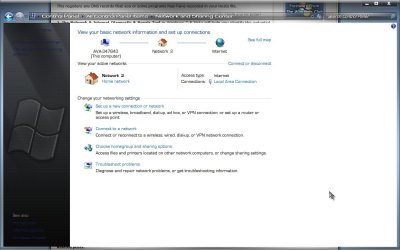
3) Start> Control Panel> Network & Sharing Center

Network.jpg

Click on Troubleshoot Problems

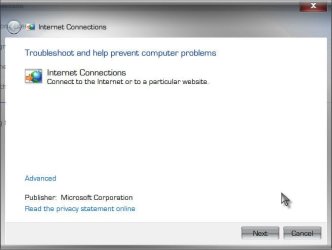
Troubleshooting.jpg

Click on Internet Connections

Internet.jpg

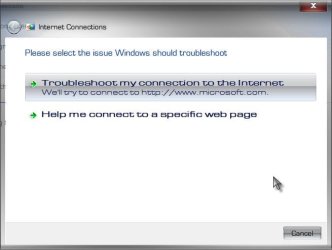
Click next, and choose Help me connect to a specific webpage

Help.jpg

Good luck, let us know how it goes. A Guy
 

My Computer My Computer

Computer type
PC/Desktop
OS
Windows 10 Home x64
CPU
INTEL Core i5-750 Quad-Core 3.37GHz
Motherboard
ASUS P7P55D
Memory
HyperX Fury Black Series 8GB (2 x 4GB) 1866Mhz
Graphics Card(s)
EVGA GeForce GTX 750 Superclocked 1GB 128-Bit GDDR5
Monitor(s) Displays
LG 32MA68HY 32" IPS
Screen Resolution
1920 x 1080
Hard Drives
Samsung 840 Evo 120GB, SEAGATE 500GB Barracuda® 7200.12, SATA 3 Gb/s, 7200 RPM, 16MB cache
PSU
ANTEC TruePower New TP-550, 80 PLUS, 550W
Case
ANTEC Three Hundred Illusion
Cooling
COOLER MASTER Hyper 212 Plus, 4 x 120mm 1 x 140mm Noctua's
Internet Speed
85 + Mbps
Antivirus
Avast
Browser
Vivaldi
Do you have your network setup as "home" or "public"?
 

My Computer My Computer

Computer Manufacturer/Model Number
Toshiba P300
OS
Windows 8 Pro
CPU
Intel Centrino Dual Core P7450 2.13GHz
Memory
4gb
Graphics Card(s)
ATI Mobility Raedon HD3650
Hard Drives
Toshiba MK3252GSX ATA
Internet Speed
Wish it were faster
Back
Top