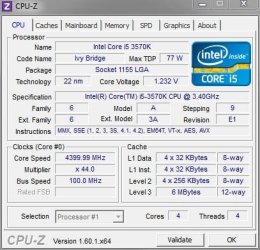
Only 100 megahertz???

I thought it was you that originally told me to validate using this system... but you've never used it yourself? How do you do load tests? Is there some other method that is better?

OK, so I'll assume all is functioning properly and the rejection notice is just a zombie
invasion bug that will be fixed soon.
 

My Computer

OS
Windows 7 64bit
I use CPU-Z, but just to see the information the program displays. I have never validated anything with it.

This is what I use it for:
CPU-Z Example.JPG
 

My Computer

Computer type
PC/Desktop
Computer Manufacturer/Model Number
Custom Built
OS
Windows 7 Professional 64bit SP1
CPU
Intel Core i5-3570K @ 4.5GHz
Motherboard
Asus Sabertooth Z77
Memory
Corsair Vengeance 16GB (4x4) @1866MHz CL 9-9-9-24 1T
Graphics Card(s)
EVGA GTX 750 Ti FTW
Sound Card
Onboard Audio
Monitor(s) Displays
Dell S2309W
Screen Resolution
1920x1080
Hard Drives
Samsung 830 128GB SSD - OS
(4) Seagate 5TB HDD
(1) Seagate 2TB HDD
PSU
Seasonic X750 80+ Gold Full Modular
Case
Antec Eleven Hundred Super Mid Tower
Cooling
Intel Liquid Cooler
Keyboard
Max Nighthawk X8 Mechanical keyboard
Mouse
Mionix Naos 7000
Internet Speed
50 Mbps Down / 10 Mbps Up
Antivirus
Microsoft Security Essentials/Malwarebytes Anti-Malware
Browser
Chrome/Firefox
Other Info
Klipsch ProMedia 2.1's
Asus RT-N66R Wireless Router
OK, I was just using that so I could post a link so folks could see the readout

Any idea why in my BIOS is shows the timing being 10-10-10-27
but the load test is showing the timing at 9-9-9-24

Did my timing get retarded er something?
 

My Computer

OS
Windows 7 64bit
OK, I hope I didn't mess up my system... I was in the BIOS looking at the section that shows the primary timings and the secondary timings and there was this one setting that I clicked on and the computer immediately shut down.

Now, all it will do is attempt to start, and then shut down... attempt to start, and then shut down..etc, etc.

I had to un-plug the power.

It was one of the two settings down at the bottom and when you click on it it says OK, or cancel.
I can't imagine this causing it to not be able to start at all.

When I try to start it up, there is a red light on the mother board that comes on that I've never seen before and then it shuts down.

Any idea how to get it back to where it will start?
Is there a way to manually re-set the mother board settings, or do I have to send it back to the manufacturer now and have them replace the mother board?
 

My Computer

OS
Windows 7 64bit
Go back into the BIOS and change it back, exit saving changes
 

My Computer

Computer type
PC/Desktop
Computer Manufacturer/Model Number
Custom Built
OS
Windows 7 Professional 64bit SP1
CPU
Intel Core i5-3570K @ 4.5GHz
Motherboard
Asus Sabertooth Z77
Memory
Corsair Vengeance 16GB (4x4) @1866MHz CL 9-9-9-24 1T
Graphics Card(s)
EVGA GTX 750 Ti FTW
Sound Card
Onboard Audio
Monitor(s) Displays
Dell S2309W
Screen Resolution
1920x1080
Hard Drives
Samsung 830 128GB SSD - OS
(4) Seagate 5TB HDD
(1) Seagate 2TB HDD
PSU
Seasonic X750 80+ Gold Full Modular
Case
Antec Eleven Hundred Super Mid Tower
Cooling
Intel Liquid Cooler
Keyboard
Max Nighthawk X8 Mechanical keyboard
Mouse
Mionix Naos 7000
Internet Speed
50 Mbps Down / 10 Mbps Up
Antivirus
Microsoft Security Essentials/Malwarebytes Anti-Malware
Browser
Chrome/Firefox
Other Info
Klipsch ProMedia 2.1's
Asus RT-N66R Wireless Router
How can you do that if the computer won't even start up?

It keeps turning itself off before it starts, over and over, and over... I had to un-plug the power.
 

My Computer

OS
Windows 7 64bit
Nevermind... I found the user manual and it told me what to do in order to set the BIOS back to default.

It was the GPU Boost that I clicked on that made it do this... it no likey!
 

My Computer

OS
Windows 7 64bit
Interesting... before putting in the new RAM, I had no changed anything in the BIOS.

But, when it wouldn't boot and I had to reset the BIOS to default... I went and looked
and now the RAM timing is set to 10-10-10-27 instead of 9-9-9-24

So, while I was there I set that command to 1 that you were telling me about... it was set at 2
 

My Computer

OS
Windows 7 64bit
OK, so I followed the instructions sent to me by Velocity Micro (my PC manufacturer) and it now tests back at 4000 like it was before and all seems to be just as stable as before.

I have the RAm set at 1600 with the new voltage settings that automatically
changed themselves as Corsair said they should.

Think I should do anything else to it??? :p


Here's their overclock instructions...

Step 1.
Enter BIOS by tapping "Delete" when you see the Velocity Micro splash screen during boot.

Step 2.
Use the arrows keys(or your mouse) to tab over to the "Tool" menu

Step 3.
From the tool menu select "ASUS O.C. Profile"

Step 4.
Go down to "Load from Profile" and select any profile numbers 1-7 and press enter.

Step 5.
With Step 4 all of your settings are loaded for the 4.0 OC but now with your different memory you need to make sure that it is still properly setup. Tab over to the "A.I. Tweaker" tab and verify at the top that it states "Target CPU Turbo-mode Speed: 4000Mhz"

Step 6.
Change "AI Overclock Tuner to X.M.P" and verify your RAM speed at the top of the screen where it says "Target DRAM Speed" Once X.M.P is enabled

Step 7.
Return to the "Tool" menu and save a custom profile now that your memory is in XMP with the OC. Save only one profile until you verify that the system is stable in Windows before saving over all of the profiles

Step 8.
Press F10 and select save and exit. Return to the BIOS to save profiles once you verify stability in Windows.

 

My Computer

OS
Windows 7 64bit
It's good advice.
 

My Computer

Computer type
PC/Desktop
Computer Manufacturer/Model Number
Systems by SmartEyeball
OS
8 Pro x64
CPU
i7 3770K 4.6GHz
Motherboard
ASUS P8Z77 WS
Memory
16GB G.Skill Trident X 2666mhz
Graphics Card(s)
x2 EVGA 780 Ti Superclocked SLI
Sound Card
SB X-FI Surround 5.1 PRO USB / ATH-AD900 Headphones
Monitor(s) Displays
x3 Dell U2410 / 58" Samsung
Screen Resolution
5760*1200/ 1920*1200
Hard Drives
2x Intel 520 240GB (RAID 0) * 2x WD Caviar Blacks 2TB (RAID 0) * 2TB WD Caviar Black * Sony Optirac DVD
PSU
Silverstone Strider Evolution 1200W
Case
Thermaltake Level 10 GT Snow Edition
Cooling
Noctua NH-D14
Keyboard
Topre Realforce // Ducky Shine MX Black // Filco Ninja TKL
Mouse
Thermaltake Theron (Highly Recommended) + Razer Imperator
Antivirus
MSE
Browser
IE, FF, WaterFox
Other Info
GT Extreme V2 Sim Racing Cockpit + 40" LCD and K/B Mouse stand ▼
Fanatec CSR Elite Wheel + Clubsport V1 Pedals + CSR shifter/7G-H ▼Saitek X52 Pro ▼ TrackIR 5 Pro
Buttkicker v2 Seat Rumbler with Dedicated 5.1 and Sub Woofer attached to frame ▼
=
Bloody Big Grin
I would leave well enough alone...
 

My Computer

Computer type
PC/Desktop
Computer Manufacturer/Model Number
Custom Built
OS
Windows 7 Professional 64bit SP1
CPU
Intel Core i5-3570K @ 4.5GHz
Motherboard
Asus Sabertooth Z77
Memory
Corsair Vengeance 16GB (4x4) @1866MHz CL 9-9-9-24 1T
Graphics Card(s)
EVGA GTX 750 Ti FTW
Sound Card
Onboard Audio
Monitor(s) Displays
Dell S2309W
Screen Resolution
1920x1080
Hard Drives
Samsung 830 128GB SSD - OS
(4) Seagate 5TB HDD
(1) Seagate 2TB HDD
PSU
Seasonic X750 80+ Gold Full Modular
Case
Antec Eleven Hundred Super Mid Tower
Cooling
Intel Liquid Cooler
Keyboard
Max Nighthawk X8 Mechanical keyboard
Mouse
Mionix Naos 7000
Internet Speed
50 Mbps Down / 10 Mbps Up
Antivirus
Microsoft Security Essentials/Malwarebytes Anti-Malware
Browser
Chrome/Firefox
Other Info
Klipsch ProMedia 2.1's
Asus RT-N66R Wireless Router
Does that mean for my system, I've pretty much done all that can be done?
 

My Computer

OS
Windows 7 64bit
Are you really not happy with the performance?
 

My Computer

Computer type
PC/Desktop
Computer Manufacturer/Model Number
Custom Built
OS
Windows 7 Professional 64bit SP1
CPU
Intel Core i5-3570K @ 4.5GHz
Motherboard
Asus Sabertooth Z77
Memory
Corsair Vengeance 16GB (4x4) @1866MHz CL 9-9-9-24 1T
Graphics Card(s)
EVGA GTX 750 Ti FTW
Sound Card
Onboard Audio
Monitor(s) Displays
Dell S2309W
Screen Resolution
1920x1080
Hard Drives
Samsung 830 128GB SSD - OS
(4) Seagate 5TB HDD
(1) Seagate 2TB HDD
PSU
Seasonic X750 80+ Gold Full Modular
Case
Antec Eleven Hundred Super Mid Tower
Cooling
Intel Liquid Cooler
Keyboard
Max Nighthawk X8 Mechanical keyboard
Mouse
Mionix Naos 7000
Internet Speed
50 Mbps Down / 10 Mbps Up
Antivirus
Microsoft Security Essentials/Malwarebytes Anti-Malware
Browser
Chrome/Firefox
Other Info
Klipsch ProMedia 2.1's
Asus RT-N66R Wireless Router
Oh it performs fine... I guess.

I was just curious if I had done all the normal stuff to tweak it.
If I was better performance, I can always install a SSD
 

My Computer

OS
Windows 7 64bit
You should get a better OC with that setup but nothings a lock, if you get more ram it might hold back your OC, you do not need it. It's the middle of the night and I have to vote in the AM, please post your specs, all of your hardware. Power supply and cooling too......

Kbrady1979 gave you some good advice, take it.

See this just for reference:
Motherboards (Intel): Extreme BIOS Glossary - EXTREME Overclocking Forums

:cool:
 

My Computer

Computer type
PC/Desktop
Computer Manufacturer/Model Number
Custom Build
OS
Win 10 Pro
CPU
E3-1230 V2
Motherboard
Asus P8Z77 LX
Memory
2 X 4gb Samsung Green Wonder Ram
Graphics Card(s)
Diamond HD7970
Sound Card
ALC892 8-Channel High Definition
Monitor(s) Displays
ASUS VN247/Sanyo 42 1080p LCD
Screen Resolution
1920x1080
Hard Drives
Sandisk Extreme II 240GB SSD/
1 X WD 1 TB Black Spinner
PSU
OCZ 600W Mod X Stream Modular
Case
Lian Li Pc7b-modded
Cooling
H100
Keyboard
Saitek Eclipse KYB
Mouse
Logitech G400
Internet Speed
90Mb D/L 15Mb upload
Antivirus
Webroot Secure Anywhere Endpoint Protection
Browser
Cyberfox/Chrome
Other Info
Logitech 5500 Speakers 5.1 / sOME kiND OF rUSSIAN TURNTABLE
Some say IT HAS BLOOD ON IT FETUS OIL,EWWWW DIAPHRAGM LIKERS
It performs way better than my last computer running XP Pro, but I had it rebuilt with a new mobo running an AMD quad 4 processor and it's almost as fast and this computer.

So, I think now that I've got it all reset to the OC that it came with from the manufacturer who builds custom performance PCs... I think the only thing I might consider further is an SSD as that will make it faster without too much hassle.

I'm just going to wait a bit as they are just now getting these things to where they are reliable long term. Just cause there is a software program that claims the SSD is healthy and has 8 years left on it doesn't make it so.

This technology is really evolving now that SSD's have become very popular. This means alot more money is being thrown at SSD research and development which is going to enhance the quality as SSDs go mainstream.

So, maybe this time next year I'll do a little research on the advancements made from till then with SSD technology and make a decision then.

Meanwhile, I can't complain about what I have now at all... In order to get the performance some of the big time gamers are getting, I'd need to build a whole new system anyway, so I'll just be happy with what I have... even though that's so not politically correct as it involves no whining and complaining cause somebody else has something faster than I do :zip:
 

My Computer

OS
Windows 7 64bit
okey dokey
 

My Computer

Computer type
PC/Desktop
Computer Manufacturer/Model Number
Custom Build
OS
Win 10 Pro
CPU
E3-1230 V2
Motherboard
Asus P8Z77 LX
Memory
2 X 4gb Samsung Green Wonder Ram
Graphics Card(s)
Diamond HD7970
Sound Card
ALC892 8-Channel High Definition
Monitor(s) Displays
ASUS VN247/Sanyo 42 1080p LCD
Screen Resolution
1920x1080
Hard Drives
Sandisk Extreme II 240GB SSD/
1 X WD 1 TB Black Spinner
PSU
OCZ 600W Mod X Stream Modular
Case
Lian Li Pc7b-modded
Cooling
H100
Keyboard
Saitek Eclipse KYB
Mouse
Logitech G400
Internet Speed
90Mb D/L 15Mb upload
Antivirus
Webroot Secure Anywhere Endpoint Protection
Browser
Cyberfox/Chrome
Other Info
Logitech 5500 Speakers 5.1 / sOME kiND OF rUSSIAN TURNTABLE
Some say IT HAS BLOOD ON IT FETUS OIL,EWWWW DIAPHRAGM LIKERS
Overclocking Tears...

Agressive overclocking is great - as long as you a) don't have valuable data, b) Can simply reload your OS and games without a lot of pain, c) understand that raid mirrors Do NOT protect you from overclocking screwups! Overclocking as much as possible is great for gamerz, but idiotic for business! Your risk your mission-critical data in a scenario that will cause you pain, and perhaps the loss of your business.
Mirrors insure that the data written to one or more HDD/SDDs are identical. But if the data is screwed up or flaky coming out of RAM, it will be mirrored to both drives, and they will BOTH have bad data. If you think a mirror is your backup plan, never overclock. Not any, not ever!
An old buddy called (I worked with him at Intel), asking for help to recover some 20,000+ source files from some free-lance consulting projects he was working on. He thought the mirror would be a good backup, and started pushing up the clock speed. Now he could only read 2,500+ files, the rest were corrupted beyond recognition. Sadly I had to tell him the painful truth. They are gone forever. If it is written bad (due to marginal conditions caused by overclocking), mirrored or not, it is gone forever.
Gamers don't care about this or long CPU life, because they will get a new Mobo and CPU in six months anyway. Software developers should know better, however.
 

My Computer

OS
Windows 7 Ultimate x64
I just got a new PC running Win 7 64 bit and the mobo is ASUSTeK COMPUTER INC. P8Z77-V LK Rev X.0x... but the Bus Clock is only 100 megahertz


Yeah, this throws me off, too. My Pentium 3 (Coppermine) had a FSB of 133Mhz which was totes state-of-the-art...in 1999 and the Core 2 Duo had a FSB of 333Mhzin 2006. I'd have expected more from an i5 Quad-core all this time later...right?


Not so much. Because FSB stops being a limiting factor due to memory controllers being built into the CPU, something AMD has done for a long, long time and Intel finally followed suit with the Nehilim CPU.
 

My Computer

Computer type
PC/Desktop
Computer Manufacturer/Model Number
Custom Intel Desktop
OS
Windows 7 Pro x64 SP1 Build 7601
CPU
Core i5-4690K @3.5Ghz
Motherboard
ASUS Z97-C
Memory
16Gb DDR3-1600 Nemix Gaming RAM
Graphics Card(s)
evga Geforce GTX 980
Sound Card
Creative Soundblaster Z PCIe
Monitor(s) Displays
22" Acer V226HQL
Screen Resolution
1920x1080
Hard Drives
2 x 240Gb SATA III 6Gb/s SSD RAID 0 @C:\
2 x 300Gb SATA III 6Gb/s WD VelociRaptor 10K HDD RAID 0 @D:\
1 x 1Tb SATA III 6Gb/s SSD @E:\
PSU
evga 750W (100-N1-0750-L1 750 N1) ATX12V / EPS12V
Case
DIYPC Ranger-R4-R
Cooling
Thermaltake Contac Silent 12 150W-TDP
Keyboard
Magegee Backlit USB Keyboard
Mouse
Logitech MX-518 Optical Gaming mouse
Internet Speed
13Mb/s DSL-Fiber Connection / EDUP Gigabit Ethernet PCIe
Browser
Mozilla Firefox v75.0 x64
Back
Top