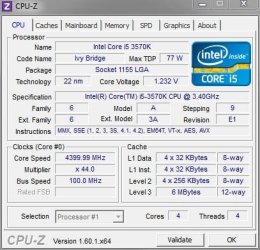
OK, so I followed the instructions sent to me by
Velocity Micro (my PC manufacturer) and it now tests back at 4000 like it was before and all seems to be just as stable as before.
I have the RAm set at 1600 with the new voltage settings that automatically
changed themselves as Corsair said they should.
Think I should do anything else to it???

Here's their overclock instructions...
Step 1.
Enter BIOS by tapping "Delete" when you see the Velocity Micro splash screen during boot.
Step 2.
Use the arrows keys(or your mouse) to tab over to the "Tool" menu
Step 3.
From the tool menu select "ASUS O.C. Profile"
Step 4.
Go down to "Load from Profile" and select any profile numbers 1-7 and press enter.
Step 5.
With Step 4 all of your settings are loaded for the 4.0 OC but now with your different memory you need to make sure that it is still properly setup. Tab over to the "A.I. Tweaker" tab and verify at the top that it states "Target CPU Turbo-mode Speed: 4000Mhz"
Step 6.
Change "AI Overclock Tuner to X.M.P" and verify your RAM speed at the top of the screen where it says "Target DRAM Speed" Once X.M.P is enabled
Step 7.
Return to the "Tool" menu and save a custom profile now that your memory is in XMP with the OC. Save only one profile until you verify that the system is stable in Windows before saving over all of the profiles
Step 8.
Press F10 and select save and exit. Return to the BIOS to save profiles once you verify stability in Windows.