Only 8 GB Ram recognised of 12 GB

Under clocking is running your RAM or processor at a lower speed/clock frequency than its rated for. If you had RAM modules rated for different speeds the faster RAM would run at the speed of the slower RAM. The motherboard sets the speed of all the RAM modules to that of the slowest stick. It reads the speed and latency from the SPD file on the RAM and adjusts things accordingly. You can override that by setting your clock speed and latency's manually in the BIOS.
 

My Computer My Computer

At a glance

Windows 10 Education 64 bitAMD Phenom II X4 980 Black Edition Deneb 3.7GHz8GB 4GBx2 Kingston PC10600 DDR3 1333 MemoryZotac NVIDIA Geforce GT640 2 Gig DDR3 PCIe
Computer type
PC/Desktop
Computer Manufacturer/Model Number
Home Built
OS
Windows 10 Education 64 bit
CPU
AMD Phenom II X4 980 Black Edition Deneb 3.7GHz
Motherboard
Asus M4N68T-M V2 µATX Motherboard
Memory
8GB 4GBx2 Kingston PC10600 DDR3 1333 Memory
Graphics Card(s)
Zotac NVIDIA Geforce GT640 2 Gig DDR3 PCIe
Sound Card
VIA VT1708s High Definition Audio 8-channel Onboard
Monitor(s) Displays
22" LG E2242 1080p and 2 19" I-INC AG191D
Screen Resolution
1280x1024 - 1920x1080 - 1280x1024
Hard Drives
Crucial M100 256 GB SSD and 500 GB WD Blue SATA
PSU
Thermaltake TR 620
Case
Power Up Black ATX Mid-Tower Case
Cooling
Stock heatsink and fan
Keyboard
Logitech Wireless K350 Wave
Mouse
Logitech Wireless M570 Trackman Wheel
Internet Speed
80 Mbps Down 30 Mbps Up
Antivirus
Windows Defender
Browser
Internet Explorer 11
Other Info
HP DVD1040e Lightscribe - External USB2
Thanks for the anwsers.
I dont thing that the sticks are bad because CPUZ recognises all six slots with all six sticks. And besides, this problem is new... just a couple of days ago all 12 GB ram were showing in windows and in Bios...

The only thing that might make sense is the bent CPU sockel pin, because some days ago I installed a new cpu cooler and I removed the CPU to remove all of the Thermal compund from the cooler before. So im guessing its possible that I bent a CPU sockel pin during that process. I think it is worth a look. And if thats the case, is there a way to bend it back?

I dont undestand anything about underclocking or anything related to that topic...

all the sticks are the same model but what does P/N mean, and were do I find that information?
I put in bold in your post what is probably important here. Since the memory controller is on the CPU if the CPU is not seated properly you can have your situation occur (some memory not showing). Remove the CPU again and make certain it seats properly (blocks in motherboard socket align with cutouts in CPU, CPU is laid flat when placed in socket, some pressure on the lever to close) and your problem may be solved.

You don't have to remove the CPU to clean old thermal paste. Keeping the alcohol bottle well away from the motherboard and careful application of the alcohol with a Q-Tip is all that's required.
 

My Computer My Computer

At a glance

Windows 10 Pro 64 bitCore i7 6700K Skylake 4.0GHzCorsair Vengeance LPX DDR4 32GB 3000MHzAsus Radeon RX480 Strix 8GB
Computer type
PC/Desktop
Computer Manufacturer/Model Number
Wordsworth 5000
OS
Windows 10 Pro 64 bit
CPU
Core i7 6700K Skylake 4.0GHz
Motherboard
Asus Z170 Pro
Memory
Corsair Vengeance LPX DDR4 32GB 3000MHz
Graphics Card(s)
Asus Radeon RX480 Strix 8GB
Sound Card
Asus Xonar DSX
Monitor(s) Displays
HP 2709m
Screen Resolution
1920x1080
Hard Drives
Intel 600p M.2 PCIe NVMe SSD 512GB; Intel 335 SSD 240GB ;Western Digital Caviar Black 1TB
PSU
Thermaltake Toughpower Grand Platinum 850W
Case
Lian Li PC-B70
Cooling
CPU-Noctua NH D15, GPU-Stock, Case-Noctua 2x140, 2x120
Keyboard
Microsoft Natural Ergo 4000
Mouse
Microsoft Wireless Optical 1000
Internet Speed
Cable
Other Info
HP bd 340,
HP bd 240,
Klipsch Promedia 5.1 THX
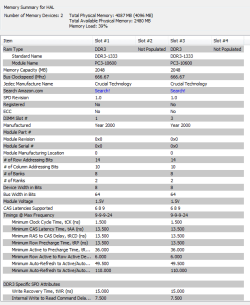
PassMark RAMMon - Identify RAM type, speed & memory timings

Download and install this program. It is FREE software.
It will show timing and voltages for all sticks and what slot is occupied.
On the right side of the page it lists a 32bit and 64bit.
I don't know which version of win Ultimate you have since it is not in your specs.
Choose the appropriate version.
Ignore the cart button.

After opening Rammon make a Snip of the page and post for us to see.
Mike
 

My Computer My Computer

At a glance

Windows7 Pro 64bit SP-1; Windows XP Pro 32bitIntel Core i7-870 Lynnfield 2.93GHz LGA 1156 ...8GB@1400MHz Crucial Ballistix DDR3-1600 4x2GBASUS ENGTX460 DirectCU/2DI/1GD5 1GB 256-bit G...
Computer Manufacturer/Model Number
Hopalong/ Godzilla
OS
Windows7 Pro 64bit SP-1; Windows XP Pro 32bit
CPU
Intel Core i7-870 Lynnfield 2.93GHz LGA 1156 95W Quad-Core
Motherboard
ASUS P7P55D-E PRO
Memory
8GB@1400MHz Crucial Ballistix DDR3-1600 4x2GB
Graphics Card(s)
ASUS ENGTX460 DirectCU/2DI/1GD5 1GB 256-bit GDDR5
Sound Card
VIA Onboard
Monitor(s) Displays
Asus VS248H-P 24"; Samsung SyncMaster 941BW 19"ws
Screen Resolution
1920x1080; 1440x900
Hard Drives
Samsung 830 120GB SSD
Intel 320 120GB SSD
Western Digital Caviar Black WD7501AALS 750GB 7200 RPM SATA 3.0Gb/s
Western Digital Caviar Black WD6401AALS 640GB 7200 RPM SATA 3.0Gb/s
PSU
COOLER MASTER Silent Pro RS850-AMBAJ3-US 850W Modular
Case
COOLER MASTER HAF 932 RC-932-KKN5-GP Black
Cooling
Scythe "Mugen-2 Rev.B" (2 ScytheKaze-Jyuni PWM fans)
Keyboard
Logitech K-320
Mouse
Kensington
Antivirus
Avast Inernet Suite
Browser
IE 9 ; Chrome
What exactly do you mean when you say "windows shows only 8GB"? Where exactly do you see this? It is best to get this information from the resource monitor memory tab

What RAM frequency does CPU-Z show?

Try reducing the RAM speed in BIOS as alpha suggested to see if it helps.
 

My Computer My Computer

At a glance

Windows 10 Pro. EFI boot partition, full EFI ...i7 4770k 4.4GHz (44-44-43-43 turbo) @ 1.248V16GB (8GBx2) @2200 MHz G.skill Sniper 10-11-1...MSI GTX 970 Gaming 4G
Computer type
PC/Desktop
Computer Manufacturer/Model Number
Home built (GeneO industries)/Model 4
OS
Windows 10 Pro. EFI boot partition, full EFI boot
CPU
i7 4770k 4.4GHz (44-44-43-43 turbo) @ 1.248V
Motherboard
ASUS Maximus VI Hero
Memory
16GB (8GBx2) @2200 MHz G.skill Sniper 10-11-10-30-1, 1.6V
Graphics Card(s)
MSI GTX 970 Gaming 4G
Sound Card
Onboard SupremeFX Audio
Monitor(s) Displays
NEC Spectraview 2490WUXi-SV
Screen Resolution
1920 x 1200
Hard Drives
Samsung 850 Pro 256GB (OS), Samsung 2x 128GB 840 Pro SSD in RAID0, 3x WD Blue 6Gb/s 1TB RAID0, WD 2TB Black external USB 3.0, 2TB WD20EARS Green external USB 3.0, 2x 500GB Seagate and 1 750 GB external USB, 1x 350GB external USB3
PSU
Seasonic X-850 (2012 KM3 model)
Case
Fractal Design Define R4
Cooling
NH-D14, NF-F12, NF-A15; NF-P14, NF-P12,NF-A14, S12A PWM
Keyboard
Cooler Master Storm Quickfire Rapid - Brown
Mouse
Logitech G602
Internet Speed
126.4 Mb/s down, 24.3 Mb/s up
Other Info
USB 3.0 x8 , SATA III x8, eSATA, USB 2.0 x6. Samsung DVD R/W drive.

WEI: CPU 7.8, Memory 7.9, Graphics 7.9, Disk 7.9
Okay I understand. once I have time again Im going to open my Pc and check if the CPU is seated properly.

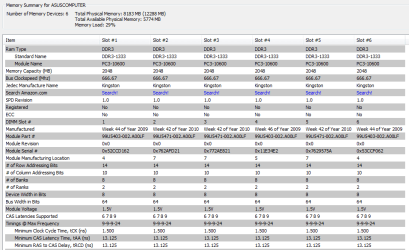
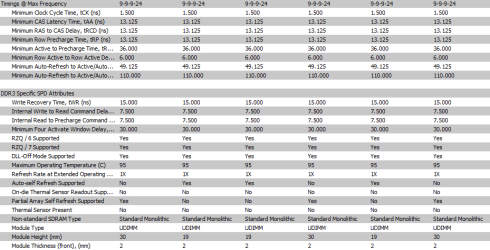
meanwhile, heres what rammon reports:

Code:
RAMMon v1.0 Build: 1002 built with SysInfo v1.0 Build: 1006
PassMark (R) Software
www.passmark.com

Memmory summary for ASUSCOMPUTER:
Number of Memory Devices: 6    Total Physical Memory: 8183 MB (12288 MB)
                Total Available Physical Memory: 5832 MB
                Memory Load: 28%    

Item                                                                           | Slot #1                | Slot #2                | Slot #3                | Slot #4                | Slot #5                | Slot #6                | 
-------------------------------------------------------------------------------|------------------------|------------------------|------------------------|------------------------|------------------------|------------------------|-
Ram Type                                                                       | DDR3                   | DDR3                   | DDR3                   | DDR3                   | DDR3                   | DDR3                   | 
       Standard Name                                                           | DDR3-1333              | DDR3-1333              | DDR3-1333              | DDR3-1333              | DDR3-1333              | DDR3-1333              | 
       Module Name                                                             | PC3-10600              | PC3-10600              | PC3-10600              | PC3-10600              | PC3-10600              | PC3-10600              | 
Memory Capacity (MB)                                                           | 2048                   | 2048                   | 2048                   | 2048                   | 2048                   | 2048                   | 
Bus Clockspeed (Mhz)                                                           | 666.67                 | 666.67                 | 666.67                 | 666.67                 | 666.67                 | 666.67                 | 
Jedec Manufacture Name                                                         | Kingston               | Kingston               | Kingston               | Kingston               | Kingston               | Kingston               | 
Search Amazon.com                                                              | Search!                | Search!                | Search!                | Search!                | Search!                | Search!                | 
SPD Revision                                                                   | 1.0                    | 1.0                    | 1.0                    | 1.0                    | 1.0                    | 1.0                    | 
Registered                                                                     | No                     | No                     | No                     | No                     | No                     | No                     | 
ECC                                                                            | No                     | No                     | No                     | No                     | No                     | No                     | 
DIMM Slot #                                                                    | 1                      | 2                      | 3                      | 4                      | 5                      | 6                      | 
Manufactured                                                                   | Week 44 of Year 2009   | Week 42 of Year 2010   | Week 42 of Year 2010   | Week 46 of Year 2009   | Week 42 of Year 2010   | Week 44 of Year 2009   | 
Module Part #                                                                  | 99U5403-002.A00LF      | 99U5471-002.A00LF      | 99U5471-002.A00LF      | 99U5403-002.A00LF      | 99U5471-002.A00LF      | 99U5403-002.A00LF      | 
Module Revision                                                                | 0x0                    | 0x0                    | 0x0                    | 0x0                    | 0x0                    | 0x0                    | 
Module Serial #                                                                | 0x52CCD162             | 0x762AFD21             | 0x772AE821             | 0x11E34E2              | 0x7629575A             | 0x53CCF062             | 
Module Manufacturing Location                                                  | 4                      | 7                      | 7                      | 5                      | 7                      | 4                      | 
# of Row Addressing Bits                                                       | 14                     | 14                     | 14                     | 14                     | 14                     | 14                     | 
# of Column Addressing Bits                                                    | 10                     | 10                     | 10                     | 10                     | 10                     | 10                     | 
# of Banks                                                                     | 8                      | 8                      | 8                      | 8                      | 8                      | 8                      | 
# of Ranks                                                                     | 2                      | 2                      | 2                      | 2                      | 2                      | 2                      | 
Device Width in Bits                                                           | 8                      | 8                      | 8                      | 8                      | 8                      | 8                      | 
Bus Width in Bits                                                              | 64                     | 64                     | 64                     | 64                     | 64                     | 64                     | 
Module Voltage                                                                 | 1.5V                   | 1.5V                   | 1.5V                   | 1.5V                   | 1.5V                   | 1.5V                   | 
CAS Latencies Supported                                                        | 6 7 8 9                | 6 7 8 9                | 6 7 8 9                | 6 7 8 9                | 6 7 8 9                | 6 7 8 9                | 
Timings @ Max Frequency                                                        | 9-9-9-24               | 9-9-9-24               | 9-9-9-24               | 9-9-9-24               | 9-9-9-24               | 9-9-9-24               | 
       Minimum Clock Cycle Time, tCK (ns)                                      | 1.500                  | 1.500                  | 1.500                  | 1.500                  | 1.500                  | 1.500                  | 
       Minimum CAS Latency Time, tAA (ns)                                      | 13.125                 | 13.125                 | 13.125                 | 13.125                 | 13.125                 | 13.125                 | 
       Minimum RAS to CAS Delay, tRCD (ns)                                     | 13.125                 | 13.125                 | 13.125                 | 13.125                 | 13.125                 | 13.125                 | 
       Minimum Row Precharge Time, tRP (ns)                                    | 13.125                 | 13.125                 | 13.125                 | 13.125                 | 13.125                 | 13.125                 | 
       Minimum Active to Precharge Time, tRAS (ns)                             | 36.000                 | 36.000                 | 36.000                 | 36.000                 | 36.000                 | 36.000                 | 
       Minimum Row Active to Row Active Delay, tRRD (ns)                       | 6.000                  | 6.000                  | 6.000                  | 6.000                  | 6.000                  | 6.000                  | 
       Minimum Auto-Refresh to Active/Auto-Refresh Time, tRC (ns)              | 49.125                 | 49.125                 | 49.125                 | 49.125                 | 49.125                 | 49.125                 | 
       Minimum Auto-Refresh to Active/Auto-Refresh Command Period, tRFC (ns)   | 110.000                | 110.000                | 110.000                | 110.000                | 110.000                | 110.000                | 
                                                                               |                        |                        |                        |                        |                        |                        | 
DDR3 Specific SPD Attributes                                                   |                        |                        |                        |                        |                        |                        | 
       Write Recovery Time, tWR (ns)                                           | 15.000                 | 15.000                 | 15.000                 | 15.000                 | 15.000                 | 15.000                 | 
       Internal Write to Read Command Delay, tWTR (ns)                         | 7.500                  | 7.500                  | 7.500                  | 7.500                  | 7.500                  | 7.500                  | 
       Internal Read to Precharge Command Delay, tRTP (ns)                     | 7.500                  | 7.500                  | 7.500                  | 7.500                  | 7.500                  | 7.500                  | 
       Minimum Four Activate Window Delay, tFAW (ns)                           | 30.000                 | 30.000                 | 30.000                 | 30.000                 | 30.000                 | 30.000                 | 
       RZQ / 6 Supported                                                       | Yes                    | Yes                    | Yes                    | Yes                    | Yes                    | Yes                    | 
       RZQ / 7 Supported                                                       | Yes                    | Yes                    | Yes                    | Yes                    | Yes                    | Yes                    | 
       DLL-Off Mode Supported                                                  | Yes                    | Yes                    | Yes                    | Yes                    | Yes                    | Yes                    | 
       Maximum Operating Temperature (C)                                       | 95                     | 95                     | 95                     | 95                     | 95                     | 95                     | 
       Refresh Rate at Extended Operating Temperature Range                    | 1X                     | 1X                     | 1X                     | 1X                     | 1X                     | 1X                     | 
       Auto-self Refresh Supported                                             | No                     | Yes                    | Yes                    | No                     | Yes                    | No                     | 
       On-die Thermal Sensor Readout Supported                                 | No                     | No                     | No                     | No                     | No                     | No                     | 
       Partial Array Self Refresh Supported                                    | Yes                    | No                     | No                     | Yes                    | No                     | Yes                    | 
       Thermal Sensor Present                                                  | No                     | No                     | No                     | No                     | No                     | No                     | 
       Non-standard SDRAM Type                                                 | Standard Monolithic    | Standard Monolithic    | Standard Monolithic    | Standard Monolithic    | Standard Monolithic    | Standard Monolithic    | 
       Module Type                                                             | UDIMM                  | UDIMM                  | UDIMM                  | UDIMM                  | UDIMM                  | UDIMM                  | 
       Module Height (mm)                                                      | 30                     | 19                     | 19                     | 30                     | 19                     | 30                     | 
       Module Thickness (front), (mm)                                          | 2                      | 2                      | 2                      | 2                      | 2                      | 2                      | 
       Module Thickness (back), (mm)                                           | 2                      | 2                      | 2                      | 2                      | 2                      | 2                      | 
       Module Width (mm)                                                       | 133.5                  | 133.5                  | 133.5                  | 133.5                  | 133.5                  | 133.5                  | 
       Reference Raw Card Used                                                 | Raw Card B Rev. 0      | Raw Card H Rev. 0      | Raw Card H Rev. 0      | Raw Card B Rev. 0      | Raw Card H Rev. 0      | Raw Card B Rev. 0      | 
       DRAM Manufacture ID                                                     | 0                      | 0                      | 0                      | 0                      | 0                      | 0                      | 
       # of DRAM Rows                                                          | 0                      | 0                      | 0                      | 0                      | 0                      | 0                      | 
       # of Registers                                                          | 0                      | 0                      | 0                      | 0                      | 0                      | 0                      | 
       Register Manufacturer                                                   |                        |                        |                        |                        |                        |                        | 
       Register Type                                                           |                        |                        |                        |                        |                        |                        | 
       Register Revision                                                       | 0                      | 0                      | 0                      | 0                      | 0                      | 0                      |

 

My Computer My Computer

At a glance

Windows 7 Ultimate 64 bitIntel Core i7-920 4-Cores 2,66GHz 8 Threads 8...12 GBNvidia GTX260 896MB DVI HDTV PCI-Express
Computer Manufacturer/Model Number
Asus
OS
Windows 7 Ultimate 64 bit
CPU
Intel Core i7-920 4-Cores 2,66GHz 8 Threads 8MB Cache
Motherboard
ASUS P6T SE
Memory
12 GB
Graphics Card(s)
Nvidia GTX260 896MB DVI HDTV PCI-Express
Hard Drives
1500 GB seagate Barracuda
Case
ATX Tower 6XG3BS
Cooling
Noctua NH-D14
Keyboard
Logitech DiNovo Edge
Mouse
Logitech MXair
Post up a Snip of the open window of RamMon as below or a screen shot when it is full size.

mike
 

Attachments

  • RamMon.PNG
    RamMon.PNG
    18.2 KB · Views: 107

My Computer My Computer

At a glance

Windows7 Pro 64bit SP-1; Windows XP Pro 32bitIntel Core i7-870 Lynnfield 2.93GHz LGA 1156 ...8GB@1400MHz Crucial Ballistix DDR3-1600 4x2GBASUS ENGTX460 DirectCU/2DI/1GD5 1GB 256-bit G...
Computer Manufacturer/Model Number
Hopalong/ Godzilla
OS
Windows7 Pro 64bit SP-1; Windows XP Pro 32bit
CPU
Intel Core i7-870 Lynnfield 2.93GHz LGA 1156 95W Quad-Core
Motherboard
ASUS P7P55D-E PRO
Memory
8GB@1400MHz Crucial Ballistix DDR3-1600 4x2GB
Graphics Card(s)
ASUS ENGTX460 DirectCU/2DI/1GD5 1GB 256-bit GDDR5
Sound Card
VIA Onboard
Monitor(s) Displays
Asus VS248H-P 24"; Samsung SyncMaster 941BW 19"ws
Screen Resolution
1920x1080; 1440x900
Hard Drives
Samsung 830 120GB SSD
Intel 320 120GB SSD
Western Digital Caviar Black WD7501AALS 750GB 7200 RPM SATA 3.0Gb/s
Western Digital Caviar Black WD6401AALS 640GB 7200 RPM SATA 3.0Gb/s
PSU
COOLER MASTER Silent Pro RS850-AMBAJ3-US 850W Modular
Case
COOLER MASTER HAF 932 RC-932-KKN5-GP Black
Cooling
Scythe "Mugen-2 Rev.B" (2 ScytheKaze-Jyuni PWM fans)
Keyboard
Logitech K-320
Mouse
Kensington
Antivirus
Avast Inernet Suite
Browser
IE 9 ; Chrome
okay, my screen isnt that big so I did it in two sides:
Site 1.PNG

Site 2.png
 

My Computer My Computer

At a glance

Windows 7 Ultimate 64 bitIntel Core i7-920 4-Cores 2,66GHz 8 Threads 8...12 GBNvidia GTX260 896MB DVI HDTV PCI-Express
Computer Manufacturer/Model Number
Asus
OS
Windows 7 Ultimate 64 bit
CPU
Intel Core i7-920 4-Cores 2,66GHz 8 Threads 8MB Cache
Motherboard
ASUS P6T SE
Memory
12 GB
Graphics Card(s)
Nvidia GTX260 896MB DVI HDTV PCI-Express
Hard Drives
1500 GB seagate Barracuda
Case
ATX Tower 6XG3BS
Cooling
Noctua NH-D14
Keyboard
Logitech DiNovo Edge
Mouse
Logitech MXair
There are no obvious differences that would indicate imcompatibility between the RAM (half are a different data and rev, but you are seeing more - 8/12).

I would shut off your computer, disconnect the power, make sure I am grounded to the case, and try reseating the memory. ASUS MB are finicky about how the memory cards are seated.
 

My Computer My Computer

At a glance

Windows 10 Pro. EFI boot partition, full EFI ...i7 4770k 4.4GHz (44-44-43-43 turbo) @ 1.248V16GB (8GBx2) @2200 MHz G.skill Sniper 10-11-1...MSI GTX 970 Gaming 4G
Computer type
PC/Desktop
Computer Manufacturer/Model Number
Home built (GeneO industries)/Model 4
OS
Windows 10 Pro. EFI boot partition, full EFI boot
CPU
i7 4770k 4.4GHz (44-44-43-43 turbo) @ 1.248V
Motherboard
ASUS Maximus VI Hero
Memory
16GB (8GBx2) @2200 MHz G.skill Sniper 10-11-10-30-1, 1.6V
Graphics Card(s)
MSI GTX 970 Gaming 4G
Sound Card
Onboard SupremeFX Audio
Monitor(s) Displays
NEC Spectraview 2490WUXi-SV
Screen Resolution
1920 x 1200
Hard Drives
Samsung 850 Pro 256GB (OS), Samsung 2x 128GB 840 Pro SSD in RAID0, 3x WD Blue 6Gb/s 1TB RAID0, WD 2TB Black external USB 3.0, 2TB WD20EARS Green external USB 3.0, 2x 500GB Seagate and 1 750 GB external USB, 1x 350GB external USB3
PSU
Seasonic X-850 (2012 KM3 model)
Case
Fractal Design Define R4
Cooling
NH-D14, NF-F12, NF-A15; NF-P14, NF-P12,NF-A14, S12A PWM
Keyboard
Cooler Master Storm Quickfire Rapid - Brown
Mouse
Logitech G602
Internet Speed
126.4 Mb/s down, 24.3 Mb/s up
Other Info
USB 3.0 x8 , SATA III x8, eSATA, USB 2.0 x6. Samsung DVD R/W drive.

WEI: CPU 7.8, Memory 7.9, Graphics 7.9, Disk 7.9
Thanks for the anwsers.
I dont thing that the sticks are bad because CPUZ recognises all six slots with all six sticks. And besides, this problem is new... just a couple of days ago all 12 GB ram were showing in windows and in Bios...

The only thing that might make sense is the bent CPU sockel pin, because some days ago I installed a new cpu cooler and I removed the CPU to remove all of the Thermal compund from the cooler before. So im guessing its possible that I bent a CPU sockel pin during that process. I think it is worth a look. And if thats the case, is there a way to bend it back?

I dont undestand anything about underclocking or anything related to that topic...

all the sticks are the same model but what does P/N mean, and were do I find that information?


If you had bent any of the pins you wouldn't boot at all, let alone be able to reconize anything.

Now if you talking the chip might have gotten damage when doing the above or heat done something to it from not being properly seated i could see a problem .

I almost sure if you know how to take the chip off install a cooler etc and was really carefull i doubt that would happen ,and this comes from a wreckless person when it comes to taking precautions :D
 

My Computer My Computer

At a glance

Windows 10 Home Premium 64bit sp1Intel I7-6700K @ 4.6 Ghz 1.344 volts everyday OC32GB G-Skill TridentZ 3200mhz 16-18-18-38 DDR4Sli Gigabyte Windforce GTX 980 G1
Computer type
PC/Desktop
Computer Manufacturer/Model Number
CoreI7-6700K MrFingerIII Special Builds
OS
Windows 10 Home Premium 64bit sp1
CPU
Intel I7-6700K @ 4.6 Ghz 1.344 volts everyday OC
Motherboard
Asrock Fatality K6 Z170 Socket 1151
Memory
32GB G-Skill TridentZ 3200mhz 16-18-18-38 DDR4
Graphics Card(s)
Sli Gigabyte Windforce GTX 980 G1
Sound Card
AC97 Creative Rage Tactic 3D Headphones Bluetooth
Monitor(s) Displays
27" Asus ROG Swift PG278Q G-Sync 48" Vizio Smart HD TV
Screen Resolution
2560x1440p 27"- 48" Currently Gaming at 2560x1440p Res 2K
Hard Drives
250GB Samsung Evo840SSD Seagate baracuda 500 GB WD Mybook 500Gb 1TB Seagate Barracuda
PSU
HX1050w Corsair Silver 80plus certified crosfire/sli
Case
Enthod Pro Full Tower
Cooling
Corsair H110i GT 280 mm High Performance WaterBlock
Keyboard
Logitech wireless keyboard
Mouse
Logitech wireless mouse
Internet Speed
Cox Cable 100+ mb
Antivirus
WebRoot Spysweeper with Antivirus
Browser
IE-10, Chrome, Opera
Other Info
My Other Rig is a AMD FX8320E @4.6Ghz 16GB Ballistic Sport Ram
Mobo Asrock Fatality 990FX 120GB OCZ SSD 1TB Seagate Barracuda Corsair H75 Cooling PSU Corsair CX750
GPU GTX Gigabyte 970G1
Did you update your BIOS?
 

My Computer My Computer

At a glance

Windows 10 Pro x64, Arch LinuxIntel Core 2 Quad Q8200 OC'd 3.08GHz8GB DDR2 900MhzMSI GT730 2GB GDDR5 (Kepler)
Computer type
PC/Desktop
Computer Manufacturer/Model Number
Custom Build
OS
Windows 10 Pro x64, Arch Linux
CPU
Intel Core 2 Quad Q8200 OC'd 3.08GHz
Motherboard
Asus Rampage formula LGA775
Memory
8GB DDR2 900Mhz
Graphics Card(s)
MSI GT730 2GB GDDR5 (Kepler)
Sound Card
Supreme FX2
Monitor(s) Displays
Samsung LS22F350 LED
Screen Resolution
1080P
Hard Drives
Kingston SSDNow UV400 120GB, 500GB Hitachi, 2TB Samsung, 500GB Seagate FreeAgent, 640GB Samsung, 160GB Toshiba (Arch)
PSU
AeroCool 500W Bronze
Cooling
Cooler Master V6 + 3X fans
Keyboard
Prolink keyboard
Mouse
Logitech M705
Internet Speed
1MiB/s
Browser
Chrome Beta
My Bios has the newest version which is 0908.
 

My Computer My Computer

At a glance

Windows 7 Ultimate 64 bitIntel Core i7-920 4-Cores 2,66GHz 8 Threads 8...12 GBNvidia GTX260 896MB DVI HDTV PCI-Express
Computer Manufacturer/Model Number
Asus
OS
Windows 7 Ultimate 64 bit
CPU
Intel Core i7-920 4-Cores 2,66GHz 8 Threads 8MB Cache
Motherboard
ASUS P6T SE
Memory
12 GB
Graphics Card(s)
Nvidia GTX260 896MB DVI HDTV PCI-Express
Hard Drives
1500 GB seagate Barracuda
Case
ATX Tower 6XG3BS
Cooling
Noctua NH-D14
Keyboard
Logitech DiNovo Edge
Mouse
Logitech MXair
...The only thing that might make sense is the bent CPU sockel pin, because some days ago I installed a new cpu cooler and I removed the CPU to remove all of the Thermal compund from the cooler before. So im guessing its possible that I bent a CPU sockel pin during that process. I think it is worth a look. And if thats the case, is there a way to bend it back?...
I'd have a look. Unless your vision is fantastic you might need a magnifying glass. If my memory is correct (there's a joke in there somewhere...) the memory controller is in one of the corners. When I bought a new CPU cooler ( Prolimatech Megahalems ) I checked online before installing it just to see if there were any tips. One thing constantly mentioned was to be careful tightening down the cooler. The Socket 1366 pins are very fragile and a lot of people found that cranking the screws all the way down caused just the problem you are seeing. This was due to the cooler putting undue pressure on one side causing the other side to lift up ever so slightly and not make firm contact with the pin on the opposite corner. The recommended fix was to back off the tension the slightest little bit. I would try this first, since messing with the pins themselves is about as easy as brain surgery.

If one is bent, you could try to straighten it. There is a high risk that you'll only end up bending even more pins if you're not extremely careful.

Just (another) word of caution regarding ASUS' RMA policy: ASUSTeK Computer Inc.-Forum- 1366 Socket pins

...If you had bent any of the pins you wouldn't boot at all, let alone be able to reconize anything...
Not true. ;)

Different pins do different things. There was one CPU years ago which could be unlocked by shorting two pins together. I think there was another one that could be unlocked by removing a pin. Not my idea of a fun time, though. :sarc:
 

My Computer My Computer

At a glance

Main - Windows 7 Pro SP1 64-Bit; 2nd - Window...Main - Core i7 2600K; 2nd - Core i7 920Main - 16GB Corsair Vengeance; 2nd - 12GB Cor...Main - XFX Radeon 6870 1GB; 2nd - XFX Radeon ...
Computer Manufacturer/Model Number
Self
OS
Main - Windows 7 Pro SP1 64-Bit; 2nd - Windows Server 2008 R2
CPU
Main - Core i7 2600K; 2nd - Core i7 920
Motherboard
Main - Asus P8Z68-V Pro/Gen3; 2nd - Gigabyte GA-EX58-UDR3
Memory
Main - 16GB Corsair Vengeance; 2nd - 12GB Corsair Vengeance
Graphics Card(s)
Main - XFX Radeon 6870 1GB; 2nd - XFX Radeon 4870 1GB
Sound Card
Both: Onboard Realtek Azalia
Monitor(s) Displays
Main - Hann 25" + I-INC 25" + Acer 23"; 2nd - Upgrading Soon
Screen Resolution
Main - 1920x1080 (All Three Monitors); 2nd - Upgrading Soon
Hard Drives
Main - (1) Crucial M4 128GB (Boot)
Main - (1) Seagate 2TB 64MB Cache (Data)
Main - (1) Seagate 2TB 64MB Cache (Data Backup)
2nd - (1) Intel X25-M SSD 80GB (Boot)
2nd - (3) Seagate 1TB 32MB Cache (Data Backup)
2nd - (1) Seagate 320GB (Because)
PSU
Main - OCZ 600W Modular; 2nd - OCZ 600W
Case
Main - Thermaltake Element G; 2nd - NZXT something or other
Cooling
Main - Corsair H80; 2nd - Prolimatech Megahalems
Keyboard
Main - Razer Reclusa; 2nd - Old MS Keyboard
Mouse
Main - Logitech MX Revolution; 2nd - Old MS Mouse
Internet Speed
20Mbps Time-Warner Cable
Danii, Profdlp's post reminded me of another tip you may want to know. I see you have the Noctua NH-D14. When you reinstall that cooler turn one screw on the cooler a quarter to a half turn, then do the same to the other screw, but don't tighten down one screw all the way then the other.

Hope all the info everyone has given you will help you resolve this issue.
 

My Computer My Computer

At a glance

Windows 10 Pro 64 bitCore i7 6700K Skylake 4.0GHzCorsair Vengeance LPX DDR4 32GB 3000MHzAsus Radeon RX480 Strix 8GB
Computer type
PC/Desktop
Computer Manufacturer/Model Number
Wordsworth 5000
OS
Windows 10 Pro 64 bit
CPU
Core i7 6700K Skylake 4.0GHz
Motherboard
Asus Z170 Pro
Memory
Corsair Vengeance LPX DDR4 32GB 3000MHz
Graphics Card(s)
Asus Radeon RX480 Strix 8GB
Sound Card
Asus Xonar DSX
Monitor(s) Displays
HP 2709m
Screen Resolution
1920x1080
Hard Drives
Intel 600p M.2 PCIe NVMe SSD 512GB; Intel 335 SSD 240GB ;Western Digital Caviar Black 1TB
PSU
Thermaltake Toughpower Grand Platinum 850W
Case
Lian Li PC-B70
Cooling
CPU-Noctua NH D15, GPU-Stock, Case-Noctua 2x140, 2x120
Keyboard
Microsoft Natural Ergo 4000
Mouse
Microsoft Wireless Optical 1000
Internet Speed
Cable
Other Info
HP bd 340,
HP bd 240,
Klipsch Promedia 5.1 THX
okay thank you all very much, I will try all of your tipps this weekend since I don't have time to do such a operation in the week because I have to work. Once I have the results I'll report back here.

Thank you all very much again (:
 

My Computer My Computer

At a glance

Windows 7 Ultimate 64 bitIntel Core i7-920 4-Cores 2,66GHz 8 Threads 8...12 GBNvidia GTX260 896MB DVI HDTV PCI-Express
Computer Manufacturer/Model Number
Asus
OS
Windows 7 Ultimate 64 bit
CPU
Intel Core i7-920 4-Cores 2,66GHz 8 Threads 8MB Cache
Motherboard
ASUS P6T SE
Memory
12 GB
Graphics Card(s)
Nvidia GTX260 896MB DVI HDTV PCI-Express
Hard Drives
1500 GB seagate Barracuda
Case
ATX Tower 6XG3BS
Cooling
Noctua NH-D14
Keyboard
Logitech DiNovo Edge
Mouse
Logitech MXair
Don't worry about bent pins etc. This is an issue with our Mobo. I also have the same issue as you and I'm pretty furious. If you do a search for P6T only showing 8GB of RAM you will find a ton of threads. Personally I find it unacceptable since this means this board is only able to host a baby system.
 

My Computer My Computer

At a glance

Win 7 Ultimate x64i7 930Corair XMS3
OS
Win 7 Ultimate x64
CPU
i7 930
Motherboard
P6T SE
Memory
Corair XMS3
Sound Card
Presonus Firestudio
PSU
850WT
Mesa, I have a P6T and have upgraded the memory first from 3GB to 6, then 6 to 12. No problems. Go to Newegg and look up the Gigabyte GA-X58A-UD3R motherboard reviews, another very popular board. There you find some who have the missing memory problem, the vast majority do not. Same with the Asus P6T. This can be a problem with the X58 boards and the reasons can vary. Take a look at this page.

I hope the suggestions in this thread lead you to a resolution of your problem. I would first check the CPU and cooler mounting.

We who like to build our own systems must accept the fact that problems can arise.
 

My Computer My Computer

At a glance

Windows 10 Pro 64 bitCore i7 6700K Skylake 4.0GHzCorsair Vengeance LPX DDR4 32GB 3000MHzAsus Radeon RX480 Strix 8GB
Computer type
PC/Desktop
Computer Manufacturer/Model Number
Wordsworth 5000
OS
Windows 10 Pro 64 bit
CPU
Core i7 6700K Skylake 4.0GHz
Motherboard
Asus Z170 Pro
Memory
Corsair Vengeance LPX DDR4 32GB 3000MHz
Graphics Card(s)
Asus Radeon RX480 Strix 8GB
Sound Card
Asus Xonar DSX
Monitor(s) Displays
HP 2709m
Screen Resolution
1920x1080
Hard Drives
Intel 600p M.2 PCIe NVMe SSD 512GB; Intel 335 SSD 240GB ;Western Digital Caviar Black 1TB
PSU
Thermaltake Toughpower Grand Platinum 850W
Case
Lian Li PC-B70
Cooling
CPU-Noctua NH D15, GPU-Stock, Case-Noctua 2x140, 2x120
Keyboard
Microsoft Natural Ergo 4000
Mouse
Microsoft Wireless Optical 1000
Internet Speed
Cable
Other Info
HP bd 340,
HP bd 240,
Klipsch Promedia 5.1 THX

My Computer My Computer

At a glance

Main - Windows 7 Pro SP1 64-Bit; 2nd - Window...Main - Core i7 2600K; 2nd - Core i7 920Main - 16GB Corsair Vengeance; 2nd - 12GB Cor...Main - XFX Radeon 6870 1GB; 2nd - XFX Radeon ...
Computer Manufacturer/Model Number
Self
OS
Main - Windows 7 Pro SP1 64-Bit; 2nd - Windows Server 2008 R2
CPU
Main - Core i7 2600K; 2nd - Core i7 920
Motherboard
Main - Asus P8Z68-V Pro/Gen3; 2nd - Gigabyte GA-EX58-UDR3
Memory
Main - 16GB Corsair Vengeance; 2nd - 12GB Corsair Vengeance
Graphics Card(s)
Main - XFX Radeon 6870 1GB; 2nd - XFX Radeon 4870 1GB
Sound Card
Both: Onboard Realtek Azalia
Monitor(s) Displays
Main - Hann 25" + I-INC 25" + Acer 23"; 2nd - Upgrading Soon
Screen Resolution
Main - 1920x1080 (All Three Monitors); 2nd - Upgrading Soon
Hard Drives
Main - (1) Crucial M4 128GB (Boot)
Main - (1) Seagate 2TB 64MB Cache (Data)
Main - (1) Seagate 2TB 64MB Cache (Data Backup)
2nd - (1) Intel X25-M SSD 80GB (Boot)
2nd - (3) Seagate 1TB 32MB Cache (Data Backup)
2nd - (1) Seagate 320GB (Because)
PSU
Main - OCZ 600W Modular; 2nd - OCZ 600W
Case
Main - Thermaltake Element G; 2nd - NZXT something or other
Cooling
Main - Corsair H80; 2nd - Prolimatech Megahalems
Keyboard
Main - Razer Reclusa; 2nd - Old MS Keyboard
Mouse
Main - Logitech MX Revolution; 2nd - Old MS Mouse
Internet Speed
20Mbps Time-Warner Cable
I would first check the CPU and cooler mounting.

Definitely. Since it's only a recent occurrence and you haven't been playing with the RAM settings.

I've also had the same issue in the past (showing 4GB out of 6GB) and have the same cooler. In my case, it was the cooler tension that needed a minute adjustment.

As already mentioned, it's very common with X58 with a wide range of possible causes.
 

My Computer My Computer

At a glance

8 Pro x64i7 3770K 4.6GHz16GB G.Skill Trident X 2666mhzx2 EVGA 780 Ti Superclocked SLI
Computer type
PC/Desktop
Computer Manufacturer/Model Number
Systems by SmartEyeball
OS
8 Pro x64
CPU
i7 3770K 4.6GHz
Motherboard
ASUS P8Z77 WS
Memory
16GB G.Skill Trident X 2666mhz
Graphics Card(s)
x2 EVGA 780 Ti Superclocked SLI
Sound Card
SB X-FI Surround 5.1 PRO USB / ATH-AD900 Headphones
Monitor(s) Displays
x3 Dell U2410 / 58" Samsung
Screen Resolution
5760*1200/ 1920*1200
Hard Drives
2x Intel 520 240GB (RAID 0) * 2x WD Caviar Blacks 2TB (RAID 0) * 2TB WD Caviar Black * Sony Optirac DVD
PSU
Silverstone Strider Evolution 1200W
Case
Thermaltake Level 10 GT Snow Edition
Cooling
Noctua NH-D14
Keyboard
Topre Realforce // Ducky Shine MX Black // Filco Ninja TKL
Mouse
Thermaltake Theron (Highly Recommended) + Razer Imperator
Antivirus
MSE
Browser
IE, FF, WaterFox
Other Info
GT Extreme V2 Sim Racing Cockpit + 40" LCD and K/B Mouse stand ▼
Fanatec CSR Elite Wheel + Clubsport V1 Pedals + CSR shifter/7G-H ▼Saitek X52 Pro ▼ TrackIR 5 Pro
Buttkicker v2 Seat Rumbler with Dedicated 5.1 and Sub Woofer attached to frame ▼
=
Bloody Big Grin
It got worse, now its only showing 2 GB out of 12 GB.
This is what I did:
1.checked cooler tension = nothing changed.
2.Removed cooler, checkt CPU, reseated Memory = showing only 4 out of 12.

what could be causing this? and above all, how can I fix this?
 

My Computer My Computer

At a glance

Windows 7 Ultimate 64 bitIntel Core i7-920 4-Cores 2,66GHz 8 Threads 8...12 GBNvidia GTX260 896MB DVI HDTV PCI-Express
Computer Manufacturer/Model Number
Asus
OS
Windows 7 Ultimate 64 bit
CPU
Intel Core i7-920 4-Cores 2,66GHz 8 Threads 8MB Cache
Motherboard
ASUS P6T SE
Memory
12 GB
Graphics Card(s)
Nvidia GTX260 896MB DVI HDTV PCI-Express
Hard Drives
1500 GB seagate Barracuda
Case
ATX Tower 6XG3BS
Cooling
Noctua NH-D14
Keyboard
Logitech DiNovo Edge
Mouse
Logitech MXair
Are you taking precautions against electrostatic discharge? Just one little static discharge can do big time damage to electronic components. It could be that your motherboard is damaged/failing.
 

My Computer My Computer

At a glance

Windows 10 Education 64 bitAMD Phenom II X4 980 Black Edition Deneb 3.7GHz8GB 4GBx2 Kingston PC10600 DDR3 1333 MemoryZotac NVIDIA Geforce GT640 2 Gig DDR3 PCIe
Computer type
PC/Desktop
Computer Manufacturer/Model Number
Home Built
OS
Windows 10 Education 64 bit
CPU
AMD Phenom II X4 980 Black Edition Deneb 3.7GHz
Motherboard
Asus M4N68T-M V2 µATX Motherboard
Memory
8GB 4GBx2 Kingston PC10600 DDR3 1333 Memory
Graphics Card(s)
Zotac NVIDIA Geforce GT640 2 Gig DDR3 PCIe
Sound Card
VIA VT1708s High Definition Audio 8-channel Onboard
Monitor(s) Displays
22" LG E2242 1080p and 2 19" I-INC AG191D
Screen Resolution
1280x1024 - 1920x1080 - 1280x1024
Hard Drives
Crucial M100 256 GB SSD and 500 GB WD Blue SATA
PSU
Thermaltake TR 620
Case
Power Up Black ATX Mid-Tower Case
Cooling
Stock heatsink and fan
Keyboard
Logitech Wireless K350 Wave
Mouse
Logitech Wireless M570 Trackman Wheel
Internet Speed
80 Mbps Down 30 Mbps Up
Antivirus
Windows Defender
Browser
Internet Explorer 11
Other Info
HP DVD1040e Lightscribe - External USB2
Back
Top