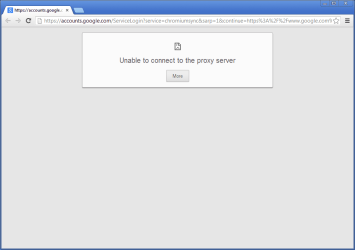
Solved Only FireFox (and a handful of other programs) can connect!

Try this

Inside Chrome click on
xljcxv.jpg
on the Far right side on the toolbar

Select Settings.
Click Show advanced settings.
In the "Network" section, click Change proxy settings. This will open the Internet Properties dialog.
Click LAN settings .
Deselect the "Automatically detect settings" checkbox.
 

My Computer My Computer

At a glance

Windows 7 Ultimate 32-Bit & Windows 7 Ultimat...Intel Core i7 CPU 950 @ 3.07GHzOCZ 6GB (3 x 2GB) 240-Pin DDR3 SDRAM DDR3 160...ATI Radeon HD 5700 Series
Computer Manufacturer/Model Number
Custom Built
OS
Windows 7 Ultimate 32-Bit & Windows 7 Ultimate 64-Bit
CPU
Intel Core i7 CPU 950 @ 3.07GHz
Motherboard
ASUS P6T DELUXE V2
Memory
OCZ 6GB (3 x 2GB) 240-Pin DDR3 SDRAM DDR3 1600 OCZ3X1600R2
Graphics Card(s)
ATI Radeon HD 5700 Series
Sound Card
OnBoard
Hard Drives
WD6400AACS-00M3B0 (640GB SATA )
PSU
CORSAIR 850w
Case
NZXT LEXA
Cooling
Intel Stock Heatsink Fan
Keyboard
Microsoft Wireless Laser Keyboard 7000
Mouse
Microsoft Wireless Laser Mouse 7000
Real life is keeping me busy. I still do not have much time to spend on these forums... so I've not re-read every post in this thread - forgive me if this has been asked/answered:
Can other devices (laptops, cell phones...) work on this network?
I'm looking for something to backup Firefox's claim that it is not using a proxy to get out of your network. I know that there is not normally a proxy in a home network, but that is how this computer is acting.

WDO has it's own OS and it could not get to the internet from your network... I just don't know if WDO attempts to read network settings from the OS that it is checking. Maybe others in this thread can suggest an operating system that you can download and run from a CD or DVD... I would suggest Ubuntu or Linux Mint, but both of those can also install from the CD/DVD if you click the wrong option. Maybe there is a portable version that has no risk of formatting the drive of the host computer.
 

My Computer My Computer

At a glance

W7 Pro SP1 64biti78GBIntel HD Graphics
Computer type
Laptop
Computer Manufacturer/Model Number
Employer provided Dell Latitude
OS
W7 Pro SP1 64bit
CPU
i7
Memory
8GB
Graphics Card(s)
Intel HD Graphics
Hard Drives
crappy SSD
Antivirus
Employer mandated Symantec Endpoint Protection
Browser
Pale Moon 64bit, IE11 64bit & Chrome 64bit
Changing the internet settings proved moot, unfortunately. Same error.
Phones and directly connected computers do work on this network. I tried using a direct connection but that didn't change anything.
It doesn't make sense that only FireFox can connect after all this. Maybe the solution lies in figuring out what Skype, FF, GoogleTalk and uTorrent have in common with regards to connecting to the internet. Those are the only programs I've tested so far that work.
 

My Computer My Computer

At a glance

Windows 7 64 bitintel core i7nvidia geforce gtx 660m
Computer type
PC/Desktop
Computer Manufacturer/Model Number
Lenovo Y580
OS
Windows 7 64 bit
CPU
intel core i7
Graphics Card(s)
nvidia geforce gtx 660m
Antivirus
Microsoft Firewall
Browser
Firefox
Can you login to Safe Mode with Networking and open Chrome and see if it works .
 

My Computer My Computer

At a glance

Windows 7 Ultimate 32-Bit & Windows 7 Ultimat...Intel Core i7 CPU 950 @ 3.07GHzOCZ 6GB (3 x 2GB) 240-Pin DDR3 SDRAM DDR3 160...ATI Radeon HD 5700 Series
Computer Manufacturer/Model Number
Custom Built
OS
Windows 7 Ultimate 32-Bit & Windows 7 Ultimate 64-Bit
CPU
Intel Core i7 CPU 950 @ 3.07GHz
Motherboard
ASUS P6T DELUXE V2
Memory
OCZ 6GB (3 x 2GB) 240-Pin DDR3 SDRAM DDR3 1600 OCZ3X1600R2
Graphics Card(s)
ATI Radeon HD 5700 Series
Sound Card
OnBoard
Hard Drives
WD6400AACS-00M3B0 (640GB SATA )
PSU
CORSAIR 850w
Case
NZXT LEXA
Cooling
Intel Stock Heatsink Fan
Keyboard
Microsoft Wireless Laser Keyboard 7000
Mouse
Microsoft Wireless Laser Mouse 7000
Can you login to Safe Mode with Networking and open Chrome and see if it works .
IE and Chrome were checked in the safe mode with networking (and failed) in post 91... but maybe something has changed.
 

My Computer My Computer

At a glance

W7 Pro SP1 64biti78GBIntel HD Graphics
Computer type
Laptop
Computer Manufacturer/Model Number
Employer provided Dell Latitude
OS
W7 Pro SP1 64bit
CPU
i7
Memory
8GB
Graphics Card(s)
Intel HD Graphics
Hard Drives
crappy SSD
Antivirus
Employer mandated Symantec Endpoint Protection
Browser
Pale Moon 64bit, IE11 64bit & Chrome 64bit
There has to be something blocking connection if only Firefox works
 

My Computer My Computer

At a glance

Windows 7 Ultimate 32-Bit & Windows 7 Ultimat...Intel Core i7 CPU 950 @ 3.07GHzOCZ 6GB (3 x 2GB) 240-Pin DDR3 SDRAM DDR3 160...ATI Radeon HD 5700 Series
Computer Manufacturer/Model Number
Custom Built
OS
Windows 7 Ultimate 32-Bit & Windows 7 Ultimate 64-Bit
CPU
Intel Core i7 CPU 950 @ 3.07GHz
Motherboard
ASUS P6T DELUXE V2
Memory
OCZ 6GB (3 x 2GB) 240-Pin DDR3 SDRAM DDR3 1600 OCZ3X1600R2
Graphics Card(s)
ATI Radeon HD 5700 Series
Sound Card
OnBoard
Hard Drives
WD6400AACS-00M3B0 (640GB SATA )
PSU
CORSAIR 850w
Case
NZXT LEXA
Cooling
Intel Stock Heatsink Fan
Keyboard
Microsoft Wireless Laser Keyboard 7000
Mouse
Microsoft Wireless Laser Mouse 7000
Changing the internet settings proved moot, unfortunately. Same error.
Phones and directly connected computers do work on this network. I tried using a direct connection but that didn't change anything.
It doesn't make sense that only FireFox can connect after all this. Maybe the solution lies in figuring out what Skype, FF, GoogleTalk and uTorrent have in common with regards to connecting to the internet. Those are the only programs I've tested so far that work.
Does that mean that other computers (when connected via your Tellus box) also have this problem?

I installed GoogleTalk into a Virtual Machine and then lied to the Operating System's Internet Properties Connection tab by telling it that I was behind a proxy. Process Monitor showed GoogleTalk attempting to resolve addresses via the bad proxy info, but then it timed out and tried a direct connection. It worked via the direct connection. My guess is that uTorrent does much the same thing.
 

My Computer My Computer

At a glance

W7 Pro SP1 64biti78GBIntel HD Graphics
Computer type
Laptop
Computer Manufacturer/Model Number
Employer provided Dell Latitude
OS
W7 Pro SP1 64bit
CPU
i7
Memory
8GB
Graphics Card(s)
Intel HD Graphics
Hard Drives
crappy SSD
Antivirus
Employer mandated Symantec Endpoint Protection
Browser
Pale Moon 64bit, IE11 64bit & Chrome 64bit
I don't think utorrent is using a proxy .
 

My Computer My Computer

At a glance

Windows 7 Ultimate 32-Bit & Windows 7 Ultimat...Intel Core i7 CPU 950 @ 3.07GHzOCZ 6GB (3 x 2GB) 240-Pin DDR3 SDRAM DDR3 160...ATI Radeon HD 5700 Series
Computer Manufacturer/Model Number
Custom Built
OS
Windows 7 Ultimate 32-Bit & Windows 7 Ultimate 64-Bit
CPU
Intel Core i7 CPU 950 @ 3.07GHz
Motherboard
ASUS P6T DELUXE V2
Memory
OCZ 6GB (3 x 2GB) 240-Pin DDR3 SDRAM DDR3 1600 OCZ3X1600R2
Graphics Card(s)
ATI Radeon HD 5700 Series
Sound Card
OnBoard
Hard Drives
WD6400AACS-00M3B0 (640GB SATA )
PSU
CORSAIR 850w
Case
NZXT LEXA
Cooling
Intel Stock Heatsink Fan
Keyboard
Microsoft Wireless Laser Keyboard 7000
Mouse
Microsoft Wireless Laser Mouse 7000
Installed Chrome into that same VM and what it does is just weird. It tried the direct connection (no proxy) first and it did not get a reply (for reasons unknown). Then it tried the fake proxy and timed out - but Chrome was able to state that it was unable to connect to the proxy server (much like the proxy feedback that IE10 gives).

BTW, I have the DNS service turned off during these tests because that forces each application to try and resolve web addresses to IP addresses. It is easier to watch the network traffic on an app by app basis. When the DNS service is turned on, each app asks the DNS service to resolve web addresses... so all DNS requests come and go thru one of the svchost processes.

Edit: I reverted the VM back to IE8 to see if Chrome was using any part of IE10 to determine if the connection problem was proxy related. (The OP has IE9. IE8/IE9 do not seem to know/give specific info about the proxy failing to respond). Chrome was still able to tell me that the fake proxy was not responding... so it does so using it own diagnostics.

chrome-proxy.png

The OP is not seeing this type of error in Chrome - so maybe proxy settings are not the issue.
 
Last edited:

My Computer My Computer

At a glance

W7 Pro SP1 64biti78GBIntel HD Graphics
Computer type
Laptop
Computer Manufacturer/Model Number
Employer provided Dell Latitude
OS
W7 Pro SP1 64bit
CPU
i7
Memory
8GB
Graphics Card(s)
Intel HD Graphics
Hard Drives
crappy SSD
Antivirus
Employer mandated Symantec Endpoint Protection
Browser
Pale Moon 64bit, IE11 64bit & Chrome 64bit
I don't think utorrent is using a proxy .
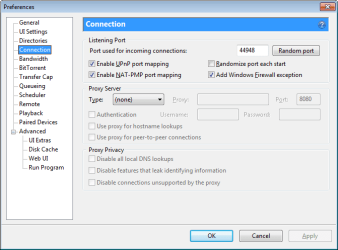
I installed uTorrent into that same VM and it ignores the OS settings and uses a direct connection as instructed by its default preferences:

u.png
 

My Computer My Computer

At a glance

W7 Pro SP1 64biti78GBIntel HD Graphics
Computer type
Laptop
Computer Manufacturer/Model Number
Employer provided Dell Latitude
OS
W7 Pro SP1 64bit
CPU
i7
Memory
8GB
Graphics Card(s)
Intel HD Graphics
Hard Drives
crappy SSD
Antivirus
Employer mandated Symantec Endpoint Protection
Browser
Pale Moon 64bit, IE11 64bit & Chrome 64bit
Lets have the OP run this tool


2j4a9si.png
64-Bit Version OS Farbar Recovery Scan Tool x64 <===== Download Link

Drag the FRST64.exe from the Downloads folder to your Desktop

Right click on FRST64.exe and choose
mawket.jpg


When the tool opens click Yes on the disclaimer window .

Press Scan button.

FRST will let you know when the scan is complete and has written the FRST.txt to file

   Note
The first time Farbar Recovery Scan Tool is run, it makes also another log Addition.txt


Please upload both logs in your reply.(FRST.txt and Addition.txt)

:note: FRST.txt and Addition.txt will be on the Desktop :note:
 

My Computer My Computer

At a glance

Windows 7 Ultimate 32-Bit & Windows 7 Ultimat...Intel Core i7 CPU 950 @ 3.07GHzOCZ 6GB (3 x 2GB) 240-Pin DDR3 SDRAM DDR3 160...ATI Radeon HD 5700 Series
Computer Manufacturer/Model Number
Custom Built
OS
Windows 7 Ultimate 32-Bit & Windows 7 Ultimate 64-Bit
CPU
Intel Core i7 CPU 950 @ 3.07GHz
Motherboard
ASUS P6T DELUXE V2
Memory
OCZ 6GB (3 x 2GB) 240-Pin DDR3 SDRAM DDR3 1600 OCZ3X1600R2
Graphics Card(s)
ATI Radeon HD 5700 Series
Sound Card
OnBoard
Hard Drives
WD6400AACS-00M3B0 (640GB SATA )
PSU
CORSAIR 850w
Case
NZXT LEXA
Cooling
Intel Stock Heatsink Fan
Keyboard
Microsoft Wireless Laser Keyboard 7000
Mouse
Microsoft Wireless Laser Mouse 7000
Wow, you guys certainly do you know your stuff. A lot of the conversation has gone over my head and unfortunately I have midterms at the moment that are keeping me from doing the research to understand. I'm running the search and I will attach the .txt files to this post.
I want to clarify that other machines connected to the same Telus unit (wired or otherwise) do not have similar problems.
Should I hit "fix" after the scan completes?
 

Attachments

My Computer My Computer

At a glance

Windows 7 64 bitintel core i7nvidia geforce gtx 660m
Computer type
PC/Desktop
Computer Manufacturer/Model Number
Lenovo Y580
OS
Windows 7 64 bit
CPU
intel core i7
Graphics Card(s)
nvidia geforce gtx 660m
Antivirus
Microsoft Firewall
Browser
Firefox
Open Notepad .

Inside Notepad Paste the highlighted text below


start
Toolbar: HKCU - No Name - {2318C2B1-4965-11D4-9B18-009027A5CD4F} - No File
FF Plugin: @microsoft.com/GENUINE - disabled No File
FF Plugin-x32: @microsoft.com/GENUINE - disabled No File
FF Plugin-x32: @qq.com/npqscall - C:\Program Files (x86)\Common Files\Tencent\NPQSCALL\npqscall.dll No File
FF Plugin-x32: @qq.com/npqscall,version=1.0.0 - %commonprogramfiles%\tencent\NPQSCALL\npqscall.dll No File
FF Plugin-x32: @qq.com/TXSSO - C:\Program Files (x86)\Common Files\Tencent\TXSSO\1.2.1.38\Bin\npSSOAxCtrlForPTLogin.dll No File
CHR Plugin: (Nitro PDF Plug-In) - C:\Program Files (x86)\Nitro PDF\Professional 7\npnitromozilla.dll No File
C:\Windows\Tasks\SA.DAT
ZeroAccess:
C:\$Recycle.Bin\S-1-5-21-3665712771-140301887-2165397799-1001\$b06bd8cb2a759526cc40026c2f04eacd

ZeroAccess:
C:\$Recycle.Bin\S-1-5-18\$b06bd8cb2a759526cc40026c2f04eacd
end


Click on File select Save As
File Name : Fixlog.txt
Save as type : All Files
Location to save file: Desktop

Open FRST64.exe and click on the [FIX] button . Once complete it will create a new log called FIXLOG.TXT upload the log.

Also run tdsskiller

TDSSKILLER

download link :ar: TDSSKiller

Right-click the program and select: Extract to tdsskiller\


A TDSSKiller folder is found on your Desktop.
Open the folder, and double-click the TDSSKiller application.


When the TDSSKiller console opens, click on: Change Parameters
Under Additional Options, place a check in the box next to: Detect TDLFS File System
Click: OK


Press: Start Scan


If a suspicious object is detected, the default action is Skip, leave it as is, and click on: Continue
If malicious objects are found, they show in the Scan results.
Ensure Cure (the default) is selected, then click: Continue > Reboot now, to finish the cleaning process.
(Note: If Cure is not available, select Skip, >>Do not select: Delete<<)


When done, the tool outputs its log to the disk with the Windows Operating System, normally C:\


Logs have a name like:
C:\TDSSKiller.X.X.X_12.04.2013_15.31.43_log.txt


Please post the TDSSKiller log in your reply.
 

My Computer My Computer

At a glance

Windows 7 Ultimate 32-Bit & Windows 7 Ultimat...Intel Core i7 CPU 950 @ 3.07GHzOCZ 6GB (3 x 2GB) 240-Pin DDR3 SDRAM DDR3 160...ATI Radeon HD 5700 Series
Computer Manufacturer/Model Number
Custom Built
OS
Windows 7 Ultimate 32-Bit & Windows 7 Ultimate 64-Bit
CPU
Intel Core i7 CPU 950 @ 3.07GHz
Motherboard
ASUS P6T DELUXE V2
Memory
OCZ 6GB (3 x 2GB) 240-Pin DDR3 SDRAM DDR3 1600 OCZ3X1600R2
Graphics Card(s)
ATI Radeon HD 5700 Series
Sound Card
OnBoard
Hard Drives
WD6400AACS-00M3B0 (640GB SATA )
PSU
CORSAIR 850w
Case
NZXT LEXA
Cooling
Intel Stock Heatsink Fan
Keyboard
Microsoft Wireless Laser Keyboard 7000
Mouse
Microsoft Wireless Laser Mouse 7000
TDS found no threats, and took one second longer than it did last time.
I ran FRST64 as you suggested saved for one change I made (the file needed to be title fixlist.txt not fixlog.txt to be detected by the program). The returned file was indeed titled fixlog.txt.
I have attached both reports as asked for.
My continued, most gracious thanks to you all.
 

Attachments

My Computer My Computer

At a glance

Windows 7 64 bitintel core i7nvidia geforce gtx 660m
Computer type
PC/Desktop
Computer Manufacturer/Model Number
Lenovo Y580
OS
Windows 7 64 bit
CPU
intel core i7
Graphics Card(s)
nvidia geforce gtx 660m
Antivirus
Microsoft Firewall
Browser
Firefox
run HitmanPro

Download
2jtn9k.png
HitManPro

64-Bit Version OS :ar:
Download


:ar: Save to Desktop

:ar: Right click on HitmanPro.exe and choose Run as administrator

:ar: When HitmanPro opens up click on Settings button uncheck Scan for Tracking cookies click on OK Then on the Next button

:ar: Click on No, I only want to perform a one-time scan to check this computer on the Setup page . Click Next once done .

:ar: Let it scan the PC once its done Click Next

:ar: Click Activate free license to start the free 30 days trial and remove all the malicious files from your computer then click Next
 

My Computer My Computer

At a glance

Windows 7 Ultimate 32-Bit & Windows 7 Ultimat...Intel Core i7 CPU 950 @ 3.07GHzOCZ 6GB (3 x 2GB) 240-Pin DDR3 SDRAM DDR3 160...ATI Radeon HD 5700 Series
Computer Manufacturer/Model Number
Custom Built
OS
Windows 7 Ultimate 32-Bit & Windows 7 Ultimate 64-Bit
CPU
Intel Core i7 CPU 950 @ 3.07GHz
Motherboard
ASUS P6T DELUXE V2
Memory
OCZ 6GB (3 x 2GB) 240-Pin DDR3 SDRAM DDR3 1600 OCZ3X1600R2
Graphics Card(s)
ATI Radeon HD 5700 Series
Sound Card
OnBoard
Hard Drives
WD6400AACS-00M3B0 (640GB SATA )
PSU
CORSAIR 850w
Case
NZXT LEXA
Cooling
Intel Stock Heatsink Fan
Keyboard
Microsoft Wireless Laser Keyboard 7000
Mouse
Microsoft Wireless Laser Mouse 7000
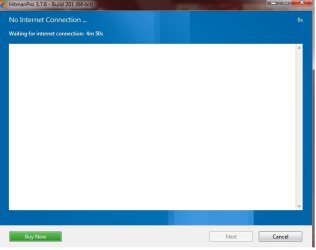
Unfortunately it seems this program requires an internet connection that it's not receiving...
 

Attachments

  • hitmanproshot1.jpg
    hitmanproshot1.jpg
    19.4 KB · Views: 1

My Computer My Computer

At a glance

Windows 7 64 bitintel core i7nvidia geforce gtx 660m
Computer type
PC/Desktop
Computer Manufacturer/Model Number
Lenovo Y580
OS
Windows 7 64 bit
CPU
intel core i7
Graphics Card(s)
nvidia geforce gtx 660m
Antivirus
Microsoft Firewall
Browser
Firefox
s1lva1.png
AdwCleaner

Click here AdwCleaner

:ar: Click on Download Now button

:ar: Save to the Desktop

:ar: Right-click on AdwCleaner.exe and choose
mawket.jpg


:ar: Click on Delete and confirm the prompt.

axcoj5.jpg


:ar: Your computer will be rebooted automatically. A text file will open after the restart.

Upload the log : The log file is at C:\AdwCleaner[Sn].txt


Once you're back onto the desktop

Use MiniToolBox


If you don't have it anymore redownload the tool below

:ar:MiniToolBox

Select
  • Flush DNS
  • Report IE Proxy Settings
  • Reset FF Proxy Settings
Click
fkz81u.jpg
button

Upload the Result.txt file
 

My Computer My Computer

At a glance

Windows 7 Ultimate 32-Bit & Windows 7 Ultimat...Intel Core i7 CPU 950 @ 3.07GHzOCZ 6GB (3 x 2GB) 240-Pin DDR3 SDRAM DDR3 160...ATI Radeon HD 5700 Series
Computer Manufacturer/Model Number
Custom Built
OS
Windows 7 Ultimate 32-Bit & Windows 7 Ultimate 64-Bit
CPU
Intel Core i7 CPU 950 @ 3.07GHz
Motherboard
ASUS P6T DELUXE V2
Memory
OCZ 6GB (3 x 2GB) 240-Pin DDR3 SDRAM DDR3 1600 OCZ3X1600R2
Graphics Card(s)
ATI Radeon HD 5700 Series
Sound Card
OnBoard
Hard Drives
WD6400AACS-00M3B0 (640GB SATA )
PSU
CORSAIR 850w
Case
NZXT LEXA
Cooling
Intel Stock Heatsink Fan
Keyboard
Microsoft Wireless Laser Keyboard 7000
Mouse
Microsoft Wireless Laser Mouse 7000
Done and done.
 

Attachments

My Computer My Computer

At a glance

Windows 7 64 bitintel core i7nvidia geforce gtx 660m
Computer type
PC/Desktop
Computer Manufacturer/Model Number
Lenovo Y580
OS
Windows 7 64 bit
CPU
intel core i7
Graphics Card(s)
nvidia geforce gtx 660m
Antivirus
Microsoft Firewall
Browser
Firefox
Delete all of the Adwcleaner logs and retry to run HitmanPro
 

My Computer My Computer

At a glance

Windows 7 Ultimate 32-Bit & Windows 7 Ultimat...Intel Core i7 CPU 950 @ 3.07GHzOCZ 6GB (3 x 2GB) 240-Pin DDR3 SDRAM DDR3 160...ATI Radeon HD 5700 Series
Computer Manufacturer/Model Number
Custom Built
OS
Windows 7 Ultimate 32-Bit & Windows 7 Ultimate 64-Bit
CPU
Intel Core i7 CPU 950 @ 3.07GHz
Motherboard
ASUS P6T DELUXE V2
Memory
OCZ 6GB (3 x 2GB) 240-Pin DDR3 SDRAM DDR3 1600 OCZ3X1600R2
Graphics Card(s)
ATI Radeon HD 5700 Series
Sound Card
OnBoard
Hard Drives
WD6400AACS-00M3B0 (640GB SATA )
PSU
CORSAIR 850w
Case
NZXT LEXA
Cooling
Intel Stock Heatsink Fan
Keyboard
Microsoft Wireless Laser Keyboard 7000
Mouse
Microsoft Wireless Laser Mouse 7000
Deleted all logs. I noticed a FaceProv.txt. I don't know what that is so I didn't delete it.
HitmanPro still searches for an internet connection. =/
 

My Computer My Computer

At a glance

Windows 7 64 bitintel core i7nvidia geforce gtx 660m
Computer type
PC/Desktop
Computer Manufacturer/Model Number
Lenovo Y580
OS
Windows 7 64 bit
CPU
intel core i7
Graphics Card(s)
nvidia geforce gtx 660m
Antivirus
Microsoft Firewall
Browser
Firefox
Back
Top