Open Command Window Here as Administrator

Add or Remove "Open Command Window Here as Administrator" to Context Menu

   Information
This will show you how to add or remove Open Command Window Here as Administrator to the context menu of a folder, drive, and desktop of all users to open an elevated command prompt with the focus at the library, folder, drive, and desktop location in Windows 7 and Windows 8.

You must be logged in as an administrator to be able to do the steps in this tutorial.

   Note
This is just like the Open Command Window Here context menu item, except that it opens an elevated "run as administrator" command prompt at the library, folder, or drive location instead.

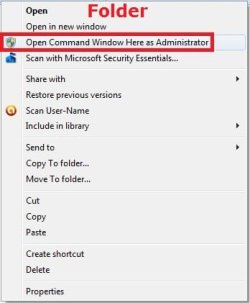
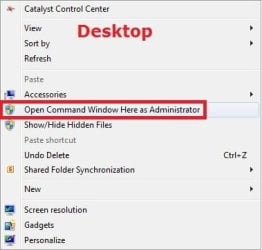
When added, you can right click on a library, folder, or drive to see the Open Command Window Here as Administrator context menu item. You will then be prompted by UAC to click on YES or type in the administrator's password.

   Warning
This will not work with Library folders.

If you added the Take Ownership context menu item, then adding Open Command Window Here as Administrator will remove and replace it for folders and drives.


EXAMPLE: Open Command Window Here as Administrator
NOTE: This is the context menu with this added and you right click on a drive, folder, or on the desktop.
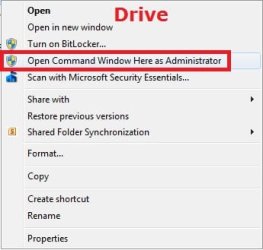
Drive.jpgFolder.jpgDesktop.jpg


Here's How:

1. Do step 2, 3, or 4 below for what you would like to do.

2. Add "Open Command Window Here as Administrator" to Context Menu
A) Click/tap on the download button below to download the file below, and go to step 5 below.

Add_Open_Command_Window_Here_as_Administrator.reg


Download


3. Add Shift + Right Click "Open Command Window Here as Administrator" to Context Menu
A) Click/tap on the download button below to download the file below, and go to step 5 below.

Add_Shift+Open_Command_Window_Here_as_Administrator.reg


Download


4. Remove "Open Command Window Here as Administrator" from Context Menu
A) Click/tap on the download button below to download the file below, and go to step 5 below.

Remove_Open_Command_Window_Here_as_Administrator.reg


Download


5. Save the .reg file to your desktop.

6. Double click/tap on the downloaded .reg file to merge it.

7. When prompted, click on Run, Yes (UAC), Yes, and OK to approve merging the .reg file.

8. You can now delete the downloaded .reg file if you like.


That's it
Shawn


Attachments

Last edited:
thanks a lot
I was searching for it from a long tym to use attribute command line utility
 

My Computer

Computer Manufacturer/Model Number
HP pavillion dv2910tx
OS
windows 7
Memory
3GB
Graphics Card(s)
Nvidia Gforce 8400 series 128mb
Screen Resolution
1200x800
Don't you find that intereferes with any other runas context menu items, e.g. Take Ownership?
 

My Computers

System One System Two

  • Computer type
    PC/Desktop
    OS
    7 X64
    CPU
    i5 8400
    Motherboard
    gigabyte b365m ds3h
    Memory
    2x8gb 3200mhz
    Hard Drives
    various
    PSU
    pure power 11 400w cm
    Case
    Coolermaster
    Cooling
    cryorig m9i
  • Computer type
    PC/Desktop
    OS
    7x64
    CPU
    g5400
    Motherboard
    ga b365m ds3h
    Memory
    8gb ddr4 2400
    PSU
    xfx pro 450w
Hi Brink

When I click on the unzipped reg file all I get is Notepad opening up showing the detail of the patch. I can't make it merge into the registry.
Thanks.
 

My Computer

Computer type
Laptop
Computer Manufacturer/Model Number
HP Envy 15
OS
Windows 8.1.1
CPU
AMD A10-5750M APU with Radeon(tm) HD Graphics
Memory
8gb
Hard Drives
1TB Serial ATA 16mb buffer
Hi Brink

When I click on the unzipped reg file all I get is Notepad opening up showing the detail of the patch. I can't make it merge into the registry.
Thanks.

If you open regedit (type regedit in the start search bar then press enter) then from the regedit file menu select import and then select the downloaded reg file.
 

My Computer

Computer type
PC/Desktop
OS
Windows 11
Hi Brink

When I click on the unzipped reg file all I get is Notepad opening up showing the detail of the patch. I can't make it merge into the registry.
Thanks.


Hello Bertie,

It sounds like you have a improper association set for .reg file extensions. Double check in Default Programs to make sure that the .reg file extension has it's "Current Default" program set to Registry Editor (C:\Windows\regedit.exe).

Afterwards, see if you can merge the downloaded REG file.

Hope this helps,
Shawn
 

My Computer

Computer type
PC/Desktop
Computer Manufacturer/Model Number
Self built custom
OS
64-bit Windows 11 Pro for Workstations
CPU
Intel i7-8700K OC'd to 5 GHz
Motherboard
ASUS ROG Maximus XI Formula Z390
Memory
64 GB (4x16GB) G.SKILL TridentZ RGB DDR4 3600 MHz
Graphics Card(s)
ASUS ROG-STRIX-GTX1080TI-O11G-GAMING
Sound Card
Integrated
Monitor(s) Displays
2 x Samsung Odyssey G7 27"
Screen Resolution
2560x1440
Hard Drives
1TB Samsung 990 PRO M.2,
4TB Samsung 990 PRO PRO M.2,
TerraMaster F8 SSD Plus NAS
PSU
Seasonic Prime Titanium 850W
Case
Thermaltake Core P3
Cooling
Corsair Hydro H115i
Keyboard
Logitech wireless K800
Mouse
Logitech MX Master 4
Internet Speed
2 Gb/s Download and 100 Mb/s Upload
Antivirus
Malwarebyte Anti-Malware Premium
Browser
Google Chrome
Other Info
Logitech Z625 speaker system,
Logitech BRIO 4K Pro webcam,
HP Color LaserJet Pro MFP M477fdn,
APC SMART-UPS RT 1000 XL - SURT1000XLI,
Galaxy S23 Plus phone
That fixed it!
Thanks Brink and Z3r010
 

My Computer

Computer type
Laptop
Computer Manufacturer/Model Number
HP Envy 15
OS
Windows 8.1.1
CPU
AMD A10-5750M APU with Radeon(tm) HD Graphics
Memory
8gb
Hard Drives
1TB Serial ATA 16mb buffer
You're most welcome Bertie. :)
 

My Computer

Computer type
PC/Desktop
Computer Manufacturer/Model Number
Self built custom
OS
64-bit Windows 11 Pro for Workstations
CPU
Intel i7-8700K OC'd to 5 GHz
Motherboard
ASUS ROG Maximus XI Formula Z390
Memory
64 GB (4x16GB) G.SKILL TridentZ RGB DDR4 3600 MHz
Graphics Card(s)
ASUS ROG-STRIX-GTX1080TI-O11G-GAMING
Sound Card
Integrated
Monitor(s) Displays
2 x Samsung Odyssey G7 27"
Screen Resolution
2560x1440
Hard Drives
1TB Samsung 990 PRO M.2,
4TB Samsung 990 PRO PRO M.2,
TerraMaster F8 SSD Plus NAS
PSU
Seasonic Prime Titanium 850W
Case
Thermaltake Core P3
Cooling
Corsair Hydro H115i
Keyboard
Logitech wireless K800
Mouse
Logitech MX Master 4
Internet Speed
2 Gb/s Download and 100 Mb/s Upload
Antivirus
Malwarebyte Anti-Malware Premium
Browser
Google Chrome
Other Info
Logitech Z625 speaker system,
Logitech BRIO 4K Pro webcam,
HP Color LaserJet Pro MFP M477fdn,
APC SMART-UPS RT 1000 XL - SURT1000XLI,
Galaxy S23 Plus phone
I have an issue like brink

I know what brink means,if i put take ownership and this reg together,when i try to open a command prompt as admin,it just takes over the folder,and doesn't open a cmd window.
The reg entries are as follows if u have both installed:
@="cmd.exe /s /k pushd "%V""
and IsolatedCommand=cmd.exe /c takeown /f "%1" /r /d y && icacls "%1" /grant administrators:F /t

It seems to use the last command all the time.Also it would not let me merge from the reg file when i have take ownership installed,i had to manually put it in.It still shows on menu,but that's outside the key that has the command in the registry.
The only way i can get the open cmd window to work is to take out the isolated command line.
I've no idea why it does it this way,but it does for me,and prob Brink aswell.
Thanx for the info by the way.If i use a different grant admin reg 'hack',i can have both installed,just not with the take ownership for directory 'hack'.

I hope everyone knows what the hell i'm talking about...
:huh:

Edit : i was mistaken,it won't work with the grant admin reg either,just takes over folder when i do cmd as admin.Had to take out.
 
Last edited:

My Computer

Computer Manufacturer/Model Number
Si setup
OS
windows 7 Premium
CPU
AMD phenom quad 9550
Motherboard
asus M3A78 Pro
Memory
4gb 1066
Graphics Card(s)
HD 6850 1GB
Sound Card
Realtek
Monitor(s) Displays
acer 19" flat
Screen Resolution
1440x900
Hard Drives
1 x sataII 1TB samsung F3
Corsair Force GT (55 GB)
PSU
500w
Cooling
3 fans
Keyboard
Microsoft 600
Mouse
Laser Logitech MX 518
Internet Speed
30mb / 3mb
Hello Rover,

I'm not sure why you and SIW had a issue with this Open Command Window Here as Administrator and the Take Ownership context menu items working with both added to the context menu separately. I have not had any issues with them. :confused:
 
Last edited:

My Computer

Computer type
PC/Desktop
Computer Manufacturer/Model Number
Self built custom
OS
64-bit Windows 11 Pro for Workstations
CPU
Intel i7-8700K OC'd to 5 GHz
Motherboard
ASUS ROG Maximus XI Formula Z390
Memory
64 GB (4x16GB) G.SKILL TridentZ RGB DDR4 3600 MHz
Graphics Card(s)
ASUS ROG-STRIX-GTX1080TI-O11G-GAMING
Sound Card
Integrated
Monitor(s) Displays
2 x Samsung Odyssey G7 27"
Screen Resolution
2560x1440
Hard Drives
1TB Samsung 990 PRO M.2,
4TB Samsung 990 PRO PRO M.2,
TerraMaster F8 SSD Plus NAS
PSU
Seasonic Prime Titanium 850W
Case
Thermaltake Core P3
Cooling
Corsair Hydro H115i
Keyboard
Logitech wireless K800
Mouse
Logitech MX Master 4
Internet Speed
2 Gb/s Download and 100 Mb/s Upload
Antivirus
Malwarebyte Anti-Malware Premium
Browser
Google Chrome
Other Info
Logitech Z625 speaker system,
Logitech BRIO 4K Pro webcam,
HP Color LaserJet Pro MFP M477fdn,
APC SMART-UPS RT 1000 XL - SURT1000XLI,
Galaxy S23 Plus phone
Yeah,sorry I meant SIW2,got names mixed up.
Thanx for ur help Brink,they both work fine now thanx to u.
 

My Computer

Computer Manufacturer/Model Number
Si setup
OS
windows 7 Premium
CPU
AMD phenom quad 9550
Motherboard
asus M3A78 Pro
Memory
4gb 1066
Graphics Card(s)
HD 6850 1GB
Sound Card
Realtek
Monitor(s) Displays
acer 19" flat
Screen Resolution
1440x900
Hard Drives
1 x sataII 1TB samsung F3
Corsair Force GT (55 GB)
PSU
500w
Cooling
3 fans
Keyboard
Microsoft 600
Mouse
Laser Logitech MX 518
Internet Speed
30mb / 3mb
Hello Rover,

I'm not sure why you and SIW had a issue with this Open Command Window Here as Administrator and the Take Ownership context menu items working with both added to the context menu separately. I have not had any issues with them. :confused:

Update.

I have updated the Open Command Window Here as Administrator and the Take Ownership downloads so that installing one will completely remove the other one so it will not cause issues. I have not found a way to have both in the context menu at the same time yet since they both use the runas key and cannot use it at the same time. :(
 

My Computer

Computer type
PC/Desktop
Computer Manufacturer/Model Number
Self built custom
OS
64-bit Windows 11 Pro for Workstations
CPU
Intel i7-8700K OC'd to 5 GHz
Motherboard
ASUS ROG Maximus XI Formula Z390
Memory
64 GB (4x16GB) G.SKILL TridentZ RGB DDR4 3600 MHz
Graphics Card(s)
ASUS ROG-STRIX-GTX1080TI-O11G-GAMING
Sound Card
Integrated
Monitor(s) Displays
2 x Samsung Odyssey G7 27"
Screen Resolution
2560x1440
Hard Drives
1TB Samsung 990 PRO M.2,
4TB Samsung 990 PRO PRO M.2,
TerraMaster F8 SSD Plus NAS
PSU
Seasonic Prime Titanium 850W
Case
Thermaltake Core P3
Cooling
Corsair Hydro H115i
Keyboard
Logitech wireless K800
Mouse
Logitech MX Master 4
Internet Speed
2 Gb/s Download and 100 Mb/s Upload
Antivirus
Malwarebyte Anti-Malware Premium
Browser
Google Chrome
Other Info
Logitech Z625 speaker system,
Logitech BRIO 4K Pro webcam,
HP Color LaserJet Pro MFP M477fdn,
APC SMART-UPS RT 1000 XL - SURT1000XLI,
Galaxy S23 Plus phone
To Brink

I just tried it to make sure,and since the change

ie:

Windows Registry Editor Version 5.00

[HKEY_CLASSES_ROOT\Directory\shell\Command as Admin]

[HKEY_CLASSES_ROOT\Directory\shell\Command as Admin\command]
@="cmd.exe /s /k pushd \"%V\""

Not inside run as,it works fine.
I just took over a folder and got up a command window as admin while it was doing it.
Definitely works for me now,thanx Brink.
:D
 

My Computer

Computer Manufacturer/Model Number
Si setup
OS
windows 7 Premium
CPU
AMD phenom quad 9550
Motherboard
asus M3A78 Pro
Memory
4gb 1066
Graphics Card(s)
HD 6850 1GB
Sound Card
Realtek
Monitor(s) Displays
acer 19" flat
Screen Resolution
1440x900
Hard Drives
1 x sataII 1TB samsung F3
Corsair Force GT (55 GB)
PSU
500w
Cooling
3 fans
Keyboard
Microsoft 600
Mouse
Laser Logitech MX 518
Internet Speed
30mb / 3mb
Hello Rover,

Sorry, but it's not a elevated command prompt. :(

If you type diskpart (requires elevated command prompt to use) and press enter in the command prompt that you open using the above, UAC will prompt you to then elevate the command prompt. The "C:\Windows\system32.cmd.exe" in the tiltle bar is misleading since a title bar does not indicate whether it's elevated or not.

Thank you though. :)
 

My Computer

Computer type
PC/Desktop
Computer Manufacturer/Model Number
Self built custom
OS
64-bit Windows 11 Pro for Workstations
CPU
Intel i7-8700K OC'd to 5 GHz
Motherboard
ASUS ROG Maximus XI Formula Z390
Memory
64 GB (4x16GB) G.SKILL TridentZ RGB DDR4 3600 MHz
Graphics Card(s)
ASUS ROG-STRIX-GTX1080TI-O11G-GAMING
Sound Card
Integrated
Monitor(s) Displays
2 x Samsung Odyssey G7 27"
Screen Resolution
2560x1440
Hard Drives
1TB Samsung 990 PRO M.2,
4TB Samsung 990 PRO PRO M.2,
TerraMaster F8 SSD Plus NAS
PSU
Seasonic Prime Titanium 850W
Case
Thermaltake Core P3
Cooling
Corsair Hydro H115i
Keyboard
Logitech wireless K800
Mouse
Logitech MX Master 4
Internet Speed
2 Gb/s Download and 100 Mb/s Upload
Antivirus
Malwarebyte Anti-Malware Premium
Browser
Google Chrome
Other Info
Logitech Z625 speaker system,
Logitech BRIO 4K Pro webcam,
HP Color LaserJet Pro MFP M477fdn,
APC SMART-UPS RT 1000 XL - SURT1000XLI,
Galaxy S23 Plus phone
Hello All,

As a possible solution to having both an Elevated Prompt and the Take Ownership menu option in the context menu, what I have found that you can do is first install the Take Ownership registry file. For the Elevated Command Prompt, the process is a little bit more involved.

The first step is to copy the cmd.exe file from C:\Windows\System32 directory to C:\Windows. The next and key step is to change the properties of the cmd.exe file that you just copied in to the C:\Windows directory. What you want to do is to change the Compatibility settings for the cmd.exe file and check the box for "Run this program as an administrator". The next few steps are just to manually edit the registry settings to add the Elevated Command Prompt context menu choice.

In HKCR>Directory>shell, create the key ElevatedPrompt. For the Default REG_SZ setting, change the value to "Open Elevated Command Prompt Here". Next, create a new string value called Icon and assign is the value "C:\Windows\cmd.exe". Now, create a sub key from ElevatedPrompt called "command". Inside this sub key, assign the default value of cmd.exe /s /k pushd "%V".

Repeat the above steps in HKCR>Drive>shell.

Now, you should have both Take Ownership and Elevated Command Prompt active in the context menu.

I hope this helps.

Doc.
 

My Computer

OS
Windows 7 Ultimate x64
Great addon. One request to make it better

This is a great addon for Win7. However it leaves you in the slightly odd situation where getting to a command prompt with admin privs is easier than just opening a (non-admin) shell with "Open Command Window Here".

Opening a normal command shell needs you to hold down the shift key to get the extended right-click menu, whereas this adds an admin shell to the normal (non-shift) right click menu.

So, any chance of a tweak to either-

  1. Add the "Command Window As Administrator" option to the SHIFTED context menu.
  2. Add the normal non-admin command shell to the default context menu as we as the one with admin privs.
Thanks


colin_e
 

My Computer

OS
Windows 7 Pro 64 bit

My Computer

Computer type
PC/Desktop
Computer Manufacturer/Model Number
Self built custom
OS
64-bit Windows 11 Pro for Workstations
CPU
Intel i7-8700K OC'd to 5 GHz
Motherboard
ASUS ROG Maximus XI Formula Z390
Memory
64 GB (4x16GB) G.SKILL TridentZ RGB DDR4 3600 MHz
Graphics Card(s)
ASUS ROG-STRIX-GTX1080TI-O11G-GAMING
Sound Card
Integrated
Monitor(s) Displays
2 x Samsung Odyssey G7 27"
Screen Resolution
2560x1440
Hard Drives
1TB Samsung 990 PRO M.2,
4TB Samsung 990 PRO PRO M.2,
TerraMaster F8 SSD Plus NAS
PSU
Seasonic Prime Titanium 850W
Case
Thermaltake Core P3
Cooling
Corsair Hydro H115i
Keyboard
Logitech wireless K800
Mouse
Logitech MX Master 4
Internet Speed
2 Gb/s Download and 100 Mb/s Upload
Antivirus
Malwarebyte Anti-Malware Premium
Browser
Google Chrome
Other Info
Logitech Z625 speaker system,
Logitech BRIO 4K Pro webcam,
HP Color LaserJet Pro MFP M477fdn,
APC SMART-UPS RT 1000 XL - SURT1000XLI,
Galaxy S23 Plus phone
I'm having a problem. Suppose I am in a directory (say, X:\folder1), and I want the cmd to reference this directory. When I've done this previously using some other reg key, I would right click a folder in this directory (say X:\folder1\folder2) and open the command prompt and it would open a cmd at X:\folder1.

With this reg fix, the cmd opens in X:\folder1\folder2 instead. I don't remember where I found the other key but I lost it somehow. How can I edit this code to open the cmd one directory higher than it currently is? I know that it would be an easy code fix, though, except I am not sure how to edit the key.


[-HKEY_CLASSES_ROOT\Directory\shell\runas]

[HKEY_CLASSES_ROOT\Directory\shell\runas]
@="Open command window here as Administrator"
"HasLUAShield"=""

[HKEY_CLASSES_ROOT\Directory\shell\runas\command]
@="cmd.exe /s /k pushd \"%V\""

[-HKEY_CLASSES_ROOT\Directory\Background\shell\runas]

[HKEY_CLASSES_ROOT\Directory\Background\shell\runas]
@="Open command window here as Administrator"
"HasLUAShield"=""

[HKEY_CLASSES_ROOT\Directory\Background\shell\runas\command]
@="cmd.exe /s /k pushd \"%V\""

[-HKEY_CLASSES_ROOT\Drive\shell\runas]

[HKEY_CLASSES_ROOT\Drive\shell\runas]
@="Open command window here as Administrator"
"HasLUAShield"=""

[HKEY_CLASSES_ROOT\Drive\shell\runas\command]
@="cmd.exe /s /k pushd \"%V\""


Thanks. :)
 

My Computer

OS
Win 7 Ultimate x64
Hello PistolSlap,

To "Open command window here" for a specific folder (ex: A), you would need to either press shift + right click on that folder (ex: A) OR press shift + right click on an empty area in that folder (ex: A).

If you shift + right click on a folder (ex: B) inside the specific folder (ex: A), then it would open to B and not A.

Hope this helps, :)
Shawn
 

My Computer

Computer type
PC/Desktop
Computer Manufacturer/Model Number
Self built custom
OS
64-bit Windows 11 Pro for Workstations
CPU
Intel i7-8700K OC'd to 5 GHz
Motherboard
ASUS ROG Maximus XI Formula Z390
Memory
64 GB (4x16GB) G.SKILL TridentZ RGB DDR4 3600 MHz
Graphics Card(s)
ASUS ROG-STRIX-GTX1080TI-O11G-GAMING
Sound Card
Integrated
Monitor(s) Displays
2 x Samsung Odyssey G7 27"
Screen Resolution
2560x1440
Hard Drives
1TB Samsung 990 PRO M.2,
4TB Samsung 990 PRO PRO M.2,
TerraMaster F8 SSD Plus NAS
PSU
Seasonic Prime Titanium 850W
Case
Thermaltake Core P3
Cooling
Corsair Hydro H115i
Keyboard
Logitech wireless K800
Mouse
Logitech MX Master 4
Internet Speed
2 Gb/s Download and 100 Mb/s Upload
Antivirus
Malwarebyte Anti-Malware Premium
Browser
Google Chrome
Other Info
Logitech Z625 speaker system,
Logitech BRIO 4K Pro webcam,
HP Color LaserJet Pro MFP M477fdn,
APC SMART-UPS RT 1000 XL - SURT1000XLI,
Galaxy S23 Plus phone
Back
Top