Solved Open dialog problem

hotbuddy723

New member
Local time
3:11 PM
Messages
6
HELLO EVERYONE
The problem is when i open a file from any software like adobe / save a file /upload a file
,when i enter certain words it will automatically pick some files/folders name in drop-box (same initials to the words I entered) but it did not pick the files/folders name with same initials.

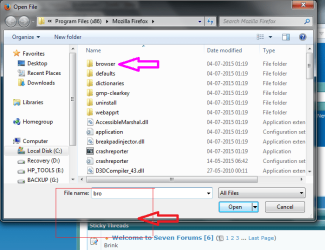
EXAMPLE- In uploaded Photo I put bro as you see it has to pic folder browser and show in drop-box but it did not pick that
please help in this regard and thanks for your efforts
 

Attachments

  • open dialog problem.png
    open dialog problem.png
    117.5 KB · Views: 5

My Computer

Computer type
Laptop
Computer Manufacturer/Model Number
hp pavilion g6
OS
Microsoft Windows 7 Ultimate 64-bit 7601 Multiprocessor Free Service Pack 1
CPU
Intel(R) Core(TM) i3-2350M CPU @ 2.30GHz
Motherboard
Hewlett-Packard 1670
Memory
4.00 GB
Graphics Card(s)
(1) Intel(R) HD Graphics Family (2) Radeon (TM) HD 7450M
Sound Card
(1) IDT High Definition Audio CODEC (2) Bluetooth Hands-fr
Screen Resolution
1366 x 768 x 32 bits (4294967296 colors) @ 59 Hz
Hard Drives
ST9500325AS
The default folder it opened to was Program Files (X86)\Mozilla Firefox which does not have any file or folder in it that starts with bro so it has nothing it can show you.

The Save and Open dialogs normally open to the last folder you were in the last time you did a save or open.
 

My Computer

Computer type
PC/Desktop
Computer Manufacturer/Model Number
Lenovo IdeaCenter 450
OS
Windows 10 Pro X64
CPU
Intel Quad Core i7-4770 @ 3.4Ghz
Memory
16.0GB PC3-12800 DDR3 SDRAM 1600 MHz
Graphics Card(s)
Intel Integrated HD Graphics
Sound Card
Realtek HD Audio
Monitor(s) Displays
HP 22" LCD
Screen Resolution
1680 x 1050
Hard Drives
250GB Samsung EVO SATA-3 SSD
2TB Seagate ST2000DM001 SATA-2
1.5TB Seagate ST3150041AS SATA
Keyboard
Dell USB
Mouse
Lenovo USB
Internet Speed
Cable via Road Runner 3MB Upload, 30MB Download
Antivirus
Windows Defender, MBAM Pro, MBAE
Browser
Seamonkey
Other Info
UEFI/GPT
PLDS DVD-RW DH16AERSH
What has worked for me is:

  • Go to Options (you can also type about : preferences in the Address bar - without the spaces)
  • Select the General tab
  • Set a "Save files to" location
  • Choose "Always ask me where to save files"
Options Downloads.png
 
Last edited:

My Computer

Computer type
PC/Desktop
Computer Manufacturer/Model Number
n/a
OS
W7 Ultimate SP1, LM19.2 MATE, W10 Home 1703, W10 Pro 1703 VM, #All 64 bit
CPU
AMD Phenom II x6 1100T, 3.3 GHz
Motherboard
ASUS M4A88T-M/USB3 (AM3)
Memory
12GB DDR3 1333 G-Skill (4GB x 2), G-Skill (2GB x 2)
Graphics Card(s)
NVIDIA GeForce GTX 660
Sound Card
Realtek?
Monitor(s) Displays
Samsung S23B350
Screen Resolution
1920x1080
Hard Drives
WD Green 2TB (SATA), WD Green 3TB (SATA), WD Blue 4TB (SATA), WD Blue 6TB (SATA)
PSU
Cooler Master
Case
Antec GX300 Tower
Cooling
3x Antec TRICOOL 120mm Fans
Mouse
Wired Optical
Internet Speed
DSL
Antivirus
Avast
Browser
Pale Moon (64 bit)
Other Info
2018-12-27 Upgraded HDDs
2015-12-10 Upgraded case, graphics card, storage
2015-08-15 Upgraded motherboard & RAM
2015-07-15 Upgraded LM17.1 to LM17.2
thanks for your efforts but i meant to say it just an example and it everywhere like when you want to open a file in adobe/nitro pdf , once the open dialog box opens it did not work like that as it previously did.I think the problem occurred after June/2015 update but don't want to restore or reset my computer to previous point
 

My Computer

Computer type
Laptop
Computer Manufacturer/Model Number
hp pavilion g6
OS
Microsoft Windows 7 Ultimate 64-bit 7601 Multiprocessor Free Service Pack 1
CPU
Intel(R) Core(TM) i3-2350M CPU @ 2.30GHz
Motherboard
Hewlett-Packard 1670
Memory
4.00 GB
Graphics Card(s)
(1) Intel(R) HD Graphics Family (2) Radeon (TM) HD 7450M
Sound Card
(1) IDT High Definition Audio CODEC (2) Bluetooth Hands-fr
Screen Resolution
1366 x 768 x 32 bits (4294967296 colors) @ 59 Hz
Hard Drives
ST9500325AS
please help me out I have to save a lot of files in a day with almost same name varies in date/some part.It lot easier to when it already pick previous saved file name while saving a file.
 

My Computer

Computer type
Laptop
Computer Manufacturer/Model Number
hp pavilion g6
OS
Microsoft Windows 7 Ultimate 64-bit 7601 Multiprocessor Free Service Pack 1
CPU
Intel(R) Core(TM) i3-2350M CPU @ 2.30GHz
Motherboard
Hewlett-Packard 1670
Memory
4.00 GB
Graphics Card(s)
(1) Intel(R) HD Graphics Family (2) Radeon (TM) HD 7450M
Sound Card
(1) IDT High Definition Audio CODEC (2) Bluetooth Hands-fr
Screen Resolution
1366 x 768 x 32 bits (4294967296 colors) @ 59 Hz
Hard Drives
ST9500325AS
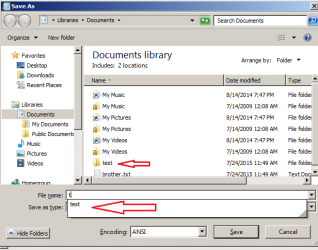
I do not have a solution, but maybe I can help to further document the issue:

save-as.png

The screenshot above is from Notepad > File > Save As...

@Others,
The prompt with objects that match what is being typed is what the OP is missing. I get that prompt/match even after all OS updates.
 

My Computer

Computer type
Laptop
Computer Manufacturer/Model Number
Employer provided Dell Latitude
OS
W7 Pro SP1 64bit
CPU
i7
Memory
8GB
Graphics Card(s)
Intel HD Graphics
Hard Drives
crappy SSD
Antivirus
Employer mandated Symantec Endpoint Protection
Browser
Pale Moon 64bit, IE11 64bit & Chrome 64bit
yes exactly this is the problem that i m facing.
Thanks for your help
 

My Computer

Computer type
Laptop
Computer Manufacturer/Model Number
hp pavilion g6
OS
Microsoft Windows 7 Ultimate 64-bit 7601 Multiprocessor Free Service Pack 1
CPU
Intel(R) Core(TM) i3-2350M CPU @ 2.30GHz
Motherboard
Hewlett-Packard 1670
Memory
4.00 GB
Graphics Card(s)
(1) Intel(R) HD Graphics Family (2) Radeon (TM) HD 7450M
Sound Card
(1) IDT High Definition Audio CODEC (2) Bluetooth Hands-fr
Screen Resolution
1366 x 768 x 32 bits (4294967296 colors) @ 59 Hz
Hard Drives
ST9500325AS
That's my point.

In your example (t) there is a test folder so you see the prompts.

In hotbuddy723's example, he typed bro but there is no file or folder starting with bro in the Program Files (X86)\Mozilla Firefox folder so no prompt is shown. If he had entered a then

AccessibleMarshal.dll
application


would have shown in the Prompt area.


That's the way it's supposed to work.
 

My Computer

Computer type
PC/Desktop
Computer Manufacturer/Model Number
Lenovo IdeaCenter 450
OS
Windows 10 Pro X64
CPU
Intel Quad Core i7-4770 @ 3.4Ghz
Memory
16.0GB PC3-12800 DDR3 SDRAM 1600 MHz
Graphics Card(s)
Intel Integrated HD Graphics
Sound Card
Realtek HD Audio
Monitor(s) Displays
HP 22" LCD
Screen Resolution
1680 x 1050
Hard Drives
250GB Samsung EVO SATA-3 SSD
2TB Seagate ST2000DM001 SATA-2
1.5TB Seagate ST3150041AS SATA
Keyboard
Dell USB
Mouse
Lenovo USB
Internet Speed
Cable via Road Runner 3MB Upload, 30MB Download
Antivirus
Windows Defender, MBAM Pro, MBAE
Browser
Seamonkey
Other Info
UEFI/GPT
PLDS DVD-RW DH16AERSH
@Ztruker,
Not only did I miss seeing the folder that the dialog box had opened to in the original post screenshot, I missed seeing your post #2 all together. Let's see if the hotbuddy723 can provide a screenshot that demonstrates the problem.


:::makes an appointment for new eye glasses:::
 

My Computer

Computer type
Laptop
Computer Manufacturer/Model Number
Employer provided Dell Latitude
OS
W7 Pro SP1 64bit
CPU
i7
Memory
8GB
Graphics Card(s)
Intel HD Graphics
Hard Drives
crappy SSD
Antivirus
Employer mandated Symantec Endpoint Protection
Browser
Pale Moon 64bit, IE11 64bit & Chrome 64bit
Browser starts with Bro

That's my point.

In your example (t) there is a test folder so you see the prompts.

In hotbuddy723's example, he typed bro but there is no file or folder starting with bro in the Program Files (X86)\Mozilla Firefox folder so no prompt is shown. If he had entered a then

AccessibleMarshal.dll
application


would have shown in the Prompt area.
@Ztruker,
Not only did I miss seeing the folder that the dialog box had opened to in the original post screenshot, I missed seeing your post #2 all together. Let's see if the hotbuddy723 can provide a screenshot that demonstrates the problem.
He is saying that the folder browser did not appear in the suggestions.
Open Dialogue Suggestions.png
 
Last edited:

My Computer

Computer type
PC/Desktop
Computer Manufacturer/Model Number
n/a
OS
W7 Ultimate SP1, LM19.2 MATE, W10 Home 1703, W10 Pro 1703 VM, #All 64 bit
CPU
AMD Phenom II x6 1100T, 3.3 GHz
Motherboard
ASUS M4A88T-M/USB3 (AM3)
Memory
12GB DDR3 1333 G-Skill (4GB x 2), G-Skill (2GB x 2)
Graphics Card(s)
NVIDIA GeForce GTX 660
Sound Card
Realtek?
Monitor(s) Displays
Samsung S23B350
Screen Resolution
1920x1080
Hard Drives
WD Green 2TB (SATA), WD Green 3TB (SATA), WD Blue 4TB (SATA), WD Blue 6TB (SATA)
PSU
Cooler Master
Case
Antec GX300 Tower
Cooling
3x Antec TRICOOL 120mm Fans
Mouse
Wired Optical
Internet Speed
DSL
Antivirus
Avast
Browser
Pale Moon (64 bit)
Other Info
2018-12-27 Upgraded HDDs
2015-12-10 Upgraded case, graphics card, storage
2015-08-15 Upgraded motherboard & RAM
2015-07-15 Upgraded LM17.1 to LM17.2
DOH! I've slept since post #6.
Maybe I did notice that browser folder.

Notice that I created a file named brother.txt. That got a match when I typed bro. Then I changed my mind and went with a folder named test for the image in my post. I can only guess that I opted to match a folder because the OP was not matching a folder. That's my story for now. I'll remember things differently after some more posts.


:::would make for a terrible eye witness:::
 

My Computer

Computer type
Laptop
Computer Manufacturer/Model Number
Employer provided Dell Latitude
OS
W7 Pro SP1 64bit
CPU
i7
Memory
8GB
Graphics Card(s)
Intel HD Graphics
Hard Drives
crappy SSD
Antivirus
Employer mandated Symantec Endpoint Protection
Browser
Pale Moon 64bit, IE11 64bit & Chrome 64bit
[FONT=&quot]I am sorry I did not represent my problem properly but with the help of Username Issues I made a better presentation [/FONT]
[FONT=&quot]In recent days i encountered with this problem of folder option (i think) when i usually try to save a file or open a file-i entered few words and a drop menu appeared in file name box with a list of some file name with same initials that I entered, but now it did not appear[/FONT]
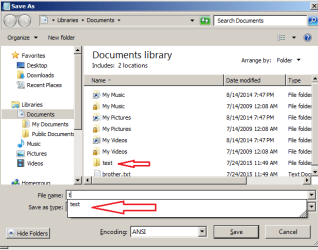
[FONT=&quot]I have attached two photos with this to give more clear idea of problem. Both these Screenshots are of Notepad so that I can provide you the exact problem[/FONT]
[FONT=&quot]Photo -1 Problem

[/FONT]
[FONT=&quot]Photo-2-Required Solution


[/FONT]
[FONT=&quot]I also tried the restore default option in folder options[/FONT][FONT=&quot] but it did not work. Please help me in this regard and thanks for your effort [/FONT]
 

Attachments

  • folder option error.jpg
    folder option error.jpg
    52.7 KB · Views: 14
  • folder opton required.png
    folder opton required.png
    17 KB · Views: 14

My Computer

Computer type
Laptop
Computer Manufacturer/Model Number
hp pavilion g6
OS
Microsoft Windows 7 Ultimate 64-bit 7601 Multiprocessor Free Service Pack 1
CPU
Intel(R) Core(TM) i3-2350M CPU @ 2.30GHz
Motherboard
Hewlett-Packard 1670
Memory
4.00 GB
Graphics Card(s)
(1) Intel(R) HD Graphics Family (2) Radeon (TM) HD 7450M
Sound Card
(1) IDT High Definition Audio CODEC (2) Bluetooth Hands-fr
Screen Resolution
1366 x 768 x 32 bits (4294967296 colors) @ 59 Hz
Hard Drives
ST9500325AS
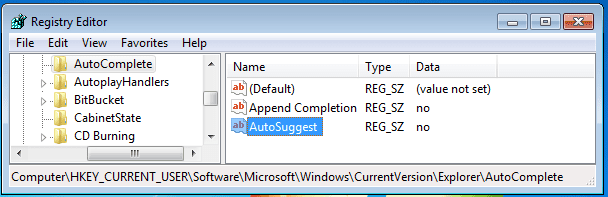
Setting AutoSuggest to no will reproduce your issue for me within a W7 Virtual Machine (VM).

Setting AutoSuggest to yes might fix your issue.

AutoSuggest.PNG

But here is the puzzle:
The key named AutoComplete (shown in the left pane in the image above) does not exist in Windows 7 by default. At least not in the W7pro64bit VM that only has SP1 installed... and not in the W7pro64bit VM that has all updates installed. Something else must add that key.
 

My Computer

Computer type
Laptop
Computer Manufacturer/Model Number
Employer provided Dell Latitude
OS
W7 Pro SP1 64bit
CPU
i7
Memory
8GB
Graphics Card(s)
Intel HD Graphics
Hard Drives
crappy SSD
Antivirus
Employer mandated Symantec Endpoint Protection
Browser
Pale Moon 64bit, IE11 64bit & Chrome 64bit
Auto-suggest was set to no but after setting it to yes, problem solved.

thanks UsernameIssues and all of you for help.
 

My Computer

Computer type
Laptop
Computer Manufacturer/Model Number
hp pavilion g6
OS
Microsoft Windows 7 Ultimate 64-bit 7601 Multiprocessor Free Service Pack 1
CPU
Intel(R) Core(TM) i3-2350M CPU @ 2.30GHz
Motherboard
Hewlett-Packard 1670
Memory
4.00 GB
Graphics Card(s)
(1) Intel(R) HD Graphics Family (2) Radeon (TM) HD 7450M
Sound Card
(1) IDT High Definition Audio CODEC (2) Bluetooth Hands-fr
Screen Resolution
1366 x 768 x 32 bits (4294967296 colors) @ 59 Hz
Hard Drives
ST9500325AS
You are welcome.

It seems that Windows common dialog boxes do the suggestions by default.

Some app* adds that registry info as a way to turn suggestions off.

We just needed to turn suggestions back on.


*Perhaps some security app thought suggestions were a privacy concern - since it could suggest names of files that are not otherwise visible in the top part of the dialog box unless you scroll. Someone looking over your shoulder might see NSFW file names.
 

My Computer

Computer type
Laptop
Computer Manufacturer/Model Number
Employer provided Dell Latitude
OS
W7 Pro SP1 64bit
CPU
i7
Memory
8GB
Graphics Card(s)
Intel HD Graphics
Hard Drives
crappy SSD
Antivirus
Employer mandated Symantec Endpoint Protection
Browser
Pale Moon 64bit, IE11 64bit & Chrome 64bit
Nice find, good solution. Rep to you if I could :)
 

My Computer

Computer type
PC/Desktop
Computer Manufacturer/Model Number
Custom Build
OS
Windows 7 Ultimate x64 SP1
CPU
AMD Phenom 2 1090T
Motherboard
Gigabyte GA-890FXA-UD5
Memory
2x8GB Kingston HyperX Fury Black 1600Mhz Unganged
Graphics Card(s)
MSI GTX 970 Gaming 4G
Sound Card
Realtek On-Board HD 7.1 Audio / Logitech G35
Monitor(s) Displays
3xAcer GD245HQ
Screen Resolution
1920x1080
Hard Drives
Samsung 850 Pro 512GB SSD - OS /
WD Caviar Black SATA 3 - 1 TBx2 - Dynamic RAID 0 /
WD Caviar Green SATA 2 - 640GBx2 - Dynamic RAID 0 /
WD Caviar Green SATA 2 - 640GB - Internal Backup /
Seagate Barracude SATA 3 - 3TB - External Backup/ Sync
PSU
HighPower 1000W
Case
Cooler Master HAF 932
Cooling
Noctua NH-D14
Keyboard
Logitech G19
Mouse
Logitech G500
Internet Speed
100/4 Mbit Cable (100GB quota)
Antivirus
ZoneAlarm Extreme Security / MBAM Pro / MBAE Free / SAS Free
Browser
IE 11 - Firefox - Chrome
Other Info
Logitech F710/ G27/ G940/ Z5500 // TrackIR 5 // Nvidia 3D Surround Vision
Back
Top