Open File Security Warning - Enable or Disable

How to Disable the "Open File Security Warning" in Windows


   Information
This will show you how to enable or disable XP, Vista, or Windows 7 prompting you with the Open File Security Warning when you open or run a downloaded or copied file from the internet or another computer on your computer.

   Warning
The Open File - Security Warning prompt is a security measure in Windows 7 and Vista to ask for your permission (like UAC) before allowing a downloaded or copied file from the internet or another computer to be opened or run on your computer.

Disabling Open File - Security Warning will reduce the security level of Windows, and place your computer at a higher risk of being infected by malware.

Disable at your own risk if you no longer want to have a Open File - Security Warning.


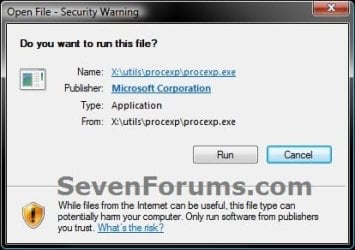
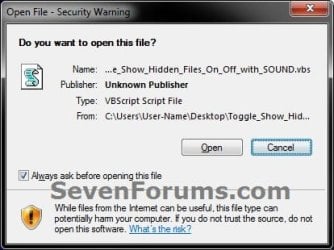
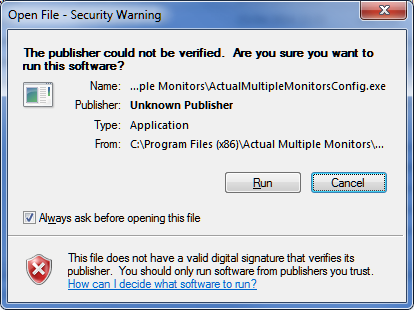
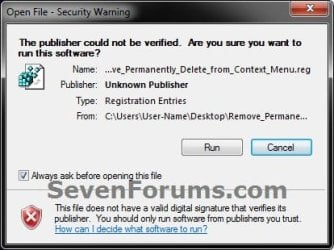
EXAMPLE: Open File - Security Warning


  • Do you want to open this File? Unknown Publisher
  • The Publisher could not be verified. Are you sure you want to run this software? Unknown Publisher
  • Do you want tio run this file? Application
warning-1.jpg

warning-2.jpg

warning-3.jpg


OPTION ONE

To Enable or Disable "Zone File Checking" using a BAT File Download


NOTE: This option will enable or disable the "Open File Security Warning" completely by enabling or disabling all security Zone checking.
1. Do step 2, 3, 4, or 5 below for what you would like to do.

2. To Enable Zone Checking for Current User Only
NOTE: Step 4 or 5 below will override this step.
A) Click/tap on the Download button below to download the .bat file below to your desktop, run it, and go to step 7 below.
Enable_Zone_Checking_for_Current_User.bat


Download


3. To Disable Zone Checking for Current User Only
NOTE: Step 4 or 5 below will override this step.
A) Click/tap on the Download button below to download the .bat file below to your desktop, run it, and go to step 7 below.
Disable_Zone_Checking_for_Current_User.bat


Download


4. To Enable Zone Checking for All Users
NOTE: You must be logged in as an administrator to be able to do this option. This is the default setting. This step will override steps 2 and 3 above.
A) Click/tap on the Download button below to download the .bat file below to your desktop.
Enable_Zone_Checking_for_All_Users.bat


Download


B) Right click on the downloaded .bat file, click on Run as administrator, and go to step 6 below.
5. To Disable Zone Checking for All Users
NOTE: You must be logged in as an administrator to be able to do this option. This step will override steps 2 and 3 above.
A) Click/tap on the Download button below to download the .bat file below to your desktop.
Disable_Zone_Checking_for_All_Users.bat


Download


B) Right click on the downloaded .bat file, click on Run as administrator, and go to step 6 below.
6. If prompted, click/tap on Run.

7. You will now notice a command prompt quckly open and close while applying the changes to your registry.

8. If you used step 4 or 5 above, then log off and on, or restart the computer to fully apply.


OPTION TWO

To Enable or Disable "Open File Security Warning" for Specific File Types using a REG File Download


NOTE: This option uses the same group policy as OPTION THREE below, but will affect all users on the computer. You must be logged in as an administrator to be able to do this option.
1. To Enable the "Open File Security Warning"
NOTE: This is the default setting.
A) Click on the Download button below to download the file below.
Enable_Open-File_Security_Warning.reg

Download


B) Go to step 3.
2. To Disable the "Open File Security Warning"
A) Click on the Download button below to download the file below.
Disable_Open-File_Security_Warning.reg

Download


   Note
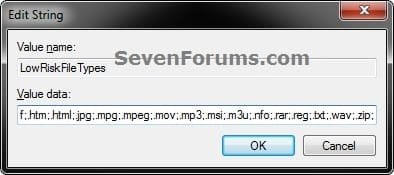
This will include the same file extensions in step 4D of OPTION THREE below. If you would like to add or remove file extensions from the exception list, then:
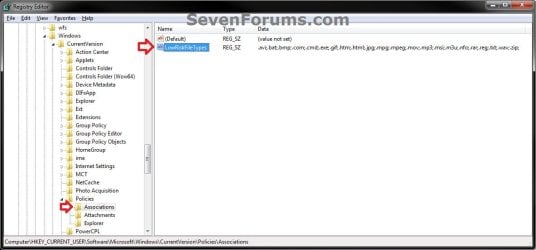
  • After downloading the REG file, do steps 3-5 below first.
  • Open the Start Menu, type regedit in the search box, and press Enter.
  • If prompted by UAC, click on Yes (Windows 7) or Continue (Vista).
  • In regedit, navigate to the location below:
    • Code:
      HKEY_CURRENT_USER\Software\Microsoft\Windows\CurrentVersion\Policies\Associations
  • In the right pane of Associations, double click on LowRiskFileTypes.
  • Add or remove file extensions using the same format, and click on OK when finished.
  • Close regedit, and go to step 6 below.
REG-1.jpgREG-2.jpg


3. Save the .reg file to the desktop.

4. Double click on the downloaded .reg file to merge it.

5. Click on Run, Yes (Windows 7) or Continue (Vista), Yes, and OK when prompted.

6. Log off and log on, or restart the computer to apply.

7. When done, you can delete the downloaded .reg file if you like.


OPTION THREE

To Enable or Disable "Open File Security Warning" for Specific File Types using the Local Group Policy Editor


NOTE: You must be logged in as an administrator to be able to do this option.
1. Open the all users, specific users or groups, or all users except administrators Local Group Policy Editor for how you want this policy applied.

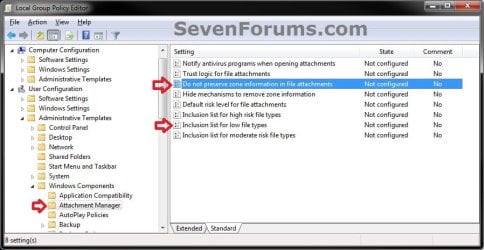
2. In the left pane, click on to expand User Configuration, Administrative Templates, Windows Components, and Attachment Manager. (see screenshot below)
GPEDIT-1.jpg
3. To Enable the "Open File Security Warning"
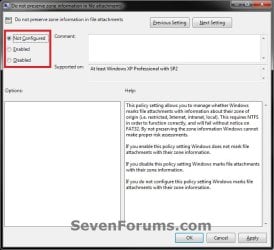
A) In the right pane, double click on Do not preserve zone information in file attachments. (see screenshot below step 2)

B) Select (dot) either Not Configured or Disabled, and click on OK. (see screenshot below)
NOTE: Not Configured is the default setting.
GPEDIT-2.jpg
C) In the right pane, double click on Inclusion list for low file types. (see screenshot below step 2)

D) Select (dot) either Not Configured or Disabled, and click on OK. (see screenshot below)
NOTE: Not Configured is the default setting.
GPEDIT-3.jpg
4. To Disable the "Open File Security Warning"
A) In the right pane, double click on Do not preserve zone information in file attachments. (see screenshot below step 2)

B) Select (dot) Enabled, and click on OK. (see screenshot below)
GPEDIT-2.jpg
C) In the right pane, double click on Inclusion list for low file types. (see screenshot below step 2)

D) Select (dot) Enabled, then copy and paste the extensions below exactly as is into the Options box and click on OK. (see screenshot below)
NOTE: These are the most common file extensions for this. If you like, you could add or remove file extensions to or from the list at anytime for those that you want to or do not want to get a Open File - Security Warning for.
Code:
.avi;.bat;.com;.cmd;.exe;.htm;.html;.lnk;.mpg;.mpeg;.mov;.mp3;.msi;.m3u;.rar;.reg;.txt;.vbs;.wav;.zip;
GPEDIT-3.jpg
5. Close the Local Group Policy Editor window.


That's it,
Shawn


Attachments

Last edited:
Good job Shawn, and quick on the draw too.

However when I open the tutorial page (and others which have several thumbnails) the display is truncated on both sides.:confused:
Truncated display.PNG
This is how it looks when I hit Reply to the thread.
Truncated display2.PNG

EDIT: I just downloaded and Merged the Disable warning, and I am still getting the warning on the downloaded .reg file.
 

My Computer

Computer type
PC/Desktop
Computer Manufacturer/Model Number
Home Built Desktop By DataTech
OS
Windows 7 Ultimate X64 SP1
CPU
Intel i5-2550K, Differing ~4.4-4.8GHz No built in GPU
Motherboard
ASUS P8Z68-V PRO/GEN3
Memory
16GB G.Skill Sniper 1866MHz @ 2133MHz 2x8GB
Graphics Card(s)
ASUS GTX650TIB-DC2OC-2GD5, (650TI Boost)
Sound Card
Onboard Realtek 5-1
Monitor(s) Displays
Samsung P2570HD
Screen Resolution
1920x1080
Hard Drives
Samsung 840 Pro 256GB SSD for OS, 500GB Seagate Constellation (Enterprise drive) for Data
PSU
Corsair HX650W
Case
Inwin Dragon Rider
Cooling
Hyper 212 EVO w/two Noctua fans, push-pull, @1300 RPM
Keyboard
E-Z Eyes, bright yellow keys with large characters
Mouse
steelseries SENSEI Laser Pro Gaming
Internet Speed
48-51Mbs Mbs down, 11 Mbs up Xfinity Cable
Antivirus
Norton Internet Security 2013
Browser
IE 10, Opera, Pale Moon if needed
Other Info
4 case fans, LG BluRay-RE, ASUS DVD-RW, Mr. Fusion power supply, 1.21 gigawatts.
Hello Gary,

Spacing issue fixed.

Did you log off and log on, or restart the computer after merging the disable REG download?
 

My Computer

Computer type
PC/Desktop
Computer Manufacturer/Model Number
Self built custom
OS
64-bit Windows 11 Pro for Workstations
CPU
Intel i7-8700K OC'd to 5 GHz
Motherboard
ASUS ROG Maximus XI Formula Z390
Memory
64 GB (4x16GB) G.SKILL TridentZ RGB DDR4 3600 MHz
Graphics Card(s)
ASUS ROG-STRIX-GTX1080TI-O11G-GAMING
Sound Card
Integrated
Monitor(s) Displays
2 x Samsung Odyssey G7 27"
Screen Resolution
2560x1440
Hard Drives
1TB Samsung 990 PRO M.2,
4TB Samsung 990 PRO PRO M.2,
TerraMaster F8 SSD Plus NAS
PSU
Seasonic Prime Titanium 850W
Case
Thermaltake Core P3
Cooling
Corsair Hydro H115i
Keyboard
Logitech wireless K800
Mouse
Logitech MX Master 4
Internet Speed
2 Gb/s Download and 100 Mb/s Upload
Antivirus
Malwarebyte Anti-Malware Premium
Browser
Google Chrome
Other Info
Logitech Z625 speaker system,
Logitech BRIO 4K Pro webcam,
HP Color LaserJet Pro MFP M477fdn,
APC SMART-UPS RT 1000 XL - SURT1000XLI,
Galaxy S23 Plus phone
Well, no I didn't.:o It works now, got in a big hurry. Page looks fine now too. Thanks!
 

My Computer

Computer type
PC/Desktop
Computer Manufacturer/Model Number
Home Built Desktop By DataTech
OS
Windows 7 Ultimate X64 SP1
CPU
Intel i5-2550K, Differing ~4.4-4.8GHz No built in GPU
Motherboard
ASUS P8Z68-V PRO/GEN3
Memory
16GB G.Skill Sniper 1866MHz @ 2133MHz 2x8GB
Graphics Card(s)
ASUS GTX650TIB-DC2OC-2GD5, (650TI Boost)
Sound Card
Onboard Realtek 5-1
Monitor(s) Displays
Samsung P2570HD
Screen Resolution
1920x1080
Hard Drives
Samsung 840 Pro 256GB SSD for OS, 500GB Seagate Constellation (Enterprise drive) for Data
PSU
Corsair HX650W
Case
Inwin Dragon Rider
Cooling
Hyper 212 EVO w/two Noctua fans, push-pull, @1300 RPM
Keyboard
E-Z Eyes, bright yellow keys with large characters
Mouse
steelseries SENSEI Laser Pro Gaming
Internet Speed
48-51Mbs Mbs down, 11 Mbs up Xfinity Cable
Antivirus
Norton Internet Security 2013
Browser
IE 10, Opera, Pale Moon if needed
Other Info
4 case fans, LG BluRay-RE, ASUS DVD-RW, Mr. Fusion power supply, 1.21 gigawatts.
LOL, you're most welcome Gary. Thank you. :)
 

My Computer

Computer type
PC/Desktop
Computer Manufacturer/Model Number
Self built custom
OS
64-bit Windows 11 Pro for Workstations
CPU
Intel i7-8700K OC'd to 5 GHz
Motherboard
ASUS ROG Maximus XI Formula Z390
Memory
64 GB (4x16GB) G.SKILL TridentZ RGB DDR4 3600 MHz
Graphics Card(s)
ASUS ROG-STRIX-GTX1080TI-O11G-GAMING
Sound Card
Integrated
Monitor(s) Displays
2 x Samsung Odyssey G7 27"
Screen Resolution
2560x1440
Hard Drives
1TB Samsung 990 PRO M.2,
4TB Samsung 990 PRO PRO M.2,
TerraMaster F8 SSD Plus NAS
PSU
Seasonic Prime Titanium 850W
Case
Thermaltake Core P3
Cooling
Corsair Hydro H115i
Keyboard
Logitech wireless K800
Mouse
Logitech MX Master 4
Internet Speed
2 Gb/s Download and 100 Mb/s Upload
Antivirus
Malwarebyte Anti-Malware Premium
Browser
Google Chrome
Other Info
Logitech Z625 speaker system,
Logitech BRIO 4K Pro webcam,
HP Color LaserJet Pro MFP M477fdn,
APC SMART-UPS RT 1000 XL - SURT1000XLI,
Galaxy S23 Plus phone
Another way is to create an environment variable called SEE_MASK_NOZONECHECKS and give it a value of 1. You can do this from an elevated command prompt: setx SEE_MASK_NOZONECHECKS 1

See next post for information about dangers involved.


Last edited:

My Computer

OS
Windows 7

My Computer

Computer type
PC/Desktop
Computer Manufacturer/Model Number
Self built custom
OS
64-bit Windows 11 Pro for Workstations
CPU
Intel i7-8700K OC'd to 5 GHz
Motherboard
ASUS ROG Maximus XI Formula Z390
Memory
64 GB (4x16GB) G.SKILL TridentZ RGB DDR4 3600 MHz
Graphics Card(s)
ASUS ROG-STRIX-GTX1080TI-O11G-GAMING
Sound Card
Integrated
Monitor(s) Displays
2 x Samsung Odyssey G7 27"
Screen Resolution
2560x1440
Hard Drives
1TB Samsung 990 PRO M.2,
4TB Samsung 990 PRO PRO M.2,
TerraMaster F8 SSD Plus NAS
PSU
Seasonic Prime Titanium 850W
Case
Thermaltake Core P3
Cooling
Corsair Hydro H115i
Keyboard
Logitech wireless K800
Mouse
Logitech MX Master 4
Internet Speed
2 Gb/s Download and 100 Mb/s Upload
Antivirus
Malwarebyte Anti-Malware Premium
Browser
Google Chrome
Other Info
Logitech Z625 speaker system,
Logitech BRIO 4K Pro webcam,
HP Color LaserJet Pro MFP M477fdn,
APC SMART-UPS RT 1000 XL - SURT1000XLI,
Galaxy S23 Plus phone
Hello Cavaldi,

Thank you for another option. I'll add it now. :)

The only problem with that is the same security risk it poses.

Note Do not use this as a permanent system environment variable because it will disable all Zone Checking.

(see Workaround at link)
The Open File - Security Warning dialog box is displayed when you try to silently install a hotfix or an update by using a Visual Basic script in Windows XP Service Pack 2

True. If possible, editing the GPO (method 3) to include shortcut files (.lnk) is preferable.
 

My Computer

OS
Windows 7
Done. ;)
 

My Computer

Computer type
PC/Desktop
Computer Manufacturer/Model Number
Self built custom
OS
64-bit Windows 11 Pro for Workstations
CPU
Intel i7-8700K OC'd to 5 GHz
Motherboard
ASUS ROG Maximus XI Formula Z390
Memory
64 GB (4x16GB) G.SKILL TridentZ RGB DDR4 3600 MHz
Graphics Card(s)
ASUS ROG-STRIX-GTX1080TI-O11G-GAMING
Sound Card
Integrated
Monitor(s) Displays
2 x Samsung Odyssey G7 27"
Screen Resolution
2560x1440
Hard Drives
1TB Samsung 990 PRO M.2,
4TB Samsung 990 PRO PRO M.2,
TerraMaster F8 SSD Plus NAS
PSU
Seasonic Prime Titanium 850W
Case
Thermaltake Core P3
Cooling
Corsair Hydro H115i
Keyboard
Logitech wireless K800
Mouse
Logitech MX Master 4
Internet Speed
2 Gb/s Download and 100 Mb/s Upload
Antivirus
Malwarebyte Anti-Malware Premium
Browser
Google Chrome
Other Info
Logitech Z625 speaker system,
Logitech BRIO 4K Pro webcam,
HP Color LaserJet Pro MFP M477fdn,
APC SMART-UPS RT 1000 XL - SURT1000XLI,
Galaxy S23 Plus phone
this broke my computer, now all my browsers when downloading block the downloads and I cant change the security settings.

if the OP worded this better my computer would work, what is zone checking? who knows, all I know is I can no longer download anything since installing something from here must be a virus, all my downloads are blocked.

someone should virus scan these files because they broke my computer.

:cry:
 

My Computer

Computer type
PC/Desktop
OS
Windows 7 Ultimate x64
this broke my computer, now all my browsers when downloading block the downloads and I cant change the security settings.

if the OP worded this better my computer would work, what is zone checking? who knows, all I know is I can no longer download anything since installing something from here must be a virus, all my downloads are blocked.

someone should virus scan these files because they broke my computer.

:cry:


Hello Tigpoppa,

First thing, the downloads in this tutorial and all tutorials here at Seven Forums are 100% clean and safe to use if used as intended in the tutorial.

Second, for your own safety, you should never do anything that you do not understand what it does. Ask questions until you do understand and feel comfortable first.


If this tutorial is the only thing you did, then you can use the "default setting" download in the OPTION you used to completely undo it. No harm no foul. :)
 
Last edited:

My Computer

Computer type
PC/Desktop
Computer Manufacturer/Model Number
Self built custom
OS
64-bit Windows 11 Pro for Workstations
CPU
Intel i7-8700K OC'd to 5 GHz
Motherboard
ASUS ROG Maximus XI Formula Z390
Memory
64 GB (4x16GB) G.SKILL TridentZ RGB DDR4 3600 MHz
Graphics Card(s)
ASUS ROG-STRIX-GTX1080TI-O11G-GAMING
Sound Card
Integrated
Monitor(s) Displays
2 x Samsung Odyssey G7 27"
Screen Resolution
2560x1440
Hard Drives
1TB Samsung 990 PRO M.2,
4TB Samsung 990 PRO PRO M.2,
TerraMaster F8 SSD Plus NAS
PSU
Seasonic Prime Titanium 850W
Case
Thermaltake Core P3
Cooling
Corsair Hydro H115i
Keyboard
Logitech wireless K800
Mouse
Logitech MX Master 4
Internet Speed
2 Gb/s Download and 100 Mb/s Upload
Antivirus
Malwarebyte Anti-Malware Premium
Browser
Google Chrome
Other Info
Logitech Z625 speaker system,
Logitech BRIO 4K Pro webcam,
HP Color LaserJet Pro MFP M477fdn,
APC SMART-UPS RT 1000 XL - SURT1000XLI,
Galaxy S23 Plus phone
this broke my computer, now all my browsers when downloading block the downloads and I cant change the security settings.

if the OP worded this better my computer would work, what is zone checking? who knows, all I know is I can no longer download anything since installing something from here must be a virus, all my downloads are blocked.

someone should virus scan these files because they broke my computer.

:cry:
I suspect you downloaded something prior to doing this tutorial, probably without knowing it. Start a thread in Performance & Maintenance - Windows 7 Help Forums for help with this.
 

My Computer

Computer type
PC/Desktop
Computer Manufacturer/Model Number
Home Built Desktop By DataTech
OS
Windows 7 Ultimate X64 SP1
CPU
Intel i5-2550K, Differing ~4.4-4.8GHz No built in GPU
Motherboard
ASUS P8Z68-V PRO/GEN3
Memory
16GB G.Skill Sniper 1866MHz @ 2133MHz 2x8GB
Graphics Card(s)
ASUS GTX650TIB-DC2OC-2GD5, (650TI Boost)
Sound Card
Onboard Realtek 5-1
Monitor(s) Displays
Samsung P2570HD
Screen Resolution
1920x1080
Hard Drives
Samsung 840 Pro 256GB SSD for OS, 500GB Seagate Constellation (Enterprise drive) for Data
PSU
Corsair HX650W
Case
Inwin Dragon Rider
Cooling
Hyper 212 EVO w/two Noctua fans, push-pull, @1300 RPM
Keyboard
E-Z Eyes, bright yellow keys with large characters
Mouse
steelseries SENSEI Laser Pro Gaming
Internet Speed
48-51Mbs Mbs down, 11 Mbs up Xfinity Cable
Antivirus
Norton Internet Security 2013
Browser
IE 10, Opera, Pale Moon if needed
Other Info
4 case fans, LG BluRay-RE, ASUS DVD-RW, Mr. Fusion power supply, 1.21 gigawatts.
this broke my computer, now all my browsers when downloading block the downloads and I cant change the security settings.

if the OP worded this better my computer would work, what is zone checking? who knows, all I know is I can no longer download anything since installing something from here must be a virus, all my downloads are blocked.

someone should virus scan these files because they broke my computer.

:cry:


Hello Tigpoppa,

First thing, the downloads in this tutorial and all tutorials here at Seven Forums are 100% clean and safe to use if used as intended in the tutorial.

Second, for your own safety, you should never do anything that you do not understand what it does. Ask questions until you do understand and feel comfortable first.


If this tutorial is the only thing you did, then you can use the "default setting" download in the OPTION you used to completely undo it. No harm no foul. :)

that is true I didnt understand it now I dont understand what I did.
Which one is the default one? The names are confusing to me like a double negative.

thanks maybe I should post to that other forum as another poster suggested
 

My Computer

Computer type
PC/Desktop
OS
Windows 7 Ultimate x64
No problem tigpoppa.

If you used OPTION ONE, then using step 4 is the default setting.

If you used OPTION TWO, then using step 1 is the default setting.

If they do not help, then please do go ahead and create a new thread in the other forum area, and we'll see what we can do to help. :)
 

My Computer

Computer type
PC/Desktop
Computer Manufacturer/Model Number
Self built custom
OS
64-bit Windows 11 Pro for Workstations
CPU
Intel i7-8700K OC'd to 5 GHz
Motherboard
ASUS ROG Maximus XI Formula Z390
Memory
64 GB (4x16GB) G.SKILL TridentZ RGB DDR4 3600 MHz
Graphics Card(s)
ASUS ROG-STRIX-GTX1080TI-O11G-GAMING
Sound Card
Integrated
Monitor(s) Displays
2 x Samsung Odyssey G7 27"
Screen Resolution
2560x1440
Hard Drives
1TB Samsung 990 PRO M.2,
4TB Samsung 990 PRO PRO M.2,
TerraMaster F8 SSD Plus NAS
PSU
Seasonic Prime Titanium 850W
Case
Thermaltake Core P3
Cooling
Corsair Hydro H115i
Keyboard
Logitech wireless K800
Mouse
Logitech MX Master 4
Internet Speed
2 Gb/s Download and 100 Mb/s Upload
Antivirus
Malwarebyte Anti-Malware Premium
Browser
Google Chrome
Other Info
Logitech Z625 speaker system,
Logitech BRIO 4K Pro webcam,
HP Color LaserJet Pro MFP M477fdn,
APC SMART-UPS RT 1000 XL - SURT1000XLI,
Galaxy S23 Plus phone
tigpoppa, what did you install, how did you install it, onto which system (hardware and software) with which patches, etc, and using which browswer(s) can you not d/l files and save them, and what other changes have ever made to your system? You don't say above.

If it was a .bat or .reg file, it's a GOOD IDEA to read them in a text editor (good to know for the future, eh?) before using them. I have not had any problem with files from this website.

Specific knowledge about MS's concept of 'zone checking' is available from MS...so that would be a good place to look for it before doing something to disable it. Generally it concerns what actions files may take depending on where they come from in the eyes of the computer. This info is recorded, again in the eyes of the OS, when the file is written as accompanying metadata, probably as a 'state' bit.

Having said all of that, I'm not really sure what the risks are of any of the methods above. I used Method 3, by editing group policy in gpedit.msc and it works for the file I wanted, when started with a link from the start menu. I want it to open on boot, which it never has (MouseEditor from TeckRepublic), but we'll see if that pans out.
 

My Computer

OS
Win7 64
CPU
i3770k
Motherboard
P8z77-v Pro
Memory
32GB @ 934MHz
Hard Drives
Samsung 830 (256GB)
Hi. I installed it on my laptop.
now my laptop for some reason removed adobe flash but i cant download it, everytime it says download blocked.
how can i fix it so i can download again?
I tried both of these but it still says failed - blocked, anyone have any advice?
 

My Computer

Computer type
PC/Desktop
OS
Windows 7 Ultimate x64
Hello tigpoppa,

Where are you trying to download Adobe Flash from?

If it's not from the official site below, then it's one of those scam pop-ups that's loaded with malware.

Adobe - Install Adobe Flash Player
 

My Computer

Computer type
PC/Desktop
Computer Manufacturer/Model Number
Self built custom
OS
64-bit Windows 11 Pro for Workstations
CPU
Intel i7-8700K OC'd to 5 GHz
Motherboard
ASUS ROG Maximus XI Formula Z390
Memory
64 GB (4x16GB) G.SKILL TridentZ RGB DDR4 3600 MHz
Graphics Card(s)
ASUS ROG-STRIX-GTX1080TI-O11G-GAMING
Sound Card
Integrated
Monitor(s) Displays
2 x Samsung Odyssey G7 27"
Screen Resolution
2560x1440
Hard Drives
1TB Samsung 990 PRO M.2,
4TB Samsung 990 PRO PRO M.2,
TerraMaster F8 SSD Plus NAS
PSU
Seasonic Prime Titanium 850W
Case
Thermaltake Core P3
Cooling
Corsair Hydro H115i
Keyboard
Logitech wireless K800
Mouse
Logitech MX Master 4
Internet Speed
2 Gb/s Download and 100 Mb/s Upload
Antivirus
Malwarebyte Anti-Malware Premium
Browser
Google Chrome
Other Info
Logitech Z625 speaker system,
Logitech BRIO 4K Pro webcam,
HP Color LaserJet Pro MFP M477fdn,
APC SMART-UPS RT 1000 XL - SURT1000XLI,
Galaxy S23 Plus phone
Thanks, Shawn. Option Three is perfect! If only MS would quit "improving" its products. :D
 

My Computer

Computer type
Laptop
OS
Windows 7 Professional x64
You're most welcome GoldBeachBiker, and welcome to Seven Forums. :)

There wouldn't be any fun if they did though. :p
 

My Computer

Computer type
PC/Desktop
Computer Manufacturer/Model Number
Self built custom
OS
64-bit Windows 11 Pro for Workstations
CPU
Intel i7-8700K OC'd to 5 GHz
Motherboard
ASUS ROG Maximus XI Formula Z390
Memory
64 GB (4x16GB) G.SKILL TridentZ RGB DDR4 3600 MHz
Graphics Card(s)
ASUS ROG-STRIX-GTX1080TI-O11G-GAMING
Sound Card
Integrated
Monitor(s) Displays
2 x Samsung Odyssey G7 27"
Screen Resolution
2560x1440
Hard Drives
1TB Samsung 990 PRO M.2,
4TB Samsung 990 PRO PRO M.2,
TerraMaster F8 SSD Plus NAS
PSU
Seasonic Prime Titanium 850W
Case
Thermaltake Core P3
Cooling
Corsair Hydro H115i
Keyboard
Logitech wireless K800
Mouse
Logitech MX Master 4
Internet Speed
2 Gb/s Download and 100 Mb/s Upload
Antivirus
Malwarebyte Anti-Malware Premium
Browser
Google Chrome
Other Info
Logitech Z625 speaker system,
Logitech BRIO 4K Pro webcam,
HP Color LaserJet Pro MFP M477fdn,
APC SMART-UPS RT 1000 XL - SURT1000XLI,
Galaxy S23 Plus phone
Hi Brink, another great article!

Lots of options, could you advise (re my situation)?

I don't want to compromise the security my browser offers (images and avis can be infected?!) but I have some files that I trust, that are safe, that sadly are not digitally signed.

I've unblocked the exe('s) in question, and unticked ask when opening the file, but still the prompt appears.

Is this a way of either

1) whitelisting certain paths (like file types via the policy editor), whilst still blocking "unsigned content"
(I thought it was just the option in IE options I've just read up on. now it sounds like there may be more to it, and I certainly don't wanna nuke my system, or expose myself unncessarily)

2) plan b - shortcut key activates policy... would this work (in theory, in your well-informed opinion)?

Many thanks

KCto6B2.png
 

My Computer

Computer type
Laptop
Computer Manufacturer/Model Number
Dell
OS
Windows 7 Ultimate 64bit
CPU
2.2
Memory
8Gb
Graphics Card(s)
NVIDIA
Screen Resolution
1280/762
Mouse
built in pad || iphone || MS wireless
Internet Speed
100MB
Antivirus
Avast
Browser
Chrome, Chrome portable
Back
Top