Open File Security Warning - Enable or Disable

How to Disable the "Open File Security Warning" in Windows


   Information
This will show you how to enable or disable XP, Vista, or Windows 7 prompting you with the Open File Security Warning when you open or run a downloaded or copied file from the internet or another computer on your computer.

   Warning
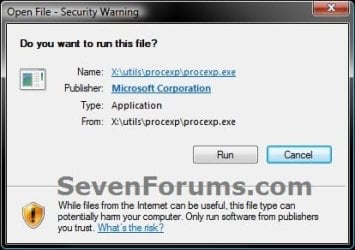
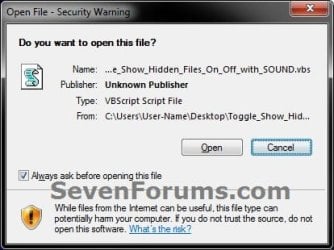
The Open File - Security Warning prompt is a security measure in Windows 7 and Vista to ask for your permission (like UAC) before allowing a downloaded or copied file from the internet or another computer to be opened or run on your computer.

Disabling Open File - Security Warning will reduce the security level of Windows, and place your computer at a higher risk of being infected by malware.

Disable at your own risk if you no longer want to have a Open File - Security Warning.


EXAMPLE: Open File - Security Warning


  • Do you want to open this File? Unknown Publisher
  • The Publisher could not be verified. Are you sure you want to run this software? Unknown Publisher
  • Do you want tio run this file? Application
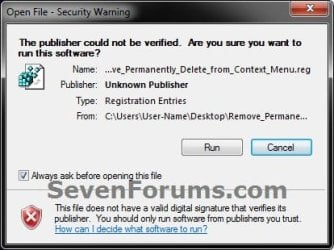
warning-1.jpg

warning-2.jpg

warning-3.jpg


OPTION ONE

To Enable or Disable "Zone File Checking" using a BAT File Download


NOTE: This option will enable or disable the "Open File Security Warning" completely by enabling or disabling all security Zone checking.
1. Do step 2, 3, 4, or 5 below for what you would like to do.

2. To Enable Zone Checking for Current User Only
NOTE: Step 4 or 5 below will override this step.
A) Click/tap on the Download button below to download the .bat file below to your desktop, run it, and go to step 7 below.
Enable_Zone_Checking_for_Current_User.bat


Download


3. To Disable Zone Checking for Current User Only
NOTE: Step 4 or 5 below will override this step.
A) Click/tap on the Download button below to download the .bat file below to your desktop, run it, and go to step 7 below.
Disable_Zone_Checking_for_Current_User.bat


Download


4. To Enable Zone Checking for All Users
NOTE: You must be logged in as an administrator to be able to do this option. This is the default setting. This step will override steps 2 and 3 above.
A) Click/tap on the Download button below to download the .bat file below to your desktop.
Enable_Zone_Checking_for_All_Users.bat


Download


B) Right click on the downloaded .bat file, click on Run as administrator, and go to step 6 below.
5. To Disable Zone Checking for All Users
NOTE: You must be logged in as an administrator to be able to do this option. This step will override steps 2 and 3 above.
A) Click/tap on the Download button below to download the .bat file below to your desktop.
Disable_Zone_Checking_for_All_Users.bat


Download


B) Right click on the downloaded .bat file, click on Run as administrator, and go to step 6 below.
6. If prompted, click/tap on Run.

7. You will now notice a command prompt quckly open and close while applying the changes to your registry.

8. If you used step 4 or 5 above, then log off and on, or restart the computer to fully apply.


OPTION TWO

To Enable or Disable "Open File Security Warning" for Specific File Types using a REG File Download


NOTE: This option uses the same group policy as OPTION THREE below, but will affect all users on the computer. You must be logged in as an administrator to be able to do this option.
1. To Enable the "Open File Security Warning"
NOTE: This is the default setting.
A) Click on the Download button below to download the file below.
Enable_Open-File_Security_Warning.reg

Download


B) Go to step 3.
2. To Disable the "Open File Security Warning"
A) Click on the Download button below to download the file below.
Disable_Open-File_Security_Warning.reg

Download


   Note
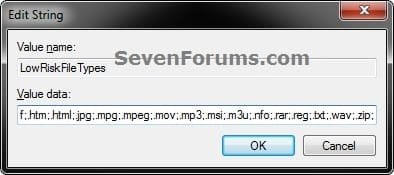
This will include the same file extensions in step 4D of OPTION THREE below. If you would like to add or remove file extensions from the exception list, then:
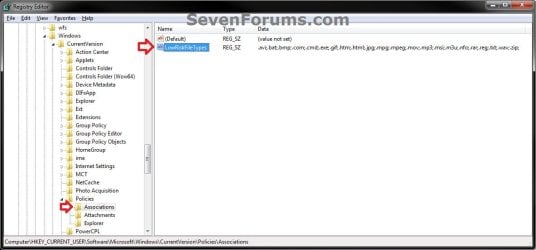
  • After downloading the REG file, do steps 3-5 below first.
  • Open the Start Menu, type regedit in the search box, and press Enter.
  • If prompted by UAC, click on Yes (Windows 7) or Continue (Vista).
  • In regedit, navigate to the location below:
    • Code:
      HKEY_CURRENT_USER\Software\Microsoft\Windows\CurrentVersion\Policies\Associations
  • In the right pane of Associations, double click on LowRiskFileTypes.
  • Add or remove file extensions using the same format, and click on OK when finished.
  • Close regedit, and go to step 6 below.
REG-1.jpgREG-2.jpg


3. Save the .reg file to the desktop.

4. Double click on the downloaded .reg file to merge it.

5. Click on Run, Yes (Windows 7) or Continue (Vista), Yes, and OK when prompted.

6. Log off and log on, or restart the computer to apply.

7. When done, you can delete the downloaded .reg file if you like.


OPTION THREE

To Enable or Disable "Open File Security Warning" for Specific File Types using the Local Group Policy Editor


NOTE: You must be logged in as an administrator to be able to do this option.
1. Open the all users, specific users or groups, or all users except administrators Local Group Policy Editor for how you want this policy applied.

2. In the left pane, click on to expand User Configuration, Administrative Templates, Windows Components, and Attachment Manager. (see screenshot below)
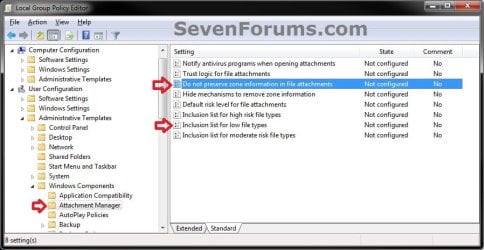
GPEDIT-1.jpg
3. To Enable the "Open File Security Warning"
A) In the right pane, double click on Do not preserve zone information in file attachments. (see screenshot below step 2)

B) Select (dot) either Not Configured or Disabled, and click on OK. (see screenshot below)
NOTE: Not Configured is the default setting.
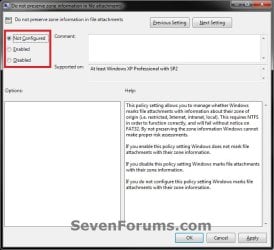
GPEDIT-2.jpg
C) In the right pane, double click on Inclusion list for low file types. (see screenshot below step 2)

D) Select (dot) either Not Configured or Disabled, and click on OK. (see screenshot below)
NOTE: Not Configured is the default setting.
GPEDIT-3.jpg
4. To Disable the "Open File Security Warning"
A) In the right pane, double click on Do not preserve zone information in file attachments. (see screenshot below step 2)

B) Select (dot) Enabled, and click on OK. (see screenshot below)
GPEDIT-2.jpg
C) In the right pane, double click on Inclusion list for low file types. (see screenshot below step 2)

D) Select (dot) Enabled, then copy and paste the extensions below exactly as is into the Options box and click on OK. (see screenshot below)
NOTE: These are the most common file extensions for this. If you like, you could add or remove file extensions to or from the list at anytime for those that you want to or do not want to get a Open File - Security Warning for.
Code:
.avi;.bat;.com;.cmd;.exe;.htm;.html;.lnk;.mpg;.mpeg;.mov;.mp3;.msi;.m3u;.rar;.reg;.txt;.vbs;.wav;.zip;
GPEDIT-3.jpg
5. Close the Local Group Policy Editor window.


That's it,
Shawn


Attachments

Last edited:
To block a file manually, from the Command Prompt,
Code:
(echo [ZoneTransfer]& echo ZoneId=3) > "[B][COLOR=red]C:\path\to\file.exe[/COLOR][/B]:Zone.Identifier"

Thank you. :)
 

My Computer

Computer type
PC/Desktop
Computer Manufacturer/Model Number
Self built custom
OS
64-bit Windows 11 Pro for Workstations
CPU
Intel i7-8700K OC'd to 5 GHz
Motherboard
ASUS ROG Maximus XI Formula Z390
Memory
64 GB (4x16GB) G.SKILL TridentZ RGB DDR4 3600 MHz
Graphics Card(s)
ASUS ROG-STRIX-GTX1080TI-O11G-GAMING
Sound Card
Integrated
Monitor(s) Displays
2 x Samsung Odyssey G7 27"
Screen Resolution
2560x1440
Hard Drives
1TB Samsung 990 PRO M.2,
4TB Samsung 990 PRO PRO M.2,
TerraMaster F8 SSD Plus NAS
PSU
Seasonic Prime Titanium 850W
Case
Thermaltake Core P3
Cooling
Corsair Hydro H115i
Keyboard
Logitech wireless K800
Mouse
Logitech MX Master 4
Internet Speed
2 Gb/s Download and 100 Mb/s Upload
Antivirus
Malwarebyte Anti-Malware Premium
Browser
Google Chrome
Other Info
Logitech Z625 speaker system,
Logitech BRIO 4K Pro webcam,
HP Color LaserJet Pro MFP M477fdn,
APC SMART-UPS RT 1000 XL - SURT1000XLI,
Galaxy S23 Plus phone
To block a file manually, from the Command Prompt,
Code:
(echo [ZoneTransfer]& echo ZoneId=3) > "[B][COLOR=red]C:\path\to\file.exe[/COLOR][/B]:Zone.Identifier"
Thanks, I guess thats my best bet. Was hoping for something that would take care of all the files.
 

My Computer

Computer type
PC/Desktop
OS
Windows 7 Ultimate x64.
If you can gather a list of files you wish to block, you can easily batch process them.


Brink, that typo is still there.
(P.S. Theres a small typo in the original tutorial, in the "Note" of Option 2 -> 2. It says
"the same file extensions in step 4D of OPTION TWO below"
but it should say OPTION THREE)
 

My Computer

Computer type
PC/Desktop
OS
Windows 10, Windows 8.1 Pro, Windows 7 Professional, OS X El Capitan
If you can gather a list of files you wish to block, you can easily batch process them.


Brink, that typo is still there.
(P.S. Theres a small typo in the original tutorial, in the "Note" of Option 2 -> 2. It says
"the same file extensions in step 4D of OPTION TWO below"
but it should say OPTION THREE)

Thank you. Now corrected. :)
 

My Computer

Computer type
PC/Desktop
Computer Manufacturer/Model Number
Self built custom
OS
64-bit Windows 11 Pro for Workstations
CPU
Intel i7-8700K OC'd to 5 GHz
Motherboard
ASUS ROG Maximus XI Formula Z390
Memory
64 GB (4x16GB) G.SKILL TridentZ RGB DDR4 3600 MHz
Graphics Card(s)
ASUS ROG-STRIX-GTX1080TI-O11G-GAMING
Sound Card
Integrated
Monitor(s) Displays
2 x Samsung Odyssey G7 27"
Screen Resolution
2560x1440
Hard Drives
1TB Samsung 990 PRO M.2,
4TB Samsung 990 PRO PRO M.2,
TerraMaster F8 SSD Plus NAS
PSU
Seasonic Prime Titanium 850W
Case
Thermaltake Core P3
Cooling
Corsair Hydro H115i
Keyboard
Logitech wireless K800
Mouse
Logitech MX Master 4
Internet Speed
2 Gb/s Download and 100 Mb/s Upload
Antivirus
Malwarebyte Anti-Malware Premium
Browser
Google Chrome
Other Info
Logitech Z625 speaker system,
Logitech BRIO 4K Pro webcam,
HP Color LaserJet Pro MFP M477fdn,
APC SMART-UPS RT 1000 XL - SURT1000XLI,
Galaxy S23 Plus phone
Thanks for the tip, it works like a charm! It disables all those nasty and useless nagging.

It should be noted that, contrary to what the tutorial warns, those "warnings" don't add any security or protection at all, and is (mis)feature of Windows Explorer only. Any other file manager or program won't show those dialogs.
 

My Computer

Computer type
Laptop
Computer Manufacturer/Model Number
Toshiba Sattelite A665-S6092
OS
Windows 7 Ultimate x64
CPU
Intel Core i7-740QM
Memory
8 GB DDR3
Graphics Card(s)
NVIDIA GeForce 330GT
Screen Resolution
1366x768
Hard Drives
Samsung 840 SSD 500GB
1TB USB3 external HD
Cooling
Coolermaster Notepal U3 notebook cooling pad
Internet Speed
3mbps ASDL
Antivirus
ClamWin 0.98.7
Browser
Opera 12.17 x86 (main), Firefox 38 (sec), IE11 (last resort)
Integrity Levels - Cause of these warnings and how to fix

Had typed a nice thorough post and realized that my login was timed out when hitting the submit button and lost the whole thing! So, a little bit shorter version follows.

More info can be read from this SevenForums thread by BigAlUK.

Integrity Levels, (or also known as Mandatory Integrity Labels or IL s) are causing this security warning message we are seeing. Most recommendations are just hiding/suppressing this warning (warning isn't really helping us anyway). Let's remove what is causing the warning instead of hiding the warning.

IE running in Protected Mode is probably running with Integrity Level of LOW. Untagged files and folders are equal to having IL set of MEDIUM. Processes CAN NOT access a file or folder of higher IE level. IE running in Protected Mode is setting a folder that it is saving into to IL level of LOW so it can save to it. Processes accessing files or folders of LOWER IL than itself prompt with a security warning.

Set IL of a folder that got set to LOW (for example, Desktop) to MEDIUM, by running the following ICALCS (built into Windows) command from an elevated command prompt.
Code:
icacls Desktop /L /SetIntegrityLevel med

To set the folder back to it's original state and remove the IL, run the following command (requires free 3rd-party util from Mark Manasi) from an elevated command prompt.
Code:
chml Desktop -rl

Verify that an IL set to LOW is indeed your problem by running the following from the command prompt. If you see a "Mandatory Integrity Label" of Low, one of the two above will fix your problem and no security prompt. I use the Desktop folder as an example as that is where I have seen the issue occur in my school district, but it could happen to other folders as well (running a program with LOW IL to save a file).
Code:
icacls Desktop


Posting to this thread as don't know if I've found any other solution (except BigAlUK's as mentioned above) about the issue being IL related and using ICALCS. My personal opinion is that removing the IL (using chml) is preferred and results in a much "cleaner" way of handling the issue than working around it or just masking what is going on. Am hopefully helping out a few others to understand what is actually causing this security warning and giving another couple ways to deal with it.
 
Last edited:

My Computer

OS
64-bit Windows 7 and 10 Ent, 8.1 Pro WMC
Had typed a nice thorough post and realized that my login was timed out when hitting the submit button and lost the whole thing!
That’s probably happened to me at least ten times. I find that Internet Explorer is least resilient to this sort of loss. With other browsers, like Chrome, if you jump to the previous page quick enough you usually get the second change.


Jpickerell, I believe your analysis is great, but do realise that those instructions outline a method of expelling a very specific kind of security prompt and cannot be a substitute for any of the methods described in this tutorial which deals with a very similar prompt (see images in tutorial).

Currently, we do not yet have a tutorial that removes the type of security prompt you’ve stumbled upon. *cough* Brink *cough*
 

My Computer

Computer type
PC/Desktop
OS
Windows 10, Windows 8.1 Pro, Windows 7 Professional, OS X El Capitan
I'm new to this forum; please forgive any gaffes -- I'll learn as I go along.

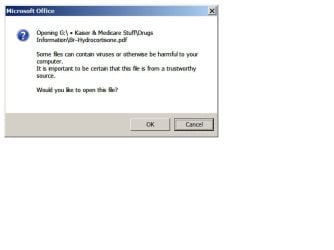
In a spreadsheet (Excel 2007; also Excel 2003) I have placed hyperlinks to display local PDF files (which I created) that are located on a USB drive. When I click on one of those links, I get the warning. Here's an example:
Opening G:\ • Kaiser & Medicare Stuff\Drugs Information\Br–Levobunolol.pdf
Some files can contain viruses or otherwise be harmful to your computer. It is important to be certain that this file is from a trustworthy source.
Would you like to open this file?When I open the target file directly (for instance, by clicking on the file name in its Windows Explorer directory location) I do not get any warning: the file opens in my PDF viewing app.

To disable the warnings, I have followed all three fix-it options published by Brink on 21 Aug 2011 -- and all of the changes wrought by each of those approaches (including the addition of ".pdf;" in the LowRiskFileTypes list) remain in place on my computer -- yet the warning message persistently reappears every time I try to activate a hyperlink in the spreadsheet.

Can anyone suggest what is the cause of that behavior, and what is the fix? Thank you.
 

My Computer

Computer type
Laptop
Computer Manufacturer/Model Number
IBM [Lenovo] 88952FU [T61]
OS
Windows 7 Professional 32bit
CPU
Intel(R) Core(TM)2 Duo CPU T9300 @ 2.50GHz
Memory
3072MB
Hard Drives
Samsung SSD 850 EVO 250G
WD 1200BEA External USB Device
WD My Passport 07A8 USB Device
Antivirus
360 Total Security 8.2.0.1039
Browser
Mozilla Firefox 48.0.1 (x86 en-US)

My Computer

Computer type
PC/Desktop
Computer Manufacturer/Model Number
Self built custom
OS
64-bit Windows 11 Pro for Workstations
CPU
Intel i7-8700K OC'd to 5 GHz
Motherboard
ASUS ROG Maximus XI Formula Z390
Memory
64 GB (4x16GB) G.SKILL TridentZ RGB DDR4 3600 MHz
Graphics Card(s)
ASUS ROG-STRIX-GTX1080TI-O11G-GAMING
Sound Card
Integrated
Monitor(s) Displays
2 x Samsung Odyssey G7 27"
Screen Resolution
2560x1440
Hard Drives
1TB Samsung 990 PRO M.2,
4TB Samsung 990 PRO PRO M.2,
TerraMaster F8 SSD Plus NAS
PSU
Seasonic Prime Titanium 850W
Case
Thermaltake Core P3
Cooling
Corsair Hydro H115i
Keyboard
Logitech wireless K800
Mouse
Logitech MX Master 4
Internet Speed
2 Gb/s Download and 100 Mb/s Upload
Antivirus
Malwarebyte Anti-Malware Premium
Browser
Google Chrome
Other Info
Logitech Z625 speaker system,
Logitech BRIO 4K Pro webcam,
HP Color LaserJet Pro MFP M477fdn,
APC SMART-UPS RT 1000 XL - SURT1000XLI,
Galaxy S23 Plus phone
Screenshot is attached.Warning.jpg
 

My Computer

Computer type
Laptop
Computer Manufacturer/Model Number
IBM [Lenovo] 88952FU [T61]
OS
Windows 7 Professional 32bit
CPU
Intel(R) Core(TM)2 Duo CPU T9300 @ 2.50GHz
Memory
3072MB
Hard Drives
Samsung SSD 850 EVO 250G
WD 1200BEA External USB Device
WD My Passport 07A8 USB Device
Antivirus
360 Total Security 8.2.0.1039
Browser
Mozilla Firefox 48.0.1 (x86 en-US)
Ah, that would be some setting in Microsoft Office instead.
 

My Computer

Computer type
PC/Desktop
Computer Manufacturer/Model Number
Self built custom
OS
64-bit Windows 11 Pro for Workstations
CPU
Intel i7-8700K OC'd to 5 GHz
Motherboard
ASUS ROG Maximus XI Formula Z390
Memory
64 GB (4x16GB) G.SKILL TridentZ RGB DDR4 3600 MHz
Graphics Card(s)
ASUS ROG-STRIX-GTX1080TI-O11G-GAMING
Sound Card
Integrated
Monitor(s) Displays
2 x Samsung Odyssey G7 27"
Screen Resolution
2560x1440
Hard Drives
1TB Samsung 990 PRO M.2,
4TB Samsung 990 PRO PRO M.2,
TerraMaster F8 SSD Plus NAS
PSU
Seasonic Prime Titanium 850W
Case
Thermaltake Core P3
Cooling
Corsair Hydro H115i
Keyboard
Logitech wireless K800
Mouse
Logitech MX Master 4
Internet Speed
2 Gb/s Download and 100 Mb/s Upload
Antivirus
Malwarebyte Anti-Malware Premium
Browser
Google Chrome
Other Info
Logitech Z625 speaker system,
Logitech BRIO 4K Pro webcam,
HP Color LaserJet Pro MFP M477fdn,
APC SMART-UPS RT 1000 XL - SURT1000XLI,
Galaxy S23 Plus phone
Thanks!

Hi Brink,

Thanks for the post. I saw all the crazy options at the start of this page and was like.... I'm not doing any of that!!! Then the simple post about how to unblock a single file through the file properties was explained later in your post. I highly suggest sticking that into the fore front of all of those work around hacks. It is likely what most will initially be googling for.

Thanks again,

FEFF
 

My Computer

Computer Manufacturer/Model Number
Asus
OS
Windows 7
CPU
Stock
Motherboard
P4S533-VM
Memory
Stock
Graphics Card(s)
Stock
Sound Card
Stock
Monitor(s) Displays
CRT
Screen Resolution
XGA
Internet Speed
Cable
Can anyone tell me why when I remove SaveZoneInformation from OPTION TWO with the reg file it does nothing? I really don't wanna disable zone information but I do wanna allow low risk files.
 

My Computer

Computer type
PC/Desktop
OS
64 bit

My Computer

Computer type
PC/Desktop
Computer Manufacturer/Model Number
Self built custom
OS
64-bit Windows 11 Pro for Workstations
CPU
Intel i7-8700K OC'd to 5 GHz
Motherboard
ASUS ROG Maximus XI Formula Z390
Memory
64 GB (4x16GB) G.SKILL TridentZ RGB DDR4 3600 MHz
Graphics Card(s)
ASUS ROG-STRIX-GTX1080TI-O11G-GAMING
Sound Card
Integrated
Monitor(s) Displays
2 x Samsung Odyssey G7 27"
Screen Resolution
2560x1440
Hard Drives
1TB Samsung 990 PRO M.2,
4TB Samsung 990 PRO PRO M.2,
TerraMaster F8 SSD Plus NAS
PSU
Seasonic Prime Titanium 850W
Case
Thermaltake Core P3
Cooling
Corsair Hydro H115i
Keyboard
Logitech wireless K800
Mouse
Logitech MX Master 4
Internet Speed
2 Gb/s Download and 100 Mb/s Upload
Antivirus
Malwarebyte Anti-Malware Premium
Browser
Google Chrome
Other Info
Logitech Z625 speaker system,
Logitech BRIO 4K Pro webcam,
HP Color LaserJet Pro MFP M477fdn,
APC SMART-UPS RT 1000 XL - SURT1000XLI,
Galaxy S23 Plus phone
Back
Top