Open File - Security Warning : Unblock File

How to Unblock a File to Stop "Open File - Security Warning" and "Windows 8 SmartScreen" Prompt

   Information
This will show you how to unblock a file that you have downloaded or copied from the internet or external source to no longer get the "Open File - Security Warning" or "Windows 8 SmartScreen" prompt when you open or run the file.

The Open File - Security Warning prompt is a security measure in Vista, Windows 7, and Windows 8 to ask for your permission (like UAC) before allowing a downloaded or copied file from the internet or another computer to be opened or run on your computer.

Windows SmartScreen, like the SmartScreen Filter in Internet Explorer, can help keep your whole computer safer by warning you before running unrecognized programs downloaded from the internet in Windows 8.

   Warning
You should only unblock files that you trust.


EXAMPLE: "Windows protected your PC" from Windows 8/8.1 SmartScreen
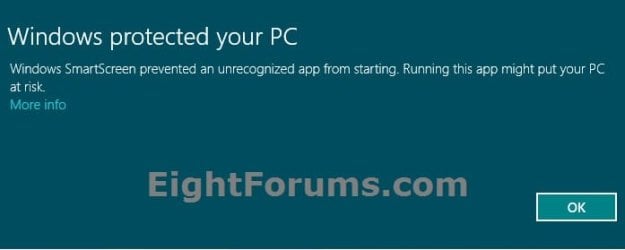
SmartSreen-1.jpg

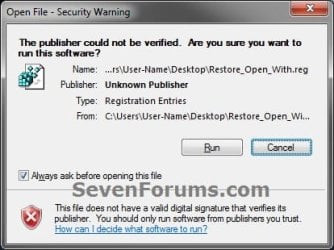
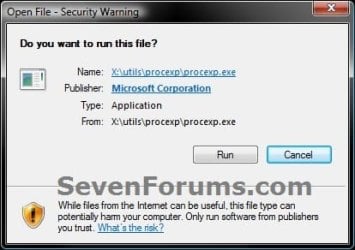
EXAMPLE: Open File - Security Warning
  • Do you want to open this File? Unknown Publisher
  • The Publisher could not be verified. Are you sure you want to run this software? Unknown Publisher
  • Do you want to run this file? Application
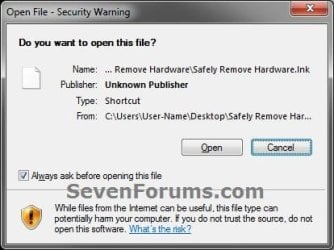
Example-1.jpgExample-2.jpg
warning-2.jpg


OPTION ONE

To Unblock the File Through Properties Page


NOTE: This option can only be done when the file or folder is still in one of your C:\Users\(user-name) folder locations. For example, your Desktop or Downloads folder. If it's not, then you will need to move the file to this location first, unblock it, then move it back.
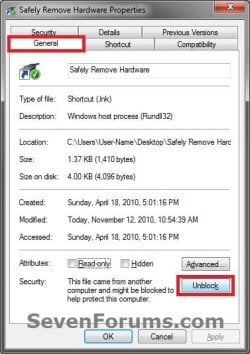
1. While the file is on your desktop or in one of your user folders, right click or press and hold on the file, and click/tap on Properties.

2. Under the General tab, click/tap on the Unblock button, and click/tap on OK. (see screenshot below)
NOTE: If you do not see an Unblock button, then the file has already been unblocked.
Step2.jpg
3. You will now no longer get a Open File - Security Warning prompt when you try to open or run this specific file.


OPTION TWO

Unblock File when you Open or Run it and get "Open File - Security Warning"


NOTE: This option will unblock the file no matter where it's located.
1. Open or Run the file to trigger the Open File - Security Warning prompt.

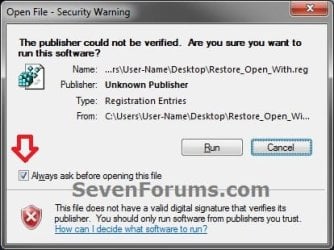
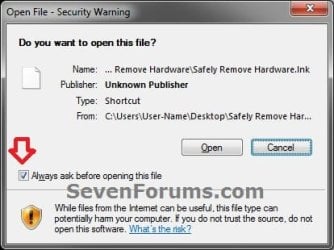
2. In the Open File - Security Warning prompt, uncheck the Always ask before opening this file box, then click/tap on either the Open or Run button. (see screenshots below)
Step1.jpgStep1-B.jpg
3. If prompted by UAC, then click/tap on Yes (Windows 7/8) or Continue (Vista), or enter the administrator's password (standard user).
NOTE: You will only be prompted by UAC if the file is not in one of the C:\Users\(user-name) folder locations, and in a system folder (ex: C:\Windows) instead.

4. The file will now open or run, and you will now no longer get a Open File - Security Warning prompt when you try to open or run this specific file next time.


OPTION THREE

Unblock File when you Open or Run it and get "Windows 8/8.1 SmartScreen"


NOTE: This option only applies to Windows 8 or 8.1. Doing OPTION ONE or OPTION TWO above will also unblock the file to no longer get the "Windows protected your PC" prompt from Windows 8/8.1 SmartScreen.
1. Open or Run the file to trigger the Windows protected your PC prompt.
NOTE: If you do not get this prompt, then the file has already been unblocked, and there's nothing else that needs to be done.

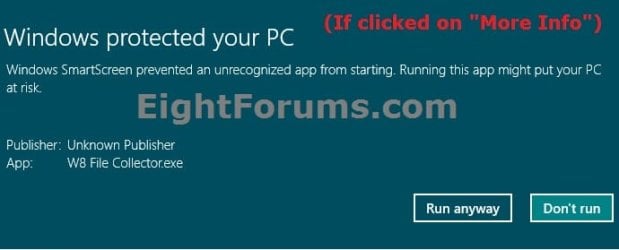
2. Click/tap on the More info link. (see screenshot below)
SmartSreen-1.jpg
3. Click/tap on the Run anyway button. (see screenshot below)
SmartSreen-2.jpg
4. The file will now open or run, and you will now no longer get a Windows protected your PC prompt when you try to open or run this specific file next time.
That's it,
Shawn


Last edited:
Excuse me for jumping in, but it's been a couple of years since this thread was started, and now I'm suddenly getting the same prompt before opening shortcut files (.lnk) I have marked LowRiskFileTypes (and the others for that matter) for .lnk Also enabled the "Do not preserve zone information in file attachments" in Group Policy. I don't see the "Always ask before opening" prompt nor an unblock button. I use Avast A/V and run Malware Bytes every other day (automatically), so no malware. "Run as admin" does work, but I'm already an admin! I've also got the UAC set to the very bottom. And yes, I've rebooted, several times :)

This is a 1 yo Windows 7 Pro x64 machine, fully updated, and I guarantee you this is new behavior for me, and it's annoying as all get out. I know random windows updates can fubar other stuff, but this one was a new one on me. I'd appreciate any new thoughts on how to get rid of this prompt.

TIA
Elaine
Ivy, VA
 

My Computer

Computer type
PC/Desktop
Computer Manufacturer/Model Number
Lenovo-home; Dell-work
OS
win7 pro x32 work; win7 x64 home
Hello Elaine, and welcome to Seven Forums. :)

Double check this below to see if it may help with the Open File - Security Warning.

http://www.sevenforums.com/tutorial...urity-warning-allow-prevent-unblock-file.html

http://www.sevenforums.com/tutorials/182353-open-file-security-warning-enable-disable.html

As for "Run as Administrator", that's to run the app with elevated rights. Being an administrator doesn't affect that unless you are logged in to the built-in Administrator account. Everything runs elevated when logged in to that account.
 

My Computer

Computer type
PC/Desktop
Computer Manufacturer/Model Number
Self built custom
OS
64-bit Windows 11 Pro for Workstations
CPU
Intel i7-8700K OC'd to 5 GHz
Motherboard
ASUS ROG Maximus XI Formula Z390
Memory
64 GB (4x16GB) G.SKILL TridentZ RGB DDR4 3600 MHz
Graphics Card(s)
ASUS ROG-STRIX-GTX1080TI-O11G-GAMING
Sound Card
Integrated
Monitor(s) Displays
2 x Samsung Odyssey G7 27"
Screen Resolution
2560x1440
Hard Drives
1TB Samsung 990 PRO M.2,
4TB Samsung 990 PRO PRO M.2,
TerraMaster F8 SSD Plus NAS
PSU
Seasonic Prime Titanium 850W
Case
Thermaltake Core P3
Cooling
Corsair Hydro H115i
Keyboard
Logitech wireless K800
Mouse
Logitech MX Master 4
Internet Speed
2 Gb/s Download and 100 Mb/s Upload
Antivirus
Malwarebyte Anti-Malware Premium
Browser
Google Chrome
Other Info
Logitech Z625 speaker system,
Logitech BRIO 4K Pro webcam,
HP Color LaserJet Pro MFP M477fdn,
APC SMART-UPS RT 1000 XL - SURT1000XLI,
Galaxy S23 Plus phone
I tried all of those already, Brink, none fixed it or I didn't have the options available (no block button, no click to hide, etc). Yes, I use the built-in Admin account, always have, so yes, that's why that works. I created a second admin account, and interestingly, it didn't have the same problems. Obviously something changed on the main account, but I simply don't know what.

I happen to be a 'puter professional, but I have to confess I've never seen this particular issue before.

elaine
 

My Computer

Computer type
PC/Desktop
Computer Manufacturer/Model Number
Lenovo-home; Dell-work
OS
win7 pro x32 work; win7 x64 home
If it wasn't to long ago that this started to happen you might consider doing a system restore using a restore point dated before it started to hopefully fix the issue.
 

My Computer

Computer type
PC/Desktop
Computer Manufacturer/Model Number
Self built custom
OS
64-bit Windows 11 Pro for Workstations
CPU
Intel i7-8700K OC'd to 5 GHz
Motherboard
ASUS ROG Maximus XI Formula Z390
Memory
64 GB (4x16GB) G.SKILL TridentZ RGB DDR4 3600 MHz
Graphics Card(s)
ASUS ROG-STRIX-GTX1080TI-O11G-GAMING
Sound Card
Integrated
Monitor(s) Displays
2 x Samsung Odyssey G7 27"
Screen Resolution
2560x1440
Hard Drives
1TB Samsung 990 PRO M.2,
4TB Samsung 990 PRO PRO M.2,
TerraMaster F8 SSD Plus NAS
PSU
Seasonic Prime Titanium 850W
Case
Thermaltake Core P3
Cooling
Corsair Hydro H115i
Keyboard
Logitech wireless K800
Mouse
Logitech MX Master 4
Internet Speed
2 Gb/s Download and 100 Mb/s Upload
Antivirus
Malwarebyte Anti-Malware Premium
Browser
Google Chrome
Other Info
Logitech Z625 speaker system,
Logitech BRIO 4K Pro webcam,
HP Color LaserJet Pro MFP M477fdn,
APC SMART-UPS RT 1000 XL - SURT1000XLI,
Galaxy S23 Plus phone
I don't know exactly when it started, tho, I'm only on this particular machine rather sporadically, darn it. I'd rather try some less "drastic" approaches if possible. I understand it may not be tho :( but in the meantime I'll see what I've got out there for restore points.
 

My Computer

Computer type
PC/Desktop
Computer Manufacturer/Model Number
Lenovo-home; Dell-work
OS
win7 pro x32 work; win7 x64 home
I decided to "byte the bullet" and did go ahead and do a system restore from July 10. I kicked it off before going to bed, as it said it would take a LONG time. When I looked this morning, there was an error box stating it had failed, with error code 0xc0000022, and that no files had been changed. However, to my surprise, the problem with it not opening shortcut files was (almost) fixed! I say "almost" because after I rebooted, it did prompt for one shortcut I had in my startup. All the others on my desktop, tho, actually come up normally again.

I looked up the error message, and while it seems to be somewhat generic with different meanings, I think it was a security issue, because I'd also been having issues where it warned me that some file might be dangerous when I tried opening it. All of this is new behavior, but much of it seemed to be that somehow it no longer saw my normal login (which wasn't the actual built in admin, come to find out--it was not showing)(but I WAS an admin on the normal account) as having full admin privileges. Why? Who knows?

The last batch of updates I'd done (21!), btw, had to be redone, of course, but I did them just now, and all is still well, other than that one startup shortcut, so I'm guessing/hoping they were not the ones that fubar'd my machine. But who knows?

I've still got some other issues I'd like to resolve, not related to this current one, but I'll start a new thread on those if I can't find any other solution :)

Thanks for pointing me to a solution!

elaine
 

My Computer

Computer type
PC/Desktop
Computer Manufacturer/Model Number
Lenovo-home; Dell-work
OS
win7 pro x32 work; win7 x64 home
That's good news so far Elaine. I hope the other issues will get sorted as well. :)
 

My Computer

Computer type
PC/Desktop
Computer Manufacturer/Model Number
Self built custom
OS
64-bit Windows 11 Pro for Workstations
CPU
Intel i7-8700K OC'd to 5 GHz
Motherboard
ASUS ROG Maximus XI Formula Z390
Memory
64 GB (4x16GB) G.SKILL TridentZ RGB DDR4 3600 MHz
Graphics Card(s)
ASUS ROG-STRIX-GTX1080TI-O11G-GAMING
Sound Card
Integrated
Monitor(s) Displays
2 x Samsung Odyssey G7 27"
Screen Resolution
2560x1440
Hard Drives
1TB Samsung 990 PRO M.2,
4TB Samsung 990 PRO PRO M.2,
TerraMaster F8 SSD Plus NAS
PSU
Seasonic Prime Titanium 850W
Case
Thermaltake Core P3
Cooling
Corsair Hydro H115i
Keyboard
Logitech wireless K800
Mouse
Logitech MX Master 4
Internet Speed
2 Gb/s Download and 100 Mb/s Upload
Antivirus
Malwarebyte Anti-Malware Premium
Browser
Google Chrome
Other Info
Logitech Z625 speaker system,
Logitech BRIO 4K Pro webcam,
HP Color LaserJet Pro MFP M477fdn,
APC SMART-UPS RT 1000 XL - SURT1000XLI,
Galaxy S23 Plus phone
Still not quite there. I mentioned that one startup file, and I'm also getting UAC warnings on some stuff being "dangerous" to run despite being an Admin AND having the UAC set to none (they never flagged before). I may try to go back even further on a system restore, in hopes that might work. At least "normal" shortcuts are working now, thank heavens. Worst case, I might try setting up a brand new admin profile, I guess. Not yet tho :)
 

My Computer

Computer type
PC/Desktop
Computer Manufacturer/Model Number
Lenovo-home; Dell-work
OS
win7 pro x32 work; win7 x64 home
I have reluctantly come to the conclusion that the profile I've been using since the beginning must have become corrupted somehow. It's still showing as an administrator with UAC at the bottom, yet some things are failing when I try to run them, and I'm still getting prompted on some shortcuts on login, but that may be because it doesn't really "know" who is logging in yet? I've restored back to a June restore point, the oldest one I still have, but given I don't use the machine on a daily basis, I'm not 100% sure when all this started. I still get that xc0000022 error message too on the restore, so I don't really know if the restore worked or not, frankly, because I suspect it's security related. I think (but can't remember now, sorry) I *may* have tried it while logged in as the "real" admin too and got the same error. I may try that one more time.

So I guess the next trick is to create a brand new admin profile, but rather than take up space in this not really related thread, I'll see if I can find more info in another. Setting it up is easy, but I'll need info on how to "transfer" the current profile stuff over to it. Docs etc are not the problem, but I've got a number of apps that are set to current user only. I assume I can simply re-install them but that will be painful. Any other "gotchas" to look out for?

Elaine
Ivy, VA
 

My Computer

Computer type
PC/Desktop
Computer Manufacturer/Model Number
Lenovo-home; Dell-work
OS
win7 pro x32 work; win7 x64 home
Elaine,

You'll lose your app settings and such in the new account and profile, but you can just create new shortcuts to the apps instead of reinstalling them. When a program installs on a computer, it installs for all users. It's just that sometimes you have the option to not have shortcuts created for all users during the program's setup.
 

My Computer

Computer type
PC/Desktop
Computer Manufacturer/Model Number
Self built custom
OS
64-bit Windows 11 Pro for Workstations
CPU
Intel i7-8700K OC'd to 5 GHz
Motherboard
ASUS ROG Maximus XI Formula Z390
Memory
64 GB (4x16GB) G.SKILL TridentZ RGB DDR4 3600 MHz
Graphics Card(s)
ASUS ROG-STRIX-GTX1080TI-O11G-GAMING
Sound Card
Integrated
Monitor(s) Displays
2 x Samsung Odyssey G7 27"
Screen Resolution
2560x1440
Hard Drives
1TB Samsung 990 PRO M.2,
4TB Samsung 990 PRO PRO M.2,
TerraMaster F8 SSD Plus NAS
PSU
Seasonic Prime Titanium 850W
Case
Thermaltake Core P3
Cooling
Corsair Hydro H115i
Keyboard
Logitech wireless K800
Mouse
Logitech MX Master 4
Internet Speed
2 Gb/s Download and 100 Mb/s Upload
Antivirus
Malwarebyte Anti-Malware Premium
Browser
Google Chrome
Other Info
Logitech Z625 speaker system,
Logitech BRIO 4K Pro webcam,
HP Color LaserJet Pro MFP M477fdn,
APC SMART-UPS RT 1000 XL - SURT1000XLI,
Galaxy S23 Plus phone
Oh that's true, good point. Duh on me :) Easiest way to deal with that is take all the shortcuts I currently show on my desktop (and yes, I know there's a lot more, not least in the start menu) and just save them off somewhere in MyDocs where I can grab and move them later. I long ago made shortcuts to locations like My Startup, My Sendto, etc, along with the All Users equivalents. Very handy!

elaine
 

My Computer

Computer type
PC/Desktop
Computer Manufacturer/Model Number
Lenovo-home; Dell-work
OS
win7 pro x32 work; win7 x64 home
thank you
 

My Computer

Computer type
PC/Desktop
Computer Manufacturer/Model Number
GIGABYTE
OS
Windows 10 Pro x64
CPU
Amd FX 6300
Motherboard
Gigabyte
Memory
32GB
Graphics Card(s)
Nvidia Gtx660
Hard Drives
320GB
500Gb
5TB
Antivirus
Eset Smart Security
Browser
Microsoft Edge
In the end, after much trepidation, I bit the final bullet and restored my system from recovery disks, since a system restore didn't solve any of the problems, mainly because I think the problems began prior to the earliest system backup I had. It did take care of all of the problems, not surprisingly.

Thanks to all who wrote!

Elaine
 

My Computer

Computer type
PC/Desktop
Computer Manufacturer/Model Number
Lenovo-home; Dell-work
OS
win7 pro x32 work; win7 x64 home
Great news Elaine. :)
 

My Computer

Computer type
PC/Desktop
Computer Manufacturer/Model Number
Self built custom
OS
64-bit Windows 11 Pro for Workstations
CPU
Intel i7-8700K OC'd to 5 GHz
Motherboard
ASUS ROG Maximus XI Formula Z390
Memory
64 GB (4x16GB) G.SKILL TridentZ RGB DDR4 3600 MHz
Graphics Card(s)
ASUS ROG-STRIX-GTX1080TI-O11G-GAMING
Sound Card
Integrated
Monitor(s) Displays
2 x Samsung Odyssey G7 27"
Screen Resolution
2560x1440
Hard Drives
1TB Samsung 990 PRO M.2,
4TB Samsung 990 PRO PRO M.2,
TerraMaster F8 SSD Plus NAS
PSU
Seasonic Prime Titanium 850W
Case
Thermaltake Core P3
Cooling
Corsair Hydro H115i
Keyboard
Logitech wireless K800
Mouse
Logitech MX Master 4
Internet Speed
2 Gb/s Download and 100 Mb/s Upload
Antivirus
Malwarebyte Anti-Malware Premium
Browser
Google Chrome
Other Info
Logitech Z625 speaker system,
Logitech BRIO 4K Pro webcam,
HP Color LaserJet Pro MFP M477fdn,
APC SMART-UPS RT 1000 XL - SURT1000XLI,
Galaxy S23 Plus phone
Hmm any ideas for my issue?

So in windows 7 I found this prompt only occurs on downloaded files and unblocking it via properties removes it.

On windows 8.1 I get the prompt even on files I created locally e.g. .reg files, so if i right click a reg file and select edit, before notepad opens I get a prompt telling me my .reg file is unsigned, seems very bizarre. I even disabled smart screen but it has had no impact.

There is no unblock button.
No tick box for always check this file.

There is a clickable "how do I decide what software to run", but the help page has been taken down, (I assume replaced with windows 10 specific content).
 

My Computer

Computer type
PC/Desktop
Computer Manufacturer/Model Number
home built
OS
windows 8.1 Pro x64
CPU
intel i5 4670k @ 4.3ghz
Motherboard
asus z87-plus
Memory
16 gig ram ddr3 @ 1600 corsair vengeance
Graphics Card(s)
evga 970 GTX 4 GIG FTW ACX 2.0
Sound Card
asus xonar D2X
Monitor(s) Displays
benq gw2765ht
Screen Resolution
2560x1440
Hard Drives
Samsung 850 pro SSD 512gig - boot device wooosh
WD black cavalier 640gig WD6401AALS
Seagate 500gig ST3500630AS
WD 2TB Green WDC20EARS
2 x WD Red 3TB WD30EFRX
Samsung 750gig HD753LG - on asmedia controller
PSU
coolermaster silent pro 600watt modular
Case
fractal define R4
Cooling
artic freezer i30, 3 case fans
Keyboard
microsoft business ps2 keyboard
Mouse
microsoft optical black mouse
Internet Speed
80/20 FTTC SkyBB
Antivirus
Nod32 AV v8, HitmanProAlert, SRP, System Hardening
Browser
Chrome x64
Other Info
Intel controller is in AHCI mode currently using IaSTOR 12.8.0.1016 drivers
Hello Chrysalis, :)

Please go ahead and post a screenshot showing the prompt you get.

Is the folder you created or saved them to unblocked? If not, then that may be a possible reason.
 

My Computer

Computer type
PC/Desktop
Computer Manufacturer/Model Number
Self built custom
OS
64-bit Windows 11 Pro for Workstations
CPU
Intel i7-8700K OC'd to 5 GHz
Motherboard
ASUS ROG Maximus XI Formula Z390
Memory
64 GB (4x16GB) G.SKILL TridentZ RGB DDR4 3600 MHz
Graphics Card(s)
ASUS ROG-STRIX-GTX1080TI-O11G-GAMING
Sound Card
Integrated
Monitor(s) Displays
2 x Samsung Odyssey G7 27"
Screen Resolution
2560x1440
Hard Drives
1TB Samsung 990 PRO M.2,
4TB Samsung 990 PRO PRO M.2,
TerraMaster F8 SSD Plus NAS
PSU
Seasonic Prime Titanium 850W
Case
Thermaltake Core P3
Cooling
Corsair Hydro H115i
Keyboard
Logitech wireless K800
Mouse
Logitech MX Master 4
Internet Speed
2 Gb/s Download and 100 Mb/s Upload
Antivirus
Malwarebyte Anti-Malware Premium
Browser
Google Chrome
Other Info
Logitech Z625 speaker system,
Logitech BRIO 4K Pro webcam,
HP Color LaserJet Pro MFP M477fdn,
APC SMART-UPS RT 1000 XL - SURT1000XLI,
Galaxy S23 Plus phone
For the benefit of others I found the cause.

If the exe is either in a low integrity folder or is a low integrity exe, then windows will show the prompt with no way to set it to never show the warning again.

There is basically 4 options.

1 - Live with the prompt everytime you run the program.
2 - Move the exe to a non low integrity folder. (if its due to the folder)
3 - Raise the integrity level of the exe via icacls. (if its due to the exe)
4 - Go into internet options and disable the function to warn on running unsafe programs, If you do this you get a big fat warning and IE will mark your settings as insecure :p

Why would a folder be set to low integrity? I had set my downloads folder to low integrity as I run cyberfox in low integrity mode. :) So generally I will be doing option #1 or #2. #4 is a bad idea.

Some info here. How to Disable the Open File Security Warning in Windows 8
 

My Computer

Computer type
PC/Desktop
Computer Manufacturer/Model Number
home built
OS
windows 8.1 Pro x64
CPU
intel i5 4670k @ 4.3ghz
Motherboard
asus z87-plus
Memory
16 gig ram ddr3 @ 1600 corsair vengeance
Graphics Card(s)
evga 970 GTX 4 GIG FTW ACX 2.0
Sound Card
asus xonar D2X
Monitor(s) Displays
benq gw2765ht
Screen Resolution
2560x1440
Hard Drives
Samsung 850 pro SSD 512gig - boot device wooosh
WD black cavalier 640gig WD6401AALS
Seagate 500gig ST3500630AS
WD 2TB Green WDC20EARS
2 x WD Red 3TB WD30EFRX
Samsung 750gig HD753LG - on asmedia controller
PSU
coolermaster silent pro 600watt modular
Case
fractal define R4
Cooling
artic freezer i30, 3 case fans
Keyboard
microsoft business ps2 keyboard
Mouse
microsoft optical black mouse
Internet Speed
80/20 FTTC SkyBB
Antivirus
Nod32 AV v8, HitmanProAlert, SRP, System Hardening
Browser
Chrome x64
Other Info
Intel controller is in AHCI mode currently using IaSTOR 12.8.0.1016 drivers
For the benefit of others I found the cause.

If the exe is either in a low integrity folder or is a low integrity exe, then windows will show the prompt with no way to set it to never show the warning again.

There is basically 4 options.

1 - Live with the prompt everytime you run the program.
2 - Move the exe to a non low integrity folder. (if its due to the folder)
3 - Raise the integrity level of the exe via icacls. (if its due to the exe)
4 - Go into internet options and disable the function to warn on running unsafe programs, If you do this you get a big fat warning and IE will mark your settings as insecure :p

Why would a folder be set to low integrity? I had set my downloads folder to low integrity as I run cyberfox in low integrity mode. :) So generally I will be doing option #1 or #2. #4 is a bad idea.

Some info here. How to Disable the Open File Security Warning in Windows 8

See also: ;)

http://www.sevenforums.com/tutorials/182353-open-file-security-warning-enable-disable.html
 

My Computer

Computer type
PC/Desktop
Computer Manufacturer/Model Number
Self built custom
OS
64-bit Windows 11 Pro for Workstations
CPU
Intel i7-8700K OC'd to 5 GHz
Motherboard
ASUS ROG Maximus XI Formula Z390
Memory
64 GB (4x16GB) G.SKILL TridentZ RGB DDR4 3600 MHz
Graphics Card(s)
ASUS ROG-STRIX-GTX1080TI-O11G-GAMING
Sound Card
Integrated
Monitor(s) Displays
2 x Samsung Odyssey G7 27"
Screen Resolution
2560x1440
Hard Drives
1TB Samsung 990 PRO M.2,
4TB Samsung 990 PRO PRO M.2,
TerraMaster F8 SSD Plus NAS
PSU
Seasonic Prime Titanium 850W
Case
Thermaltake Core P3
Cooling
Corsair Hydro H115i
Keyboard
Logitech wireless K800
Mouse
Logitech MX Master 4
Internet Speed
2 Gb/s Download and 100 Mb/s Upload
Antivirus
Malwarebyte Anti-Malware Premium
Browser
Google Chrome
Other Info
Logitech Z625 speaker system,
Logitech BRIO 4K Pro webcam,
HP Color LaserJet Pro MFP M477fdn,
APC SMART-UPS RT 1000 XL - SURT1000XLI,
Galaxy S23 Plus phone
There is basically 4 options.

1 - Live with the prompt everytime you run the program.
2 - Move the exe to a non low integrity folder. (if its due to the folder)
3 - Raise the integrity level of the exe via icacls. (if its due to the exe)
4 - Go into internet options and disable the function to warn on running unsafe programs

http://www.c-sharpcorner.com/Upload...-the-open-file-security-warning-in-windows-8/

i choose option #1

using xp x32 sp3. logged in as administrator. has support for xp ended ? well, how about that ?
anyway, the "unblock" option under the program's properties page, and uncheck the check box to always check brings me right back to the confirm "unknown publisher" security warning dialogue box.

so, after some investigation (reading through the posts for ideas), and no success, i choose option #1
 

My Computer

Computer type
PC/Desktop
Computer Manufacturer/Model Number
hamidbuilt
OS
debian, mint, mx, 7
CPU
ryzen 7 2700
Motherboard
asrock b450 itx ac
Memory
g.skill ddr4 3200
Graphics Card(s)
evga gtx 750 ti
Monitor(s) Displays
aoc gsync
Screen Resolution
1920x1080
Hard Drives
evoplus m.2
PSU
stryker fanless (kingwin)
Case
fractal design nano s window
Keyboard
logitech
Mouse
logitech trackball
Internet Speed
dsl, one step above analog modem
Antivirus
me. i am the antivirus. i remove mcafee and norton
Browser
pale moon, sea monkey, vivaldi, firefox
Other Info
i started programming with punch cards on fortran
using xp x32 sp3. logged in as administrator.

oh, oh, i think i'm on the wrong forum. i'm thinking of upgrading to 7 when i build my next system. i should hope that the probability that i may in the future use a win 7 os should qualify me to post as a potential candidate unless someone can recommend a linux distribution that will keep me going for a few more years; and then, there's always the multiboot option ...
 

My Computer

Computer type
PC/Desktop
Computer Manufacturer/Model Number
hamidbuilt
OS
debian, mint, mx, 7
CPU
ryzen 7 2700
Motherboard
asrock b450 itx ac
Memory
g.skill ddr4 3200
Graphics Card(s)
evga gtx 750 ti
Monitor(s) Displays
aoc gsync
Screen Resolution
1920x1080
Hard Drives
evoplus m.2
PSU
stryker fanless (kingwin)
Case
fractal design nano s window
Keyboard
logitech
Mouse
logitech trackball
Internet Speed
dsl, one step above analog modem
Antivirus
me. i am the antivirus. i remove mcafee and norton
Browser
pale moon, sea monkey, vivaldi, firefox
Other Info
i started programming with punch cards on fortran
Back
Top