Open in New Process - Folder

How to Open Folder in New Process in Windows 7 and Windows 8


   Information
This tutorial will show you how to open a drive, folder, or library window in a separate new explorer process in Windows 7 and Windows 8.

   Note
This is not the same as just having a folder open in a separate new window. Those two folder windows would still just be running in the same single explorer.exe process.


Having a folder open in a separate process will allow multiple instances of the open folder window to be running with each instance running with a separate explorer.exe process. If one of these instances should close or crash, the other instances would be completely unaffected by it.
   Warning
This can increase the stability of Windows 7 by opening every folder in a separate part of memory. Use this setting if your computer frequently crashes, and you are trying to minimize problems or troubleshoot. Be aware, however, that doing this could slow down the performance of your computer.
   Tip
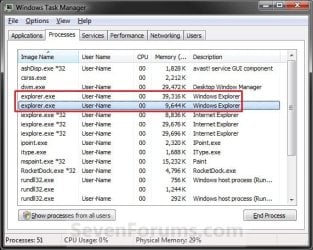
To see what processes (ex: explorer.exe) are running:
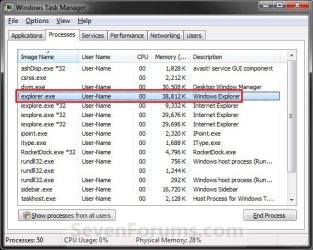
  • Open Task Manager (CTRL+SHIFT+ESCAPE).
  • Click on the Processes tab. (See screenshots below)
  • Under Image Name, look for how many explorer.exe processes you have open. You will have one for each new folder process you open.
Task_Manager-1.jpgTask_Manager-2.jpg


OPTION ONE

To Manually Open a Folder in a New Process


NOTE: This will allow you to manually open a selected folder window in a new separate process.
1. Press and hold the Shift key, then right click on the drive, folder, or library that you want to open in a separate process, release the Shift key, and click/tap on Open in New Process. (See screenshot below)
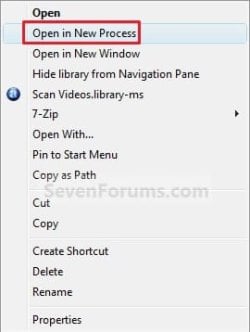
Context_menu.jpg
2. This will now open the selected folder in a separate window that is in a new process.


OPTION TWO

Turn On or Off to Launch Folders in Separate Process in Folder Options


NOTE: This will set Windows to always open all folder windows in a separate new process or not when they are opened.
1. Open Folder Options in Windows 7 or Windows 8, and click/tap on the View tab. (See screenshot below step 4)

2. To Launch Folder Windows in a Separate Process when Opened
NOTE: Folders open in the same process as each other, but a separate instance to the process that provides the Shell.
A) Check the Launch folder windows in a separate process box. (See screenshot below step 4)

B) Go to step 4.
3. To Not Launch Folder Windows in a Separate Process when Opened
NOTE: Folders open in the same process as each other, in the same instance to the process that provides the Shell. This is the default setting.
A) Uncheck the Launch folder windows in a separate process box. (See screenshot below step 4)
4. Click on OK. (See screenshot below)
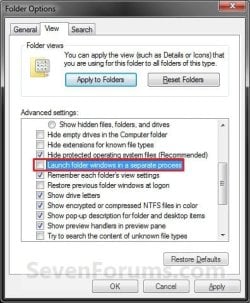
Folder_Options.jpg


OPTION THREE

Turn On or Off to Launch Folders in Separate Process using a REG File


1. To Launch Folder Windows in a Separate Process when Opened
A) Click on the Download button below to download the file below.
Launch_Folder_Windows_in_Separate_Process.reg

Download


B) Go to step 3.
2. To Not Launch Folder Windows in a Separate Process when Opened
A) Click on the Download button below to download the file below.
NOTE: This is the default setting.
Not_Launch_Folder_Windows_in_Separate_Process.reg

Download


3. Save the .reg file to your desktop.

4. Double click/tap on the downloaded .reg file to merge it.

5. If prompted, click/tap on Run, Yes (UAC), Yes, and OK to approve the merge.

6. If open, close and reopen Windows Explorer (Window 7) or File Explorer (Windows 8) to apply.
NOTE: If you do not see a change, then log off and log on, or restart the computer to apply.

7. When done, you can delete the downloaded .reg file if you like.
That's it,
Shawn


Attachments

Last edited:
Another spot-on effort brink. Great Tutorial:geek:
 

My Computer

Computer Manufacturer/Model Number
Self Built
OS
Vista X32. Windows 7 32bit
CPU
Intel Quad Core 6600
Motherboard
Asus P5B
Memory
4096 MB Xtreme-Dark 800mhz
Graphics Card(s)
Zotac Amp Edition 8800GT - 512MB DDR3, O/C 700mhz
Monitor(s) Displays
Samsung 206BW
Screen Resolution
1680 X 1024
Hard Drives
4 X Samsung 500GB 7200rpm Serial ATA-II HDD w. 16MB Cache .
PSU
550 w
Case
Thermaltake
Cooling
3 x octua NF-S12-1200 - 120mm 1200RPM Sound Optimised Fans
Keyboard
Microsoft
Mouse
Targus
Internet Speed
1500kbs
Thank you Norm.
 

My Computer

Computer type
PC/Desktop
Computer Manufacturer/Model Number
Self built custom
OS
64-bit Windows 11 Pro for Workstations
CPU
Intel i7-8700K OC'd to 5 GHz
Motherboard
ASUS ROG Maximus XI Formula Z390
Memory
64 GB (4x16GB) G.SKILL TridentZ RGB DDR4 3600 MHz
Graphics Card(s)
ASUS ROG-STRIX-GTX1080TI-O11G-GAMING
Sound Card
Integrated
Monitor(s) Displays
2 x Samsung Odyssey G7 27"
Screen Resolution
2560x1440
Hard Drives
1TB Samsung 990 PRO M.2,
4TB Samsung 990 PRO PRO M.2,
TerraMaster F8 SSD Plus NAS
PSU
Seasonic Prime Titanium 850W
Case
Thermaltake Core P3
Cooling
Corsair Hydro H115i
Keyboard
Logitech wireless K800
Mouse
Logitech MX Master 4
Internet Speed
2 Gb/s Download and 100 Mb/s Upload
Antivirus
Malwarebyte Anti-Malware Premium
Browser
Google Chrome
Other Info
Logitech Z625 speaker system,
Logitech BRIO 4K Pro webcam,
HP Color LaserJet Pro MFP M477fdn,
APC SMART-UPS RT 1000 XL - SURT1000XLI,
Galaxy S23 Plus phone
cheers. I'm trying it for a few days.

So this has no benefit in performance(but does it help, if you got more RAM or not? or better cpu??)
 

My Computer

OS
Windows 7 Pro x64
CPU
Intel Core 2 Quad Q6600 [2.4Ghz] OC speeds 3.2Ghz
Motherboard
ASUS P5QL-E
Memory
Kingston HyperX KHX8500D2K2-4G 1066Mhz 8GB (2GB*4)
Graphics Card(s)
ASUS GeForce GTX 550 Ti
Sound Card
OnBoard
Monitor(s) Displays
Samsung SyncMaster T220
Screen Resolution
1680*1050
Hard Drives
Intel SSD 320 Series 80GB
PSU
Corsair TX750W
Case
CM 690 II
Cooling
Cooler Master Hyper 212+
Keyboard
Logitech G510
Mouse
Logitech G400
Internet Speed
50Mb :D
Hello John,

Say you have multiple Windows Explorer windows opened with all of then opened and using the same process (ex: explorer.exe in Task Manager Processes tab), and if that explorer.exe should crash or freeze, then all of these multiple Windows Explorer windows running under this process will as well.


Say instead you have one Windows Explorer window opened in one explorer.exe process and open another Windows Explorer window with a new explorer.exe process, and if one of those explorer.exe processes crashes, then the other one will not be affected by it. No performance benefit with this other than more redunancy and reliability. Think of it how Internet Explorer does this with mulitple tabs. This is why you see multiple iexplorer.exe processes entries in Task Manager. One for each tab + Internet Explorer itself. If one tab should crash, the other ones still work and you just need to close the crashed one.

Hope this helps,
Shawn
 

My Computer

Computer type
PC/Desktop
Computer Manufacturer/Model Number
Self built custom
OS
64-bit Windows 11 Pro for Workstations
CPU
Intel i7-8700K OC'd to 5 GHz
Motherboard
ASUS ROG Maximus XI Formula Z390
Memory
64 GB (4x16GB) G.SKILL TridentZ RGB DDR4 3600 MHz
Graphics Card(s)
ASUS ROG-STRIX-GTX1080TI-O11G-GAMING
Sound Card
Integrated
Monitor(s) Displays
2 x Samsung Odyssey G7 27"
Screen Resolution
2560x1440
Hard Drives
1TB Samsung 990 PRO M.2,
4TB Samsung 990 PRO PRO M.2,
TerraMaster F8 SSD Plus NAS
PSU
Seasonic Prime Titanium 850W
Case
Thermaltake Core P3
Cooling
Corsair Hydro H115i
Keyboard
Logitech wireless K800
Mouse
Logitech MX Master 4
Internet Speed
2 Gb/s Download and 100 Mb/s Upload
Antivirus
Malwarebyte Anti-Malware Premium
Browser
Google Chrome
Other Info
Logitech Z625 speaker system,
Logitech BRIO 4K Pro webcam,
HP Color LaserJet Pro MFP M477fdn,
APC SMART-UPS RT 1000 XL - SURT1000XLI,
Galaxy S23 Plus phone
thanks for the explanation brink. :)

This can increase the stability of Windows 7 by opening every folder in a separate part of memory. Use this setting if your computer frequently crashes, and you are trying to minimize problems or troubleshoot. Be aware, however, that doing this could slow down the performance of your computer.

After trying it for a week, it's slow my PC, had some freezes, and long loading time on opening explorer.exe :devil: Just like you said it would.

Everything back to normal, after unchecking it. :p
 

My Computer

OS
Windows 7 Pro x64
CPU
Intel Core 2 Quad Q6600 [2.4Ghz] OC speeds 3.2Ghz
Motherboard
ASUS P5QL-E
Memory
Kingston HyperX KHX8500D2K2-4G 1066Mhz 8GB (2GB*4)
Graphics Card(s)
ASUS GeForce GTX 550 Ti
Sound Card
OnBoard
Monitor(s) Displays
Samsung SyncMaster T220
Screen Resolution
1680*1050
Hard Drives
Intel SSD 320 Series 80GB
PSU
Corsair TX750W
Case
CM 690 II
Cooling
Cooler Master Hyper 212+
Keyboard
Logitech G510
Mouse
Logitech G400
Internet Speed
50Mb :D
Hello John,

Well, it was worth a try I suppose. ;)
 

My Computer

Computer type
PC/Desktop
Computer Manufacturer/Model Number
Self built custom
OS
64-bit Windows 11 Pro for Workstations
CPU
Intel i7-8700K OC'd to 5 GHz
Motherboard
ASUS ROG Maximus XI Formula Z390
Memory
64 GB (4x16GB) G.SKILL TridentZ RGB DDR4 3600 MHz
Graphics Card(s)
ASUS ROG-STRIX-GTX1080TI-O11G-GAMING
Sound Card
Integrated
Monitor(s) Displays
2 x Samsung Odyssey G7 27"
Screen Resolution
2560x1440
Hard Drives
1TB Samsung 990 PRO M.2,
4TB Samsung 990 PRO PRO M.2,
TerraMaster F8 SSD Plus NAS
PSU
Seasonic Prime Titanium 850W
Case
Thermaltake Core P3
Cooling
Corsair Hydro H115i
Keyboard
Logitech wireless K800
Mouse
Logitech MX Master 4
Internet Speed
2 Gb/s Download and 100 Mb/s Upload
Antivirus
Malwarebyte Anti-Malware Premium
Browser
Google Chrome
Other Info
Logitech Z625 speaker system,
Logitech BRIO 4K Pro webcam,
HP Color LaserJet Pro MFP M477fdn,
APC SMART-UPS RT 1000 XL - SURT1000XLI,
Galaxy S23 Plus phone
Has anyone actually tried this and looked at the task list? I never see more than two explorer.exe's running, no matter what I try. Can anyone confirm? Screenshots would be cool too.
 

My Computer

OS
Win7
Hello A, and welcome to Seven Forums.

It's confirmed. You can see screenshots of two explorer.exe processes opened in the yellow TIP box at the top of the tutorial. :)
 

My Computer

Computer type
PC/Desktop
Computer Manufacturer/Model Number
Self built custom
OS
64-bit Windows 11 Pro for Workstations
CPU
Intel i7-8700K OC'd to 5 GHz
Motherboard
ASUS ROG Maximus XI Formula Z390
Memory
64 GB (4x16GB) G.SKILL TridentZ RGB DDR4 3600 MHz
Graphics Card(s)
ASUS ROG-STRIX-GTX1080TI-O11G-GAMING
Sound Card
Integrated
Monitor(s) Displays
2 x Samsung Odyssey G7 27"
Screen Resolution
2560x1440
Hard Drives
1TB Samsung 990 PRO M.2,
4TB Samsung 990 PRO PRO M.2,
TerraMaster F8 SSD Plus NAS
PSU
Seasonic Prime Titanium 850W
Case
Thermaltake Core P3
Cooling
Corsair Hydro H115i
Keyboard
Logitech wireless K800
Mouse
Logitech MX Master 4
Internet Speed
2 Gb/s Download and 100 Mb/s Upload
Antivirus
Malwarebyte Anti-Malware Premium
Browser
Google Chrome
Other Info
Logitech Z625 speaker system,
Logitech BRIO 4K Pro webcam,
HP Color LaserJet Pro MFP M477fdn,
APC SMART-UPS RT 1000 XL - SURT1000XLI,
Galaxy S23 Plus phone
hey,

perhaps I should have added a little more detail. When I try this out, I always get one process for the desktop instance of explorer, and one process for the file manager window of explorer. If I launch two, three, or twenty file manager windows, I still only ever have two instances of explorer.exe running.

Am I misunderstanding what the purpose of "open in a new process" means? Or is something just really strange with my installation of Windows? I have a suspicion that the true answer to both of those is "no", and that this is just a bug in Win7. So if anyone could confirm that (by saying so, or taking a screenshot of 3+ explorer.exe processes), that would be great.
 

My Computer

OS
Win7
Is it like this even when you use OPTION ONE to open it in a new process?
 

My Computer

Computer type
PC/Desktop
Computer Manufacturer/Model Number
Self built custom
OS
64-bit Windows 11 Pro for Workstations
CPU
Intel i7-8700K OC'd to 5 GHz
Motherboard
ASUS ROG Maximus XI Formula Z390
Memory
64 GB (4x16GB) G.SKILL TridentZ RGB DDR4 3600 MHz
Graphics Card(s)
ASUS ROG-STRIX-GTX1080TI-O11G-GAMING
Sound Card
Integrated
Monitor(s) Displays
2 x Samsung Odyssey G7 27"
Screen Resolution
2560x1440
Hard Drives
1TB Samsung 990 PRO M.2,
4TB Samsung 990 PRO PRO M.2,
TerraMaster F8 SSD Plus NAS
PSU
Seasonic Prime Titanium 850W
Case
Thermaltake Core P3
Cooling
Corsair Hydro H115i
Keyboard
Logitech wireless K800
Mouse
Logitech MX Master 4
Internet Speed
2 Gb/s Download and 100 Mb/s Upload
Antivirus
Malwarebyte Anti-Malware Premium
Browser
Google Chrome
Other Info
Logitech Z625 speaker system,
Logitech BRIO 4K Pro webcam,
HP Color LaserJet Pro MFP M477fdn,
APC SMART-UPS RT 1000 XL - SURT1000XLI,
Galaxy S23 Plus phone
yes, I have tried both ways... restarted to make sure that the folder options setting took effect as well.
 

My Computer

OS
Win7
That is perfectly normal. When you have the option Launch folder windows in a separate process checked, it does not mean that each window that you have opened opens in a separate process (just to confuse things). What this actually does is separate the main explorer process (the one that provides the main Shell and the desktop) from your open folders.

Option enabled (checked):

Folders open in the same process as each other, but a separate instance to the process that provides the Shell.

Option disabled (unchecked, default):

Folders open in the same process as each other, in the same instance to the process that provides the Shell.
 

My Computer

Computer type
PC/Desktop
Computer Manufacturer/Model Number
Dwarf Dwf/11/2012 r09/2013
OS
Windows 8.1 Pro RTM x64
CPU
Intel Core-i5-3570K 4-core @ 3.4GHz (Ivy Bridge) (OC 4.4GHz)
Motherboard
ASRock Z77 Extreme4-M
Memory
4 x 4GB DDR3-1600 Corsair Vengeance CMZ8GX3M2A1600C9B (16GB)
Graphics Card(s)
MSI GeForce GTX770 Gaming OC 2GB
Sound Card
Realtek High Definition on board solution (ALC 898)
Monitor(s) Displays
ViewSonic VA1912w Widescreen (VGA)
Screen Resolution
1440x900
Hard Drives
OCZ Agility 3 SSD 120GB SATA III x2 (RAID 0)
Samsung HD501LJ 500GB SATA II x2
Hitachi HDS721010CLA332 1TB SATA II
Iomega 1.5TB Ext USB 2.0
WD 2.0TB Ext USB 3.0
PSU
XFX Pro Series 850W Semi-Modular
Case
Gigabyte IF233
Cooling
1 x 120mm Front Inlet 1 x 120mm Rear Exhaust
Keyboard
Microsoft Comfort Curve Keyboard 3000 (USB)
Mouse
Microsoft Comfort Mouse 3000 for Business (USB)
Internet Speed
NetGear DG834Gv3 ADSL Modem/Router (Ethernet) ~4.0 Mb/s (O2)
Antivirus
Avast! 8.0.1497
Browser
IE 11
Other Info
Optical Drive: HL-DT-ST BD-RE BH10LS30 SATA Bluray
Lexmark S305 Printer/Scanner/Copier (USB)
WEI Score: 8.1/8.1/8.5/8.5/8.25
Asus Eee PC 1011PX Netbook (Windows 7 x86 Starter)
Ahh, ok. That would make sense (even if it seems somewhat contradictory). Thanks for the info!
 

My Computer

OS
Win7
You're welcome. :)

I suppose it does sound confusing and contradictory. Perhaps the option would have been better called Launch folder windows in a separate process from the Shell, but that would probably be too long to fit in the dialogue box.
 

My Computer

Computer type
PC/Desktop
Computer Manufacturer/Model Number
Dwarf Dwf/11/2012 r09/2013
OS
Windows 8.1 Pro RTM x64
CPU
Intel Core-i5-3570K 4-core @ 3.4GHz (Ivy Bridge) (OC 4.4GHz)
Motherboard
ASRock Z77 Extreme4-M
Memory
4 x 4GB DDR3-1600 Corsair Vengeance CMZ8GX3M2A1600C9B (16GB)
Graphics Card(s)
MSI GeForce GTX770 Gaming OC 2GB
Sound Card
Realtek High Definition on board solution (ALC 898)
Monitor(s) Displays
ViewSonic VA1912w Widescreen (VGA)
Screen Resolution
1440x900
Hard Drives
OCZ Agility 3 SSD 120GB SATA III x2 (RAID 0)
Samsung HD501LJ 500GB SATA II x2
Hitachi HDS721010CLA332 1TB SATA II
Iomega 1.5TB Ext USB 2.0
WD 2.0TB Ext USB 3.0
PSU
XFX Pro Series 850W Semi-Modular
Case
Gigabyte IF233
Cooling
1 x 120mm Front Inlet 1 x 120mm Rear Exhaust
Keyboard
Microsoft Comfort Curve Keyboard 3000 (USB)
Mouse
Microsoft Comfort Mouse 3000 for Business (USB)
Internet Speed
NetGear DG834Gv3 ADSL Modem/Router (Ethernet) ~4.0 Mb/s (O2)
Antivirus
Avast! 8.0.1497
Browser
IE 11
Other Info
Optical Drive: HL-DT-ST BD-RE BH10LS30 SATA Bluray
Lexmark S305 Printer/Scanner/Copier (USB)
WEI Score: 8.1/8.1/8.5/8.5/8.25
Asus Eee PC 1011PX Netbook (Windows 7 x86 Starter)
Back
Top