Open With - Change Default Program

How to Change the Default Program a File Type Opens With in Windows 7

   Information
A default program is the program that Windows 7 uses when you open a particular type of file extension. This will show you how to change a file type to open with a different default program for just this one time or always using the context menu in Windows 7.

These Default Programs association settings are a per user setting and not applied to all users.


Here's How:
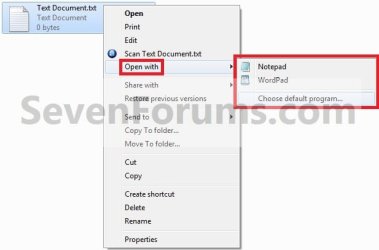
1. Right click on the file type (ex: .txt file) that you want to change the default program for, then click on Open with. (see screenshot below)
Step1.jpg

   Note
If you do not have Open with in the context menu, then this means this file does not have a program associated to open it with.
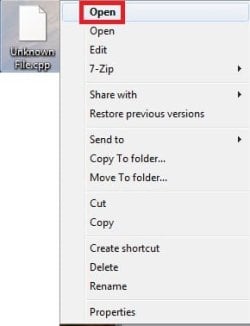
  • Instead, click on Open.
Open-1.jpg
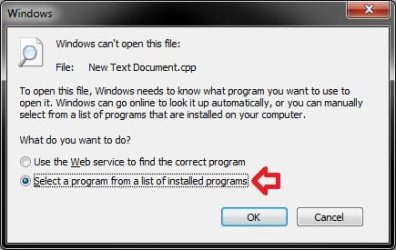
  • Select (dot) Select a program from a list of installed programs, and click on OK.
  • Go to step 3.
Open.jpg


2. To Select a Program that is Already Listed in Context Menu
NOTE: This option will only open the file type with this program for just this one time and not everytime by default.
A) After you have expanded Open with, select a listed program (ex: Notepad or Wordpad) that you want to open the file with for just this one time. (see screenshot below)
Step1.jpg
B) Go to step 4.
3. To Select a Program that is Not Listed in Context Menu
NOTE: This option will allow you to be able to select to have the file type to always open with the selected program by default if you like.
A) After you have expanded Open with, select Choose default program. (see screenshot below step 1)

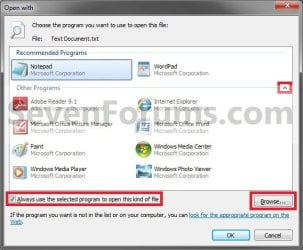
B) Under Other Programs, click on the drop down arrow to the far right to exapnd it and see more programs to select from. (See screenshot below)
Step2.jpg
C) Select the program that you want to open the file with. (See screenshot above)
NOTE: If the program you wanted to select is still not listed, then click on the Browse button and navigate to the program's exe file. Select it, and click on the Open button to add it to be able to select it.


D) To Always Open this File Type with the Selected Program by Default
  • Check the Always use the selected program to open this kind of file box. (See screenshot below step 3B)
  • Go to step 3F.
E) To Only Open this File Type with the Selected Program for Just this One Time
  • Uncheck the Always use the selected program to open this kind of file box. (See screenshot below step 3B)
F) Click on OK. (See screenshot below step 3B)
4. The file will now be opened by the selected program.
That's it,
Shawn


Last edited:
Hello David, and welcome to Seven Forums.

What program is the .exe file? Someone may already have a solution for it.

Have you tried using compatibility mode on the exe file for what Windows OS it was made for to see if that may help.

Hope this may help for now,
Shawn
 

My Computer

Computer type
PC/Desktop
Computer Manufacturer/Model Number
Self built custom
OS
64-bit Windows 11 Pro for Workstations
CPU
Intel i7-8700K OC'd to 5 GHz
Motherboard
ASUS ROG Maximus XI Formula Z390
Memory
64 GB (4x16GB) G.SKILL TridentZ RGB DDR4 3600 MHz
Graphics Card(s)
ASUS ROG-STRIX-GTX1080TI-O11G-GAMING
Sound Card
Integrated
Monitor(s) Displays
2 x Samsung Odyssey G7 27"
Screen Resolution
2560x1440
Hard Drives
1TB Samsung 990 PRO M.2,
4TB Samsung 990 PRO PRO M.2,
TerraMaster F8 SSD Plus NAS
PSU
Seasonic Prime Titanium 850W
Case
Thermaltake Core P3
Cooling
Corsair Hydro H115i
Keyboard
Logitech wireless K800
Mouse
Logitech MX Master 4
Internet Speed
2 Gb/s Download and 100 Mb/s Upload
Antivirus
Malwarebyte Anti-Malware Premium
Browser
Google Chrome
Other Info
Logitech Z625 speaker system,
Logitech BRIO 4K Pro webcam,
HP Color LaserJet Pro MFP M477fdn,
APC SMART-UPS RT 1000 XL - SURT1000XLI,
Galaxy S23 Plus phone
Hello,

I have been having this problem for some time: I can't change the default program for video files. I try to make vlc the default program, but every time I restart the PC, winamp gets right back and every file opens with it.
I didn't want to open a new thread, so I figured that I'd get an answer here. Any suggestions to a permanent change?

Thanks
 

My Computer

OS
Windows 7 Ultimate x64
Hello Quas,

Are you selecting the VLC exe file, and checking the Always use the selected program to open this kind of file box?

If so, then you might download the file extension(s) in the tutorial below for the video file(s) that this is happening with to reset them back to their default associations. Afterwards try setting them to VLC again.

http://www.sevenforums.com/tutorials/19449-default-file-type-associations-restore.html

Hope this helps,
Shawn
 

My Computer

Computer type
PC/Desktop
Computer Manufacturer/Model Number
Self built custom
OS
64-bit Windows 11 Pro for Workstations
CPU
Intel i7-8700K OC'd to 5 GHz
Motherboard
ASUS ROG Maximus XI Formula Z390
Memory
64 GB (4x16GB) G.SKILL TridentZ RGB DDR4 3600 MHz
Graphics Card(s)
ASUS ROG-STRIX-GTX1080TI-O11G-GAMING
Sound Card
Integrated
Monitor(s) Displays
2 x Samsung Odyssey G7 27"
Screen Resolution
2560x1440
Hard Drives
1TB Samsung 990 PRO M.2,
4TB Samsung 990 PRO PRO M.2,
TerraMaster F8 SSD Plus NAS
PSU
Seasonic Prime Titanium 850W
Case
Thermaltake Core P3
Cooling
Corsair Hydro H115i
Keyboard
Logitech wireless K800
Mouse
Logitech MX Master 4
Internet Speed
2 Gb/s Download and 100 Mb/s Upload
Antivirus
Malwarebyte Anti-Malware Premium
Browser
Google Chrome
Other Info
Logitech Z625 speaker system,
Logitech BRIO 4K Pro webcam,
HP Color LaserJet Pro MFP M477fdn,
APC SMART-UPS RT 1000 XL - SURT1000XLI,
Galaxy S23 Plus phone
please help...

i accidentally set WordPad as my default program when opening word documents. I got so close to changing it to Microsoft word but i wasn't able to find Microsoft word in the suggested list of programs in my computer. But i have Microsoft Office 2010 (Word, Excel...etc) installed in my laptop. I tried browsing, i found the 'Microsoft office' folder, i clicked it, and found another folder named 'Office14'. So, there, i clicked it again but i just found the folder empty. Please help. I really want to make Microsoft Word my default program when opening word documents. Thank you so much!

P.S.

i'm really not that expert with computers. :)

-erikaM47
 

My Computer

OS
windows 7 home premium 32 bit
Hello Erika, and welcome to Seven Forums.

The location of the exe file for Word should be the one below. Selecting it using "Open With" or in Default Programs for .doc files should set Word back as the default program.

C:\Program Files\Microsoft Office\Office14\WINWORD.EXE

Hope this helps,
Shawn
 

My Computer

Computer type
PC/Desktop
Computer Manufacturer/Model Number
Self built custom
OS
64-bit Windows 11 Pro for Workstations
CPU
Intel i7-8700K OC'd to 5 GHz
Motherboard
ASUS ROG Maximus XI Formula Z390
Memory
64 GB (4x16GB) G.SKILL TridentZ RGB DDR4 3600 MHz
Graphics Card(s)
ASUS ROG-STRIX-GTX1080TI-O11G-GAMING
Sound Card
Integrated
Monitor(s) Displays
2 x Samsung Odyssey G7 27"
Screen Resolution
2560x1440
Hard Drives
1TB Samsung 990 PRO M.2,
4TB Samsung 990 PRO PRO M.2,
TerraMaster F8 SSD Plus NAS
PSU
Seasonic Prime Titanium 850W
Case
Thermaltake Core P3
Cooling
Corsair Hydro H115i
Keyboard
Logitech wireless K800
Mouse
Logitech MX Master 4
Internet Speed
2 Gb/s Download and 100 Mb/s Upload
Antivirus
Malwarebyte Anti-Malware Premium
Browser
Google Chrome
Other Info
Logitech Z625 speaker system,
Logitech BRIO 4K Pro webcam,
HP Color LaserJet Pro MFP M477fdn,
APC SMART-UPS RT 1000 XL - SURT1000XLI,
Galaxy S23 Plus phone
hey brink!!! yey! fixed it, finally. thank you! really appreciated it. God Bless! you're great. :))))
 

My Computer

OS
windows 7 home premium 32 bit
You're most welcome Erika. :)
 

My Computer

Computer type
PC/Desktop
Computer Manufacturer/Model Number
Self built custom
OS
64-bit Windows 11 Pro for Workstations
CPU
Intel i7-8700K OC'd to 5 GHz
Motherboard
ASUS ROG Maximus XI Formula Z390
Memory
64 GB (4x16GB) G.SKILL TridentZ RGB DDR4 3600 MHz
Graphics Card(s)
ASUS ROG-STRIX-GTX1080TI-O11G-GAMING
Sound Card
Integrated
Monitor(s) Displays
2 x Samsung Odyssey G7 27"
Screen Resolution
2560x1440
Hard Drives
1TB Samsung 990 PRO M.2,
4TB Samsung 990 PRO PRO M.2,
TerraMaster F8 SSD Plus NAS
PSU
Seasonic Prime Titanium 850W
Case
Thermaltake Core P3
Cooling
Corsair Hydro H115i
Keyboard
Logitech wireless K800
Mouse
Logitech MX Master 4
Internet Speed
2 Gb/s Download and 100 Mb/s Upload
Antivirus
Malwarebyte Anti-Malware Premium
Browser
Google Chrome
Other Info
Logitech Z625 speaker system,
Logitech BRIO 4K Pro webcam,
HP Color LaserJet Pro MFP M477fdn,
APC SMART-UPS RT 1000 XL - SURT1000XLI,
Galaxy S23 Plus phone
Having some issues after virus removal...

This topic might have been touched-on in another thread, but you guys seem pretty well-informed here.

I recently had an experience with a rogue anti-virus ploy called Win 7 Home Defender 2012. Initially, my Webroot Internet Security Essentials couldn't locate it. After reading around on their site, I discovered that I could restart in Safe Mode, and then it would be found in a sweep. I did this, and it appears to be successfully removed (I'm actually able to get online with this computer now).

THE PROBLEM

Upon rebooting, I removed the virus from quarantine. All appears to be working, except when I click on any icon, Windows brings up an "Open With" dialogue. It took quite some time just to be able open a working Firefox window. All of the programs that I have tried to open seem to do this. Additionally, the information is not saved. Everytime I open Firefox, I have to locate the .exe file.

THE QUESTION

Is there something I can do to solve this? I thought about attempting a System Restore, but I'm not really familiar with that process, and I was also afraid it may restore to a point where the Trojan was still installed, thus creating the same series of events.

I really don't want to have to dig for files every time I want to run an application.

Any suggestions?


Thanks,
Matt
 

My Computer

Computer Manufacturer/Model Number
Toshiba Satellite A505
OS
Windows 7 Home Premium 64bit
CPU
Intel Core i7, Q720@ 1.60Ghz
Memory
4Gb

My Computer

Computer type
PC/Desktop
Computer Manufacturer/Model Number
Self built custom
OS
64-bit Windows 11 Pro for Workstations
CPU
Intel i7-8700K OC'd to 5 GHz
Motherboard
ASUS ROG Maximus XI Formula Z390
Memory
64 GB (4x16GB) G.SKILL TridentZ RGB DDR4 3600 MHz
Graphics Card(s)
ASUS ROG-STRIX-GTX1080TI-O11G-GAMING
Sound Card
Integrated
Monitor(s) Displays
2 x Samsung Odyssey G7 27"
Screen Resolution
2560x1440
Hard Drives
1TB Samsung 990 PRO M.2,
4TB Samsung 990 PRO PRO M.2,
TerraMaster F8 SSD Plus NAS
PSU
Seasonic Prime Titanium 850W
Case
Thermaltake Core P3
Cooling
Corsair Hydro H115i
Keyboard
Logitech wireless K800
Mouse
Logitech MX Master 4
Internet Speed
2 Gb/s Download and 100 Mb/s Upload
Antivirus
Malwarebyte Anti-Malware Premium
Browser
Google Chrome
Other Info
Logitech Z625 speaker system,
Logitech BRIO 4K Pro webcam,
HP Color LaserJet Pro MFP M477fdn,
APC SMART-UPS RT 1000 XL - SURT1000XLI,
Galaxy S23 Plus phone
Yes!!

Thanks Shawn!!!

It worked great, and everything is back to normal.

Next time you're in Omaha, I'll buy you a beer.


Thanks again,
Matt
 

My Computer

Computer Manufacturer/Model Number
Toshiba Satellite A505
OS
Windows 7 Home Premium 64bit
CPU
Intel Core i7, Q720@ 1.60Ghz
Memory
4Gb
You're most welcome Matt. Sounds like a plan. :)
 

My Computer

Computer type
PC/Desktop
Computer Manufacturer/Model Number
Self built custom
OS
64-bit Windows 11 Pro for Workstations
CPU
Intel i7-8700K OC'd to 5 GHz
Motherboard
ASUS ROG Maximus XI Formula Z390
Memory
64 GB (4x16GB) G.SKILL TridentZ RGB DDR4 3600 MHz
Graphics Card(s)
ASUS ROG-STRIX-GTX1080TI-O11G-GAMING
Sound Card
Integrated
Monitor(s) Displays
2 x Samsung Odyssey G7 27"
Screen Resolution
2560x1440
Hard Drives
1TB Samsung 990 PRO M.2,
4TB Samsung 990 PRO PRO M.2,
TerraMaster F8 SSD Plus NAS
PSU
Seasonic Prime Titanium 850W
Case
Thermaltake Core P3
Cooling
Corsair Hydro H115i
Keyboard
Logitech wireless K800
Mouse
Logitech MX Master 4
Internet Speed
2 Gb/s Download and 100 Mb/s Upload
Antivirus
Malwarebyte Anti-Malware Premium
Browser
Google Chrome
Other Info
Logitech Z625 speaker system,
Logitech BRIO 4K Pro webcam,
HP Color LaserJet Pro MFP M477fdn,
APC SMART-UPS RT 1000 XL - SURT1000XLI,
Galaxy S23 Plus phone
Greetings,

I have already figured out how to do this, the issue I face is on another level and I find myself utterly annoyed by it:
At every reboot (shutdown/restart), all those settings regarding which app should open which file type, reverts to default. Every, single, time.

How to make it stick ?

My computer is an HP mini and so the default ones are the HP apps which are heavy on it and slows it down; therefore I made alternative choices for each file type and don't have time to re-enter this information every time I turn on the computer..


Thank you


(Note that I do make sure that "always use this app" is ticked before confirming my selection with "apply" and closing the window with "ok".)
 

My Computer

Computer Manufacturer/Model Number
HP Mini 110-3000
OS
Windows 7 Ultimate 32bits
CPU
1.66GHz
Memory
1GB RAM
Screen Resolution
1024x600
Hard Drives
Toshiba 150GB

My Computer

Computer type
PC/Desktop
Computer Manufacturer/Model Number
Self built custom
OS
64-bit Windows 11 Pro for Workstations
CPU
Intel i7-8700K OC'd to 5 GHz
Motherboard
ASUS ROG Maximus XI Formula Z390
Memory
64 GB (4x16GB) G.SKILL TridentZ RGB DDR4 3600 MHz
Graphics Card(s)
ASUS ROG-STRIX-GTX1080TI-O11G-GAMING
Sound Card
Integrated
Monitor(s) Displays
2 x Samsung Odyssey G7 27"
Screen Resolution
2560x1440
Hard Drives
1TB Samsung 990 PRO M.2,
4TB Samsung 990 PRO PRO M.2,
TerraMaster F8 SSD Plus NAS
PSU
Seasonic Prime Titanium 850W
Case
Thermaltake Core P3
Cooling
Corsair Hydro H115i
Keyboard
Logitech wireless K800
Mouse
Logitech MX Master 4
Internet Speed
2 Gb/s Download and 100 Mb/s Upload
Antivirus
Malwarebyte Anti-Malware Premium
Browser
Google Chrome
Other Info
Logitech Z625 speaker system,
Logitech BRIO 4K Pro webcam,
HP Color LaserJet Pro MFP M477fdn,
APC SMART-UPS RT 1000 XL - SURT1000XLI,
Galaxy S23 Plus phone
File and Program association doesn't work

Hello,
I want to change association files (.indd) from Adobe InDesign CS4 (a later version) to Adobe InDesign CS.
When I follow the steps above, InDesign CS is not on the list. I click on "browse" and select it, but it doesn't appear on the list.
I tried to change the file association both from start-default programs and from "open with", same result.

How to change file association in this case?

Thanks in advance for your help.
 

My Computer

OS
Windows 7 home premium 32bit

My Computer

Computer type
PC/Desktop
Computer Manufacturer/Model Number
Self built custom
OS
64-bit Windows 11 Pro for Workstations
CPU
Intel i7-8700K OC'd to 5 GHz
Motherboard
ASUS ROG Maximus XI Formula Z390
Memory
64 GB (4x16GB) G.SKILL TridentZ RGB DDR4 3600 MHz
Graphics Card(s)
ASUS ROG-STRIX-GTX1080TI-O11G-GAMING
Sound Card
Integrated
Monitor(s) Displays
2 x Samsung Odyssey G7 27"
Screen Resolution
2560x1440
Hard Drives
1TB Samsung 990 PRO M.2,
4TB Samsung 990 PRO PRO M.2,
TerraMaster F8 SSD Plus NAS
PSU
Seasonic Prime Titanium 850W
Case
Thermaltake Core P3
Cooling
Corsair Hydro H115i
Keyboard
Logitech wireless K800
Mouse
Logitech MX Master 4
Internet Speed
2 Gb/s Download and 100 Mb/s Upload
Antivirus
Malwarebyte Anti-Malware Premium
Browser
Google Chrome
Other Info
Logitech Z625 speaker system,
Logitech BRIO 4K Pro webcam,
HP Color LaserJet Pro MFP M477fdn,
APC SMART-UPS RT 1000 XL - SURT1000XLI,
Galaxy S23 Plus phone
Can't correctly open a folder

I have saved a TechRepublic article in Documents, but it does not open as an article.

When right clicking , seeking the Open with option, this was not shown. In this forum , the advice when it is not shown is to click on Open -
"Instead, click on Open, select (dot) Select a program from a list of installed programs, and click on OK" -but when done the list shown in the attachment is displayed, not a list of installed programs.

I have checked the list of default programs, and .htm shows as having Internet Explorer as the default.

I can not find a way to get the saved folder to open in Internet Explorer.

Can anyone suggest what to do?
 

My Computer

Computer Manufacturer/Model Number
Dell Vostro 3500
OS
W7 64bit
CPU
i5
Motherboard
Dell
Memory
4GBG
Graphics Card(s)
inbuilt
Sound Card
inbuilt
Monitor(s) Displays
laptop
Hard Drives
320G
Case
laptop

My Computer

Computer type
PC/Desktop
Computer Manufacturer/Model Number
Self built custom
OS
64-bit Windows 11 Pro for Workstations
CPU
Intel i7-8700K OC'd to 5 GHz
Motherboard
ASUS ROG Maximus XI Formula Z390
Memory
64 GB (4x16GB) G.SKILL TridentZ RGB DDR4 3600 MHz
Graphics Card(s)
ASUS ROG-STRIX-GTX1080TI-O11G-GAMING
Sound Card
Integrated
Monitor(s) Displays
2 x Samsung Odyssey G7 27"
Screen Resolution
2560x1440
Hard Drives
1TB Samsung 990 PRO M.2,
4TB Samsung 990 PRO PRO M.2,
TerraMaster F8 SSD Plus NAS
PSU
Seasonic Prime Titanium 850W
Case
Thermaltake Core P3
Cooling
Corsair Hydro H115i
Keyboard
Logitech wireless K800
Mouse
Logitech MX Master 4
Internet Speed
2 Gb/s Download and 100 Mb/s Upload
Antivirus
Malwarebyte Anti-Malware Premium
Browser
Google Chrome
Other Info
Logitech Z625 speaker system,
Logitech BRIO 4K Pro webcam,
HP Color LaserJet Pro MFP M477fdn,
APC SMART-UPS RT 1000 XL - SURT1000XLI,
Galaxy S23 Plus phone
Can not correctly open folder

Apologies to anyone who has tried to make sense of the first post.

I saved the same article on another computer and found that two files were saved - one a "File folder" and the other with an Internet Explorer icon. The latter opened the article.

Then scrolled down below all the folders to the files, and found the IE flagged file, which of course I could open.

Tried deleting one the "file folder", but that deleted both.

Thank you Brink for replying, but as you can see the problem was me - nothing in the system.
 

My Computer

Computer Manufacturer/Model Number
Dell Vostro 3500
OS
W7 64bit
CPU
i5
Motherboard
Dell
Memory
4GBG
Graphics Card(s)
inbuilt
Sound Card
inbuilt
Monitor(s) Displays
laptop
Hard Drives
320G
Case
laptop
No problem dsim. I'm just happy that you got it sorted. :)
 

My Computer

Computer type
PC/Desktop
Computer Manufacturer/Model Number
Self built custom
OS
64-bit Windows 11 Pro for Workstations
CPU
Intel i7-8700K OC'd to 5 GHz
Motherboard
ASUS ROG Maximus XI Formula Z390
Memory
64 GB (4x16GB) G.SKILL TridentZ RGB DDR4 3600 MHz
Graphics Card(s)
ASUS ROG-STRIX-GTX1080TI-O11G-GAMING
Sound Card
Integrated
Monitor(s) Displays
2 x Samsung Odyssey G7 27"
Screen Resolution
2560x1440
Hard Drives
1TB Samsung 990 PRO M.2,
4TB Samsung 990 PRO PRO M.2,
TerraMaster F8 SSD Plus NAS
PSU
Seasonic Prime Titanium 850W
Case
Thermaltake Core P3
Cooling
Corsair Hydro H115i
Keyboard
Logitech wireless K800
Mouse
Logitech MX Master 4
Internet Speed
2 Gb/s Download and 100 Mb/s Upload
Antivirus
Malwarebyte Anti-Malware Premium
Browser
Google Chrome
Other Info
Logitech Z625 speaker system,
Logitech BRIO 4K Pro webcam,
HP Color LaserJet Pro MFP M477fdn,
APC SMART-UPS RT 1000 XL - SURT1000XLI,
Galaxy S23 Plus phone
Hi, i accidently set for all the '.lnk' programs to open in notepad, so now i cannot access them. I tried using system restore, but it is just stuck on the 'starting system restore' window. Please could you help sort this out?
 

My Computer

OS
Windows 7 Home Premium 32bit
Back
Top