Open With - Change Default Program

How to Change the Default Program a File Type Opens With in Windows 7

   Information
A default program is the program that Windows 7 uses when you open a particular type of file extension. This will show you how to change a file type to open with a different default program for just this one time or always using the context menu in Windows 7.

These Default Programs association settings are a per user setting and not applied to all users.


Here's How:
1. Right click on the file type (ex: .txt file) that you want to change the default program for, then click on Open with. (see screenshot below)
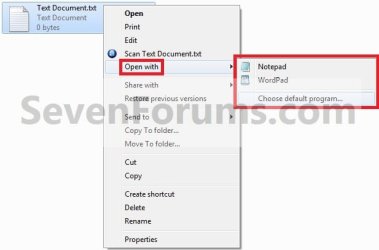
Step1.jpg

   Note
If you do not have Open with in the context menu, then this means this file does not have a program associated to open it with.
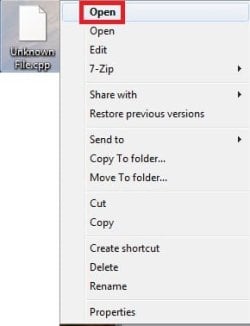
  • Instead, click on Open.
Open-1.jpg
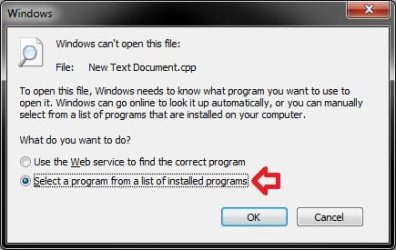
  • Select (dot) Select a program from a list of installed programs, and click on OK.
  • Go to step 3.
Open.jpg


2. To Select a Program that is Already Listed in Context Menu
NOTE: This option will only open the file type with this program for just this one time and not everytime by default.
A) After you have expanded Open with, select a listed program (ex: Notepad or Wordpad) that you want to open the file with for just this one time. (see screenshot below)
Step1.jpg
B) Go to step 4.
3. To Select a Program that is Not Listed in Context Menu
NOTE: This option will allow you to be able to select to have the file type to always open with the selected program by default if you like.
A) After you have expanded Open with, select Choose default program. (see screenshot below step 1)

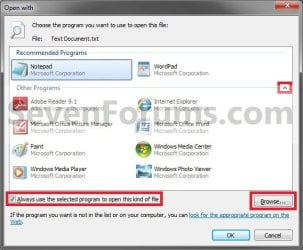
B) Under Other Programs, click on the drop down arrow to the far right to exapnd it and see more programs to select from. (See screenshot below)
Step2.jpg
C) Select the program that you want to open the file with. (See screenshot above)
NOTE: If the program you wanted to select is still not listed, then click on the Browse button and navigate to the program's exe file. Select it, and click on the Open button to add it to be able to select it.


D) To Always Open this File Type with the Selected Program by Default
  • Check the Always use the selected program to open this kind of file box. (See screenshot below step 3B)
  • Go to step 3F.
E) To Only Open this File Type with the Selected Program for Just this One Time
  • Uncheck the Always use the selected program to open this kind of file box. (See screenshot below step 3B)
F) Click on OK. (See screenshot below step 3B)
4. The file will now be opened by the selected program.
That's it,
Shawn


Last edited:

My Computer

Computer type
PC/Desktop
Computer Manufacturer/Model Number
Self built custom
OS
64-bit Windows 11 Pro for Workstations
CPU
Intel i7-8700K OC'd to 5 GHz
Motherboard
ASUS ROG Maximus XI Formula Z390
Memory
64 GB (4x16GB) G.SKILL TridentZ RGB DDR4 3600 MHz
Graphics Card(s)
ASUS ROG-STRIX-GTX1080TI-O11G-GAMING
Sound Card
Integrated
Monitor(s) Displays
2 x Samsung Odyssey G7 27"
Screen Resolution
2560x1440
Hard Drives
1TB Samsung 990 PRO M.2,
4TB Samsung 990 PRO PRO M.2,
TerraMaster F8 SSD Plus NAS
PSU
Seasonic Prime Titanium 850W
Case
Thermaltake Core P3
Cooling
Corsair Hydro H115i
Keyboard
Logitech wireless K800
Mouse
Logitech MX Master 4
Internet Speed
2 Gb/s Download and 100 Mb/s Upload
Antivirus
Malwarebyte Anti-Malware Premium
Browser
Google Chrome
Other Info
Logitech Z625 speaker system,
Logitech BRIO 4K Pro webcam,
HP Color LaserJet Pro MFP M477fdn,
APC SMART-UPS RT 1000 XL - SURT1000XLI,
Galaxy S23 Plus phone
thankyou, your a life saver! anyway to get icons back to normal? its not as important, but it is a bit of a pain in the arse!
 

My Computer

OS
Windows 7 Home Premium 32bit
You're most welcome.

It depends on if it's the actual shortcut's icon or the overlay arrow on the icon. If you would, please post a screenshot showing them to see if it may help ID what may be wrong with them
 

My Computer

Computer type
PC/Desktop
Computer Manufacturer/Model Number
Self built custom
OS
64-bit Windows 11 Pro for Workstations
CPU
Intel i7-8700K OC'd to 5 GHz
Motherboard
ASUS ROG Maximus XI Formula Z390
Memory
64 GB (4x16GB) G.SKILL TridentZ RGB DDR4 3600 MHz
Graphics Card(s)
ASUS ROG-STRIX-GTX1080TI-O11G-GAMING
Sound Card
Integrated
Monitor(s) Displays
2 x Samsung Odyssey G7 27"
Screen Resolution
2560x1440
Hard Drives
1TB Samsung 990 PRO M.2,
4TB Samsung 990 PRO PRO M.2,
TerraMaster F8 SSD Plus NAS
PSU
Seasonic Prime Titanium 850W
Case
Thermaltake Core P3
Cooling
Corsair Hydro H115i
Keyboard
Logitech wireless K800
Mouse
Logitech MX Master 4
Internet Speed
2 Gb/s Download and 100 Mb/s Upload
Antivirus
Malwarebyte Anti-Malware Premium
Browser
Google Chrome
Other Info
Logitech Z625 speaker system,
Logitech BRIO 4K Pro webcam,
HP Color LaserJet Pro MFP M477fdn,
APC SMART-UPS RT 1000 XL - SURT1000XLI,
Galaxy S23 Plus phone
here we go
 

Attachments

  • Untitled.png
    Untitled.png
    339.1 KB · Views: 149

My Computer

OS
Windows 7 Home Premium 32bit
It's hard to tell what the shortcuts are for with the text garble and blurry, but you might see if rebuilding the icon cache may help now since the default association has been restored.
 

My Computer

Computer type
PC/Desktop
Computer Manufacturer/Model Number
Self built custom
OS
64-bit Windows 11 Pro for Workstations
CPU
Intel i7-8700K OC'd to 5 GHz
Motherboard
ASUS ROG Maximus XI Formula Z390
Memory
64 GB (4x16GB) G.SKILL TridentZ RGB DDR4 3600 MHz
Graphics Card(s)
ASUS ROG-STRIX-GTX1080TI-O11G-GAMING
Sound Card
Integrated
Monitor(s) Displays
2 x Samsung Odyssey G7 27"
Screen Resolution
2560x1440
Hard Drives
1TB Samsung 990 PRO M.2,
4TB Samsung 990 PRO PRO M.2,
TerraMaster F8 SSD Plus NAS
PSU
Seasonic Prime Titanium 850W
Case
Thermaltake Core P3
Cooling
Corsair Hydro H115i
Keyboard
Logitech wireless K800
Mouse
Logitech MX Master 4
Internet Speed
2 Gb/s Download and 100 Mb/s Upload
Antivirus
Malwarebyte Anti-Malware Premium
Browser
Google Chrome
Other Info
Logitech Z625 speaker system,
Logitech BRIO 4K Pro webcam,
HP Color LaserJet Pro MFP M477fdn,
APC SMART-UPS RT 1000 XL - SURT1000XLI,
Galaxy S23 Plus phone
not working for me

I'm following these steps to try to add Audacity to the list of programs I can use to open an audio file, but when I choose "audacity.exe" and click "open" it does not appear on the list! Anyone have any ideas as to why that would be or how I can successfully add it to the list of programs? Thanks!
 

My Computer

OS
windows 7
Hello Zuckie, and welcome to Seven Forums.

Did you expand Other Programs in "Open with" at step 3B to see if it was listed there?
 

My Computer

Computer type
PC/Desktop
Computer Manufacturer/Model Number
Self built custom
OS
64-bit Windows 11 Pro for Workstations
CPU
Intel i7-8700K OC'd to 5 GHz
Motherboard
ASUS ROG Maximus XI Formula Z390
Memory
64 GB (4x16GB) G.SKILL TridentZ RGB DDR4 3600 MHz
Graphics Card(s)
ASUS ROG-STRIX-GTX1080TI-O11G-GAMING
Sound Card
Integrated
Monitor(s) Displays
2 x Samsung Odyssey G7 27"
Screen Resolution
2560x1440
Hard Drives
1TB Samsung 990 PRO M.2,
4TB Samsung 990 PRO PRO M.2,
TerraMaster F8 SSD Plus NAS
PSU
Seasonic Prime Titanium 850W
Case
Thermaltake Core P3
Cooling
Corsair Hydro H115i
Keyboard
Logitech wireless K800
Mouse
Logitech MX Master 4
Internet Speed
2 Gb/s Download and 100 Mb/s Upload
Antivirus
Malwarebyte Anti-Malware Premium
Browser
Google Chrome
Other Info
Logitech Z625 speaker system,
Logitech BRIO 4K Pro webcam,
HP Color LaserJet Pro MFP M477fdn,
APC SMART-UPS RT 1000 XL - SURT1000XLI,
Galaxy S23 Plus phone
Yes I did. I clicked on "browse" found the "audacity.exe" file, clicked open and nothing happened - it did not appear in the list of programs I could open audio files with, it was as if I hadn't done anything. Any ideas are welcome!
 

My Computer

OS
windows 7
The exe file may not be the correct file from the program to run the audio file with, or the exe doesn't support running that audio file. Are you able to open the file from within the program itself to run it? If so, then it may be another file from the program that runs it instead. What does the program's shortcut target point to?
 

My Computer

Computer type
PC/Desktop
Computer Manufacturer/Model Number
Self built custom
OS
64-bit Windows 11 Pro for Workstations
CPU
Intel i7-8700K OC'd to 5 GHz
Motherboard
ASUS ROG Maximus XI Formula Z390
Memory
64 GB (4x16GB) G.SKILL TridentZ RGB DDR4 3600 MHz
Graphics Card(s)
ASUS ROG-STRIX-GTX1080TI-O11G-GAMING
Sound Card
Integrated
Monitor(s) Displays
2 x Samsung Odyssey G7 27"
Screen Resolution
2560x1440
Hard Drives
1TB Samsung 990 PRO M.2,
4TB Samsung 990 PRO PRO M.2,
TerraMaster F8 SSD Plus NAS
PSU
Seasonic Prime Titanium 850W
Case
Thermaltake Core P3
Cooling
Corsair Hydro H115i
Keyboard
Logitech wireless K800
Mouse
Logitech MX Master 4
Internet Speed
2 Gb/s Download and 100 Mb/s Upload
Antivirus
Malwarebyte Anti-Malware Premium
Browser
Google Chrome
Other Info
Logitech Z625 speaker system,
Logitech BRIO 4K Pro webcam,
HP Color LaserJet Pro MFP M477fdn,
APC SMART-UPS RT 1000 XL - SURT1000XLI,
Galaxy S23 Plus phone
thanks
but this doesn't work with VLC.exe and FLV extension :(
 

My Computer

Computer type
PC/Desktop
OS
windows 7 ultimate 64bit
thanks
but this doesn't work with VLC.exe and FLV extension :(

Hello Drugo,

Are you able to select the VLC media player in "Open with" instead?

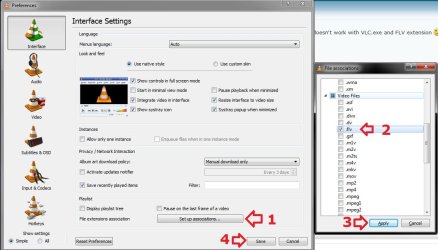
In addition, in VLC media player, you can click on Tools (menu bar) and Preferences, then do what's in the screenshot below to set FLV to open with VLC media player. :)

Preferences.jpg
 
Last edited:

My Computer

Computer type
PC/Desktop
Computer Manufacturer/Model Number
Self built custom
OS
64-bit Windows 11 Pro for Workstations
CPU
Intel i7-8700K OC'd to 5 GHz
Motherboard
ASUS ROG Maximus XI Formula Z390
Memory
64 GB (4x16GB) G.SKILL TridentZ RGB DDR4 3600 MHz
Graphics Card(s)
ASUS ROG-STRIX-GTX1080TI-O11G-GAMING
Sound Card
Integrated
Monitor(s) Displays
2 x Samsung Odyssey G7 27"
Screen Resolution
2560x1440
Hard Drives
1TB Samsung 990 PRO M.2,
4TB Samsung 990 PRO PRO M.2,
TerraMaster F8 SSD Plus NAS
PSU
Seasonic Prime Titanium 850W
Case
Thermaltake Core P3
Cooling
Corsair Hydro H115i
Keyboard
Logitech wireless K800
Mouse
Logitech MX Master 4
Internet Speed
2 Gb/s Download and 100 Mb/s Upload
Antivirus
Malwarebyte Anti-Malware Premium
Browser
Google Chrome
Other Info
Logitech Z625 speaker system,
Logitech BRIO 4K Pro webcam,
HP Color LaserJet Pro MFP M477fdn,
APC SMART-UPS RT 1000 XL - SURT1000XLI,
Galaxy S23 Plus phone
Hello Drugo,

Are you able to select the VLC media player in "Open with" instead?

yes

In addition, in VLC media player, you can click on Tools (menu bar) and Preferences, then do what's in the screenshot below to set FLV to open with VLC media player. :)
i downloaded the zip file
i doesn't work
 

My Computer

Computer type
PC/Desktop
OS
windows 7 ultimate 64bit

My Computer

Computer type
PC/Desktop
Computer Manufacturer/Model Number
Self built custom
OS
64-bit Windows 11 Pro for Workstations
CPU
Intel i7-8700K OC'd to 5 GHz
Motherboard
ASUS ROG Maximus XI Formula Z390
Memory
64 GB (4x16GB) G.SKILL TridentZ RGB DDR4 3600 MHz
Graphics Card(s)
ASUS ROG-STRIX-GTX1080TI-O11G-GAMING
Sound Card
Integrated
Monitor(s) Displays
2 x Samsung Odyssey G7 27"
Screen Resolution
2560x1440
Hard Drives
1TB Samsung 990 PRO M.2,
4TB Samsung 990 PRO PRO M.2,
TerraMaster F8 SSD Plus NAS
PSU
Seasonic Prime Titanium 850W
Case
Thermaltake Core P3
Cooling
Corsair Hydro H115i
Keyboard
Logitech wireless K800
Mouse
Logitech MX Master 4
Internet Speed
2 Gb/s Download and 100 Mb/s Upload
Antivirus
Malwarebyte Anti-Malware Premium
Browser
Google Chrome
Other Info
Logitech Z625 speaker system,
Logitech BRIO 4K Pro webcam,
HP Color LaserJet Pro MFP M477fdn,
APC SMART-UPS RT 1000 XL - SURT1000XLI,
Galaxy S23 Plus phone

My Computer

Computer type
PC/Desktop
OS
windows 7 ultimate 64bit
Give the exe version a try instead. :)
 

My Computer

Computer type
PC/Desktop
Computer Manufacturer/Model Number
Self built custom
OS
64-bit Windows 11 Pro for Workstations
CPU
Intel i7-8700K OC'd to 5 GHz
Motherboard
ASUS ROG Maximus XI Formula Z390
Memory
64 GB (4x16GB) G.SKILL TridentZ RGB DDR4 3600 MHz
Graphics Card(s)
ASUS ROG-STRIX-GTX1080TI-O11G-GAMING
Sound Card
Integrated
Monitor(s) Displays
2 x Samsung Odyssey G7 27"
Screen Resolution
2560x1440
Hard Drives
1TB Samsung 990 PRO M.2,
4TB Samsung 990 PRO PRO M.2,
TerraMaster F8 SSD Plus NAS
PSU
Seasonic Prime Titanium 850W
Case
Thermaltake Core P3
Cooling
Corsair Hydro H115i
Keyboard
Logitech wireless K800
Mouse
Logitech MX Master 4
Internet Speed
2 Gb/s Download and 100 Mb/s Upload
Antivirus
Malwarebyte Anti-Malware Premium
Browser
Google Chrome
Other Info
Logitech Z625 speaker system,
Logitech BRIO 4K Pro webcam,
HP Color LaserJet Pro MFP M477fdn,
APC SMART-UPS RT 1000 XL - SURT1000XLI,
Galaxy S23 Plus phone
I find it hard to believe, here it is Dec/2015, and this issue has not been fixed by Microsoft as part of a Win7 update. I have a favourite text editor, and I want my Win7 PC to recognise it as one of the "Open with" applications, and for file associations. NOTHING I have seen or tried works, unless I am willing to try to edit the registry. When I do not see it listed among the choices, I use Browse, locate it on another drive/folder and choose it, with the box ticked for 'Always use' and my choice does not "stick". Win7 seems to forget my choice as soon as I leave the browse function. This was easy in XP. Why is it impossible in Win7 ? It is getting annoying that each time I want to open one of several file types, I have to drag the file icon out to the Desktop icon, and use Open With. When I go to the Install Programs menu, all I see is CD/DVD or Web. Why is there no choice for "Already installed and running on drive X:" ? I downloaded that DefaultProgramsEditor program and that is useless. Doesn't do what it seems to advertise. Or maybe I am just dim.
 

My Computer

Computer type
PC/Desktop
Computer Manufacturer/Model Number
IBM
OS
ON - Ontario
CPU
Xeon
Hello farmerbb, and welcome to Seven Forums. :)

Is the text editor program installed, or is it a portable standalone program? Usually, only installed programs will stay listed in Open with.

This also depends on the program being compatible with Windows 7, and properly registers itself when installed.

What's program is this for? I'll see if I may be able to test it on my system.
 
Last edited:

My Computer

Computer type
PC/Desktop
Computer Manufacturer/Model Number
Self built custom
OS
64-bit Windows 11 Pro for Workstations
CPU
Intel i7-8700K OC'd to 5 GHz
Motherboard
ASUS ROG Maximus XI Formula Z390
Memory
64 GB (4x16GB) G.SKILL TridentZ RGB DDR4 3600 MHz
Graphics Card(s)
ASUS ROG-STRIX-GTX1080TI-O11G-GAMING
Sound Card
Integrated
Monitor(s) Displays
2 x Samsung Odyssey G7 27"
Screen Resolution
2560x1440
Hard Drives
1TB Samsung 990 PRO M.2,
4TB Samsung 990 PRO PRO M.2,
TerraMaster F8 SSD Plus NAS
PSU
Seasonic Prime Titanium 850W
Case
Thermaltake Core P3
Cooling
Corsair Hydro H115i
Keyboard
Logitech wireless K800
Mouse
Logitech MX Master 4
Internet Speed
2 Gb/s Download and 100 Mb/s Upload
Antivirus
Malwarebyte Anti-Malware Premium
Browser
Google Chrome
Other Info
Logitech Z625 speaker system,
Logitech BRIO 4K Pro webcam,
HP Color LaserJet Pro MFP M477fdn,
APC SMART-UPS RT 1000 XL - SURT1000XLI,
Galaxy S23 Plus phone
Thanks for the response. The text editor is called Lpex, it IS installed, and I doubt it registered itself when installed. (evfwlx40.exe) I just copied it and unzipped it from a previous machine. As for compatibility, every thing I use in it seems to work, other than I just can't get Win7 to recognise it. XP handled it fine. I don't know if it is available anywhere, as it was developed by IBM, maybe 20 years ago. I continue to use it because I am familiar with it, and need nothing else to do my work. I have written many million lines of code with it and with the predecessor, EPM for OS/2.

As for "staying listed in Open With", this has NEVER appeared in Open With. Not for a second. I use Browse to tell what the application is, and Win7 just forgets my choice as soon as I leave the panel where I chose it. A thought....please tell me Windows will accept an application installed on drives other then C:.....
 

My Computer

Computer type
PC/Desktop
Computer Manufacturer/Model Number
IBM
OS
ON - Ontario
CPU
Xeon
Yeah, with it being that old, it's not fully compatible to work with this properly.

If you like, post back with the full path of the evfwlx40.exe file, and I'll post back with a modified version of the tutorial below so that you will have a "Open with Lpex" in the context menu of all files.

You can then test to make sure it works properly for you with it.

http://www.sevenforums.com/tutorials/90686-open-notepad-add-remove-context-menu-files.html
 

My Computer

Computer type
PC/Desktop
Computer Manufacturer/Model Number
Self built custom
OS
64-bit Windows 11 Pro for Workstations
CPU
Intel i7-8700K OC'd to 5 GHz
Motherboard
ASUS ROG Maximus XI Formula Z390
Memory
64 GB (4x16GB) G.SKILL TridentZ RGB DDR4 3600 MHz
Graphics Card(s)
ASUS ROG-STRIX-GTX1080TI-O11G-GAMING
Sound Card
Integrated
Monitor(s) Displays
2 x Samsung Odyssey G7 27"
Screen Resolution
2560x1440
Hard Drives
1TB Samsung 990 PRO M.2,
4TB Samsung 990 PRO PRO M.2,
TerraMaster F8 SSD Plus NAS
PSU
Seasonic Prime Titanium 850W
Case
Thermaltake Core P3
Cooling
Corsair Hydro H115i
Keyboard
Logitech wireless K800
Mouse
Logitech MX Master 4
Internet Speed
2 Gb/s Download and 100 Mb/s Upload
Antivirus
Malwarebyte Anti-Malware Premium
Browser
Google Chrome
Other Info
Logitech Z625 speaker system,
Logitech BRIO 4K Pro webcam,
HP Color LaserJet Pro MFP M477fdn,
APC SMART-UPS RT 1000 XL - SURT1000XLI,
Galaxy S23 Plus phone
Thanks for the offer, I truly appreciate it. I have two copies installed, for some reason. How about either this path

c:\lpex\bin\evfwlx40.exe or c:\utilities\lpex\BIN\evfwlx40.exe

I wonder how many others will read this thread and use your response to fix a problem they too have ?
 

My Computer

Computer type
PC/Desktop
Computer Manufacturer/Model Number
IBM
OS
ON - Ontario
CPU
Xeon
Back
Top