
Open with menu is grey out in windows 7

ampicillin

New member
Local time
4:50 PM
Messages
4
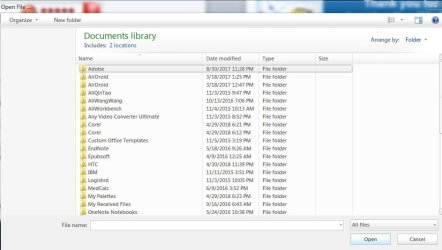
What could be the issue of this? Whenever I try to open with side menu comes like this. It happens most of the time and usually limited to programs that I have installed or about to install. It seems fine within windows. I have installed theme called Elune and have changed my exploreframe.dll etc. How to fix this issue? I cannot see desktop, drives etc.
 

Attachments
  • Untitled.jpg
    Untitled.jpg
    47.9 KB · Views: 0

My Computer My Computer

At a glance

Windows 7 Ultimate 64 bit
Computer type
Laptop
OS
Windows 7 Ultimate 64 bit
Hi ampicillin,

First off, let's get your system specs sorted out and we can go from there!
Perhaps you could include your system specifications in your UserCP > Edit System Spec setup.

The tutorial below (Published by Brink and written by CyberZeus) let's you easily see all of your system information, and has an option to make filling out your system specs here at Seven Forums easier to do.

How to See Your System Specs with "System Info"

This way it will be easier for people to help you in the future!

I hope this helps!
 

My Computer My Computer

At a glance

Win 7 HP SP1 64-bit Vista HB SP2 32-bit Linux...Intel(R) Pentium(R) CPU P6200 @ 2.13GHz4.00 GBIntel(R) Graphics Media Accelerator HD
Computer type
Laptop
Computer Manufacturer/Model Number
Fujitsu LIFEBOOK
OS
Win 7 HP SP1 64-bit Vista HB SP2 32-bit Linux Mint 18.3
CPU
Intel(R) Pentium(R) CPU P6200 @ 2.13GHz
Motherboard
FUJITSU FJNBB06
Memory
4.00 GB
Graphics Card(s)
Intel(R) Graphics Media Accelerator HD
Sound Card
[1] Realtek High Definition Audio [2] Intel(R) Display Audio
Screen Resolution
1366 x 768 x 32 bits (4294967296 colors) @ 59 Hz
Hard Drives
TOSHIBA MK5076GSX
Antivirus
AVG FREE
Back
Top