Help with Cleaning Up "Open With" Menu

TDKMate

New member
Member
VIP
Local time
7:25 PM
Messages
335
I found the sticky thread on this (Open with - Clean Up and Remove Programs - Windows 7 Help Forums) and tried the OpenWithView tip/program.

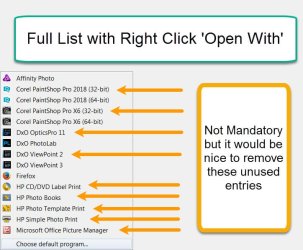
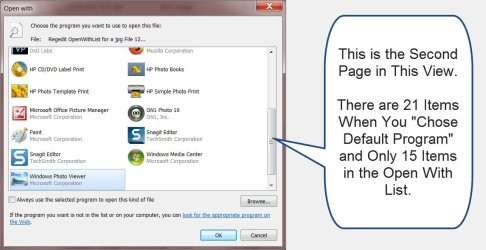
Unfortunately it doesn't show any more items in the Open With menu than CCleaner does, meaning all the junk I want to get rid of is not shown. When picking a program to open a jpeg I have, for instance, four printer utilities showing that I never use (as seen in the attachment), plus a bunch of duplicate of programs where they installed both 32 and 64 bit versions of the program, and more.

I'm trying to add an Open With program and it doesn't 'stick.' I think the problem is there's no room for it to show with a simple click on Open With.

Until it got full I was always able to:
Open With
Choose Default Program
Uncheck Make Default
Then select the program.

Note that the program I want to use is already showing in the icon list in Choose Default Program, meaning I don't have to go Browse for it. That's the main reason I think the list is full when just clicking on Open With (if I said that right...).

Any ideas?
.
 

Attachments
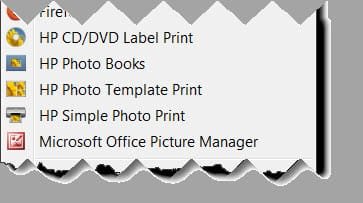
  • Open With - Too Many Options 12-19-17.jpg
    Open With - Too Many Options 12-19-17.jpg
    12.9 KB · Views: 23

My Computer

Computer type
PC/Desktop
Computer Manufacturer/Model Number
home built
OS
Win 7 Pro 64 SP1
CPU
i7 6700K SkyLake
Motherboard
MSI Gaming M7
Memory
32 GB
Graphics Card(s)
nVidia GTX 970
Sound Card
onboard
Monitor(s) Displays
DELL U2711
Screen Resolution
2560x1440
Hard Drives
1 SSD OS, 2 WD Black Caviar data harddrives
PSU
EVGA Super Nova 850W G2 'Gold'
Case
Thermaltake Soprano Snow Edition
Cooling
Cooler Master Hyper 212 evo
Keyboard
Logitech K350
Mouse
Mad Kats RATT
Antivirus
Avast
Browser
Firefox
Hi TDKMate,

Read and reread you post and need a little clarification. The image appears to be from the context menu. In your post, you appear to be referencing the OpenWith menu & you include mention of multiple printers which you say you don't use. Are you trying to remove the unused entries? Or are you just trying to add an additional entry? Or are you trying to accomplish both?

I downloaded OpenWithView and run the program. I'm showing 28 available programs. When I right-click a jpeg and hover over open with I have 8 programs, which is the same as the Open With dialog box which appears when I click Choose default program...

I perused sevenforums and this may be a resolution to your issue click here

If that doesn't work, you could try modifying the registry. Can post info/instruction if needed.

If you decide to proceed on your own with a registry tweak, BE ADVISED, BACKUP YOUR REGISTRY AND/OR THE KEY WHICH YOU ATTEMPT TO MODIFY. MISTAKES MAY RENDER WINDOWS INOPERATIVE. Whenever I mess with the registry I always back up the key or the entire registry & image the entire drive to an external HDD. An ounce of prevention is worth a pound of cure.
 
Last edited:

My Computer

Computer type
PC/Desktop
Computer Manufacturer/Model Number
HP Desktop & Compaq Laptop
OS
Win 10 x64, Linux Lite, Win 7 x64, BlackArch, & Kali
Hard Drives
Samsung 850 Pro 256Gb,
Hitachi HDD 1Tb,
Crucial MX SSD 250Gb
Segate 3Tb USB 3.0 Ext. Backup HDD
Internet Speed
150Mbps dn, 20Mbps up
Antivirus
Avast Free, Malwarebytes Anti-Exploit & Anti-Ransomware
Browser
Firefox, Chrome, Opera, & VPN
Hi TDKMate,

Read and reread you post and need a little clarification. The image appears to be from the context menu. In your post, you appear to be referencing the OpenWith menu & you include mention of multiple printers which you say you don't use. Are you trying to remove the unused entries? Or are you just trying to add an additional entry? Or are you trying to accomplish both?

Hi Snick. Thanks for the post. Sorry I wasn’t ‘more clear.’ Yes, it's from the Menu when you Right Click on Open With on a jpg. Removing unused entries would be nice but not mandatory. I just figured that if I removed unused entries there would be more room to show entries I do want. I hope I say this right: In a sense, I’m not ‘adding’ an entry, but it’s only showing up when I click on Choose Default Program and not with the Right Click ‘Open With.’ Again, I’m thinking there is just no room to show in Open With. Hopefully the screenshots will help clarify this.

I downloaded OpenWithView and run the program. I'm showing 28 available programs. When I right-click a jpeg and hover over open with I have 8 programs, which is the same as the Open With dialog box which appears when I click Choose default program...
I tried OpenWithView already and it does Not list all the programs showing in either Open With or Choose Default Program. I can see the same list in CCleaner’s Context Menu tool.

I perused sevenforums and this may be a resolution to your issue click here

If that doesn't work, you could try modifying the registry. Can post info/instruction if needed….
Thanks for the link. I went thru the whole thread and no joy. Most of it didn’t apply in the sense that the program I want to ‘Add’ is already there, so I don’t need to Add it. It’s just that it only shows in Choose Default Program and not in the Open With choices. It’s just a minor annoyance in that it’s several additional clicks instead of one to open the jpg with the particular program (SnagIt).

I also tried the Regedit tip in the link but no joy there either: it also doesn’t show all the entries I see in Open With or Choose Default Program. See screenshot of its list.

(Well, I just uploaded the screenshots, one at time to keep them in order, and they are not appearing in Preview Post in the order I uploaded them in. Don't know how to rearrange them, sorry...)
.
 

Attachments

  • Full List with Right Click 'Open With'.jpg
    Full List with Right Click 'Open With'.jpg
    59.1 KB · Views: 12
  • Chose Default Program 12-20-17.jpg
    Chose Default Program 12-20-17.jpg
    75.5 KB · Views: 1
  • Regedit OpenWithList for a jpg File 12-20-17.jpg
    Regedit OpenWithList for a jpg File 12-20-17.jpg
    27.9 KB · Views: 1

My Computer

Computer type
PC/Desktop
Computer Manufacturer/Model Number
home built
OS
Win 7 Pro 64 SP1
CPU
i7 6700K SkyLake
Motherboard
MSI Gaming M7
Memory
32 GB
Graphics Card(s)
nVidia GTX 970
Sound Card
onboard
Monitor(s) Displays
DELL U2711
Screen Resolution
2560x1440
Hard Drives
1 SSD OS, 2 WD Black Caviar data harddrives
PSU
EVGA Super Nova 850W G2 'Gold'
Case
Thermaltake Soprano Snow Edition
Cooling
Cooler Master Hyper 212 evo
Keyboard
Logitech K350
Mouse
Mad Kats RATT
Antivirus
Avast
Browser
Firefox
Back
Top