Solved "Open With" Not Working

naszdom

New member
Local time
2:03 PM
Messages
6
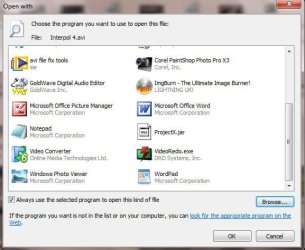
When I right click an AVI – I used to be able to “open with” – “choose default program” and open it with Virtualdub or whatever. Now I click on Virtualdub but it does not appear in the list of “Recommended” or “Other Programs”. Also having used Virtualdub it used to appear in the list of programmes when I right clicked but not any more. Instead it’s always the same programmes including Windows Media Player which I never use for AVIs and Windows Media Center which I have never used in my life.

Elsewhere on this site I have found “Open With View” – does not work and two registry .reg files Remove_Open_With and Restore_Open_With – still the same after I restored it.

Is there anyway of restoring “open with” preferably with permanent removal Windows Media Player and Windows Media Center as default choices?
 

My Computer

Computer Manufacturer/Model Number
Mongrel
OS
Windows 7 Enterprise 32bit.
CPU
Intel Pentium Dual E2220 2.4Ghz
Motherboard
MSI
Memory
4 gig
Graphics Card(s)
Radeon X1950
Sound Card
Realtek
Monitor(s) Displays
Targa
Hello Naszdom, and welcome to Seven Forums.

You might see if manually setting the association in Default Programs to see if it may appear in Open with afterwards.

Hope this helps,
Shawn
 

My Computer

Computer type
PC/Desktop
Computer Manufacturer/Model Number
Self built custom
OS
64-bit Windows 11 Pro for Workstations
CPU
Intel i7-8700K OC'd to 5 GHz
Motherboard
ASUS ROG Maximus XI Formula Z390
Memory
64 GB (4x16GB) G.SKILL TridentZ RGB DDR4 3600 MHz
Graphics Card(s)
ASUS ROG-STRIX-GTX1080TI-O11G-GAMING
Sound Card
Integrated
Monitor(s) Displays
2 x Samsung Odyssey G7 27"
Screen Resolution
2560x1440
Hard Drives
1TB Samsung 990 PRO M.2,
4TB Samsung 990 PRO PRO M.2,
TerraMaster F8 SSD Plus NAS
PSU
Seasonic Prime Titanium 850W
Case
Thermaltake Core P3
Cooling
Corsair Hydro H115i
Keyboard
Logitech wireless K800
Mouse
Logitech MX Master 4
Internet Speed
2 Gb/s Download and 100 Mb/s Upload
Antivirus
Malwarebyte Anti-Malware Premium
Browser
Google Chrome
Other Info
Logitech Z625 speaker system,
Logitech BRIO 4K Pro webcam,
HP Color LaserJet Pro MFP M477fdn,
APC SMART-UPS RT 1000 XL - SURT1000XLI,
Galaxy S23 Plus phone
Thanks Brink/Shawn

I tried changing the default file through Properties and Control Panel but it did not work.

I also downloaded the AVI .reg file merged it and tried again. No luck.

Interestingly although the .reg file removed a couple of the "open with" choices when I right clicked it did not change the default file type to Windows Media Player but left it as VLC.
 

My Computer

Computer Manufacturer/Model Number
Mongrel
OS
Windows 7 Enterprise 32bit.
CPU
Intel Pentium Dual E2220 2.4Ghz
Motherboard
MSI
Memory
4 gig
Graphics Card(s)
Radeon X1950
Sound Card
Realtek
Monitor(s) Displays
Targa
Did you see if restarting the computer after merging the AVI download may fully apply it afterwards?

When you go into Default Programs (see link), do you have Windows Media Player listed to select and to click on "Set this program as default"?
 

My Computer

Computer type
PC/Desktop
Computer Manufacturer/Model Number
Self built custom
OS
64-bit Windows 11 Pro for Workstations
CPU
Intel i7-8700K OC'd to 5 GHz
Motherboard
ASUS ROG Maximus XI Formula Z390
Memory
64 GB (4x16GB) G.SKILL TridentZ RGB DDR4 3600 MHz
Graphics Card(s)
ASUS ROG-STRIX-GTX1080TI-O11G-GAMING
Sound Card
Integrated
Monitor(s) Displays
2 x Samsung Odyssey G7 27"
Screen Resolution
2560x1440
Hard Drives
1TB Samsung 990 PRO M.2,
4TB Samsung 990 PRO PRO M.2,
TerraMaster F8 SSD Plus NAS
PSU
Seasonic Prime Titanium 850W
Case
Thermaltake Core P3
Cooling
Corsair Hydro H115i
Keyboard
Logitech wireless K800
Mouse
Logitech MX Master 4
Internet Speed
2 Gb/s Download and 100 Mb/s Upload
Antivirus
Malwarebyte Anti-Malware Premium
Browser
Google Chrome
Other Info
Logitech Z625 speaker system,
Logitech BRIO 4K Pro webcam,
HP Color LaserJet Pro MFP M477fdn,
APC SMART-UPS RT 1000 XL - SURT1000XLI,
Galaxy S23 Plus phone
Brink

You were right restating switched it to Windows Media Player. However "Open With" still would not accept Virtualdub. I have now entered a separate entry in my context menu for Virtualdub which is a pity as it means more clutter.
 

My Computer

Computer Manufacturer/Model Number
Mongrel
OS
Windows 7 Enterprise 32bit.
CPU
Intel Pentium Dual E2220 2.4Ghz
Motherboard
MSI
Memory
4 gig
Graphics Card(s)
Radeon X1950
Sound Card
Realtek
Monitor(s) Displays
Targa
There should be a browse button on the Open With dialogue. If you browse to the executable it will include it.

2011-07-18_122529.png
 

My Computer

Computer type
Laptop
Computer Manufacturer/Model Number
Hewlett-Packard/G62-107SA Notebook
OS
Microsoft Windows 7 Home Premium 64-bit Service Pack 1
CPU
Intel(R) Core(TM) i3 CPU M 330 @ 2.13GHz
Motherboard
Hewlett-Packard 1425
Memory
8 GB DDR3
Graphics Card(s)
Intel(R) HD Graphics
Sound Card
Realtek High Definition Audio
Monitor(s) Displays
Builtin
Screen Resolution
1366 x 768 x 32 bits (4294967296 colors) @ 60 Hz
Hard Drives
250 GB SATA Hard Disk Drive 7200 rpm
2TB Seagate GoFlex USB 2 Drive
1TB Iomega Prestige USB 2 Drive
1.5TB Iomega Prestige USB 2 Drive (Samsung)
2TB WD MyBook Live NAS.
Mouse
Logitech Anywhere MX
Internet Speed
152 Mbs download 10 Mbs upload
Antivirus
Norton 360
Browser
Chrome
Kado897

I know what there should be. The problem is if I browse to the executable it does not include it
 

Attachments

  • Image6.jpg
    Image6.jpg
    41.4 KB · Views: 39
  • Image8.jpg
    Image8.jpg
    40.5 KB · Views: 95

My Computer

Computer Manufacturer/Model Number
Mongrel
OS
Windows 7 Enterprise 32bit.
CPU
Intel Pentium Dual E2220 2.4Ghz
Motherboard
MSI
Memory
4 gig
Graphics Card(s)
Radeon X1950
Sound Card
Realtek
Monitor(s) Displays
Targa

My Computer

Computer Manufacturer/Model Number
Acer Aspire 7741Z
OS
Windows 7 Home Premium 64-bit, SP1
CPU
Intel Pentium P6200, Cores 2, 2.13 GHz
Memory
4 GB
Graphics Card(s)
Intel HD
Sound Card
unknown
Monitor(s) Displays
17.3 inches
Screen Resolution
1600 x 900
Hard Drives
640 GB, 5400 PRM
No I know what to do. Its what you do when it does not work I'm stuck on.

Please read my first post.
 

My Computer

Computer Manufacturer/Model Number
Mongrel
OS
Windows 7 Enterprise 32bit.
CPU
Intel Pentium Dual E2220 2.4Ghz
Motherboard
MSI
Memory
4 gig
Graphics Card(s)
Radeon X1950
Sound Card
Realtek
Monitor(s) Displays
Targa
Kado897

I know what there should be. The problem is if I browse to the executable it does not include it

Is this you are looking for ?..................
How to add a program to Open With list :
Open With - Add Program - Vista Forums

No I know what to do. Its what you do when it does not work I'm stuck on.

Please read my first post.

Please try the OpenWithAdd program in METHOD TWO at the tutorial link above before dismissing it to see if it may be able to add it back for you.
 

My Computer

Computer type
PC/Desktop
Computer Manufacturer/Model Number
Self built custom
OS
64-bit Windows 11 Pro for Workstations
CPU
Intel i7-8700K OC'd to 5 GHz
Motherboard
ASUS ROG Maximus XI Formula Z390
Memory
64 GB (4x16GB) G.SKILL TridentZ RGB DDR4 3600 MHz
Graphics Card(s)
ASUS ROG-STRIX-GTX1080TI-O11G-GAMING
Sound Card
Integrated
Monitor(s) Displays
2 x Samsung Odyssey G7 27"
Screen Resolution
2560x1440
Hard Drives
1TB Samsung 990 PRO M.2,
4TB Samsung 990 PRO PRO M.2,
TerraMaster F8 SSD Plus NAS
PSU
Seasonic Prime Titanium 850W
Case
Thermaltake Core P3
Cooling
Corsair Hydro H115i
Keyboard
Logitech wireless K800
Mouse
Logitech MX Master 4
Internet Speed
2 Gb/s Download and 100 Mb/s Upload
Antivirus
Malwarebyte Anti-Malware Premium
Browser
Google Chrome
Other Info
Logitech Z625 speaker system,
Logitech BRIO 4K Pro webcam,
HP Color LaserJet Pro MFP M477fdn,
APC SMART-UPS RT 1000 XL - SURT1000XLI,
Galaxy S23 Plus phone
Thanks Brink

It works. Sorry I was dismissive I did not get as far reading down to the Openwithadd utility.

Nice little tool.


My Computer

Computer Manufacturer/Model Number
Mongrel
OS
Windows 7 Enterprise 32bit.
CPU
Intel Pentium Dual E2220 2.4Ghz
Motherboard
MSI
Memory
4 gig
Graphics Card(s)
Radeon X1950
Sound Card
Realtek
Monitor(s) Displays
Targa
No problem. I'm happy to hear that it was able to help. :)
 

My Computer

Computer type
PC/Desktop
Computer Manufacturer/Model Number
Self built custom
OS
64-bit Windows 11 Pro for Workstations
CPU
Intel i7-8700K OC'd to 5 GHz
Motherboard
ASUS ROG Maximus XI Formula Z390
Memory
64 GB (4x16GB) G.SKILL TridentZ RGB DDR4 3600 MHz
Graphics Card(s)
ASUS ROG-STRIX-GTX1080TI-O11G-GAMING
Sound Card
Integrated
Monitor(s) Displays
2 x Samsung Odyssey G7 27"
Screen Resolution
2560x1440
Hard Drives
1TB Samsung 990 PRO M.2,
4TB Samsung 990 PRO PRO M.2,
TerraMaster F8 SSD Plus NAS
PSU
Seasonic Prime Titanium 850W
Case
Thermaltake Core P3
Cooling
Corsair Hydro H115i
Keyboard
Logitech wireless K800
Mouse
Logitech MX Master 4
Internet Speed
2 Gb/s Download and 100 Mb/s Upload
Antivirus
Malwarebyte Anti-Malware Premium
Browser
Google Chrome
Other Info
Logitech Z625 speaker system,
Logitech BRIO 4K Pro webcam,
HP Color LaserJet Pro MFP M477fdn,
APC SMART-UPS RT 1000 XL - SURT1000XLI,
Galaxy S23 Plus phone
Back
Top