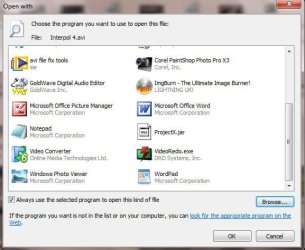
When I right click an AVI – I used to be able to “open with” – “choose default program” and open it with Virtualdub or whatever. Now I click on Virtualdub but it does not appear in the list of “Recommended” or “Other Programs”. Also having used Virtualdub it used to appear in the list of programmes when I right clicked but not any more. Instead it’s always the same programmes including Windows Media Player which I never use for AVIs and Windows Media Center which I have never used in my life.
Elsewhere on this site I have found “Open With View” – does not work and two registry .reg files Remove_Open_With and Restore_Open_With – still the same after I restored it.
Is there anyway of restoring “open with” preferably with permanent removal Windows Media Player and Windows Media Center as default choices?
Elsewhere on this site I have found “Open With View” – does not work and two registry .reg files Remove_Open_With and Restore_Open_With – still the same after I restored it.
Is there anyway of restoring “open with” preferably with permanent removal Windows Media Player and Windows Media Center as default choices?
My Computer
- Computer Manufacturer/Model Number
- Mongrel
- OS
- Windows 7 Enterprise 32bit.
- CPU
- Intel Pentium Dual E2220 2.4Ghz
- Motherboard
- MSI
- Memory
- 4 gig
- Graphics Card(s)
- Radeon X1950
- Sound Card
- Realtek
- Monitor(s) Displays
- Targa