Solved OpenCLL.dll not found error

loninappleton

New member
Member
VIP
Local time
6:42 AM
Messages
892
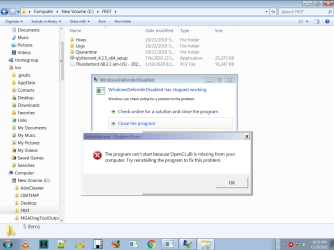
Well, this just cropped up today. I am getting the message about OpenCL.dll missing.

The advice I did find was copy the DLL from another machine. I checked my other MSI compatible machine and now OpenCL.dll on it.

Does Seven Forums have of their dll installers for this?
 
Last edited:

My Computer

Computer type
PC/Desktop
Computer Manufacturer/Model Number
custom
OS
Windows 7 x64 Ultimate
CPU
AMD Athlon II x3 450
Motherboard
MSI 880GM
Memory
2 GB
Hard Drives
various
Browser
Firefox, Opera
The most common cause of this problem that I could find is that the driver for your graphics card or onboard chip is out of date.
 

My Computer

Computer type
Laptop
Computer Manufacturer/Model Number
Dell M6500 Precision Work Station
OS
Windows 7 Pro SP1 64 bit
Memory
8 GB
Screen Resolution
1920x
Internet Speed
30 Mbps
Antivirus
Norton Security
Browser
IE 11
Everything is out of date on these old MSI machines I have. Thanks for prompt reply. One workaround I have is to search my clone backup. This is onboard video. I don't use anything else. When I loaded the original installer disc "video" was greyed out. Perhaps a downloaded driver can be run.

An Update:
I did find another OpenCL.dll whateves. I copied and put it in the directory on the problem machine and the error persists.
It locks up an image on screen too.

I've made a screen shot of the full error description involving Windows Defender which I have turned off.

I don't know if Defender has to be turned back on to see it or what. Not doing anything more with it today.

But the question remains: Is OpenCL.dll installed in a Windows directory by some other program -- some say-- graphics driver or what? To me one side being Win7 and the other side being some video problem makes no sense. I have a lot of work on the problem disk (just my own hobbies) but I could transfer some files to my good backup.

What I was told as the answer apparently was wrong. Simply moving a DLL wasn't it, though in the other PC I have I found it in the same location. Perhaps someone in the the Security discussion of Sevenforums can give some advice. It's late here. I'll come back to it tomorrow and in the meantime, check that the backup drive I have is bootable. It should be ok.

In sum I do not tinker with this old version of Windows. I leave it alone and keep whatever I can turn off... off. My program content-- executables and whatever --have not given this problem that I recall. But it has to be a common one-- lots of searchable stuff -- but that's a needle in a haystack and usually involves a pitch for some program.
 

Attachments

  • openCL.png
    openCL.png
    49.9 KB · Views: 0

My Computer

Computer type
PC/Desktop
Computer Manufacturer/Model Number
custom
OS
Windows 7 x64 Ultimate
CPU
AMD Athlon II x3 450
Motherboard
MSI 880GM
Memory
2 GB
Hard Drives
various
Browser
Firefox, Opera
Do not just replace dll files on your system, especially with those from the internet. The are likely linked in their programming and could be infected. First remove your graphics driver using this: Display Driver Uninstaller Download version 18.0.4.7 Then reinstall it with a fresh download from the manufacturer's website.
 

My Computers

System One System Two

OpenCL can be read about here.

I've checked two of my computers and there are two versions of this DLL both in the SysWOW64 and System32 folders. They are digitally signed by Nvidia and Microsoft and copyright The Khronos Group which is mentioned in the linked Wikipedia page.

From Google:

The Khronos Group, Inc. is an open, non-profit, member-driven consortium of 170 organizations developing, publishing and maintaining royalty-free interoperability standards for 3D graphics, virtual reality, augmented reality, parallel computation, vision acceleration and machine learning.

And they link The Khronos Group Wikipedia entry.

So, as was mentioned, you need to reinstall your graphics card driver. If you're rolling straight from the CPU and not discrete, go to your motherboard manufacture's link and grab the driver.

Just so that you know, most of the time you don't just place a DLL in a directory and expect it to work. No, they made it a little more difficult than that. You have to register the DLL. And it needs to be in the right directly. Typically System32 or the SysWOW64 directory. You can register the DLL in one of two ways. 1)Via the command line, or my method, via right clicking the DLL and registering it that way. But that right click context menu option is not built into Windows by default. You have to add it. Register and Unregister DLLs Elevated via Right-click Context Menu >> Winhelponline Sometimes even that won't work and that's because the DLL wasn't coded correctly. And for the life of me I can't remember now how to fix that. That's only typical for some niche thing though. Like a niche project you're messing with that needs a DLL registered and it was coded by a moron.

Now, this don't mean you should just willy-nilly place the aforementioned DLL in those folders and register them. You need to reinstall your graphics driver which will do all this and fix anything else you may be unaware of. I bet if you go to both the 32 bit and 64 bit version of dxdiag you'll find some problems listed.

Now having said all this, it begs the question: how did the DLL disappear or become corrupted in the first place? Well, did Farbar Recovery Scan Tool quarantine it? Do you have a bad hard drive? Bad memory? You use qBittorrent. Have a habit of installing naughty no, no software potently laced with malware?


Pro tip:

If a DLL is copyright Umbrella Corporation, I would hazard a guess it turns your computer into a zombie botnet. :D J/K

- - - Updated - - -

Run this program once called Sanity Check. I'm just curios. Resplendence Software - Free Downloads It's toward the middle of the page. (It may BSOD your puter. It's been a known issue and the Devs know the issue exists and don't know why. I asked them. It happens to me on a very rare occasion.
 

My Computer

Computer type
PC/Desktop
OS
Windows 7 Ultimate x64
Somehow I'm thinking this is the long way around. But you did excellent research. In my manual and at MSI support page for MSI 880gmE41 there was nothing on video. It made me think that redoing the chipset drivers since that is the only active tab related to this should be run as a safe procedure.

Why is this not all about fixing Defender?

I'll read the long detail above more carefully. I still have to do those checks on my backup. That little MSI board has been through a lot over the years. I want to replace some hardware but I'll pursue this fix as I can.

- - - Updated - - -

There is something off with this whole issue. I have my backup clone HD attached. I looked for the OpenCL.dll on that and did not see it at all. I was going to try a transfer from the clone HD since there is no reason it should not be the same preceding the error. Is there a naming convention changed where a standard Win7 would show it as a different named item in the error message?

I don't know.

Defender seems to be turned off and not able to be turned back on. I opened the Control Panel, went to Defender
and it just says turned off. I barely know what Defender is. It's possible that something affected it. That's all I can say.

I am transferring my personal files that need rescue to the backup drive. That takes some time.

- - - Updated - - -

I've read a bit of the Wiki on Open CL. Too much for me to grasp in the detail but since no video tab is active on the old MSI installer disk, the description of OpenCL could take place in the system install. But that is closed-- just doesn't open to write over. I made a backup disk of that long ago but I do not expect any change.

I'm hoping the transfer of my files only takes a few hours. :-/ I do not want to go down the tech rabbit hole here. And if I did mention third party software or some such in answer to your query above, the finger wagging- would start. I prefer to avoid it. Let's just say I'm not on Bill Gates team in any way. They've done enough with tricks like reregistering things as you've described. Please do not mention Linux. None of my regular programs are built for that.

I do appreciate the help but I've got nagging questions on what caused the error that seemingly cannot be traced back.
 

My Computer

Computer type
PC/Desktop
Computer Manufacturer/Model Number
custom
OS
Windows 7 x64 Ultimate
CPU
AMD Athlon II x3 450
Motherboard
MSI 880GM
Memory
2 GB
Hard Drives
various
Browser
Firefox, Opera
Just so that you know, most of the time you don't just place a DLL in a directory and expect it to work. No, they made it a little more difficult than that. You have to register the DLL. And it needs to be in the right directly.

Also the dll might be called by another dll in the program, in this case the driver. So if he replaced the dll with a different version the code is likely in a different spot breaking the program.

@loninappleton Why not just uninstall and reinstall the driver like 3 of us have said to do? If you are going to ignore our advice then why are we providing it? Even if you get the correct version back from a backup you are still left the original problem. That only (might) fix your new one. It doesn't address the original problem. You are so stuck on the file listed in the error message that you aren't likely to fix the issue on your own. The tricky thing about dll files is that they are linked to each other and call each other. There is live code in them. The issue might not even be with the file in the error message but with a file that is trying to use that one. The only true way to fix an issue with a dll file in a program is to replace all of them. Hence our advise to reinstall the driver. But continue on your path and hope for the best.
 

My Computers

System One System Two

I think we are talking past each other on this. I have no idea where a separate driver is on this MSI setup. At MSI I saw nothing about separate video. Recall that the installer disk has no active option that says "Let's uninstall a driver and reinstrall it." Perhaps you are talking about going into Device Manager. I'm being as cooperative as I can, though I may be ignorant about procedures and the meaning of Dynamic Library Links. I accept that criticism. But elsewhere I may be on a path to get this solved.

- - - Updated - - -

[FONT=Segoe UI, Arial]I have run Sanity check.
Also will look at using the install uninstall routine described above. I will look at it and see what is involved. Apologies for the large paste job. I couldn't see any other way to do it.
Welcome to SanityCheck 3.52

[/FONT]
[FONT=Segoe UI, Arial]This program does a thorough check on your system to look for irregularities which are typically the work of rootkits, viruses and other malware. This software goes to great lengths to check your system for hidden processes, hidden drivers, hidden threads and detects many different types of hooks, hacks and hijacks.

Note that certain irregularities may be the work of antivirus or another security product that you have installed. This is because security software itself often makes use of the same controversial techniques which are normally associated with malware. This is why it is recommended to first disable all antivirus, antispyware, firewall and other security software which may be running on your system.

In case any irregularities are found the report will attempt to find a responsbile process or module and offer suggestions on how to proceed in the investigation.

Note that although this software creates a comprehensible report it is not intended for absolute novice users who do not have not any type of idea about the software that is installed and running on their systems.
[/FONT]

[FONT=Segoe UI, Arial]SanityCheck will do great efforts to detect:

Hidden processes

Processes with spoofed names

Processes attempting to appear as standard Windows processes

Processes with obviously deceptive names

Processes without product, company and description information

Valid signatures in processes and kernel modules

Intercepted system services and the modules responsible

Intercepted kernel routines and the modules responsible

Intercepted kernel object callout routines and the modules responsible

Drivers with intercepted dispatch entry points


Hidden drivers

[/FONT][FONT=Segoe UI, Arial]Hidden files
[/FONT]

[FONT=Segoe UI, Arial]
Home Edition notice

[/FONT]
[FONT=Segoe UI, Arial]This version of SanityCheck is free for use at home only. If you would like to use this software at work or in a commercial environment you should get the professional edition. The professional edition of SanityCheck does a more thorough and detailed analysis than the home edition. [/FONT]

[FONT=Segoe UI, Arial]Click here to check if you have the latest version or if an update is available.

[/FONT][FONT=Segoe UI, Arial]Click the Analyze button to start analyzing your system...

[/FONT]

[FONT=Segoe UI, Arial]
Analysis

[/FONT]
[FONT=Segoe UI, Arial]Analyzing your system ...[/FONT]

[FONT=Segoe UI, Arial]Processes with suspicious filenames have been detected

One or more processes have been detected which are trying to appear as a standard Windows process. This may be an indication of malware at work.
[/FONT]

[FONT=Segoe UI, Arial] [/FONT]
[FONT=Segoe UI, Arial]The process [FONT=Segoe UI, Arial]atiode.exe [/FONT]is suspicious as it is trying to appear as a a standard Windows process.[/FONT]

[FONT=Segoe UI, Arial]Information about the responsible process [FONT=Segoe UI, Arial]atiode.exe[/FONT]:

[/FONT][FONT=Segoe UI, Arial]file path: C:\users\lon\appdata\roaming\microsoft\atiode.exe[/FONT]
[FONT=Segoe UI, Arial]product: ATIODE Application[/FONT]
[FONT=Segoe UI, Arial]description: ATIODE Application[/FONT]
[FONT=Segoe UI, Arial]company: Advanced Micro Devices, Inc.[/FONT]
[FONT=Segoe UI, Arial]Click here to do a Google search on atiode.exe[/FONT]

[FONT=Segoe UI, Arial]Processes are running without company, product and description information

One or more processes have been detected which have not registered any company, product and description information. This is not uncommon or necessarily the work of a virus or malware but does raise a flag of suspicion. It is suggested that you find out what this process belongs to and why it is running on your system.
[/FONT]

[FONT=Segoe UI, Arial] [/FONT]
[FONT=Segoe UI, Arial]The process [FONT=Segoe UI, Arial]defender.exe [/FONT]does not have any product, company or description information.[/FONT]

[FONT=Segoe UI, Arial]Information about the responsible process [FONT=Segoe UI, Arial]defender.exe[/FONT]:

[/FONT][FONT=Segoe UI, Arial]file path: C:\users\lon\appdata\roaming\microsoft\windows\start menu\programs\startup\defender.exe[/FONT]
[FONT=Segoe UI, Arial]Click here to do a Google search on defender.exe[/FONT]

[FONT=Segoe UI, Arial]

[/FONT]

[FONT=Segoe UI, Arial]
Conclusion

[/FONT]
[FONT=Segoe UI, Arial]Irregularities have been detected on your system which indicate your system is possibly compromised by malware but it may also be that these are caused by a legitimate product. If you do not know what these files are about it is suggested that you locate the above mentioned files and do a search on their filenames with Google. This may help you find out whether the reported issues are the work of a legitimate product that you have installed deliberately or the work of a rootkit of other malware. [/FONT]

[FONT=Segoe UI, Arial]As always, we suggest you use a good antivirus scanner which does not make use of any controversial techniques and always practice caution when downloading files and opening email attachments. [/FONT]

[FONT=Segoe UI, Arial]Note that is is not always possible to make a clear distinction between malware and legitimate products. This is because certain legitimate products resort to aggressive controversial techniques as an anti-piracy measure, to avoid debugging or for anti-competitive purposes. Antivirus or other security software may be making use of rootkit-like techniques in an attempt to hide itself from malware. Worse, such products may be involved in a controversial race along the lines of "defeat evil with its own weapons". [/FONT]

[FONT=Segoe UI, Arial]
About your system:

Windows version: Windows 7 Service Pack 1, 6.1, build: 7601
Windows dir: C:\Windows
CPU: AuthenticAMD AMD Athlon(tm) II X3 450 Processor 8664, level: 16
3 logical processors, active mask: 7
RAM: 4025671680 total

Report generated on 12/28/2021 12:35:32 AM

[/FONT]

- - - Updated - - -

AMD Radeon Software - Wikipedia

This is a description of Catalyst from AMD. I've seen it on the system and in programs list. But I didn't make a connection of Catalyst with a driver install. Catalyst appears as a graphics handler and not specifically defined as a device driver. So I simply looked up what it was. The wiki is pretty long on this. And I don't know how Catalyst is stored any more. I'm used to removing it as being intrusive in the tray. But I'll take you guidance onb uninstalling, installing Catalyst if that is a solution. It's the only thing I could find.

Again, I don't want to seem totally unhandy in all this. I've just gotten used to things opertating correctly and I forget things.

I'll look through the Calalyst wiki and again what is on the MSI installer disk.

Enough for today.

- - - Updated - - -

In Device Manager I saw that the driver needed is for ATI Radeon 4250. The number is so old it's not even listed but
is another puzzle piece.

AMD Radeon Software - Wikipedia

And I looked at ATI.

https://www.amd.com/en/support

I may have a driver file in my old CD disk collection. But a newer one would be great. I always recall that Win7 or XP
gave me fits in trying to do a driver install with their 'let us search for it' and the rest.
 

My Computer

Computer type
PC/Desktop
Computer Manufacturer/Model Number
custom
OS
Windows 7 x64 Ultimate
CPU
AMD Athlon II x3 450
Motherboard
MSI 880GM
Memory
2 GB
Hard Drives
various
Browser
Firefox, Opera
I don't know if this is your exact mobo but go here-

Please Wait... | Cloudflare

Halfway down the list you will find what I think is the file you need- Observations: ATI System & VGA Drivers

Also, which AV are you using? Some, like Norton, disable Windows Defender.
 

My Computer

Computer type
Laptop
Computer Manufacturer/Model Number
Dell M6500 Precision Work Station
OS
Windows 7 Pro SP1 64 bit
Memory
8 GB
Screen Resolution
1920x
Internet Speed
30 Mbps
Antivirus
Norton Security
Browser
IE 11
This will no doubt give you a reason to wag a finger but I use no AV. I haven't for years. And no problems resulting. There was a time when I did, I stopped, deleted the stuff and found no change.

Thanks for looking up that motherboard info and yes that is the old 880gmE41.

So if this is the problem.... wait, I'll get the needed driver before asking about that post above on driver deleters.

- - - Updated - - -

I found an ATI Radeon for MSI on CD in my stored box of programs and utility backups. I'll try that before any downloads
though I may go get it just as a backup.

Please give guidance on how to procede in steps I can follow. I have completed the needed file transfers to
the cloned HD and worst case is I do a wipe. But as you say, the problem may resurface if a permanet solution
is not found.

thanks for your patience.

- - - Updated - - -

Looking further into this I see why you asked about AntiVirus progs. None on the mSI PC but I did turn on the Windows 7 default Firewall.

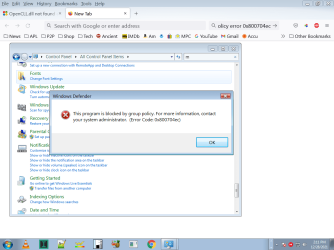
Just going to Start > Control Panel > Windows Defender (brick wall icon) and clicking on that gave the message that the action is blocked by Group Policy Code 0x800704ec

I would be surprised if no one here has seen the error. I'll put on a screen shot of it just for accuracy.

Google Search briefly says that some register fix of policy settings has to be done and turn off AV progs.

Like Sargeant Schultz on "Hogan's Heroes" says, "I know nothing, nothing (about registry editing.)"

To review: I get a brief screen lockup when the OpenCl message appears but then the mouse activates again and I can close those troublesome windows and operate normally.


Would a System Restore do anything on this? My restore points may or may not be on here-- just wondering if that would be a reset/repair.

- - - Updated - - -

I have run the Everything file search program. Defender shows up as being accessed a bunch of times and (full disclosure) might have been triggered by my use of some malware or new version of a software tool. I'll not be disclosing my private concerns here on that. But to correct the problem, Everything shows the location of defender.exe. Why not delete it?

- - - Updated - - -

I have loaded my CD with the ATI Radeon Driver I had in store. I went to Device Manager and requested update (it wouldn't show the DVD drive) but System said your driver is up to date. I did not attempt to uninstall that Driver which System says is ok.


If that was the solution the problem may just be my bad with an app I had used for years and used a newer version. What I want to do is do a scratch install, use my old CD version of that tool and see if the problem repeats. If it doesn't the case on this might as well be closed. I'll wipe the disk and mark solved. That all takes some time.
 

Attachments

  • MSI group policy error code.png
    MSI group policy error code.png
    48.7 KB · Views: 0

My Computer

Computer type
PC/Desktop
Computer Manufacturer/Model Number
custom
OS
Windows 7 x64 Ultimate
CPU
AMD Athlon II x3 450
Motherboard
MSI 880GM
Memory
2 GB
Hard Drives
various
Browser
Firefox, Opera
1) Go to the manufacturer's website and look for the driver by model. Since you didn't provide all of the your system information we can't help you there. Alternatively provide the make and model of your graphics card and we can try to find it for you.
2) Use the program I provided to uninstall the driver. That program is better than device manager because it makes sure that the driver is gone.
3) Run the installer downloaded from the website to install the driver.

With graphics issues simply "updating" using device manager isn't enough especially if you use the same disk. That's why you got the message that the driver is up to date. Also don't depend upon the search option. Microsoft also never got the online search right either.
 

My Computers

System One System Two

Well I did some of that-- looking up ATI etc. I will follow your guidance here but I think the error was caused by an app I had. I know this because as I said above, I made a scratch Win7 install, ran the _old_ app and no problems. My CD of the app says burned in 2014.

So whatever happens to the HD now is moot since I would wipe it in favor of the backup. Just now my head is spinning from too much, well , TMI: too much information.

For your patience with this and my practice I will get whatever Radeon driver I can from ATI.

Then delete - not disable - the Radeon driver shown in Devbice Manager.

Then-- what installs the replacement? If Win7 has to look for it, it may never get found.

Regardless I now know the problem and can mark solved at some point since it is a bad app. / program content that caused the problem .
 

My Computer

Computer type
PC/Desktop
Computer Manufacturer/Model Number
custom
OS
Windows 7 x64 Ultimate
CPU
AMD Athlon II x3 450
Motherboard
MSI 880GM
Memory
2 GB
Hard Drives
various
Browser
Firefox, Opera
The bad app/program was the second cause I had found for your problem but went with the most common one.

You said you reinstalled Win 7 from 2014. Did you update it? It may also affect your mobo drivers. Not sure why you're hesitant to install the linked download. Of course, you should create a system restore point before installing something like that.
 

My Computer

Computer type
Laptop
Computer Manufacturer/Model Number
Dell M6500 Precision Work Station
OS
Windows 7 Pro SP1 64 bit
Memory
8 GB
Screen Resolution
1920x
Internet Speed
30 Mbps
Antivirus
Norton Security
Browser
IE 11
News of the day is I followed what was said above: delete driver 4250 in Device Manager. Then I went to AMD or Ati or whatever it is and got the 4000 package which even _says_ includes OpenCl ( install I guess.) What I got was that wretched Catalyst control panel install again. What I want is an .exe to simply put the ATI driver back. And the icing on this cake is that all that long Catalyst install did not replace 4250. By the time I rebooted, the Generic VGA driver showed up which is, I presume, what system installs to get any sort of video.

And the Error message from Defender has not been resloved. Make no mistake, the system is usable. I can just say to "program not responding," to close the program. So the HD is not hosed. It's just annoying. I'll wipe the disc in favor of the the backup simply to get rid of the tiresome error. Didn't do that yet in case there are other comments.
 

My Computer

Computer type
PC/Desktop
Computer Manufacturer/Model Number
custom
OS
Windows 7 x64 Ultimate
CPU
AMD Athlon II x3 450
Motherboard
MSI 880GM
Memory
2 GB
Hard Drives
various
Browser
Firefox, Opera

My Computer

Computer type
PC/Desktop
Computer Manufacturer/Model Number
medionl/Aspire 6930G/acer x55a
OS
W7 home premium 32bit/W7HP 64bit/w10 tp insider ring
CPU
E5300 dual core
Motherboard
medion MS7366
Memory
3gb
Graphics Card(s)
Nvidia Geforce 7100 Nforce 630i
Monitor(s) Displays
avixc
Internet Speed
n (isp resticted to 72)
Antivirus
mse/pands
Browser
palemoon
Other Info
Belkin Fd7050 n USB using Railink RT2870 drivers, more upto date
it would be great if he would run msinfo32 and save the file as an .nfo and attach it here.
 

My Computer

Computer type
Laptop
Computer Manufacturer/Model Number
Dell M6500 Precision Work Station
OS
Windows 7 Pro SP1 64 bit
Memory
8 GB
Screen Resolution
1920x
Internet Speed
30 Mbps
Antivirus
Norton Security
Browser
IE 11
It looks like you may have malware. Before you try and "fix" this error, lets see what those two irregularities are that Sanity Check pointed out. Defender of all things is showing up and it's the reason why you're here in the first place, but something is not right here and it may be malware.

Do exactly what I say.

Hopefully you can install a program.

1) Download and install HashTools.

2) Once HashTools is installed, fire up Everyting.exe

3) In Everyting.exe look for: defender.exe You may see many versions. You want the one in this path: C:\users\lon\appdata\roaming\microsoft\windows\start menu\programs\startup\defender.exe

4) Right click that little bugger and select HashTools in the right click context menu. YOu want to generate an SHA256 hash of that defender.exe file.

5)Now copy that long SHA256 sting of characters and go here to VirusTotal. What's the result? If noting, you'll have to copy and paste that defender.exe file to your desktop (not ideal, but it won't make a difference at this point) and then upload that defender.exe file to VirusTotal and let it scan. The general consensus is four hits and it's bogus.


Do the same thing for the other suspicious file atiode.exe That one looks alright, it's just not in a path I'd expect it to be so reeks of a suspicious nature. And you can't trust the file properties. Just scan 'er anyway and see what VirusTotal tells you. If it's a false positive, you can help find out what in the world it is by running Autoruns, and in the Everything tab search for atiode.exe Now let me now what it belongs to. Consequently, in Autorun go above to File and save the ARN file. Zip that file and upload here.

Having said all this, I'm willing to bet Rich Uncle Pennybag's ("Mr. Monopoly") "monocle" that you have an infected computer. If this turns out to be the case, backup your important data to another hard drive, scan that hard drive in a live boot environment with Hiren's Boot CD PE or other live anti-virus scanners, and then format and reinstall Windows. Or you could mess with all the crap and still have hidden shenanigans and try to clean things up by getting help at bleeepingcomputer.

P.S. I just scanned two of my computers running Windows 7 with Everything for defender.exe and found zipo. It appears however that defender.exe exists in Windows 10 and probably in subsequent 11. But it also appears defender.exe could be malicious.


Curios, if you right click defender.exe, what do the properties say? Is it actually signed?

- - - Updated - - -

Have a banquet of fun my friend. If you're p2ping (use the piratebay) and what not, don't. I can't stress this enough.

And no, Linux is not a cure all. It's a great OS for three things:

1) Servers

2) Small home and office Apping

3) Nerds | penetration testing | ethical hacking

If you want to run Linux as an everyday driver, you're probably better off with the Unix of that of a Macintosh and its native OS. Seriously, Jurassic Park knew that much... LOL

 

My Computer

Computer type
PC/Desktop
OS
Windows 7 Ultimate x64
hi,
this should help.... multiple solutions
Fix: Windows Defender Blocked by Group Policy Error 0x800704ec - Appuals.com

notes,
rsop results should only show entries YOU have created rules for
are you really only running 2gb ram

This operation sort of looks like fun. I'll report back any success. I should have 4G ram but I recently replaced added an off brand 2Gb. I'll run the Memtest to show what's current. However I'm not sanguine about success.

Today

I have not wiped the HD yet. I think it's bothering my home network as well.

After screwing around with an old memtest program in Windows which _did _ run but gave no report as the
helpfile says it does after you reboot. Nowhere to be found and don't tell me.

The memory on this PC is 4 Gb. I finally settled on Device Manager lookup.

At some point I'll try the Group Policy Fix which I'll have to copy out to make it usable. All the rest of it, well I'm not going to read it all through again-- I'm just tired of this.

I looked at all that policy fix site. Too many maybes. It's time to cut bait. The fishing trip has gone on too long.
 
Last edited:

My Computer

Computer type
PC/Desktop
Computer Manufacturer/Model Number
custom
OS
Windows 7 x64 Ultimate
CPU
AMD Athlon II x3 450
Motherboard
MSI 880GM
Memory
2 GB
Hard Drives
various
Browser
Firefox, Opera
Maybe the last thing on this. Today I saw an item at Microsoft (linked from another source) about those Group Policy errors and it has a download for a Group Policy Rollback. I tried that. It did no harm but it did no good either. These are just things I've tried before doing the wipe. As to a page of eight or whatever it is options for register fixes. That's guessing. There's no 'testimonials" that a jokey website guy had any success with any of it. None I saw in any case. As for me and registry editing, as Dirty Harry said, "A man has to know his limitations."
 

My Computer

Computer type
PC/Desktop
Computer Manufacturer/Model Number
custom
OS
Windows 7 x64 Ultimate
CPU
AMD Athlon II x3 450
Motherboard
MSI 880GM
Memory
2 GB
Hard Drives
various
Browser
Firefox, Opera
Windows button+r. Type gpedit.msc to open up group policy editor (pro or higher only). Go to computer configuration. There is the option to show all the policies or do a filter. Look for disabled or enabled to see which ones are set. Open them up and change to not configured. Go here to find out which one is for Windows defender. Enable Windows Defender Windows 7 GP - Active Directory & GPO - Spiceworks

There are some that I always set like for ceip.
 

My Computers

System One System Two

Back
Top