- Local time
- 2:14 PM
- Messages
- 892
Ok. I am trying to be cooperative. I'll see if I can do this instruction though I'd like to know where it's going. Will get at it soon. The HD is still usable and it is a backup mirror system.
thanks for your patience.
- - - Updated - - -
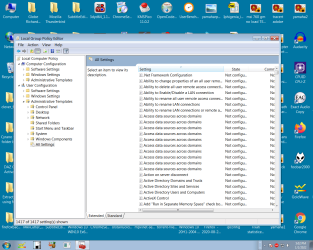
The screen shot shows what I found. A lot of the tabs showed no activity. I set the filter from manage to all or whatever b/c I don't know how to use it. Back at the Gropu plolicy wondow you see the last item of settings with a long list of things. I went trhrough the entire list manually with the slider and all are marked not configured.
Anything else to open up I'll have to get advice. Most of them show no activity. I'll recheck something I missed-- to look for Windows Defender if I can find that....
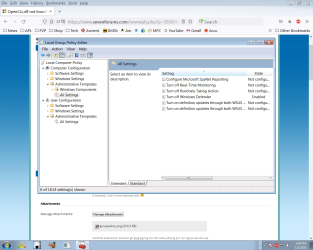
I am pleased with myself. I was able to use the filter keyword ' defender ' and actually got a hit. That is in the second screen shot.
It's in that first group where I had not seen anything open at the 'caret' or whatevs, so I don't know how it opened. Some step I missed.
- - - Updated - - -
the linked item just says (quoting it) Double check wether you have the right OU.
I'm guessing you set this GPO:
Local Computer Policy > Administrative Templates > Windows Components > Windows Defender Antivirus >Turn off Windows Defender Antivirus.
If you disable or do not configure this policy setting, by default Windows Defender should run.
If it doesn't check the Registry:
HKEY_LOCAL_MACHINE\SOFTWARE\Policies\Microsoft\Windows Defender
If you see a DisableAntiSpyware key there, delete it, restart and check again
I haven't tinkered with any of this.
thanks for your patience.
- - - Updated - - -
The screen shot shows what I found. A lot of the tabs showed no activity. I set the filter from manage to all or whatever b/c I don't know how to use it. Back at the Gropu plolicy wondow you see the last item of settings with a long list of things. I went trhrough the entire list manually with the slider and all are marked not configured.
Anything else to open up I'll have to get advice. Most of them show no activity. I'll recheck something I missed-- to look for Windows Defender if I can find that....
I am pleased with myself. I was able to use the filter keyword ' defender ' and actually got a hit. That is in the second screen shot.
It's in that first group where I had not seen anything open at the 'caret' or whatevs, so I don't know how it opened. Some step I missed.
- - - Updated - - -
the linked item just says (quoting it) Double check wether you have the right OU.
I'm guessing you set this GPO:
Local Computer Policy > Administrative Templates > Windows Components > Windows Defender Antivirus >Turn off Windows Defender Antivirus.
If you disable or do not configure this policy setting, by default Windows Defender should run.
If it doesn't check the Registry:
HKEY_LOCAL_MACHINE\SOFTWARE\Policies\Microsoft\Windows Defender
If you see a DisableAntiSpyware key there, delete it, restart and check again
I haven't tinkered with any of this.
Attachments
My Computer
- Computer type
- PC/Desktop
- Computer Manufacturer/Model Number
- custom
- OS
- Windows 7 x64 Ultimate
- CPU
- AMD Athlon II x3 450
- Motherboard
- MSI 880GM
- Memory
- 2 GB
- Hard Drives
- various
- Browser
- Firefox, Opera