OpenOffice + Windows 7

Firestrider

New member
Power User
VIP
Local time
9:26 AM
Messages
333
Has anyone noticed that Impress documents, Writer documents, and Calc documents are all bundled under one icon in Windows 7? Is there any way to change this?
 

My Computer

Computer Manufacturer/Model Number
Intel WBIBX10J
OS
Linux (Debian, Android)
CPU
Intel Core i7 860
Motherboard
Intel DP55WB
Memory
2x 2GB Kingston DDR3-1333
Graphics Card(s)
AMD Radeon HD 5750
Sound Card
Realtek ALC888
Monitor(s) Displays
2x Dell Inc. E248WFP
Screen Resolution
3840x1200
Hard Drives
Intel X25-V
Samsung HD103SJ
PSU
Corsair CX400
Case
Silverstone GD05
Cooling
Stock
Keyboard
Dell Inc. Bluetooth Wireless
Internet Speed
30 Mbps
Hi, You can right click your taskbar and customize the way 7 shows the grouped icons. Go to properties and in the drop down box next to "Taskbar Buttons" select either "Never Combine" or "Combine only when taskbar is full". Hope that helps
 

My Computer

Computer Manufacturer/Model Number
Custom
OS
Windows7 Ultimate x64
CPU
Intel Q6600 C2Q
Motherboard
EVGA 780i
Memory
4GIG DDR2 800 Transcend
Graphics Card(s)
SLI Nvidia 8800GT
Sound Card
Realtek HD On Board
Monitor(s) Displays
24" MAG Proview
Hard Drives
2 x 200GIG WD 7000RPM
PSU
Great Wall 750W
Case
CM SNIPER
Cooling
XIGMATEK S-1283
-7welt i think what he is saying that all thoes 3 types of documents are all using the same exact icon.

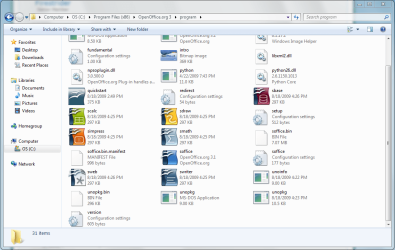
-Firestrider the only thing I could see is to try to find the ico/png file they use for the icon in C:\Program Files and see if its just 1 file or if they had different one's for all the different file types. if so just change according if not then your going to have to do some file editing.

Let me know if you can find the image file they use, if not maybe I'll install OpenOffice and see if I can get in there and get it changed!

Thanks,
Kukag
 

My Computer

Computer Manufacturer/Model Number
Custom
OS
Windows 7
CPU
AMD Phenom II X4 940 3.0 Stock
Motherboard
Gigabyte GA-MA78GM-S2H
Memory
G.SKILL DDR2 800 PI Black 4GB+Corsair XMS2 Xtrm Gaming 2GB
Graphics Card(s)
ASUS EN8800GT TOP (Fact OC)
Monitor(s) Displays
Optiquest 20" Flatscreen
Screen Resolution
1680x1050
Hard Drives
Seagate 3.5' 7200RPM 750GB HDD
PSU
Antec NeoHE 550W
Cooling
Stock AMD Phenom HSF
Keyboard
Logitech G15
Internet Speed
Charter HighSpeed 10 Down / 5 Up
They all use different icons:

openoffice.PNG

If OO Writer is opened first then all documents (Impress, Calc, etc) will get bundled under the Writer icon.
 

My Computer

Computer Manufacturer/Model Number
Intel WBIBX10J
OS
Linux (Debian, Android)
CPU
Intel Core i7 860
Motherboard
Intel DP55WB
Memory
2x 2GB Kingston DDR3-1333
Graphics Card(s)
AMD Radeon HD 5750
Sound Card
Realtek ALC888
Monitor(s) Displays
2x Dell Inc. E248WFP
Screen Resolution
3840x1200
Hard Drives
Intel X25-V
Samsung HD103SJ
PSU
Corsair CX400
Case
Silverstone GD05
Cooling
Stock
Keyboard
Dell Inc. Bluetooth Wireless
Internet Speed
30 Mbps
Hmm well thats a developer thing have you checked the OpenOffice forums??

Let me know,
Thanks
Kukag
 

My Computer

Computer Manufacturer/Model Number
Custom
OS
Windows 7
CPU
AMD Phenom II X4 940 3.0 Stock
Motherboard
Gigabyte GA-MA78GM-S2H
Memory
G.SKILL DDR2 800 PI Black 4GB+Corsair XMS2 Xtrm Gaming 2GB
Graphics Card(s)
ASUS EN8800GT TOP (Fact OC)
Monitor(s) Displays
Optiquest 20" Flatscreen
Screen Resolution
1680x1050
Hard Drives
Seagate 3.5' 7200RPM 750GB HDD
PSU
Antec NeoHE 550W
Cooling
Stock AMD Phenom HSF
Keyboard
Logitech G15
Internet Speed
Charter HighSpeed 10 Down / 5 Up
Hi , I have the same problem

What he meant is that all open office documents (writer, calc, impress) are all grouped under one open office icon in the windows 7 taskbar. What I want is how to seperate those documents types in the windows 7 taskbar. Ie, all openoffice writer grouped together, all openoffice calc documents grouped together, etc. . . . . .
 

My Computer

OS
Windows 7
Back
Top