Solved Operating system not found – Samsung RV511 Windows 7

CHRISE321

New member
Local time
4:20 AM
Messages
9
Operating system not found – Samsung RV511 Windows 7

Hi,

I have the above computer which I purchased in 2011,following a recommended Windows 7 update a couple of months ago, the laptop locked. I powered off the laptop and could not viewmy main hard disc’s(C or D) when the computer rebooted, however I had access tomy external drives

A local so called Microsoft specialist(rogue) visited meon my instruction with the intention of recovering my data from both these drives, which he didto an external drive which I supplied him. He removed my hard disc from my machine in order to do this

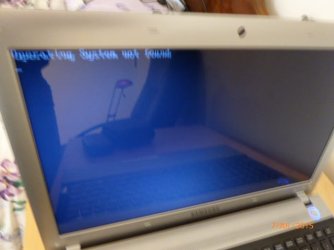
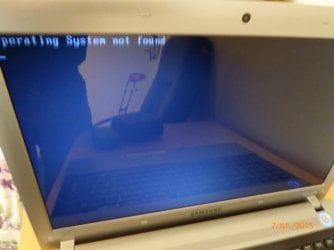
Today, I have reinserted the hard disc into my computer,however I am getting the above message “Operating system not found

I have selected both Boot-up options:-

· F2 – Setup, there appears to be no option to Boot from an external drive in the setup

· F4 – Recovery, I cannot enter the Windows menuto perform this task, laptop appears to hang

Any ideas would be welcome or am I just wasting my time withthis laptop(hard disc) which despite this problem appears physically in verygood condition as it has been well looked after

I confirm my laptop was protected by the latest version of Norton and Malwarebytes at the time of my problem

This my first post on this forum, I trust it is in the correct location and your advice would be most appreciated

Many thanks
 
Last edited:

My Computer My Computer

At a glance

Windows 7
Computer type
Laptop
Computer Manufacturer/Model Number
Samsung RV511
OS
Windows 7
Antivirus
Norton
Your HDD is inside, why are you looking for an external one? (or I understood you wrong)
F2 and set boot order to HDD (might show as it's name). Save and exit.

If this doesn't work boot with a Windows Repair Disk and see if your OS is recognized.
 

My Computer My Computer

At a glance

Windows 7 Ultimate x64 SP1AMD Phenom 2 1090T2x8GB Kingston HyperX Fury Black 1600Mhz Unga...MSI GTX 970 Gaming 4G
Computer type
PC/Desktop
Computer Manufacturer/Model Number
Custom Build
OS
Windows 7 Ultimate x64 SP1
CPU
AMD Phenom 2 1090T
Motherboard
Gigabyte GA-890FXA-UD5
Memory
2x8GB Kingston HyperX Fury Black 1600Mhz Unganged
Graphics Card(s)
MSI GTX 970 Gaming 4G
Sound Card
Realtek On-Board HD 7.1 Audio / Logitech G35
Monitor(s) Displays
3xAcer GD245HQ
Screen Resolution
1920x1080
Hard Drives
Samsung 850 Pro 512GB SSD - OS /
WD Caviar Black SATA 3 - 1 TBx2 - Dynamic RAID 0 /
WD Caviar Green SATA 2 - 640GBx2 - Dynamic RAID 0 /
WD Caviar Green SATA 2 - 640GB - Internal Backup /
Seagate Barracude SATA 3 - 3TB - External Backup/ Sync
PSU
HighPower 1000W
Case
Cooler Master HAF 932
Cooling
Noctua NH-D14
Keyboard
Logitech G19
Mouse
Logitech G500
Internet Speed
100/4 Mbit Cable (100GB quota)
Antivirus
ZoneAlarm Extreme Security / MBAM Pro / MBAE Free / SAS Free
Browser
IE 11 - Firefox - Chrome
Other Info
Logitech F710/ G27/ G940/ Z5500 // TrackIR 5 // Nvidia 3D Surround Vision
Yes correct HDD disc is in my laptop, I have already selected F2(Setup), but there appears to be NO option to select a boot disc, I cannot access my HDD, this is the reason I am looking to boot from an external drive on my computer

My daughter has a later version of my Samsung(Daughter=S3511), in perfectly good working order, I have today compared F2 options in the setup menu on both her and my computer, there is no difference

In summary, how do I select a boot disc in the Setup menu(F2) on a Samsung laptop as there appears no such option in the menu.?

I thank you for your response
 

My Computer My Computer

At a glance

Windows 7
Computer type
Laptop
Computer Manufacturer/Model Number
Samsung RV511
OS
Windows 7
Antivirus
Norton
Well, external won't work if there is no OS on it either.

Can you take a photo of the BIOS menu? Would help a ton to clear confusion.
 

My Computer My Computer

At a glance

Windows 7 Ultimate x64 SP1AMD Phenom 2 1090T2x8GB Kingston HyperX Fury Black 1600Mhz Unga...MSI GTX 970 Gaming 4G
Computer type
PC/Desktop
Computer Manufacturer/Model Number
Custom Build
OS
Windows 7 Ultimate x64 SP1
CPU
AMD Phenom 2 1090T
Motherboard
Gigabyte GA-890FXA-UD5
Memory
2x8GB Kingston HyperX Fury Black 1600Mhz Unganged
Graphics Card(s)
MSI GTX 970 Gaming 4G
Sound Card
Realtek On-Board HD 7.1 Audio / Logitech G35
Monitor(s) Displays
3xAcer GD245HQ
Screen Resolution
1920x1080
Hard Drives
Samsung 850 Pro 512GB SSD - OS /
WD Caviar Black SATA 3 - 1 TBx2 - Dynamic RAID 0 /
WD Caviar Green SATA 2 - 640GBx2 - Dynamic RAID 0 /
WD Caviar Green SATA 2 - 640GB - Internal Backup /
Seagate Barracude SATA 3 - 3TB - External Backup/ Sync
PSU
HighPower 1000W
Case
Cooler Master HAF 932
Cooling
Noctua NH-D14
Keyboard
Logitech G19
Mouse
Logitech G500
Internet Speed
100/4 Mbit Cable (100GB quota)
Antivirus
ZoneAlarm Extreme Security / MBAM Pro / MBAE Free / SAS Free
Browser
IE 11 - Firefox - Chrome
Other Info
Logitech F710/ G27/ G940/ Z5500 // TrackIR 5 // Nvidia 3D Surround Vision
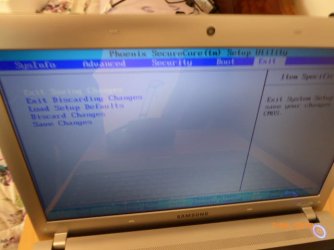
Photo's as requested:-

  • My problem Operating system not found - Photo 002.jpg
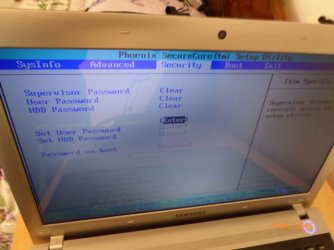
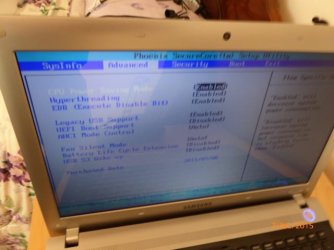
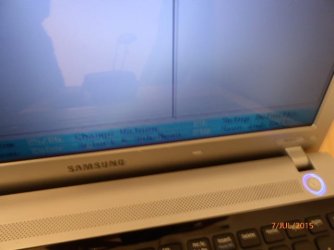
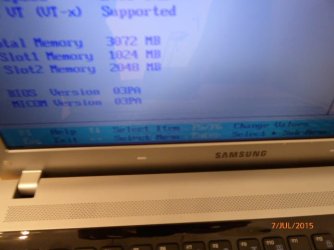
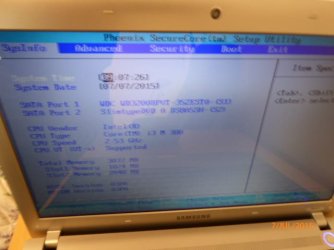
  • Setup Menu's(F2) - Photo's 003-009.jpg
  • Response for laptop when I select Recovery mode(F4)
I have attempted to select F9(setup defaults) within the setup menu, but this does also not work

Many thanks
 

Attachments

  • 002.JPG
    002.JPG
    46.9 KB · Views: 16
  • 003.JPG
    003.JPG
    51 KB · Views: 16
  • 004.JPG
    004.JPG
    51.5 KB · Views: 16
  • 005.JPG
    005.JPG
    53.9 KB · Views: 16
  • 006.JPG
    006.JPG
    55.8 KB · Views: 16
  • 010.JPG
    010.JPG
    47 KB · Views: 16
  • 009.JPG
    009.JPG
    45.6 KB · Views: 16
  • 008.JPG
    008.JPG
    50 KB · Views: 16
  • 007.JPG
    007.JPG
    51.1 KB · Views: 16

My Computer My Computer

At a glance

Windows 7
Computer type
Laptop
Computer Manufacturer/Model Number
Samsung RV511
OS
Windows 7
Antivirus
Norton
Ok, you almost made it but missed it by an inch :P

Go into BIOS, boot menu, Boot device priority and press enter to see the list, adjust the menu: 1 can be CD/DVD, 2 set the HDD

HDD should show it's model name.

If still doesn't work, there may be no OS on the disk indeed or a bootmgr problem.

See http://www.sevenforums.com/tutorials/219533-troubleshooting-windows-7-failure-boot.html, try a startup repair (but read other options too of course)
 

My Computer My Computer

At a glance

Windows 7 Ultimate x64 SP1AMD Phenom 2 1090T2x8GB Kingston HyperX Fury Black 1600Mhz Unga...MSI GTX 970 Gaming 4G
Computer type
PC/Desktop
Computer Manufacturer/Model Number
Custom Build
OS
Windows 7 Ultimate x64 SP1
CPU
AMD Phenom 2 1090T
Motherboard
Gigabyte GA-890FXA-UD5
Memory
2x8GB Kingston HyperX Fury Black 1600Mhz Unganged
Graphics Card(s)
MSI GTX 970 Gaming 4G
Sound Card
Realtek On-Board HD 7.1 Audio / Logitech G35
Monitor(s) Displays
3xAcer GD245HQ
Screen Resolution
1920x1080
Hard Drives
Samsung 850 Pro 512GB SSD - OS /
WD Caviar Black SATA 3 - 1 TBx2 - Dynamic RAID 0 /
WD Caviar Green SATA 2 - 640GBx2 - Dynamic RAID 0 /
WD Caviar Green SATA 2 - 640GB - Internal Backup /
Seagate Barracude SATA 3 - 3TB - External Backup/ Sync
PSU
HighPower 1000W
Case
Cooler Master HAF 932
Cooling
Noctua NH-D14
Keyboard
Logitech G19
Mouse
Logitech G500
Internet Speed
100/4 Mbit Cable (100GB quota)
Antivirus
ZoneAlarm Extreme Security / MBAM Pro / MBAE Free / SAS Free
Browser
IE 11 - Firefox - Chrome
Other Info
Logitech F710/ G27/ G940/ Z5500 // TrackIR 5 // Nvidia 3D Surround Vision
Ok, you almost made it but missed it by an inch :P - I am sorry but I do not understand what you mean, are you referring to one of my photo's, I can take further if necessary

How do I access BIOS, within the setup menu(F2) I cannot find within the menu a location to select the boot priority order

I thank you for your response
 

My Computer My Computer

At a glance

Windows 7
Computer type
Laptop
Computer Manufacturer/Model Number
Samsung RV511
OS
Windows 7
Antivirus
Norton
It is the Setup menu (F2) - see the third photo of yours. Your cursor was exactly on the option to be selected.
 

My Computer My Computer

At a glance

Windows 7 Ultimate x64 SP1AMD Phenom 2 1090T2x8GB Kingston HyperX Fury Black 1600Mhz Unga...MSI GTX 970 Gaming 4G
Computer type
PC/Desktop
Computer Manufacturer/Model Number
Custom Build
OS
Windows 7 Ultimate x64 SP1
CPU
AMD Phenom 2 1090T
Motherboard
Gigabyte GA-890FXA-UD5
Memory
2x8GB Kingston HyperX Fury Black 1600Mhz Unganged
Graphics Card(s)
MSI GTX 970 Gaming 4G
Sound Card
Realtek On-Board HD 7.1 Audio / Logitech G35
Monitor(s) Displays
3xAcer GD245HQ
Screen Resolution
1920x1080
Hard Drives
Samsung 850 Pro 512GB SSD - OS /
WD Caviar Black SATA 3 - 1 TBx2 - Dynamic RAID 0 /
WD Caviar Green SATA 2 - 640GBx2 - Dynamic RAID 0 /
WD Caviar Green SATA 2 - 640GB - Internal Backup /
Seagate Barracude SATA 3 - 3TB - External Backup/ Sync
PSU
HighPower 1000W
Case
Cooler Master HAF 932
Cooling
Noctua NH-D14
Keyboard
Logitech G19
Mouse
Logitech G500
Internet Speed
100/4 Mbit Cable (100GB quota)
Antivirus
ZoneAlarm Extreme Security / MBAM Pro / MBAE Free / SAS Free
Browser
IE 11 - Firefox - Chrome
Other Info
Logitech F710/ G27/ G940/ Z5500 // TrackIR 5 // Nvidia 3D Surround Vision
@GokAy, I thank you once again

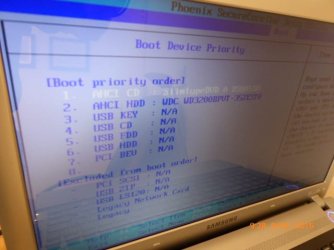
I have entered the Boot menu, I enclose a photo of the Boot Device Priority for my laptop, I have not personally made any changes to date within this boot menu - The CD at the top of the list(No 1) means nothing to me, I assume it is a cd disc associated with my rogue Microsoft man

Having researched this problem on the internet, I discovered this website/SW for recovery:-
Download Hiren?s BootCD 15.2 | HBCD Fan & Discussion Platform

I have inserted this CD into my laptop, sadly nothing which I expected, however my laptop physically recognises my CD, would you suggest I move HDD into to priority 1

I would be most grateful if you have any further suggestions(following my latest posting) prior to me attempting to moving HDD to priority 1 or exploring the other options in your earlier posting advice regarding bootup options

Regards and thank you
 
Last edited:

My Computer My Computer

At a glance

Windows 7
Computer type
Laptop
Computer Manufacturer/Model Number
Samsung RV511
OS
Windows 7
Antivirus
Norton
No need to change boot order, if no CD is found it will try the next boot device, which is your HDD.

It may be that your HDD lost its formatting etc. Download Partition Wizard free and make its bootable media. Then boot with it and take a photo of it, post here, lets see how it looks like.
 

My Computer My Computer

At a glance

Windows 7 Ultimate x64 SP1AMD Phenom 2 1090T2x8GB Kingston HyperX Fury Black 1600Mhz Unga...MSI GTX 970 Gaming 4G
Computer type
PC/Desktop
Computer Manufacturer/Model Number
Custom Build
OS
Windows 7 Ultimate x64 SP1
CPU
AMD Phenom 2 1090T
Motherboard
Gigabyte GA-890FXA-UD5
Memory
2x8GB Kingston HyperX Fury Black 1600Mhz Unganged
Graphics Card(s)
MSI GTX 970 Gaming 4G
Sound Card
Realtek On-Board HD 7.1 Audio / Logitech G35
Monitor(s) Displays
3xAcer GD245HQ
Screen Resolution
1920x1080
Hard Drives
Samsung 850 Pro 512GB SSD - OS /
WD Caviar Black SATA 3 - 1 TBx2 - Dynamic RAID 0 /
WD Caviar Green SATA 2 - 640GBx2 - Dynamic RAID 0 /
WD Caviar Green SATA 2 - 640GB - Internal Backup /
Seagate Barracude SATA 3 - 3TB - External Backup/ Sync
PSU
HighPower 1000W
Case
Cooler Master HAF 932
Cooling
Noctua NH-D14
Keyboard
Logitech G19
Mouse
Logitech G500
Internet Speed
100/4 Mbit Cable (100GB quota)
Antivirus
ZoneAlarm Extreme Security / MBAM Pro / MBAE Free / SAS Free
Browser
IE 11 - Firefox - Chrome
Other Info
Logitech F710/ G27/ G940/ Z5500 // TrackIR 5 // Nvidia 3D Surround Vision
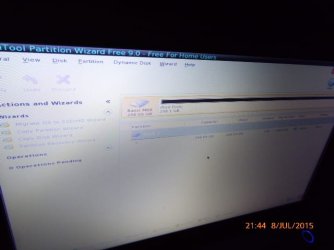
Downloaded Partition Wizard to CD as suggested, please see the following photo's

005.jpg - there appears to no change, boot menu exactly the same with new CD inserted

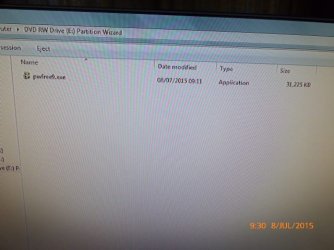
007.jpg - this photo was taken from another laptop, it's just the program on the CD

Many thanks
 

Attachments

  • 005.JPG
    005.JPG
    54.5 KB · Views: 12
  • 007.JPG
    007.JPG
    54.4 KB · Views: 12

My Computer My Computer

At a glance

Windows 7
Computer type
Laptop
Computer Manufacturer/Model Number
Samsung RV511
OS
Windows 7
Antivirus
Norton
Ok, on your working PC, install partition wizard and run it. Once it is open, find the bootable media button (I am not home to provide any more detail). Insert a blank CD and make the media. Put the media in non-booting one and restart, press any key if it asks to to boot from CD. Select defaults if being asked.

Once the program loads, take a photo of the screen (try not to shake it, make sure text is readable).
 

My Computer My Computer

At a glance

Windows 7 Ultimate x64 SP1AMD Phenom 2 1090T2x8GB Kingston HyperX Fury Black 1600Mhz Unga...MSI GTX 970 Gaming 4G
Computer type
PC/Desktop
Computer Manufacturer/Model Number
Custom Build
OS
Windows 7 Ultimate x64 SP1
CPU
AMD Phenom 2 1090T
Motherboard
Gigabyte GA-890FXA-UD5
Memory
2x8GB Kingston HyperX Fury Black 1600Mhz Unganged
Graphics Card(s)
MSI GTX 970 Gaming 4G
Sound Card
Realtek On-Board HD 7.1 Audio / Logitech G35
Monitor(s) Displays
3xAcer GD245HQ
Screen Resolution
1920x1080
Hard Drives
Samsung 850 Pro 512GB SSD - OS /
WD Caviar Black SATA 3 - 1 TBx2 - Dynamic RAID 0 /
WD Caviar Green SATA 2 - 640GBx2 - Dynamic RAID 0 /
WD Caviar Green SATA 2 - 640GB - Internal Backup /
Seagate Barracude SATA 3 - 3TB - External Backup/ Sync
PSU
HighPower 1000W
Case
Cooler Master HAF 932
Cooling
Noctua NH-D14
Keyboard
Logitech G19
Mouse
Logitech G500
Internet Speed
100/4 Mbit Cable (100GB quota)
Antivirus
ZoneAlarm Extreme Security / MBAM Pro / MBAE Free / SAS Free
Browser
IE 11 - Firefox - Chrome
Other Info
Logitech F710/ G27/ G940/ Z5500 // TrackIR 5 // Nvidia 3D Surround Vision
Hi,

I have installed partition wizard on my good Samsung, but sorry I do not understand how to make media as I have no experience of this tool and somewhat nervous as I do not wish to damage my daughters laptop

The one thing I did attempt was to select the Bootable CD option from partition wizard it took me to this website:

Bootable Partition Manger | MiniTool Partition Wizard Bootable Edition

I downloaded the software(pwfree9.iso) from this website on to a CD and inserted the CD into my broken laptop

Unfortunately no progress, albeit I was not sure what I was doing

Thanks again
 

My Computer My Computer

At a glance

Windows 7
Computer type
Laptop
Computer Manufacturer/Model Number
Samsung RV511
OS
Windows 7
Antivirus
Norton

My Computer My Computer

At a glance

Windows 7 Ultimate x64 SP1AMD Phenom 2 1090T2x8GB Kingston HyperX Fury Black 1600Mhz Unga...MSI GTX 970 Gaming 4G
Computer type
PC/Desktop
Computer Manufacturer/Model Number
Custom Build
OS
Windows 7 Ultimate x64 SP1
CPU
AMD Phenom 2 1090T
Motherboard
Gigabyte GA-890FXA-UD5
Memory
2x8GB Kingston HyperX Fury Black 1600Mhz Unganged
Graphics Card(s)
MSI GTX 970 Gaming 4G
Sound Card
Realtek On-Board HD 7.1 Audio / Logitech G35
Monitor(s) Displays
3xAcer GD245HQ
Screen Resolution
1920x1080
Hard Drives
Samsung 850 Pro 512GB SSD - OS /
WD Caviar Black SATA 3 - 1 TBx2 - Dynamic RAID 0 /
WD Caviar Green SATA 2 - 640GBx2 - Dynamic RAID 0 /
WD Caviar Green SATA 2 - 640GB - Internal Backup /
Seagate Barracude SATA 3 - 3TB - External Backup/ Sync
PSU
HighPower 1000W
Case
Cooler Master HAF 932
Cooling
Noctua NH-D14
Keyboard
Logitech G19
Mouse
Logitech G500
Internet Speed
100/4 Mbit Cable (100GB quota)
Antivirus
ZoneAlarm Extreme Security / MBAM Pro / MBAE Free / SAS Free
Browser
IE 11 - Firefox - Chrome
Other Info
Logitech F710/ G27/ G940/ Z5500 // TrackIR 5 // Nvidia 3D Surround Vision
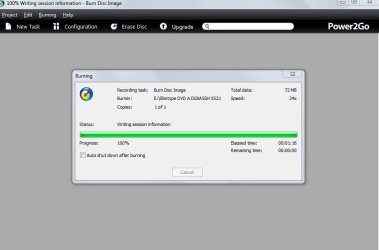
Mega Progress, thank you so much..........!!!!!

Please see how..

Which is the best way forward now, rather than waste more of your time, shall I learn this program via Youtube

Or is there a simple way forward in partition wizard to setup my laptop..

Thank you so much once again..
 

Attachments

  • Burn pwfree9dotISO.JPG
    Burn pwfree9dotISO.JPG
    38.1 KB · Views: 0
  • P2GoLog.txt
    P2GoLog.txt
    1.9 KB · Views: 4
  • 014.JPG
    014.JPG
    43.7 KB · Views: 7

My Computer My Computer

At a glance

Windows 7
Computer type
Laptop
Computer Manufacturer/Model Number
Samsung RV511
OS
Windows 7
Antivirus
Norton
Don't get alarmed just yet (yours doesn't say read only) but see http://www.sevenforums.com/hardware...-hdd-bad-disk-unallocated-not-initialize.html

Download link in Jumanji's post, select the Windows DOS version, and follow the instructions to make it bootable. Then run an extended test on the drive. If it makes it, then try:
- Select the drive in Partition Wizard and start the Partition Recovery wizard, whole disk, quick scan
- See if your files/folders will show up, double click the partitions (that may show up after scan) and take a photo of them and post here, quit out of the wizard.
 

My Computer My Computer

At a glance

Windows 7 Ultimate x64 SP1AMD Phenom 2 1090T2x8GB Kingston HyperX Fury Black 1600Mhz Unga...MSI GTX 970 Gaming 4G
Computer type
PC/Desktop
Computer Manufacturer/Model Number
Custom Build
OS
Windows 7 Ultimate x64 SP1
CPU
AMD Phenom 2 1090T
Motherboard
Gigabyte GA-890FXA-UD5
Memory
2x8GB Kingston HyperX Fury Black 1600Mhz Unganged
Graphics Card(s)
MSI GTX 970 Gaming 4G
Sound Card
Realtek On-Board HD 7.1 Audio / Logitech G35
Monitor(s) Displays
3xAcer GD245HQ
Screen Resolution
1920x1080
Hard Drives
Samsung 850 Pro 512GB SSD - OS /
WD Caviar Black SATA 3 - 1 TBx2 - Dynamic RAID 0 /
WD Caviar Green SATA 2 - 640GBx2 - Dynamic RAID 0 /
WD Caviar Green SATA 2 - 640GB - Internal Backup /
Seagate Barracude SATA 3 - 3TB - External Backup/ Sync
PSU
HighPower 1000W
Case
Cooler Master HAF 932
Cooling
Noctua NH-D14
Keyboard
Logitech G19
Mouse
Logitech G500
Internet Speed
100/4 Mbit Cable (100GB quota)
Antivirus
ZoneAlarm Extreme Security / MBAM Pro / MBAE Free / SAS Free
Browser
IE 11 - Firefox - Chrome
Other Info
Logitech F710/ G27/ G940/ Z5500 // TrackIR 5 // Nvidia 3D Surround Vision
I am afraid that your drive for all practical purposes is dead.

You may have to replace the drive and reinstall the OS. If you have the recovery disks supplied by Samsung or you had made the recovery disks yourself as per insructions in the laptop manual, you may use those disks to reinstall the original OS on the new HDD. If not contact Samsung Tech. Support for Recovery Disks.

GokAy in his last post has advised you to check that HDD with the HDD manufacturer's Diagnostic/Repair Utility. Of course you have to download the DOS version and make a bootable CD with it to run.
 

My Computer My Computer

At a glance

Windows 7 Home Premium 32 bit
OS
Windows 7 Home Premium 32 bit

Hi Guys,

I am now positive I am fighting a lost cause with my laptop,the cost of a refurbished hard drive is approximately $60, one month guarantee,a new replacement from Samsung is approximately $270. You may also be aware Samsung have droppedout of the laptop market

I have taken the decision to purchase a new laptop

My goal on joining this forum was to hopefully fix my harddrive and assist future members with similar problems, unfortunately it has notbeen achieved

I wish to personally thank GoKay for his assistance, he hasmade a great effort to help me
 

My Computer My Computer

At a glance

Windows 7
Computer type
Laptop
Computer Manufacturer/Model Number
Samsung RV511
OS
Windows 7
Antivirus
Norton

My Computer My Computer

At a glance

Windows 7 Ultimate x64 SP1AMD Phenom 2 1090T2x8GB Kingston HyperX Fury Black 1600Mhz Unga...MSI GTX 970 Gaming 4G
Computer type
PC/Desktop
Computer Manufacturer/Model Number
Custom Build
OS
Windows 7 Ultimate x64 SP1
CPU
AMD Phenom 2 1090T
Motherboard
Gigabyte GA-890FXA-UD5
Memory
2x8GB Kingston HyperX Fury Black 1600Mhz Unganged
Graphics Card(s)
MSI GTX 970 Gaming 4G
Sound Card
Realtek On-Board HD 7.1 Audio / Logitech G35
Monitor(s) Displays
3xAcer GD245HQ
Screen Resolution
1920x1080
Hard Drives
Samsung 850 Pro 512GB SSD - OS /
WD Caviar Black SATA 3 - 1 TBx2 - Dynamic RAID 0 /
WD Caviar Green SATA 2 - 640GBx2 - Dynamic RAID 0 /
WD Caviar Green SATA 2 - 640GB - Internal Backup /
Seagate Barracude SATA 3 - 3TB - External Backup/ Sync
PSU
HighPower 1000W
Case
Cooler Master HAF 932
Cooling
Noctua NH-D14
Keyboard
Logitech G19
Mouse
Logitech G500
Internet Speed
100/4 Mbit Cable (100GB quota)
Antivirus
ZoneAlarm Extreme Security / MBAM Pro / MBAE Free / SAS Free
Browser
IE 11 - Firefox - Chrome
Other Info
Logitech F710/ G27/ G940/ Z5500 // TrackIR 5 // Nvidia 3D Surround Vision
Back
Top