
Operating System not found

corruptDNA

New member
Member
Local time
6:25 PM
Messages
90
I was using my computer normally in the morning and went to sleep for a few hours. When i woke up and turned on my computer, there was an error saying:

Operating system not found, media check fail, check cable (something along those lines)
i had recently installed an ssd instead of my hdd, and moved my hdd to my dvd drive.
My laptop was working flawlessly till yesterday and i am sure i have not dropped or damaged my laptop as i hardly move it because its a tad bit heavy.
The thing is, when i loaded into my bios, the ssd and hdd are both recognized yet i cannot boot to my windows (on the ssd, i have 2 partitions, one windows 7, one ubunut) .
So i thought, maybe the cable for the ssd is really not connected or something along those lines, so i opened the back of my laptop and the cable was connected properly, but i removed the cable and reconnected it to make sure, but there was no progress. I finally used a ubuntu live usb and boot into ubuntu live and i can access the hdd but not the ssd.

Can anyone assist me with this? I am starting to think maybe theres a software error of some kind. If it is a hardware error, i can have the ssd replaces since its only a month old and has a year guarantee but i am out of the country and will be returning home in 10 days, so i would really like to solve the problem myself if i can as i need to use my laptop.


Thanks for reading


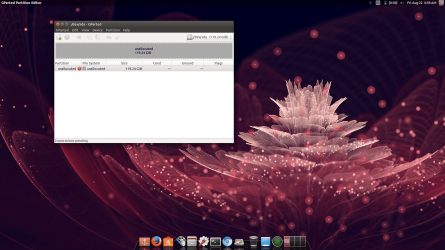
Edit: I just opened gparted on the live cd, and my ssd space is unallocated, is this problem software related? how should i proceed?
 
Last edited:

My Computer

Computer type
Laptop
Computer Manufacturer/Model Number
Dell Inspiron 7559
OS
Windows 10 64 bit
CPU
Intel(R) Core(TM) i7-6700HQ CPU @ 2.60GHz (8 CPUs), ~2.6GHz
Memory
16 GB RAM
Graphics Card(s)
NVIDIA GeForce GTX 960M
Monitor(s) Displays
1
Screen Resolution
1920 x 1080
Hard Drives
Samsung SSD 850 EVO M.2 250GB (NTFS, 238.3 GB)
ST1000LM014-1EJ164 (NTFS, 940.5 GB)
What model SSD?
 

My Computer

Computer type
PC/Desktop
Computer Manufacturer/Model Number
Custom Built
OS
Windows 10 Pro x64, Windows 8.1 Pro x64, Windows 7 Ultimate x64 SP1,
CPU
INTEL i9-7920X LGA 2066
Motherboard
Gigabyte X299-WU8 F3
Memory
64 GB (4 X 16 GB) G-Skill V Series DDR4 3200 Quad Channel
Graphics Card(s)
EVGA GTX 1060 SC 3 GB
Sound Card
Realtek Onboard ALC1220
Monitor(s) Displays
2 x Samsung S27E310
Screen Resolution
1920x1080
Hard Drives
Samsung 2 x 970 EVO Plus 500 GB NVMe
1 x 6TB WD 6003FZBX SATA
1 x 6TB WD 60EFRX SATA
12 x 3TB WD 30EFRX SATA
PSU
Seasonic X-1050
Case
Thermaltake Armor+
Cooling
Corsair H80i V2 Liquid AOI Cooler
Keyboard
Logitech G510s
Mouse
Logitech MX Master 2S
Internet Speed
200 Mb/s
Antivirus
ESET NOD32 13.1
Browser
EDGE (Dev, Canary, Beta), Chrome
Other Info
ASUS RT-AC68U router
Malwarebytes 4.0.4
Its a Transcend 128 gb ssd (dont have the box since im away from home but i dont think there are many models)
 

My Computer

Computer type
Laptop
Computer Manufacturer/Model Number
Dell Inspiron 7559
OS
Windows 10 64 bit
CPU
Intel(R) Core(TM) i7-6700HQ CPU @ 2.60GHz (8 CPUs), ~2.6GHz
Memory
16 GB RAM
Graphics Card(s)
NVIDIA GeForce GTX 960M
Monitor(s) Displays
1
Screen Resolution
1920 x 1080
Hard Drives
Samsung SSD 850 EVO M.2 250GB (NTFS, 238.3 GB)
ST1000LM014-1EJ164 (NTFS, 940.5 GB)
My Computer

Computer type
Laptop
Computer Manufacturer/Model Number
Dell XPS L502x
OS
Windows 7 Home Premium 64bit
CPU
Intel Core i7 2670QM
Motherboard
Intel HM67 Mobile Express Chipset
Memory
Samsung 8GB 1333Mhz
Graphics Card(s)
nVidia Geforce 540M GT 2GB
Sound Card
Realtek High Definition Audio
Monitor(s) Displays
15.6" Dell Standard RGB-LED Backlit Display
Screen Resolution
1366x768
Hard Drives
Seagate Momentus 2.5" 750GB HDD 5400rpm
Internet Speed
3.1 Mbits/s
Antivirus
AVG Free, Kaspersky
Browser
Google chrome
I suspect SSD failure. Interchange your HDD and SSD, see if both are detected.
Else go here for your Transcend warranty service.
Welcome to the Transcend Info Website

I will definetely be going for my warranty, but what i dont understand is if the ssd failed, why can is it still detected in the bios and why does it show as unallocated space in gpart (just installed ubuntu on hdd and changed boot sequence so second hdd is checked for operating system first)

Not going to try interchanging both since i dont have my tools and dont want to risk anything since reaching my second hdd will require going through a lot of unscrewing. Id rather have my ssd checked when i return. But nevertheless if its something i can fix without going through much hardware configuring then id want to try that.

I think that the partition table or some kind of data is corrupted and just needs a format or something.. anyone confirm or deny this? (going by with ubuntu atm)

attatching screenshot
 

Attachments

  • Screenshot from 2014-08-22 04:58:06.png
    Screenshot from 2014-08-22 04:58:06.png
    574.4 KB · Views: 2

My Computer

Computer type
Laptop
Computer Manufacturer/Model Number
Dell Inspiron 7559
OS
Windows 10 64 bit
CPU
Intel(R) Core(TM) i7-6700HQ CPU @ 2.60GHz (8 CPUs), ~2.6GHz
Memory
16 GB RAM
Graphics Card(s)
NVIDIA GeForce GTX 960M
Monitor(s) Displays
1
Screen Resolution
1920 x 1080
Hard Drives
Samsung SSD 850 EVO M.2 250GB (NTFS, 238.3 GB)
ST1000LM014-1EJ164 (NTFS, 940.5 GB)
Wierd. You had windows there and now it shows unallocated. :confused:
Try it with Windows Installation USB disk and check if even that shows SSD as unallocated.
I dont know why chose Tranecend. People are really careful while choosing SSDs due to less conformance, they check for Read/Write Cycles, Lifespan, Controller Type, Sandforce Version etc etc, while buying.
Samsung and Intel are the most reliable and most sold SSDs. Samsung 840 Pro have recorded least user problems. Intel 520 is reviewed as most reliable everywhere.
 

My Computer

Computer type
Laptop
Computer Manufacturer/Model Number
Dell XPS L502x
OS
Windows 7 Home Premium 64bit
CPU
Intel Core i7 2670QM
Motherboard
Intel HM67 Mobile Express Chipset
Memory
Samsung 8GB 1333Mhz
Graphics Card(s)
nVidia Geforce 540M GT 2GB
Sound Card
Realtek High Definition Audio
Monitor(s) Displays
15.6" Dell Standard RGB-LED Backlit Display
Screen Resolution
1366x768
Hard Drives
Seagate Momentus 2.5" 750GB HDD 5400rpm
Internet Speed
3.1 Mbits/s
Antivirus
AVG Free, Kaspersky
Browser
Google chrome
Wierd. You had windows there and now it shows unallocated. :confused:
Try it with Windows Installation USB disk and check if even that shows SSD as unallocated.
I dont know why chose Tranecend. People are really careful while choosing SSDs due to less conformance, they check for Read/Write Cycles, Lifespan, Controller Type, Sandforce Version etc etc, while buying.
Samsung and Intel are the most reliable and most sold SSDs. Samsung 840 Pro have recorded least user problems. Intel 520 is reviewed as most reliable everywhere.

I cannot get hold of a windows usb bootable since my internet speed is 1 mb at the moment and downloading a windows iso (3.7 gb without reliable internet) and then making a usb bootable from it is gonna take a lot of time. As for why i chose transcend, im regretting my decision but i wanted a ssd right away and the choice at the local shop wasnt really good and the only other choice i had was to order one from online. Between transcend and kingston i chose transcend. They did have a 256 gb samsung ssd but i didnt 256 gb but if the ssd is messed up but instead of replacing it with another trasncend, ill pay some extra cash and have them upgrade it for me..

I hope i just have to format the unallocated space but im not gonna do anything until im sure of the problem...
 

My Computer

Computer type
Laptop
Computer Manufacturer/Model Number
Dell Inspiron 7559
OS
Windows 10 64 bit
CPU
Intel(R) Core(TM) i7-6700HQ CPU @ 2.60GHz (8 CPUs), ~2.6GHz
Memory
16 GB RAM
Graphics Card(s)
NVIDIA GeForce GTX 960M
Monitor(s) Displays
1
Screen Resolution
1920 x 1080
Hard Drives
Samsung SSD 850 EVO M.2 250GB (NTFS, 238.3 GB)
ST1000LM014-1EJ164 (NTFS, 940.5 GB)
Back
Top