optimising ram usage

timeless

New member
Member
VIP
Local time
12:00 AM
Messages
637
since l removed the 8gb that seemed to be causing issues my ram usage seems to be higher than l expected. l have disabled a few services. but considering before my rebuild l was using under 30% l get closer to 50% and thats with just a few tabs on firefox open.

l was just wondering if anyone had any good recommendations for optimising ram usage, especially with firefox, in addition a good gmail notifier as well because l had to downgrade due to the gmail manager not working on the newer versions that supports multiple gmail accounts..
 

My Computer

Computer type
PC/Desktop
Computer Manufacturer/Model Number
Custom build
OS
Windows 7 Professional (64bit)
CPU
Intel i5 4440 3.10ghz
Motherboard
Gigabyte GA-H97M-D3H
Memory
Corsair 32GB (4x8GB) DDR3 1600MHz Vengeance Memory Kit 1.5V
Graphics Card(s)
Intel Graphics 4600 (on board)
Sound Card
External Creative Soundblaster
Monitor(s) Displays
32" TV
Screen Resolution
1360*768
Hard Drives
Kingston SSDNow UV400 240GB 2.5inch SATAIII SSD
1 1TB WD WD10EADS
3 1TB WD WD10EZEX
PSU
Coolermaster GM-Series 550W Semi Modular
Case
Aerocool X-Predator X1 Devil Red
Cooling
5x 120mil (Arctic F12)
Keyboard
Microsoft Curve 2000 v1
Mouse
Trust MaxTrack Mini Mouse - 6 button(s) - wired - USB
Internet Speed
34Meg
Antivirus
Bitdefender 2017
Browser
Firefox

My Computer

Computer type
PC/Desktop
Computer Manufacturer/Model Number
Own build (new) Desk1 / Asus ROG Win 7 / Desk2 1st build
OS
Desk1 7 Home Prem / Desk2 10 Pro / Main lap Asus ROG 10 Pro 2 laptop Toshiba 7 Pro Asus P2520 7 & 10
CPU
Desk1 i5 3750K / Laptop i7 GTX 860M / Desk2 i5 2500
Motherboard
Desk1 Asus P877-V / Desk2 Gigabyte H67 UD3H / Laptop ?
Memory
Desk1 8GB (1866) / Desk2 16GB (1333) / Laptop 8Gb DDR3
Graphics Card(s)
Desk 1& 2NVidia GTX 650 & Laptops on board Intel
Sound Card
Desk 1 & 2 -XONAR DG Realtek High Def audio Laptop
Monitor(s) Displays
Desk 1 Benq HD 2450 / Desk2 Philips 24" / Laptop 17.5"
Screen Resolution
1920x1080 D1 & D2 & Laptop 1
Hard Drives
Desk1 Samsung 120GB 830 SSD
Asus ROG 256GB 850 Pro SSD
Desk2 Samsung 840 256 SSD
Toshiba 120GB EVO
PSU
Desk 1 Corsair HX 1050/ Laptop ? / Desk 2 Corsair HX 650
Case
Desk 1 Cooler HAF XM ? Toshiba laptop / Desk2 Coolermaster
Cooling
Fans on all Desk1 -2 Desk2 - all Coolermasters 5 Laptop ?
Keyboard
Desk 1 MS Sidewinder X6 Desk 2 MS Sidewinder X 4
Mouse
Desk 1&2 - Gigabyte MS 900 gamer - laptop - Logitec wireless
Internet Speed
ADSL2+
Other Info
One other Desktop (tester) and spare Toshba laptop both with SSD's
Running Kaspersky 2016 ISS on all machines config'd identically
Logitec audio stereo systems on each machine (x3)
Canon MG5250MFC
Router/modem TP-Link running WPA2SK
have already run both of those previously to fix any issues. the sfc did pick up issues but didnt on the second run. nothing was picked up on scan disk, as for the 8gb ram l took out, basically l had two sets of matched pairs.. the one l purchased when l purchased everything for the system rebuild and the memory from my previous build (8gb) which admittedly was a few years old, l was getting BSODs with the other set in, (touch wood) l havent received one since removing it.
 

My Computer

Computer type
PC/Desktop
Computer Manufacturer/Model Number
Custom build
OS
Windows 7 Professional (64bit)
CPU
Intel i5 4440 3.10ghz
Motherboard
Gigabyte GA-H97M-D3H
Memory
Corsair 32GB (4x8GB) DDR3 1600MHz Vengeance Memory Kit 1.5V
Graphics Card(s)
Intel Graphics 4600 (on board)
Sound Card
External Creative Soundblaster
Monitor(s) Displays
32" TV
Screen Resolution
1360*768
Hard Drives
Kingston SSDNow UV400 240GB 2.5inch SATAIII SSD
1 1TB WD WD10EADS
3 1TB WD WD10EZEX
PSU
Coolermaster GM-Series 550W Semi Modular
Case
Aerocool X-Predator X1 Devil Red
Cooling
5x 120mil (Arctic F12)
Keyboard
Microsoft Curve 2000 v1
Mouse
Trust MaxTrack Mini Mouse - 6 button(s) - wired - USB
Internet Speed
34Meg
Antivirus
Bitdefender 2017
Browser
Firefox

My Computer

Computer type
PC/Desktop
Computer Manufacturer/Model Number
Own build (new) Desk1 / Asus ROG Win 7 / Desk2 1st build
OS
Desk1 7 Home Prem / Desk2 10 Pro / Main lap Asus ROG 10 Pro 2 laptop Toshiba 7 Pro Asus P2520 7 & 10
CPU
Desk1 i5 3750K / Laptop i7 GTX 860M / Desk2 i5 2500
Motherboard
Desk1 Asus P877-V / Desk2 Gigabyte H67 UD3H / Laptop ?
Memory
Desk1 8GB (1866) / Desk2 16GB (1333) / Laptop 8Gb DDR3
Graphics Card(s)
Desk 1& 2NVidia GTX 650 & Laptops on board Intel
Sound Card
Desk 1 & 2 -XONAR DG Realtek High Def audio Laptop
Monitor(s) Displays
Desk 1 Benq HD 2450 / Desk2 Philips 24" / Laptop 17.5"
Screen Resolution
1920x1080 D1 & D2 & Laptop 1
Hard Drives
Desk1 Samsung 120GB 830 SSD
Asus ROG 256GB 850 Pro SSD
Desk2 Samsung 840 256 SSD
Toshiba 120GB EVO
PSU
Desk 1 Corsair HX 1050/ Laptop ? / Desk 2 Corsair HX 650
Case
Desk 1 Cooler HAF XM ? Toshiba laptop / Desk2 Coolermaster
Cooling
Fans on all Desk1 -2 Desk2 - all Coolermasters 5 Laptop ?
Keyboard
Desk 1 MS Sidewinder X6 Desk 2 MS Sidewinder X 4
Mouse
Desk 1&2 - Gigabyte MS 900 gamer - laptop - Logitec wireless
Internet Speed
ADSL2+
Other Info
One other Desktop (tester) and spare Toshba laptop both with SSD's
Running Kaspersky 2016 ISS on all machines config'd identically
Logitec audio stereo systems on each machine (x3)
Canon MG5250MFC
Router/modem TP-Link running WPA2SK
l dont know what l did, but l stopped a few unnecessary services earlier, also uninstalled MS keyboard and mouse centre as l replaced my keyboard earlier (kinda taking getting used to that change), but while firefox is still using more memory than ld expected, l must admit l didnt tend to take notice of it until l noticed over 50% ram usage however things seem to be better now. havent gone over 32% usage yet. however l had looked into the above links when googling.
 

My Computer

Computer type
PC/Desktop
Computer Manufacturer/Model Number
Custom build
OS
Windows 7 Professional (64bit)
CPU
Intel i5 4440 3.10ghz
Motherboard
Gigabyte GA-H97M-D3H
Memory
Corsair 32GB (4x8GB) DDR3 1600MHz Vengeance Memory Kit 1.5V
Graphics Card(s)
Intel Graphics 4600 (on board)
Sound Card
External Creative Soundblaster
Monitor(s) Displays
32" TV
Screen Resolution
1360*768
Hard Drives
Kingston SSDNow UV400 240GB 2.5inch SATAIII SSD
1 1TB WD WD10EADS
3 1TB WD WD10EZEX
PSU
Coolermaster GM-Series 550W Semi Modular
Case
Aerocool X-Predator X1 Devil Red
Cooling
5x 120mil (Arctic F12)
Keyboard
Microsoft Curve 2000 v1
Mouse
Trust MaxTrack Mini Mouse - 6 button(s) - wired - USB
Internet Speed
34Meg
Antivirus
Bitdefender 2017
Browser
Firefox
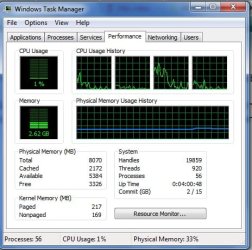
Post a screenshot of Task Manager - Performance tab.

Generally Windows does a very good job of optimizing memory usage on it's own without user intervention. Of course if there is a problem that is a different matter. But currently there is no evidence of that.
 

My Computer

Computer type
PC/Desktop
Computer Manufacturer/Model Number
HP
OS
Windows 7 Pro 64 bit
CPU
Xeon W3520
Memory
8 GB
Graphics Card(s)
Nvidia Geforce 210
its not as bad as it was. tho my main annoyance now is while my new wireless adapter seems to be working without fluctuations l cant get the speed higher than 65mbps :/ my router/adapter should be able to go up to 150mbps at least.
 

Attachments

  • ptab.jpg
    ptab.jpg
    42.7 KB · Views: 67

My Computer

Computer type
PC/Desktop
Computer Manufacturer/Model Number
Custom build
OS
Windows 7 Professional (64bit)
CPU
Intel i5 4440 3.10ghz
Motherboard
Gigabyte GA-H97M-D3H
Memory
Corsair 32GB (4x8GB) DDR3 1600MHz Vengeance Memory Kit 1.5V
Graphics Card(s)
Intel Graphics 4600 (on board)
Sound Card
External Creative Soundblaster
Monitor(s) Displays
32" TV
Screen Resolution
1360*768
Hard Drives
Kingston SSDNow UV400 240GB 2.5inch SATAIII SSD
1 1TB WD WD10EADS
3 1TB WD WD10EZEX
PSU
Coolermaster GM-Series 550W Semi Modular
Case
Aerocool X-Predator X1 Devil Red
Cooling
5x 120mil (Arctic F12)
Keyboard
Microsoft Curve 2000 v1
Mouse
Trust MaxTrack Mini Mouse - 6 button(s) - wired - USB
Internet Speed
34Meg
Antivirus
Bitdefender 2017
Browser
Firefox
Nothing unusual in the screenshot. With 8 GB RAM disabling services will gain you very little and caries with it considerable risk.
 

My Computer

Computer type
PC/Desktop
Computer Manufacturer/Model Number
HP
OS
Windows 7 Pro 64 bit
CPU
Xeon W3520
Memory
8 GB
Graphics Card(s)
Nvidia Geforce 210
very true but everything l disabled l didnt use.
 

My Computer

Computer type
PC/Desktop
Computer Manufacturer/Model Number
Custom build
OS
Windows 7 Professional (64bit)
CPU
Intel i5 4440 3.10ghz
Motherboard
Gigabyte GA-H97M-D3H
Memory
Corsair 32GB (4x8GB) DDR3 1600MHz Vengeance Memory Kit 1.5V
Graphics Card(s)
Intel Graphics 4600 (on board)
Sound Card
External Creative Soundblaster
Monitor(s) Displays
32" TV
Screen Resolution
1360*768
Hard Drives
Kingston SSDNow UV400 240GB 2.5inch SATAIII SSD
1 1TB WD WD10EADS
3 1TB WD WD10EZEX
PSU
Coolermaster GM-Series 550W Semi Modular
Case
Aerocool X-Predator X1 Devil Red
Cooling
5x 120mil (Arctic F12)
Keyboard
Microsoft Curve 2000 v1
Mouse
Trust MaxTrack Mini Mouse - 6 button(s) - wired - USB
Internet Speed
34Meg
Antivirus
Bitdefender 2017
Browser
Firefox
In that tutorial I linked go through them and in msconfig I just run my Microsoft keyboard and the security everything else I unticked the rest are good tips too:)

Points 9, 10, 11 and 22 are top tips
 

My Computer

Computer type
PC/Desktop
Computer Manufacturer/Model Number
Own build (new) Desk1 / Asus ROG Win 7 / Desk2 1st build
OS
Desk1 7 Home Prem / Desk2 10 Pro / Main lap Asus ROG 10 Pro 2 laptop Toshiba 7 Pro Asus P2520 7 & 10
CPU
Desk1 i5 3750K / Laptop i7 GTX 860M / Desk2 i5 2500
Motherboard
Desk1 Asus P877-V / Desk2 Gigabyte H67 UD3H / Laptop ?
Memory
Desk1 8GB (1866) / Desk2 16GB (1333) / Laptop 8Gb DDR3
Graphics Card(s)
Desk 1& 2NVidia GTX 650 & Laptops on board Intel
Sound Card
Desk 1 & 2 -XONAR DG Realtek High Def audio Laptop
Monitor(s) Displays
Desk 1 Benq HD 2450 / Desk2 Philips 24" / Laptop 17.5"
Screen Resolution
1920x1080 D1 & D2 & Laptop 1
Hard Drives
Desk1 Samsung 120GB 830 SSD
Asus ROG 256GB 850 Pro SSD
Desk2 Samsung 840 256 SSD
Toshiba 120GB EVO
PSU
Desk 1 Corsair HX 1050/ Laptop ? / Desk 2 Corsair HX 650
Case
Desk 1 Cooler HAF XM ? Toshiba laptop / Desk2 Coolermaster
Cooling
Fans on all Desk1 -2 Desk2 - all Coolermasters 5 Laptop ?
Keyboard
Desk 1 MS Sidewinder X6 Desk 2 MS Sidewinder X 4
Mouse
Desk 1&2 - Gigabyte MS 900 gamer - laptop - Logitec wireless
Internet Speed
ADSL2+
Other Info
One other Desktop (tester) and spare Toshba laptop both with SSD's
Running Kaspersky 2016 ISS on all machines config'd identically
Logitec audio stereo systems on each machine (x3)
Canon MG5250MFC
Router/modem TP-Link running WPA2SK
apart from skype. l have startup pretty much set the same.
 

My Computer

Computer type
PC/Desktop
Computer Manufacturer/Model Number
Custom build
OS
Windows 7 Professional (64bit)
CPU
Intel i5 4440 3.10ghz
Motherboard
Gigabyte GA-H97M-D3H
Memory
Corsair 32GB (4x8GB) DDR3 1600MHz Vengeance Memory Kit 1.5V
Graphics Card(s)
Intel Graphics 4600 (on board)
Sound Card
External Creative Soundblaster
Monitor(s) Displays
32" TV
Screen Resolution
1360*768
Hard Drives
Kingston SSDNow UV400 240GB 2.5inch SATAIII SSD
1 1TB WD WD10EADS
3 1TB WD WD10EZEX
PSU
Coolermaster GM-Series 550W Semi Modular
Case
Aerocool X-Predator X1 Devil Red
Cooling
5x 120mil (Arctic F12)
Keyboard
Microsoft Curve 2000 v1
Mouse
Trust MaxTrack Mini Mouse - 6 button(s) - wired - USB
Internet Speed
34Meg
Antivirus
Bitdefender 2017
Browser
Firefox
Ok try these first CCleaner if you haven't already only remember to check Options > Cookies after the Analysis for cookies that are linked to sites you have passwords for in the left hand column - save them to the right hand column https://www.piriform.com/ccleaner/download < download from piriform
This will clear a lot of the temp files and cookies that load at boot
and I don't think it will hurt to run these too will not take long

http://www.superantispyware.com/

http://www.malwarebytes.org/products/malwarebytes_free/

http://www.bleepingcomputer.com/download/adwcleaner/

download from bleeping computer – delete any rubbishthese find.

The Super anti will clear up a lot of PUP's in all probability.
 

My Computer

Computer type
PC/Desktop
Computer Manufacturer/Model Number
Own build (new) Desk1 / Asus ROG Win 7 / Desk2 1st build
OS
Desk1 7 Home Prem / Desk2 10 Pro / Main lap Asus ROG 10 Pro 2 laptop Toshiba 7 Pro Asus P2520 7 & 10
CPU
Desk1 i5 3750K / Laptop i7 GTX 860M / Desk2 i5 2500
Motherboard
Desk1 Asus P877-V / Desk2 Gigabyte H67 UD3H / Laptop ?
Memory
Desk1 8GB (1866) / Desk2 16GB (1333) / Laptop 8Gb DDR3
Graphics Card(s)
Desk 1& 2NVidia GTX 650 & Laptops on board Intel
Sound Card
Desk 1 & 2 -XONAR DG Realtek High Def audio Laptop
Monitor(s) Displays
Desk 1 Benq HD 2450 / Desk2 Philips 24" / Laptop 17.5"
Screen Resolution
1920x1080 D1 & D2 & Laptop 1
Hard Drives
Desk1 Samsung 120GB 830 SSD
Asus ROG 256GB 850 Pro SSD
Desk2 Samsung 840 256 SSD
Toshiba 120GB EVO
PSU
Desk 1 Corsair HX 1050/ Laptop ? / Desk 2 Corsair HX 650
Case
Desk 1 Cooler HAF XM ? Toshiba laptop / Desk2 Coolermaster
Cooling
Fans on all Desk1 -2 Desk2 - all Coolermasters 5 Laptop ?
Keyboard
Desk 1 MS Sidewinder X6 Desk 2 MS Sidewinder X 4
Mouse
Desk 1&2 - Gigabyte MS 900 gamer - laptop - Logitec wireless
Internet Speed
ADSL2+
Other Info
One other Desktop (tester) and spare Toshba laptop both with SSD's
Running Kaspersky 2016 ISS on all machines config'd identically
Logitec audio stereo systems on each machine (x3)
Canon MG5250MFC
Router/modem TP-Link running WPA2SK
most of those l have installed and run regularly. ld like to think l keep a clean system ^_^ appreciate the input.

that said, apart from disabling a couple of services... l dont know what l did but most ram l use at this second is abut 31% with firefox open and around 21% at most other times, l guess l like knowing l have plenty free for other programs that might use more.
 
Last edited:

My Computer

Computer type
PC/Desktop
Computer Manufacturer/Model Number
Custom build
OS
Windows 7 Professional (64bit)
CPU
Intel i5 4440 3.10ghz
Motherboard
Gigabyte GA-H97M-D3H
Memory
Corsair 32GB (4x8GB) DDR3 1600MHz Vengeance Memory Kit 1.5V
Graphics Card(s)
Intel Graphics 4600 (on board)
Sound Card
External Creative Soundblaster
Monitor(s) Displays
32" TV
Screen Resolution
1360*768
Hard Drives
Kingston SSDNow UV400 240GB 2.5inch SATAIII SSD
1 1TB WD WD10EADS
3 1TB WD WD10EZEX
PSU
Coolermaster GM-Series 550W Semi Modular
Case
Aerocool X-Predator X1 Devil Red
Cooling
5x 120mil (Arctic F12)
Keyboard
Microsoft Curve 2000 v1
Mouse
Trust MaxTrack Mini Mouse - 6 button(s) - wired - USB
Internet Speed
34Meg
Antivirus
Bitdefender 2017
Browser
Firefox
Do yourself a favor. Stop worrying about this! There is nothing wrong with your RAM usage. Just leave it alone. Honestly.
 

My Computer

Computer type
PC/Desktop
Computer Manufacturer/Model Number
Alienware Aurora ALX R4
OS
Windows 10 Pro (x64)
CPU
Intel Core i7-3930K (3.2GHz - 4.5GHz)
Motherboard
Alienware Aurora-R4 x79
Memory
4x Samsung 4GB PC3-12800 DDR3 (16GB 1600MHz)
Graphics Card(s)
Nvidia Geforce GTX 690
Sound Card
SteelSeries Siberia Elite
Monitor(s) Displays
Dell UltraSharp U3011
Screen Resolution
2560x1600
Hard Drives
Samsung 850 Pro 256 GB, Seagate 1TB Desktop Hybrid HDD, 2x Western Digital 4TB Green HDD
PSU
875W Some Dell PSU <.<
Case
Alienware Aurora ALX
Cooling
Custom Liquid Cooling (EK CPU & GPU blocks) dual EK 480RAD
Keyboard
Logitech G710+ Mechanical
Mouse
Logitech G700s
Internet Speed
Verizon Fios (50 mbps average)
Other Info
Server: Intel NUC D54250WYK: i5-4250U, 16GB, 256 GB mSATA, Windows Server 2012 R2
Do yourself a favor. Stop worrying about this! There is nothing wrong with your RAM usage. Just leave it alone. Honestly.

Could not agree more.

Disabling system services frees up trivial amounts of memory that would have been released by the system anyway if it was needed for other purposes. It also creates a minefield of potential problems. Many services do more than the documentation states.
 

My Computer

Computer type
PC/Desktop
Computer Manufacturer/Model Number
HP
OS
Windows 7 Pro 64 bit
CPU
Xeon W3520
Memory
8 GB
Graphics Card(s)
Nvidia Geforce 210
ld only disabled a few, but tbh whatever l did has sorted my issue.. that said the main few services l stopped were not windows services they related to third party programs, had no problems since disabling them with either running of said programs or using anything else.
 

My Computer

Computer type
PC/Desktop
Computer Manufacturer/Model Number
Custom build
OS
Windows 7 Professional (64bit)
CPU
Intel i5 4440 3.10ghz
Motherboard
Gigabyte GA-H97M-D3H
Memory
Corsair 32GB (4x8GB) DDR3 1600MHz Vengeance Memory Kit 1.5V
Graphics Card(s)
Intel Graphics 4600 (on board)
Sound Card
External Creative Soundblaster
Monitor(s) Displays
32" TV
Screen Resolution
1360*768
Hard Drives
Kingston SSDNow UV400 240GB 2.5inch SATAIII SSD
1 1TB WD WD10EADS
3 1TB WD WD10EZEX
PSU
Coolermaster GM-Series 550W Semi Modular
Case
Aerocool X-Predator X1 Devil Red
Cooling
5x 120mil (Arctic F12)
Keyboard
Microsoft Curve 2000 v1
Mouse
Trust MaxTrack Mini Mouse - 6 button(s) - wired - USB
Internet Speed
34Meg
Antivirus
Bitdefender 2017
Browser
Firefox
Yes well sorta have to agree the amount of RAM is not a lot but more than my machines do.
I have only suggested what I have and hinted at regular usage of clean up programs might help.
The malware stuff is not difficult to do and is really just an elimination part of the process, and simple good practice.

If I am not badly mistaken too I answered this post / thread after seeing it had no answers for some time as I find some members have their threads hanging to to dry for long periods with heaps of reads but no responses. :zip:
 

My Computer

Computer type
PC/Desktop
Computer Manufacturer/Model Number
Own build (new) Desk1 / Asus ROG Win 7 / Desk2 1st build
OS
Desk1 7 Home Prem / Desk2 10 Pro / Main lap Asus ROG 10 Pro 2 laptop Toshiba 7 Pro Asus P2520 7 & 10
CPU
Desk1 i5 3750K / Laptop i7 GTX 860M / Desk2 i5 2500
Motherboard
Desk1 Asus P877-V / Desk2 Gigabyte H67 UD3H / Laptop ?
Memory
Desk1 8GB (1866) / Desk2 16GB (1333) / Laptop 8Gb DDR3
Graphics Card(s)
Desk 1& 2NVidia GTX 650 & Laptops on board Intel
Sound Card
Desk 1 & 2 -XONAR DG Realtek High Def audio Laptop
Monitor(s) Displays
Desk 1 Benq HD 2450 / Desk2 Philips 24" / Laptop 17.5"
Screen Resolution
1920x1080 D1 & D2 & Laptop 1
Hard Drives
Desk1 Samsung 120GB 830 SSD
Asus ROG 256GB 850 Pro SSD
Desk2 Samsung 840 256 SSD
Toshiba 120GB EVO
PSU
Desk 1 Corsair HX 1050/ Laptop ? / Desk 2 Corsair HX 650
Case
Desk 1 Cooler HAF XM ? Toshiba laptop / Desk2 Coolermaster
Cooling
Fans on all Desk1 -2 Desk2 - all Coolermasters 5 Laptop ?
Keyboard
Desk 1 MS Sidewinder X6 Desk 2 MS Sidewinder X 4
Mouse
Desk 1&2 - Gigabyte MS 900 gamer - laptop - Logitec wireless
Internet Speed
ADSL2+
Other Info
One other Desktop (tester) and spare Toshba laptop both with SSD's
Running Kaspersky 2016 ISS on all machines config'd identically
Logitec audio stereo systems on each machine (x3)
Canon MG5250MFC
Router/modem TP-Link running WPA2SK
can you open services.msc and then make a list of the services you have disabled? You might disabled one or more that are actually necessary but not "needed" for windows to operate. I am very familiar with all the services could ou give me a list of the ones on your PC that are disabled. I might find if that was actually your problem.

If it wasn't something you did incorrectly in services it might be another app or program causing your grief.
 

My Computer

Computer type
PC/Desktop
Computer Manufacturer/Model Number
I build PC's I built this one.
OS
Windows 7 Ultimate x64
CPU
FX-6300
Motherboard
AMD
Memory
8GB
Graphics Card(s)
HD RADEON 6850 (OC'D)
Monitor(s) Displays
38" HDTV
Screen Resolution
1920X1080
Hard Drives
WD 7800RPS
Internet Speed
50Mbps
Antivirus
I dont use Antivirus. I'm not stupid enough to get a virus.
Browser
FIREFOX
tbh things seem to be fine now, tho firefox does seem to hog more ram than it used to but l can live with that as l dont browse the net all the time.

the only issue l have atm is when turning off one specific external for some reason l hear a disconnection sound of a device then a reconnection one despite things been turned off by that time. however that said when l used the safely disconnect device thing it didnt do it, it only happens with one external (the only one l have that has its own switch on the other one is fine along with my usb flash drive) but lve no other annoyances other than that at the moment.

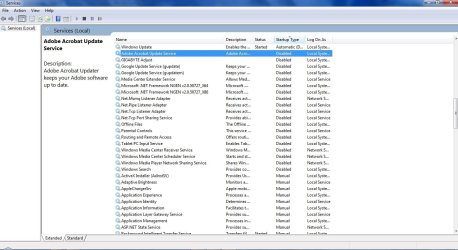
regardless l have taken a screen cap of the disabled services, to my knowledge with regards to the screen cap the only services l have personally disabled are:

Gigabyte
Windows media player ones
Tablet PC input
parental controls
google ones
Adobe
Offline files
Windows Indexing (l have usually turned this one off and have never had issues doing so)

lve not touched ANYTHING else, just those services if l remember correctly.
 

Attachments

  • Untitled.jpg
    Untitled.jpg
    111.7 KB · Views: 3

My Computer

Computer type
PC/Desktop
Computer Manufacturer/Model Number
Custom build
OS
Windows 7 Professional (64bit)
CPU
Intel i5 4440 3.10ghz
Motherboard
Gigabyte GA-H97M-D3H
Memory
Corsair 32GB (4x8GB) DDR3 1600MHz Vengeance Memory Kit 1.5V
Graphics Card(s)
Intel Graphics 4600 (on board)
Sound Card
External Creative Soundblaster
Monitor(s) Displays
32" TV
Screen Resolution
1360*768
Hard Drives
Kingston SSDNow UV400 240GB 2.5inch SATAIII SSD
1 1TB WD WD10EADS
3 1TB WD WD10EZEX
PSU
Coolermaster GM-Series 550W Semi Modular
Case
Aerocool X-Predator X1 Devil Red
Cooling
5x 120mil (Arctic F12)
Keyboard
Microsoft Curve 2000 v1
Mouse
Trust MaxTrack Mini Mouse - 6 button(s) - wired - USB
Internet Speed
34Meg
Antivirus
Bitdefender 2017
Browser
Firefox
turn both netframework back to manual. Never disable them. They are used for many processes including gaming if you do that. Just put them manual and they won't run unless your system needs them. That is a problem I have helped many gamers that use RADEON HD videos cards with. Sometimes windows will disable older netframework drivers and only use the newest installed and that causes problems on many levels that would take to many posts here to explain. Other than that I don't see any services you have disabled that would affect Memory.
 

My Computer

Computer type
PC/Desktop
Computer Manufacturer/Model Number
I build PC's I built this one.
OS
Windows 7 Ultimate x64
CPU
FX-6300
Motherboard
AMD
Memory
8GB
Graphics Card(s)
HD RADEON 6850 (OC'D)
Monitor(s) Displays
38" HDTV
Screen Resolution
1920X1080
Hard Drives
WD 7800RPS
Internet Speed
50Mbps
Antivirus
I dont use Antivirus. I'm not stupid enough to get a virus.
Browser
FIREFOX
Back
Top