optimising ram usage

.... in addition a good gmail notifier as well because l had to downgrade due to the gmail manager not working on the newer versions that supports multiple gmail accounts..

Try Gmail Watcher - https://sites.google.com/site/sonthakit/gmailwatcher - not available via the Firefox add ons page for some reason since version 1.5x IIRC but the developer is still working on it. Definitely works for multiple accounts as I am using it for that purpose.
 

My Computer

Computer type
PC/Desktop
Computer Manufacturer/Model Number
Custom Build
OS
Windows 7 64bit
CPU
Intel(R) Core(TM) i7-4770K CPU @ 3.50GHz
Motherboard
Gigabyte Technology Co., Ltd. Z87-DS3H
Memory
Corsair XMS3 16GB kit (2x8GB) DDR3 1333MHz Unbuffered CL9 DI
Graphics Card(s)
(1) Intel(R) HD Graphics 4600 (2) NVIDIA GeForce GT 640
Hard Drives
(1) Samsung SSD 840 EVO 250G SCSI Disk Device (2) Samsung SSD 850 EVO 250G SCSI Disk Device (3) WDC WD10EZEX-00KUWA0 SCSI Disk Device
Antivirus
MSE
Browser
Pale Moon
tbh things seem to be fine now, tho firefox does seem to hog more ram than it used to but l can live with that as l dont browse the net all the time.

the only issue l have atm is when turning off one specific external for some reason l hear a disconnection sound of a device then a reconnection one despite things been turned off by that time. however that said when l used the safely disconnect device thing it didnt do it, it only happens with one external (the only one l have that has its own switch on the other one is fine along with my usb flash drive) but lve no other annoyances other than that at the moment.

regardless l have taken a screen cap of the disabled services, to my knowledge with regards to the screen cap the only services l have personally disabled are:

Gigabyte
Windows media player ones
Tablet PC input
parental controls
google ones
Adobe
Offline files
Windows Indexing (l have usually turned this one off and have never had issues doing so)

lve not touched ANYTHING else, just those services if l remember correctly.

How many external devices do you have connected? My next door neighbor had like 2 external drives and one that did continuous IMAGE updates in realtime happening and sometimes his PC would freeze up. If you have external drives and only use them occasionally disconnect them and only plug them in when you need to write to them or read ( get some data) from them. USB can use alot of your PSU also and it does consume RAM to have all those running all the time.

(just a side note: I don't watch or use my dvd drive often so I don't even have it plugged into my SATA or PSU unless I actuall need to use it) *every volt your PSU doesn't have to use is another day of life it has.

Same for RAM and having to many devices that your ram has to load and then they aren't even used often.
 

My Computer

Computer type
PC/Desktop
Computer Manufacturer/Model Number
I build PC's I built this one.
OS
Windows 7 Ultimate x64
CPU
FX-6300
Motherboard
AMD
Memory
8GB
Graphics Card(s)
HD RADEON 6850 (OC'D)
Monitor(s) Displays
38" HDTV
Screen Resolution
1920X1080
Hard Drives
WD 7800RPS
Internet Speed
50Mbps
Antivirus
I dont use Antivirus. I'm not stupid enough to get a virus.
Browser
FIREFOX
I would maybe try expanding the amount of ram you currently have if at all possible. And pwr above is right. Any external devices may be consuming large amounts of ram depending on the device etc.
 

My Computer

Computer type
PC/Desktop
Computer Manufacturer/Model Number
custom built
OS
Windows 7 ultimate 64-bit
CPU
Intel I7 2600K 3.4ghz
Motherboard
Asus Evo P8P67
Memory
Corsair 16gb ddr3 1600mhz
Graphics Card(s)
Nvidia Geforce gt 430
Sound Card
Sound Blaster Titanium x-fi pci express
Monitor(s) Displays
Dell E198WFP
Hard Drives
1 western digital 2TB drive.
PSU
Antec 1200 watt
Case
Inwin Dragon Rider
Cooling
6 case supplied cooling fans
Keyboard
logitech mk700
Mouse
logitech m705
Internet Speed
25-50mbps download; 10mbps upload(i think)
Antivirus
avg free 2014
Browser
mozilla firefox
Other Info
Also have a pretty bad speaker setup which is a klipsch promedia 5.1 surround speaker setup with huge subwoofer and lg blu ray player/writer. Also a hp officejet pro 8600 plus wireless all in one and a logitech s7500 webcam.
l hear a disconnection sound of a device then a reconnection one despite things been turned off by that time
that gives me pause.. you can disconnect a device then it reconnects auto? ... can you tell me which device does that..

That might be your problem right there.

I think this has been pin pointed with what you posted right there.
 

My Computer

Computer type
PC/Desktop
Computer Manufacturer/Model Number
I build PC's I built this one.
OS
Windows 7 Ultimate x64
CPU
FX-6300
Motherboard
AMD
Memory
8GB
Graphics Card(s)
HD RADEON 6850 (OC'D)
Monitor(s) Displays
38" HDTV
Screen Resolution
1920X1080
Hard Drives
WD 7800RPS
Internet Speed
50Mbps
Antivirus
I dont use Antivirus. I'm not stupid enough to get a virus.
Browser
FIREFOX
lve set the .nets to manual that were disabled (both services l had not touched as l knew they were integral parts of the system).

as for the device that causes the issue lve linked to it here if memory serves the drive l put in it is a Seagate drive (3TB), as for connected devices the ones that are connected and turned on are my keyboard/mouse and wireless adapter, while l do have another usb cable connected the device isnt turned on as l only connect externals as and when needed, but when l used the safely disconnect yesterday (as l mentioned) l didnt get the disconnect reconnect sound.
 

My Computer

Computer type
PC/Desktop
Computer Manufacturer/Model Number
Custom build
OS
Windows 7 Professional (64bit)
CPU
Intel i5 4440 3.10ghz
Motherboard
Gigabyte GA-H97M-D3H
Memory
Corsair 32GB (4x8GB) DDR3 1600MHz Vengeance Memory Kit 1.5V
Graphics Card(s)
Intel Graphics 4600 (on board)
Sound Card
External Creative Soundblaster
Monitor(s) Displays
32" TV
Screen Resolution
1360*768
Hard Drives
Kingston SSDNow UV400 240GB 2.5inch SATAIII SSD
1 1TB WD WD10EADS
3 1TB WD WD10EZEX
PSU
Coolermaster GM-Series 550W Semi Modular
Case
Aerocool X-Predator X1 Devil Red
Cooling
5x 120mil (Arctic F12)
Keyboard
Microsoft Curve 2000 v1
Mouse
Trust MaxTrack Mini Mouse - 6 button(s) - wired - USB
Internet Speed
34Meg
Antivirus
Bitdefender 2017
Browser
Firefox
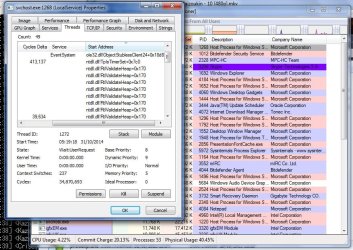
been noticing that svchost has started to eat my ram again, one of the services was eating nearly a gig of my ram on its own..

then l remembered process explorer it seems the svchost processes eating my ram are all labelled as being under the explorer process so l looked under the threads tab on the properties of the service to notice the largest of the svchost processes seems to have many instances of "ntdll.dll!RtlValidateHeap+0x170" within it, the other did as well but not as many, lm wondering if thats what has started eating my ram.

have uploaded memory dump from my windows directory, last one l removed was over 700meg this one is around 600meg (tho lve compressed this one) wondering if it will help locating the reason why svchost under the explorer process seems to starts to eat my ram as before my upgrade l never had problems with ram and the only thing that used allot was my browser but ld always go back to under 30% usage where as now it just grows and grows.

heres the link to the 600meg memory dump from my windows dir, lve compressed it down to 110meg:

https://www.sendspace.com/file/8qnhrj
 

Attachments

  • Untitled.jpg
    Untitled.jpg
    128.9 KB · Views: 2
Last edited:

My Computer

Computer type
PC/Desktop
Computer Manufacturer/Model Number
Custom build
OS
Windows 7 Professional (64bit)
CPU
Intel i5 4440 3.10ghz
Motherboard
Gigabyte GA-H97M-D3H
Memory
Corsair 32GB (4x8GB) DDR3 1600MHz Vengeance Memory Kit 1.5V
Graphics Card(s)
Intel Graphics 4600 (on board)
Sound Card
External Creative Soundblaster
Monitor(s) Displays
32" TV
Screen Resolution
1360*768
Hard Drives
Kingston SSDNow UV400 240GB 2.5inch SATAIII SSD
1 1TB WD WD10EADS
3 1TB WD WD10EZEX
PSU
Coolermaster GM-Series 550W Semi Modular
Case
Aerocool X-Predator X1 Devil Red
Cooling
5x 120mil (Arctic F12)
Keyboard
Microsoft Curve 2000 v1
Mouse
Trust MaxTrack Mini Mouse - 6 button(s) - wired - USB
Internet Speed
34Meg
Antivirus
Bitdefender 2017
Browser
Firefox
Back
Top