Solved optimizing ssd help

WindowsOP

New member
Local time
4:12 PM
Messages
60
It says with the exception of the following necessary logs, (Application, SEcurity, System, and Security ESsentials), I can disable them from starting.

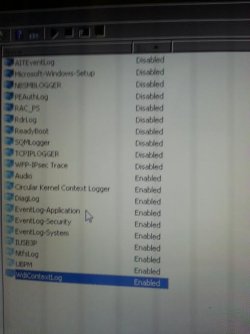
The only ones I see are EventLog-Application, EventLog-Security, and EventLog-System that are Enabled. There's no Security Essentials listed under Startup Event Trace Session. If I left the 3 alone enabled, and disabled the rest, should I be okay with my system?


Go to start/admin tools and select performance monitor. Expand data collector sets. Click on Startup Event Trace Sessions.
With the exception of the following NECESSARY logs (Application, Security, System, Security Essentials) we can stop them from starting. To do so, right click on each one that has a status of Enabled (except the ones mentioned above) and select Properties. Click the Trace Session tab. Unselect Enabled. Click Ok. Repeat for the others (including readyboot).
After your next boot, you will have a lot less writes going to the SSD that are not needed.

So far what I've done to my computer with windows 7 installed on SSD.

Disabled System Restore
Disabled Drive Indexing
Disabled Drive Defragmentation Schedule
Disabled PageFile
Disabled Hibernation
Disabled Prefetch and Superfetch
Disabled Windows Write-Cache Buffer Flusing
Disabled Windows Search and Superfetch
 

Attachments
  • unnamed (1).jpg
    unnamed (1).jpg
    25.1 KB · Views: 52

My Computer

Computer type
Laptop
Computer Manufacturer/Model Number
Dell D620
OS
Windows Ultimate x64
CPU
Intel Core 2 Duo TP5500 1.6Ghz
Memory
3GB
Graphics Card(s)
Intel 945 Chipset
Sound Card
HD Audio Device
Screen Resolution
1440x900
Hard Drives
80GB HDD
Internet Speed
25 down 5 up
Antivirus
Avast, Malwarebytes
Browser
Chrome
I think you are a little too worried about writes to your SSD, they aren't as fragile as you seem to think.

Just stay away from defragging and enjoy your SSD. You would be surprised at the actual life span of SSD's today.
 

My Computer

Computer type
PC/Desktop
Computer Manufacturer/Model Number
Self Built
OS
Win 10 Pro x64
CPU
Intel I5-2500K @3.3GHz
Motherboard
Asrock P67 Extreme4
Memory
16GB G.Skill Ripjaws X (4x4GB)
Graphics Card(s)
EVGA GeForce 750 Ti SC 2GB
Sound Card
ASUS Xonar DG 5.1 Channels 24-bit 96KHz PCI Interface Sound
Monitor(s) Displays
auria eq2367
Screen Resolution
1920 x 1080
Hard Drives
250GB Samsung 850 EVO SSD
1TB WD Blue
1TB Hitachi
PSU
SeaSonic X 650W 80 Plus Gold
Case
Corsair Obsidian 750D
Cooling
Corsair H60, Three 140mm case fans
Keyboard
Logitech Wireless Keyboard K520
Mouse
Logitech Wireless Mouse M310
Internet Speed
Wave Broadband ~ 100 dn 5 up
Antivirus
Windows Defender, Malwarebytes Premium
Browser
Edge, IE11, Chrome
Other Info
Laptop specs: HP g7-1365dx /
CPU: AMD A6-3420M APU with Radeon(tm) HD Graphics /
RAM: Crucial 8Gb (2x4Gb) /
SSD: Crucial M4-CT128M4SSD2 ATA Device/ FW 000F /
GFX: AMD Radeon HD 6520G /
OS: Windows 10 Pro x64
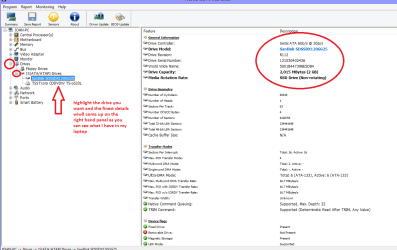
As Derek says mate and if you want to try and optimize the rive you could find out what brand it is and use their software to do just that. You can find that brand with HW Info
HWiNFO, HWiNFO32/64 - Download run it and then close the right hand window and in the left hand window open up the drives and then open out further to see details of the drives (see my pic)

Handy program to keep too for the other gear installed and especially if the machine isa laptop that often list components as graphics etc and don't give the brand name and so make it hard to find drivers for them.

Also see this http://www.sevenforums.com/tutorials/11728-optimize-windows-7-a.html :)
 

Attachments

  • HW INFO DRIVES.PNG
    HW INFO DRIVES.PNG
    113.5 KB · Views: 1

My Computer

Computer type
PC/Desktop
Computer Manufacturer/Model Number
Own build (new) Desk1 / Asus ROG Win 7 / Desk2 1st build
OS
Desk1 7 Home Prem / Desk2 10 Pro / Main lap Asus ROG 10 Pro 2 laptop Toshiba 7 Pro Asus P2520 7 & 10
CPU
Desk1 i5 3750K / Laptop i7 GTX 860M / Desk2 i5 2500
Motherboard
Desk1 Asus P877-V / Desk2 Gigabyte H67 UD3H / Laptop ?
Memory
Desk1 8GB (1866) / Desk2 16GB (1333) / Laptop 8Gb DDR3
Graphics Card(s)
Desk 1& 2NVidia GTX 650 & Laptops on board Intel
Sound Card
Desk 1 & 2 -XONAR DG Realtek High Def audio Laptop
Monitor(s) Displays
Desk 1 Benq HD 2450 / Desk2 Philips 24" / Laptop 17.5"
Screen Resolution
1920x1080 D1 & D2 & Laptop 1
Hard Drives
Desk1 Samsung 120GB 830 SSD
Asus ROG 256GB 850 Pro SSD
Desk2 Samsung 840 256 SSD
Toshiba 120GB EVO
PSU
Desk 1 Corsair HX 1050/ Laptop ? / Desk 2 Corsair HX 650
Case
Desk 1 Cooler HAF XM ? Toshiba laptop / Desk2 Coolermaster
Cooling
Fans on all Desk1 -2 Desk2 - all Coolermasters 5 Laptop ?
Keyboard
Desk 1 MS Sidewinder X6 Desk 2 MS Sidewinder X 4
Mouse
Desk 1&2 - Gigabyte MS 900 gamer - laptop - Logitec wireless
Internet Speed
ADSL2+
Other Info
One other Desktop (tester) and spare Toshba laptop both with SSD's
Running Kaspersky 2016 ISS on all machines config'd identically
Logitec audio stereo systems on each machine (x3)
Canon MG5250MFC
Router/modem TP-Link running WPA2SK
As Derek says mate and if you want to try and optimize the rive you could find out what brand it is and use their software to do just that. You can find that brand with HW Info
HWiNFO, HWiNFO32/64 - Download run it and then close the right hand window and in the left hand window open up the drives and then open out further to see details of the drives (see my pic)

Handy program to keep too for the other gear installed and especially if the machine isa laptop that often list components as graphics etc and don't give the brand name and so make it hard to find drivers for them.

Also see this http://www.sevenforums.com/tutorials/11728-optimize-windows-7-a.html :)

I'm using the same brand SSD but 256gb..
 

My Computer

Computer type
Laptop
Computer Manufacturer/Model Number
Dell D620
OS
Windows Ultimate x64
CPU
Intel Core 2 Duo TP5500 1.6Ghz
Memory
3GB
Graphics Card(s)
Intel 945 Chipset
Sound Card
HD Audio Device
Screen Resolution
1440x900
Hard Drives
80GB HDD
Internet Speed
25 down 5 up
Antivirus
Avast, Malwarebytes
Browser
Chrome
Makes no difference Wibdows - or shouldn't do.
 

My Computer

Computer type
PC/Desktop
Computer Manufacturer/Model Number
Own build (new) Desk1 / Asus ROG Win 7 / Desk2 1st build
OS
Desk1 7 Home Prem / Desk2 10 Pro / Main lap Asus ROG 10 Pro 2 laptop Toshiba 7 Pro Asus P2520 7 & 10
CPU
Desk1 i5 3750K / Laptop i7 GTX 860M / Desk2 i5 2500
Motherboard
Desk1 Asus P877-V / Desk2 Gigabyte H67 UD3H / Laptop ?
Memory
Desk1 8GB (1866) / Desk2 16GB (1333) / Laptop 8Gb DDR3
Graphics Card(s)
Desk 1& 2NVidia GTX 650 & Laptops on board Intel
Sound Card
Desk 1 & 2 -XONAR DG Realtek High Def audio Laptop
Monitor(s) Displays
Desk 1 Benq HD 2450 / Desk2 Philips 24" / Laptop 17.5"
Screen Resolution
1920x1080 D1 & D2 & Laptop 1
Hard Drives
Desk1 Samsung 120GB 830 SSD
Asus ROG 256GB 850 Pro SSD
Desk2 Samsung 840 256 SSD
Toshiba 120GB EVO
PSU
Desk 1 Corsair HX 1050/ Laptop ? / Desk 2 Corsair HX 650
Case
Desk 1 Cooler HAF XM ? Toshiba laptop / Desk2 Coolermaster
Cooling
Fans on all Desk1 -2 Desk2 - all Coolermasters 5 Laptop ?
Keyboard
Desk 1 MS Sidewinder X6 Desk 2 MS Sidewinder X 4
Mouse
Desk 1&2 - Gigabyte MS 900 gamer - laptop - Logitec wireless
Internet Speed
ADSL2+
Other Info
One other Desktop (tester) and spare Toshba laptop both with SSD's
Running Kaspersky 2016 ISS on all machines config'd identically
Logitec audio stereo systems on each machine (x3)
Canon MG5250MFC
Router/modem TP-Link running WPA2SK
Makes no difference Wibdows - or shouldn't do.

the program you linked me, is it safe to download their program to download drivers?

HWiNFO, HWiNFO32/64
 

My Computer

Computer type
Laptop
Computer Manufacturer/Model Number
Dell D620
OS
Windows Ultimate x64
CPU
Intel Core 2 Duo TP5500 1.6Ghz
Memory
3GB
Graphics Card(s)
Intel 945 Chipset
Sound Card
HD Audio Device
Screen Resolution
1440x900
Hard Drives
80GB HDD
Internet Speed
25 down 5 up
Antivirus
Avast, Malwarebytes
Browser
Chrome
You don't need a driver program, those usually cause more harm than good.

Only use the manufacturer or OEM to find your drivers, you don't always need to update drivers if you're not having problems.

Do you need help finding a missing driver? We have always been able to track them down for people.

You would help yourself and us by filling in your system specs completely, this will help with that,

http://www.sevenforums.com/tutorials/180324-system-info-see-your-system-specs.html

Since everybody knows you don't have a "California" Operating System, that is a good place to start. :)
 

My Computer

Computer type
PC/Desktop
Computer Manufacturer/Model Number
Self Built
OS
Win 10 Pro x64
CPU
Intel I5-2500K @3.3GHz
Motherboard
Asrock P67 Extreme4
Memory
16GB G.Skill Ripjaws X (4x4GB)
Graphics Card(s)
EVGA GeForce 750 Ti SC 2GB
Sound Card
ASUS Xonar DG 5.1 Channels 24-bit 96KHz PCI Interface Sound
Monitor(s) Displays
auria eq2367
Screen Resolution
1920 x 1080
Hard Drives
250GB Samsung 850 EVO SSD
1TB WD Blue
1TB Hitachi
PSU
SeaSonic X 650W 80 Plus Gold
Case
Corsair Obsidian 750D
Cooling
Corsair H60, Three 140mm case fans
Keyboard
Logitech Wireless Keyboard K520
Mouse
Logitech Wireless Mouse M310
Internet Speed
Wave Broadband ~ 100 dn 5 up
Antivirus
Windows Defender, Malwarebytes Premium
Browser
Edge, IE11, Chrome
Other Info
Laptop specs: HP g7-1365dx /
CPU: AMD A6-3420M APU with Radeon(tm) HD Graphics /
RAM: Crucial 8Gb (2x4Gb) /
SSD: Crucial M4-CT128M4SSD2 ATA Device/ FW 000F /
GFX: AMD Radeon HD 6520G /
OS: Windows 10 Pro x64
You don't need a driver program, those usually cause more harm than good.

Only use the manufacturer or OEM to find your drivers, you don't always need to update drivers if you're not having problems.

Do you need help finding a missing driver? We have always been able to track them down for people.

You would help yourself and us by filling in your system specs completely, this will help with that,

http://www.sevenforums.com/tutorials/180324-system-info-see-your-system-specs.html

Since everybody knows you don't have a "California" Operating System, that is a good place to start. :)

bookmarked.

thank you :) I love this forum. I don't think i'll ever leave windows 7 unless windows 9 is like windows 7 :cool:
 

My Computer

Computer type
Laptop
Computer Manufacturer/Model Number
Dell D620
OS
Windows Ultimate x64
CPU
Intel Core 2 Duo TP5500 1.6Ghz
Memory
3GB
Graphics Card(s)
Intel 945 Chipset
Sound Card
HD Audio Device
Screen Resolution
1440x900
Hard Drives
80GB HDD
Internet Speed
25 down 5 up
Antivirus
Avast, Malwarebytes
Browser
Chrome
I have 8 SSDs in different computers. I do very little to 'optimize' them. Windows does a good job of that by itself. I make sure defragmentation is turned of for the SSD. It will be turned on if you have mechanical hard drives, but the SSD will not be in the schedule., I disable Hibernate (http://www.sevenforums.com/tutorials/819-hibernate-enable-disable.html) if you don't use it and it will increase your space on the SSD. I do pretty much nothing else, except maybe the Virtual ram, depending on how much Ram you have. That's all. Much of what you read about on the internet was needed with the first generation SSDs, it is not needed any more. Too many people 'optimize' their SSDs to death.
 

My Computers

System One System Two

  • Computer type
    PC/Desktop
    Computer Manufacturer/Model Number
    ALWAYS UNDER CONSTRUCTION
    OS
    Windows 11 Pro
    CPU
    Ryzen 9 5900X
    Motherboard
    Asus X570 Crosshair Viii Hero
    Memory
    32GB G Skill DDR4-3600
    Graphics Card(s)
    EVGA RTX 3080 FTW 3 Ultra
    Sound Card
    On Board/Sennheiser PC37X Headset
    Monitor(s) Displays
    3 X Asus 27"
    Screen Resolution
    2560x1440
    Hard Drives
    2 X 1 TB NVME drives
    PSU
    EVGA 850
    Case
    Phanteks Eclipse P400A
    Cooling
    EVGA 280 AIO
    Keyboard
    Logitech G510s/ Logitech G13
    Mouse
    Logitech G502
    Internet Speed
    24/1
    Antivirus
    ESET/MBAM Pro/SAS Pro
    Browser
    Chrome/ Firefox/ Edge
  • Computer type
    Laptop
    System Manufacturer/Model Number
    Dell 16 Plus
    OS
    Windows 11 Pro
    CPU
    Intel Ultra 9 288V
    Memory
    32 GB LPDDR5X 8533
    Monitor(s) Displays
    16" Mini-LED HDR600 Touch 90 Hz
    Screen Resolution
    2560X1600
    Hard Drives
    1 TB NVME
I am all the way with Derek and essenbe the SSD's these days are in my mind a superior product to when they first started to become affordable.

Yes mate and all those driver finders and tune up programs they spray around like confetti at a wedding are just a load of absolute rot. I always use the manufacturers updates I am even not a great fan of the Windows feature.
 

My Computer

Computer type
PC/Desktop
Computer Manufacturer/Model Number
Own build (new) Desk1 / Asus ROG Win 7 / Desk2 1st build
OS
Desk1 7 Home Prem / Desk2 10 Pro / Main lap Asus ROG 10 Pro 2 laptop Toshiba 7 Pro Asus P2520 7 & 10
CPU
Desk1 i5 3750K / Laptop i7 GTX 860M / Desk2 i5 2500
Motherboard
Desk1 Asus P877-V / Desk2 Gigabyte H67 UD3H / Laptop ?
Memory
Desk1 8GB (1866) / Desk2 16GB (1333) / Laptop 8Gb DDR3
Graphics Card(s)
Desk 1& 2NVidia GTX 650 & Laptops on board Intel
Sound Card
Desk 1 & 2 -XONAR DG Realtek High Def audio Laptop
Monitor(s) Displays
Desk 1 Benq HD 2450 / Desk2 Philips 24" / Laptop 17.5"
Screen Resolution
1920x1080 D1 & D2 & Laptop 1
Hard Drives
Desk1 Samsung 120GB 830 SSD
Asus ROG 256GB 850 Pro SSD
Desk2 Samsung 840 256 SSD
Toshiba 120GB EVO
PSU
Desk 1 Corsair HX 1050/ Laptop ? / Desk 2 Corsair HX 650
Case
Desk 1 Cooler HAF XM ? Toshiba laptop / Desk2 Coolermaster
Cooling
Fans on all Desk1 -2 Desk2 - all Coolermasters 5 Laptop ?
Keyboard
Desk 1 MS Sidewinder X6 Desk 2 MS Sidewinder X 4
Mouse
Desk 1&2 - Gigabyte MS 900 gamer - laptop - Logitec wireless
Internet Speed
ADSL2+
Other Info
One other Desktop (tester) and spare Toshba laptop both with SSD's
Running Kaspersky 2016 ISS on all machines config'd identically
Logitec audio stereo systems on each machine (x3)
Canon MG5250MFC
Router/modem TP-Link running WPA2SK
To me the first one has to do with a SSD is quiet worrying about it. Just use it and enjoy the speed. I treat it like a hard drive except for the below.
-----------------------
Do not defrag.
I have 3 Intel SSD's and I use the Intel Toolbox Optimizer about once a month. Basically all that is TRIM. Intel recommends once a week but I feel no need to do it that often.

Trim (computing) - Wikipedia, the free encyclopedia
 

My Computer

Computer type
PC/Desktop
Computer Manufacturer/Model Number
Home made Desktop
OS
Windows 10 Pro. 64/ version 1709 Windows 7 Pro/64
CPU
Intel i7-6800K @ 4.3
Motherboard
ASUS X-99 Deluxe II
Memory
Corsair Platinum 16 gig @2400
Graphics Card(s)
EVGA GTX 1070 OC
Monitor(s) Displays
Asus 27" LED LCD/VE278Q
Screen Resolution
1920-1080 or 1280-720 HDMI
Hard Drives
INTEL SSD 730-240 Gb Sata 3.0/
PSU
EVGA Platium 1200W
Case
Phanteks Luxe Tempered Glass 8 fans/ one radiator
Cooling
XSPC/ Water Cooled CPU
Keyboard
Das 4 Professional
Mouse
Logitech M705/MX Anywhere 2-S
Internet Speed
100 mbits
Antivirus
Microsoft Security Essentials/ Malwarebytes Premium 3.0/ SAS
Browser
I.E. 11 default/Firefox/ ISP Time Warner Cable/Spectrum
Other Info
LG BluRay Burner/
Sound system-KLipsch-THX/
Icy Dock ssd Hot Swap bays.
To me the first one has to do with a SSD is quiet worrying about it. Just use it and enjoy the speed. I treat it like a hard drive except for the below.
-----------------------
Do not defrag.
I have 3 Intel SSD's and I use the Intel Toolbox Optimizer about once a month. Basically all that is TRIM. Intel recommends once a week but I feel no need to do it that often.

Trim (computing) - Wikipedia, the free encyclopedia

Does Sandisk have something like intel?

I searched for programs made by Sandisk but they don't exist.

I'm waiting for my 2nd hdd caddy for my hdd to replace the disk tray and then im ready to go!
 

My Computer

Computer type
Laptop
Computer Manufacturer/Model Number
Dell D620
OS
Windows Ultimate x64
CPU
Intel Core 2 Duo TP5500 1.6Ghz
Memory
3GB
Graphics Card(s)
Intel 945 Chipset
Sound Card
HD Audio Device
Screen Resolution
1440x900
Hard Drives
80GB HDD
Internet Speed
25 down 5 up
Antivirus
Avast, Malwarebytes
Browser
Chrome
Back
Top