OUTLOOK 2003: "the requested operation failed" error appears on Intern

klxdrt

New member
Member
VIP
Local time
7:57 PM
Messages
188
OUTLOOK 2003: "the requested operation failed" error appears on Intern

Hi.:cry:

OUTLOOK 2003: "the requested operation failed" error appears on Internet E-Mail Settings IMAP pop-up?

I have been using & setting up Outlook on 2 identical W7 pro 32 bit pc's for several yr with little or or problems.

My wife & I are moving to a new area and will have new email addresses and haven't been able to get past the above error (pix below). My ISP Charter & they are always making changes to their email program & settings. Also, after months of no W7 updates, I have just started rec'd updates for both PCs.

I'm trying to track this problem down:
Am I making an operational error, or is Charter trying to get everyone using their web mail, or is MS slipping something into W7 updates to force customers to W10??
If you guys have any suggestions, etc, please advise as I will be with out an email client on my PC when our move is completed. Please see image below.

cheers,
klxdrt
 

Attachments

  • outlook error 8-22-16.jpg
    outlook error 8-22-16.jpg
    37.6 KB · Views: 1

My Computer My Computer

Computer type
PC/Desktop
Computer Manufacturer/Model Number
locally made
OS
w7 pro 32 bit w/XP virt enabled.
CPU
AMD A6-3650
Motherboard
ASUS F1A55-M CSM
Memory
4 GB DDR3 RAM
Graphics Card(s)
NVIDIA GeForce 210
Sound Card
NVIDIA High Definition Audio
Monitor(s) Displays
28" HD monitor
Screen Resolution
1680 x 1050 x 32 bits (4294967296 colors) @ 59 Hz
Hard Drives
2 x 500 GB Western Digital Blue Hard Drive
PSU
?
Case
?
Cooling
3-4 fans
Keyboard
big yellow keys
Mouse
logitec
Internet Speed
60 mb
Antivirus
panda
Browser
ff
Other Info
scanner, webcam, bw printer, fax modem, cd/dvd burner, PC usb ports: 2 usb3, 6 usb2 plus 7 port usb hub, 2 tb usb3, 1 Tb usb3, 500Mb usb2, 120Mb USB2 portable drives, asst of flash drives 250 Mb to 32 Gb. backup PC, office
Setting up a new email account can be a problem. Have you contacted Charter to get some assistance with setting up the account.

The IMAP incoming mail server & the SMTP Outgoing mail server settings are critical & often further setting changes are needed in "More Settings".
 

My Computer My Computer

Computer type
PC/Desktop
Computer Manufacturer/Model Number
Self built using existing case
OS
Windows 7 Home Premium 64 bit sp1
CPU
Intel i5 3570 3.4Ghz Ivy Bridge SKT 1155 quad core
Motherboard
Gigabyte Z77-HD3 SKT 1155 2xSata 3, 4x USB 3.0
Memory
G-Skill Rip Jaws 16Gb (8x2) DDR3 -1600 PC3 12800 CL 10 red
Graphics Card(s)
Gigabyte NVIDIA GT610 1Gb DDR3 810/1200 PCI-E 2.0 Silent
Sound Card
NVIDIA High Definition & Realtech High Definition Audio
Monitor(s) Displays
2 x Philips 226V4L 16:9 aspect ratio
Screen Resolution
1920 x 1080 HD
Hard Drives
Samsung 840 Pro 256gb SSD, SATA 3.
Hitachi Touro Portable 1tb, USB 3.0 HDD used for image b/ups.
PSU
Corsair VS450
Case
Codeng
Cooling
PSU fan & CPU fan
Keyboard
Logitech
Mouse
Logitech Wireless trackball M570
Internet Speed
Wireless 3G. 3mg down & 550kb up.
Antivirus
Bitdefender Internet Security 2020
Browser
Opera (Current Version) & Firefox
Other Info
MS Office 2013 Pro. Davis weather station software. MGE Nova 600 avr UPS.
Ranger,

Thanks for the quick response. Charter is is part of a Broadband Cartel in the states, controlled by the Govt. You deal with it, or you don't, you have nowhere to go, no choice, no help. Esp in a Free market driven society. yuck

As you can see by the included image in my post, I can't go any further in the installation to view or make any changes. So I'm stuck with no email.
 

Attachments

  • cheers klx chainwheel.png
    cheers klx chainwheel.png
    4.7 KB · Views: 18

My Computer My Computer

Computer type
PC/Desktop
Computer Manufacturer/Model Number
locally made
OS
w7 pro 32 bit w/XP virt enabled.
CPU
AMD A6-3650
Motherboard
ASUS F1A55-M CSM
Memory
4 GB DDR3 RAM
Graphics Card(s)
NVIDIA GeForce 210
Sound Card
NVIDIA High Definition Audio
Monitor(s) Displays
28" HD monitor
Screen Resolution
1680 x 1050 x 32 bits (4294967296 colors) @ 59 Hz
Hard Drives
2 x 500 GB Western Digital Blue Hard Drive
PSU
?
Case
?
Cooling
3-4 fans
Keyboard
big yellow keys
Mouse
logitec
Internet Speed
60 mb
Antivirus
panda
Browser
ff
Other Info
scanner, webcam, bw printer, fax modem, cd/dvd burner, PC usb ports: 2 usb3, 6 usb2 plus 7 port usb hub, 2 tb usb3, 1 Tb usb3, 500Mb usb2, 120Mb USB2 portable drives, asst of flash drives 250 Mb to 32 Gb. backup PC, office

Perhaps this Charter website might be more useful. You need to scroll down to get the settings that are applicable to your device, as some of the settings are different.
Desktop settings are the second one.
It describes what is necessary, particularly the settings that you need to set in "More Settings", so you will need to click on that & follow through.
There is a video as well, but it did not seem to provide much info on setting up.

Charter.net Email Settings

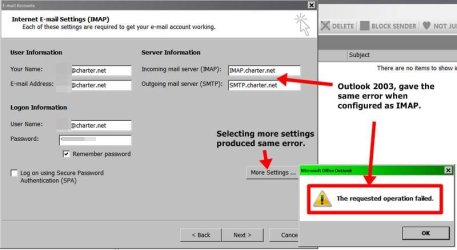
In your first post your screen shot shows that you have not included IMAP in the Incoming mail server & you have not included SMTP in the outgoing server.
The Incoming should read as:
IMAP.charter.net

& the Outgoing as:
SMTP.charter.net

You will then need to go into More Settings & change the Incoming Port & Outgoing Port settings & set the SSL setting to Off, for both IMAP & SMTP.

Be sure to save your settings & then run a test email.
 
Last edited:

My Computer My Computer

Computer type
PC/Desktop
Computer Manufacturer/Model Number
Self built using existing case
OS
Windows 7 Home Premium 64 bit sp1
CPU
Intel i5 3570 3.4Ghz Ivy Bridge SKT 1155 quad core
Motherboard
Gigabyte Z77-HD3 SKT 1155 2xSata 3, 4x USB 3.0
Memory
G-Skill Rip Jaws 16Gb (8x2) DDR3 -1600 PC3 12800 CL 10 red
Graphics Card(s)
Gigabyte NVIDIA GT610 1Gb DDR3 810/1200 PCI-E 2.0 Silent
Sound Card
NVIDIA High Definition & Realtech High Definition Audio
Monitor(s) Displays
2 x Philips 226V4L 16:9 aspect ratio
Screen Resolution
1920 x 1080 HD
Hard Drives
Samsung 840 Pro 256gb SSD, SATA 3.
Hitachi Touro Portable 1tb, USB 3.0 HDD used for image b/ups.
PSU
Corsair VS450
Case
Codeng
Cooling
PSU fan & CPU fan
Keyboard
Logitech
Mouse
Logitech Wireless trackball M570
Internet Speed
Wireless 3G. 3mg down & 550kb up.
Antivirus
Bitdefender Internet Security 2020
Browser
Opera (Current Version) & Firefox
Other Info
MS Office 2013 Pro. Davis weather station software. MGE Nova 600 avr UPS.
Ranger 4,

I see the where the confusion comes from. However the answer may be even more confusing.

I've been on the current "Charter" cable since 1981 under many different owners with min problems. I wired my home then with coax & phone jacks in every room as I surmised where business was going even then, and I'm not a techie.

When Charter took over "all hell broke loose" and continued to get worse, especially email as Charter was moving toward media, cell phones, what's kool & trendy. Several collegues are having similiar email problems esp since the were they were using Charter's poor web mail. I always used PC clients, Outlook Exp, WLM, Claws, Pegasus, a simple OE clone, Thunderbird, Outlook 2003 which I am using now.

Charter went to IMAP almost exclusively because of increase of cell phone usage, that's when the "mobile" settings came into use. Their web site instructions were not always up to date and neither were their call cntr techs. Last yr I went to their web for Outlook Setup instructions and the link to "portable" apps was broken. Call cntr tech said since I had a laptop (Charter considers laptops mobile) I should use the mobile settings. I told them the web link was broken, their response was "that was not their responsibility" !!

It was my fault that I did not mention I was trying to set Outlook on a laptop. Now another quirk with Charter email setups, a professional just installed a SDD in my desktop, re-installed Office 2003 pro with Outlook and it works fine. He set it up as a POP3, go figure??

As you suggest, I'll go back & try to setup Outlook using the IMAP settings & see what happens.

I'm just spending way to much time setting up Email, after 30+ yrs, it should be a simple no brainer.
Email changes over the yrs according to the relevance, sophistication, effectiveness of the "content" no some trendy add-on produced by a programmer. Too mush bloat.
 

Attachments

  • chain whl klx.png
    chain whl klx.png
    4.3 KB · Views: 15

My Computer My Computer

Computer type
PC/Desktop
Computer Manufacturer/Model Number
locally made
OS
w7 pro 32 bit w/XP virt enabled.
CPU
AMD A6-3650
Motherboard
ASUS F1A55-M CSM
Memory
4 GB DDR3 RAM
Graphics Card(s)
NVIDIA GeForce 210
Sound Card
NVIDIA High Definition Audio
Monitor(s) Displays
28" HD monitor
Screen Resolution
1680 x 1050 x 32 bits (4294967296 colors) @ 59 Hz
Hard Drives
2 x 500 GB Western Digital Blue Hard Drive
PSU
?
Case
?
Cooling
3-4 fans
Keyboard
big yellow keys
Mouse
logitec
Internet Speed
60 mb
Antivirus
panda
Browser
ff
Other Info
scanner, webcam, bw printer, fax modem, cd/dvd burner, PC usb ports: 2 usb3, 6 usb2 plus 7 port usb hub, 2 tb usb3, 1 Tb usb3, 500Mb usb2, 120Mb USB2 portable drives, asst of flash drives 250 Mb to 32 Gb. backup PC, office

Ranger 4,

Re-configured Outlook 2003 as IMAP &, got same error as Mobile config. Used your link to to get specs.
See image below:
 

Attachments

  • imap error same as mobil.jpg
    imap error same as mobil.jpg
    37.2 KB · Views: 1
  • chain whl klx.png
    chain whl klx.png
    4.3 KB · Views: 14

My Computer My Computer

Computer type
PC/Desktop
Computer Manufacturer/Model Number
locally made
OS
w7 pro 32 bit w/XP virt enabled.
CPU
AMD A6-3650
Motherboard
ASUS F1A55-M CSM
Memory
4 GB DDR3 RAM
Graphics Card(s)
NVIDIA GeForce 210
Sound Card
NVIDIA High Definition Audio
Monitor(s) Displays
28" HD monitor
Screen Resolution
1680 x 1050 x 32 bits (4294967296 colors) @ 59 Hz
Hard Drives
2 x 500 GB Western Digital Blue Hard Drive
PSU
?
Case
?
Cooling
3-4 fans
Keyboard
big yellow keys
Mouse
logitec
Internet Speed
60 mb
Antivirus
panda
Browser
ff
Other Info
scanner, webcam, bw printer, fax modem, cd/dvd burner, PC usb ports: 2 usb3, 6 usb2 plus 7 port usb hub, 2 tb usb3, 1 Tb usb3, 500Mb usb2, 120Mb USB2 portable drives, asst of flash drives 250 Mb to 32 Gb. backup PC, office
Thanks for getting back & I can see how frustrating this must be for you. I am sorry I really can't offer any more help.

I assume you changed the incoming & outgoing port settings in the More Changes section.
 

My Computer My Computer

Computer type
PC/Desktop
Computer Manufacturer/Model Number
Self built using existing case
OS
Windows 7 Home Premium 64 bit sp1
CPU
Intel i5 3570 3.4Ghz Ivy Bridge SKT 1155 quad core
Motherboard
Gigabyte Z77-HD3 SKT 1155 2xSata 3, 4x USB 3.0
Memory
G-Skill Rip Jaws 16Gb (8x2) DDR3 -1600 PC3 12800 CL 10 red
Graphics Card(s)
Gigabyte NVIDIA GT610 1Gb DDR3 810/1200 PCI-E 2.0 Silent
Sound Card
NVIDIA High Definition & Realtech High Definition Audio
Monitor(s) Displays
2 x Philips 226V4L 16:9 aspect ratio
Screen Resolution
1920 x 1080 HD
Hard Drives
Samsung 840 Pro 256gb SSD, SATA 3.
Hitachi Touro Portable 1tb, USB 3.0 HDD used for image b/ups.
PSU
Corsair VS450
Case
Codeng
Cooling
PSU fan & CPU fan
Keyboard
Logitech
Mouse
Logitech Wireless trackball M570
Internet Speed
Wireless 3G. 3mg down & 550kb up.
Antivirus
Bitdefender Internet Security 2020
Browser
Opera (Current Version) & Firefox
Other Info
MS Office 2013 Pro. Davis weather station software. MGE Nova 600 avr UPS.
Ranger,

Thanks for trying to help, Charter & Outlook have always been quirky, poorly designed, just like my first car, 1946 Flathead V8 busn cpe. sounded great, went like hell & girls liked it, but a bear to fix.

I guess we haven't made any "real" progress in 60 yr. Most everything I buy today, I have to bring up to "working" specs.

"I assume you changed the incoming & outgoing port settings in the More Changes section".
I never was able to get to the point where I was able to make any chgs.
 

Attachments

  • post-it blu.png
    post-it blu.png
    6.8 KB · Views: 12
  • cheers klx chainwheel.png
    cheers klx chainwheel.png
    4.7 KB · Views: 12
  • shop 1937.jpg
    shop 1937.jpg
    466.3 KB · Views: 0

My Computer My Computer

Computer type
PC/Desktop
Computer Manufacturer/Model Number
locally made
OS
w7 pro 32 bit w/XP virt enabled.
CPU
AMD A6-3650
Motherboard
ASUS F1A55-M CSM
Memory
4 GB DDR3 RAM
Graphics Card(s)
NVIDIA GeForce 210
Sound Card
NVIDIA High Definition Audio
Monitor(s) Displays
28" HD monitor
Screen Resolution
1680 x 1050 x 32 bits (4294967296 colors) @ 59 Hz
Hard Drives
2 x 500 GB Western Digital Blue Hard Drive
PSU
?
Case
?
Cooling
3-4 fans
Keyboard
big yellow keys
Mouse
logitec
Internet Speed
60 mb
Antivirus
panda
Browser
ff
Other Info
scanner, webcam, bw printer, fax modem, cd/dvd burner, PC usb ports: 2 usb3, 6 usb2 plus 7 port usb hub, 2 tb usb3, 1 Tb usb3, 500Mb usb2, 120Mb USB2 portable drives, asst of flash drives 250 Mb to 32 Gb. backup PC, office

I have asked for extra help from others in the Forum that might be familiar with Charter & getting it work in Outlook 2003.
 

My Computer My Computer

Computer type
PC/Desktop
Computer Manufacturer/Model Number
Self built using existing case
OS
Windows 7 Home Premium 64 bit sp1
CPU
Intel i5 3570 3.4Ghz Ivy Bridge SKT 1155 quad core
Motherboard
Gigabyte Z77-HD3 SKT 1155 2xSata 3, 4x USB 3.0
Memory
G-Skill Rip Jaws 16Gb (8x2) DDR3 -1600 PC3 12800 CL 10 red
Graphics Card(s)
Gigabyte NVIDIA GT610 1Gb DDR3 810/1200 PCI-E 2.0 Silent
Sound Card
NVIDIA High Definition & Realtech High Definition Audio
Monitor(s) Displays
2 x Philips 226V4L 16:9 aspect ratio
Screen Resolution
1920 x 1080 HD
Hard Drives
Samsung 840 Pro 256gb SSD, SATA 3.
Hitachi Touro Portable 1tb, USB 3.0 HDD used for image b/ups.
PSU
Corsair VS450
Case
Codeng
Cooling
PSU fan & CPU fan
Keyboard
Logitech
Mouse
Logitech Wireless trackball M570
Internet Speed
Wireless 3G. 3mg down & 550kb up.
Antivirus
Bitdefender Internet Security 2020
Browser
Opera (Current Version) & Firefox
Other Info
MS Office 2013 Pro. Davis weather station software. MGE Nova 600 avr UPS.
Technically office 2003 isn't supported on 7 which might be part of the problem. Also it isn't receiving security updates anymore. Have you verified that the addresses and ports are correct? Have you contacted their tech support? I suggest that you do so. The website might be out of date and their support would have the most recent settings. They would also be able to check your account to see if their are any issues such as an expired password or your account being locked out.
 

My Computers My Computers

System One System Two

Back
Top