Outlook 2007 Expiration Warning

LeeM

New member
Local time
10:43 AM
Messages
13
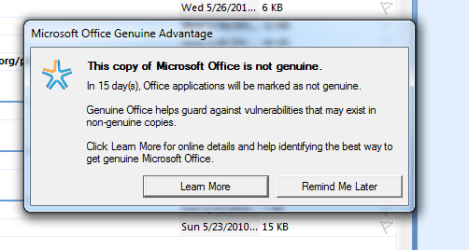
I have Office 2007 and I am using Outlook as my e-mail, contacts database, etc. When I first open it, I get a popup message saying it is not registered and is going to expire. It is registered; is there something wrong?

Thanks,

LeeM
 

My Computer

OS
Windows 7 Ultimate
I have Office 2007 and I am using Outlook as my e-mail, contacts database, etc. When I first open it, I get a popup message saying it is not registered and is going to expire. It is registered; is there something wrong?

Thanks,

LeeM

Hello Lee !!

Can you post a screen shot of the exact error message you getting. Because as if now it's kind of vague.

- Captain
 

My Computer

Computer Manufacturer/Model Number
Samsung NP550P5C-S02IN
OS
Windows 7 Ultimate - 64-bit | Windows 8 Pro - 64-bit
CPU
Intel® Core™ i7 Processor 3,610QM (2.30Hz, 6MB L3 Cach
Memory
8 GB
Graphics Card(s)
NVIDIA® GeForce® GT 650M 2GB Graphics, Optimus™ techno
Sound Card
SoundAlive™ JBL 3 Speakers (With sub-Woofer)
Monitor(s) Displays
39.62cm (15.6) SuperBright 300nit HD+ LED Display
Screen Resolution
1,600 x 900, Anti-Reflective
Hard Drives
1TB S-ATA II Hard Drive (5,400RPM)
Captain Jack,

I have attached a Snip It picture of the warning I get.

Thanks for your help,

LeeM
 

Attachments

  • MS Office Warning Snip.PNG
    MS Office Warning Snip.PNG
    12.3 KB · Views: 9

My Computer

OS
Windows 7 Ultimate
I dont know whether your Office version is genuine or not (I hope it is, where did you get it from?) but I suspect that message is NOT genuine! I've never seen a non-genuine message that says that "in 15 days, Office applications will be marked as not genuine" or "genuine Office helps guard against vulnerabilities". That looks a highly made up message to me.

I suggest you run a malware scan with free Malwarebytes Antimalware and let it clean any infection it finds. Then go to the Microsoft genuine website and validate your copy of Office. If there is any issue, take it up with MS or your vendor. DO NOT click on the buttons in that popup message, they may be highways to trojans.
 

My Computer

Computer Manufacturer/Model Number
Too many to describe...
OS
Windows 7 x64 pro/ Windows 7 x86 Pro/ XP SP3 x86
Hello !!

Do as Bill suggested also download and run Microsoft Genuine Advantage Diagnostics Tool.

Hope this helps,
Captain
 

My Computer

Computer Manufacturer/Model Number
Samsung NP550P5C-S02IN
OS
Windows 7 Ultimate - 64-bit | Windows 8 Pro - 64-bit
CPU
Intel® Core™ i7 Processor 3,610QM (2.30Hz, 6MB L3 Cach
Memory
8 GB
Graphics Card(s)
NVIDIA® GeForce® GT 650M 2GB Graphics, Optimus™ techno
Sound Card
SoundAlive™ JBL 3 Speakers (With sub-Woofer)
Monitor(s) Displays
39.62cm (15.6) SuperBright 300nit HD+ LED Display
Screen Resolution
1,600 x 900, Anti-Reflective
Hard Drives
1TB S-ATA II Hard Drive (5,400RPM)
Thank you Bill2 and Captain Jack.

LeeM
 

My Computer

OS
Windows 7 Ultimate
Back
Top