Solved Outlook 2010 does not open, error about file cannot be found

harj103

New member
Local time
1:02 PM
Messages
22
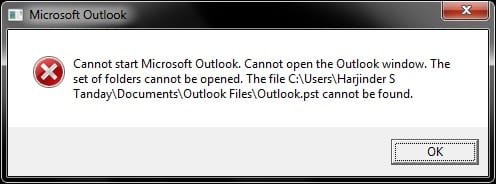
Hi, I was wondering if you guys could help me with a problem I have. I downloaded Office 2010 (only installed Outlook 2010) beta about 2 years ago and everything was going fine. Then today I purchased Office Pro 2010 and before installing I removed Outlook 2010 as it told me I must remove it first, then ran the install and everything seem fine until I tried to open Outlook 2010, it keeps coming up with a message that should be in the print screen or attachment, I have no idea what this file is and everytime I try to delete it, it re appears when I try to open Outlook again. I tired to do the set up again and select the repair option but that has not helped, other than that all other Office 2010 applications open fine, could this problem be down to the 2010 Outlook beta?
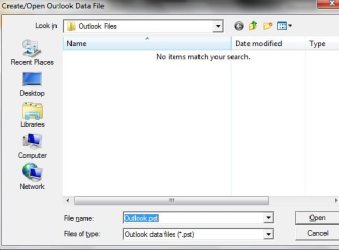
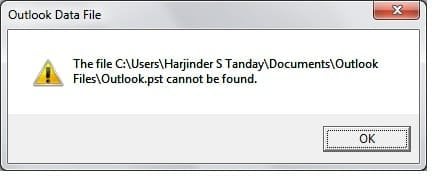
The attachment called error 1 is what appears when i try to open Outlook, empty file is what comes up when I clik OK, and error2 is what happens when i close everything.
Thanks guys for having a look, and I hope someone can help me with this problem.
 

Attachments
  • error 1.jpg
    error 1.jpg
    10.3 KB · Views: 4
  • empty file.jpg
    empty file.jpg
    21.8 KB · Views: 7
  • error2.jpg
    error2.jpg
    13.9 KB · Views: 10

My Computer

OS
Windows 7 Professional 32-bit
CPU
Intel Core i5 650 3.33GHz
Memory
4.00GB
Monitor(s) Displays
Very big
Screen Resolution
tip top
Hard Drives
300GB
Case
Black one
Cooling
A fan
Keyboard
The one with all the letters and number on it
Mouse
Nice shiny one
Internet Speed
Very fast
Your pst file (this is the file that contains all your mail) is most probably located in a different location so outlook doesn't know where it is. Do a search for pst then when outlook asks you where the file is, point it to the correct folder, or you could locate your pst file and then copy/paste it into the "Outlook Files" folder, this way outlook would find it straight away without prompting you for it ;)
 

My Computer

Computer type
PC/Desktop
Computer Manufacturer/Model Number
Self Built
OS
Windows 7 Ultimate 64bit
CPU
AMD Phenom Quad core 9950 black edition
Motherboard
Gigabyte
Memory
16Gb
Graphics Card(s)
2x XFX Radeon 5850
Sound Card
PCI Express X-Fi Titanium / Logitech G35
Monitor(s) Displays
2x HP 2410i
Screen Resolution
1920x1080
Hard Drives
2x 500Gb Seagate
1x 300Gb Seagate
1x 1Tb Seagate
2x 1Tb Hitatchi
PSU
Jean Tech Storm 700W
Case
Cooler Master COSMOS S
Cooling
Akasa Evo Blue Pro
Keyboard
Logitech G15
Mouse
Mad Catz M.M.O. 7
Internet Speed
12mb
yes thank i tired this and it has worked, many thanks
 

My Computer

OS
Windows 7 Professional 32-bit
CPU
Intel Core i5 650 3.33GHz
Memory
4.00GB
Monitor(s) Displays
Very big
Screen Resolution
tip top
Hard Drives
300GB
Case
Black one
Cooling
A fan
Keyboard
The one with all the letters and number on it
Mouse
Nice shiny one
Internet Speed
Very fast
No probs pal only to glad to help ;)
 

My Computer

Computer type
PC/Desktop
Computer Manufacturer/Model Number
Self Built
OS
Windows 7 Ultimate 64bit
CPU
AMD Phenom Quad core 9950 black edition
Motherboard
Gigabyte
Memory
16Gb
Graphics Card(s)
2x XFX Radeon 5850
Sound Card
PCI Express X-Fi Titanium / Logitech G35
Monitor(s) Displays
2x HP 2410i
Screen Resolution
1920x1080
Hard Drives
2x 500Gb Seagate
1x 300Gb Seagate
1x 1Tb Seagate
2x 1Tb Hitatchi
PSU
Jean Tech Storm 700W
Case
Cooler Master COSMOS S
Cooling
Akasa Evo Blue Pro
Keyboard
Logitech G15
Mouse
Mad Catz M.M.O. 7
Internet Speed
12mb
Back
Top