Outlook 2010 emails to send marked incorrectly

BristolPete

New member
Local time
1:50 AM
Messages
2
Hi! My emails were fine until about a week ago. Suddenly emails that I have marked to send are appearing in my Outbox with a "Draft" icon rather than the "Sending Message" one. When I then do Send and Receive, they don't go.
Opening them and then pressing send does nothing, but dragging them to another folder, opening them and then pressing send puts them back in the Outbox with the right icon. Send and Receive then transmits them. Not an earth shattering problem, but annoying.
 

My Computer My Computer

Computer Manufacturer/Model Number
Hewlett Packard
OS
Windows 7 64bit
CPU
AMD A8-3800 APU
Memory
8GB
Graphics Card(s)
Radeib HD 2.4GHz
Hello BristolPete, welcome to Seven Forums.. :D

Something to check first:

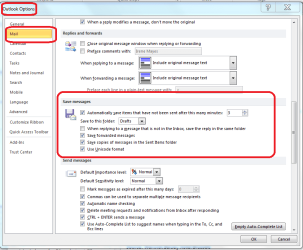
Go to the 'File' tab and choose 'Options'. Next select 'Mail' > 'Save messages'.
Now ensure that 'Save to this folder' has 'Drafts' in the drop-down.
.
 

Attachments

  • draft mail.PNG
    draft mail.PNG
    31.6 KB · Views: 7

My Computer My Computer

Computer type
PC/Desktop
Computer Manufacturer/Model Number
Packard Bell
OS
Windows 7 Home Premium 64bit
CPU
Intel(R) Core(TM) i3-2120 CPU @ 3.30GHz
Motherboard
Packard Bell IPISB-AG
Memory
3.00 GB
Graphics Card(s)
(1) Intel(R) HD Graphics (2) VNC Mirror Driver
Sound Card
Realtek High Definition Audio
Monitor(s) Displays
AIO LCD
Screen Resolution
1920 x 1080
Hard Drives
WDC WD10EADX-22TDHB0 ATA Device
Fixed hard disk media
4 partitions
931.51 GB
Keyboard
Wireless
Mouse
Wireless
Antivirus
Microsoft Security Essentials
Browser
IE; Firefox
Other Info
Also:
Samsung N220 Plus Netbook - Windows 7 Home
HP laptop
iPad 5
Thanks but

Thanks for your help, but seems to be set okay. I haven't been into the "backstage" part of Outlook for some time, and this problem seems to have come on recently.
 

My Computer My Computer

Computer Manufacturer/Model Number
Hewlett Packard
OS
Windows 7 64bit
CPU
AMD A8-3800 APU
Memory
8GB
Graphics Card(s)
Radeib HD 2.4GHz

My Computer My Computer

Computer type
PC/Desktop
Computer Manufacturer/Model Number
Packard Bell
OS
Windows 7 Home Premium 64bit
CPU
Intel(R) Core(TM) i3-2120 CPU @ 3.30GHz
Motherboard
Packard Bell IPISB-AG
Memory
3.00 GB
Graphics Card(s)
(1) Intel(R) HD Graphics (2) VNC Mirror Driver
Sound Card
Realtek High Definition Audio
Monitor(s) Displays
AIO LCD
Screen Resolution
1920 x 1080
Hard Drives
WDC WD10EADX-22TDHB0 ATA Device
Fixed hard disk media
4 partitions
931.51 GB
Keyboard
Wireless
Mouse
Wireless
Antivirus
Microsoft Security Essentials
Browser
IE; Firefox
Other Info
Also:
Samsung N220 Plus Netbook - Windows 7 Home
HP laptop
iPad 5
Emails selected in Outbox, won't send

I have just recently developed the same problem. Definitely not worth a rollback as suggested above. Guessing a patch about a month ago is to blame since that is when it started.

To repeat the problem: if I compose and email, click send, and then do a Send All, emails sends. But, if I go to Outbox, the page auto selects the top email, and whether I open it or not, it now stays in regular font, rather than italicized font, meaning that it will not send. Only solution I've found is to drag email to Inbox, then open, then click send, then Send All before I open Outbox again.

Like the other person said, annoying, but not critical. Still, annoying is annoying is annoying enough to take the time to search for a solution and post for help, which is to say, pretty annoying.

Any fixes that have actually solved the problem? Thanks.
 

My Computer My Computer

Computer Manufacturer/Model Number
Asus
OS
Windows 7 Buxiness x64
CPU
intel i7
Memory
8 gig
Encountering the same problem with one of our laptops. Runnning Office 2007 on Windows 7.

Here is an intriguing fix which seems to have helped others:

After viewing the Outbox, messages won't send

As you see, the author suggests uninstalling or deactivating Outlook Add-Ins.

That is what I am trying, but I have run into a problem: On some add-ins I get the following message:

"This Add-In is installed for all users on this computer, and can only be disabled by an administrator." But the owner of the laptop (basically a one-person laptop) *is* an administrator. Does anyone know how to solve that problem?

The addins thatI cannot disable are:
Business Contact Mgr for Outlook (cited by the author above as a potential problem)
Evernote Outlook Clipper
iCloud Outlook
MS Outlook Mobile Service
Outlook Change Notifier
Windows Search Email Indexer
MS VBA for Outlook.

Anyhow, hope the above helps. Maybe we can put our headsd together and get it solved. Seems to be an issue which is hitting a numeber of people. Maybe virus going around? Ran Norton but it just picked up some tracking cookies.
 

My Computer My Computer

Computer Manufacturer/Model Number
SONY VAIO VPCF11JFX/B
OS
Windows 7 Ultimate x64
Graphics Card(s)
NVIDIA GeForce GT 330M

My Computer My Computer

Computer type
PC/Desktop
Computer Manufacturer/Model Number
Packard Bell
OS
Windows 7 Home Premium 64bit
CPU
Intel(R) Core(TM) i3-2120 CPU @ 3.30GHz
Motherboard
Packard Bell IPISB-AG
Memory
3.00 GB
Graphics Card(s)
(1) Intel(R) HD Graphics (2) VNC Mirror Driver
Sound Card
Realtek High Definition Audio
Monitor(s) Displays
AIO LCD
Screen Resolution
1920 x 1080
Hard Drives
WDC WD10EADX-22TDHB0 ATA Device
Fixed hard disk media
4 partitions
931.51 GB
Keyboard
Wireless
Mouse
Wireless
Antivirus
Microsoft Security Essentials
Browser
IE; Firefox
Other Info
Also:
Samsung N220 Plus Netbook - Windows 7 Home
HP laptop
iPad 5
Good news: It seems that the Add-Ins do, indeed, cause the issue. As stated in my previous message, when I tried to disable some Add-Ins I got the following message:

"This Add-In is installed for all users on this computer, and can only be disabled by an administrator."

The solution was:
Right click the Outlook shortcut
Click Properties
Click Compatibility
Check "Run as Administrator."
Click OK

Now go into Outlook, to the Add-Ins dialog as mentioned in the thread above. Now it is possible to delete Add-Ins. I deleted everything except "Windows Search Email Indexer."

That did the trick. Now messages that go into the Outbox do not switch to "Draft" mode when clicked.

After that, I went back and unchecked the "Run as Administrator" box.
Hope this helps.
 

My Computer My Computer

Computer Manufacturer/Model Number
SONY VAIO VPCF11JFX/B
OS
Windows 7 Ultimate x64
Graphics Card(s)
NVIDIA GeForce GT 330M
Followed the advice listed here and in the link. Disabled iCloud addin, problem solved.
 

My Computer My Computer

Computer Manufacturer/Model Number
Asus
OS
Windows 7 Buxiness x64
CPU
intel i7
Memory
8 gig
Back
Top