Solved Overclock causing system instability?

lazerpickle

New member
Member
Local time
12:05 PM
Messages
31
Hey all, I have a question I'm hoping someone can help me out with. You see i've had this custom built PC for about 8 months now. From the day I assembled it, I've had my 3570k running a 1GHz overclock to 4.8Ghz. Now although I haven't done any day long torture tests on the OC, I have tested it multiple times for up to an hour with Prime 95 and not had any crashing. I have however noticed for some time that powerful applications (cad software, games, etc.) are often unstable, and sometimes my whole system loses its stability. Now the other day, I finally got fed up with all the crashing (ive already tried troubleshooting my Windows install, memory, and graphics) I lowered the clock rate down to it's native 3.8GHz. When I went back in to launch the game that had been crashing (LoL) it started fine. I then restarted it several times with no issues. Now I haven't been able to do very thorough testing at the new clock speed, but does anyone think the overclock could be the reason for all my crashing? I'll probably test this more later, but another question is, will this down clock have much effect on my gaming performance? (I game at 6000x1200 on a HD 7870, so I was thinking my GPU would bottom out long before my CPU does) Also, do you guys think i could safely bump my OC up to 4GHz without having to worry about stability? Thanks guys.

tl;dr Is a 1GHz oc above stock speed enough for system instability? Will dropping the oc back to 3.8GHz also drop my framrate in game? And is 4GHz a stable number?
 

My Computer

Computer Manufacturer/Model Number
Custom Build
OS
Windows 7 Home Premium x64
CPU
Intel i5-3570k
Motherboard
ASUS ROG Maximus V Gene
Memory
Gskill Ripjaws X Series 16G (4x4)
Graphics Card(s)
AMD R9 290X
Sound Card
Creative Sound Blaster X-Fi Titanium HD
Monitor(s) Displays
Dell U2412M x 3
Screen Resolution
6048x1200
Hard Drives
OCZ-VERTEX3 120GB (Boot drive)
Western Digital Black 1TB 7200RPM (Storage drive)
PSU
Cooler Master Silent Pro Gold 1000W
Case
Cooler Master HAF X
Cooling
XSPC Raystorm
Keyboard
Razer Blackwidow Ultimate (2013)
Mouse
Razer Ouroboros
Internet Speed
~50Mb/S down|~5Mb/S up
The 4.8GHz OC was probably a little too aggressive to be honest. Prime95, AIDA64 or any other stressing software needs to be ran longer than an hour. I have seen instances of Prime95 running 7 hours and then showing a failure or instability. My personal method is when I first start to OC, I turn it up a good amount and run AIDA64 for 12 hours. At the end of that, I check my temps and make sure everything is on the up and up. If it is, I consider it stable. I have run Prime95 after AIDA64 just to be certain, but that may be overkill. Any stress testing software ran for 12+ hours will generally flag a problem if there is going to be one. After my stress testing, I will fine tune some options and the voltage if need be.

What method did you use to OC your system? Did you use some software that allows you to OC while booted up in Windows, or did you do it in the BIOS? A number of us on the forum have this same CPU and most will tell you that 4.3-4.5GHz is a really good OC....4.8GHz is nearing the edge in my opinion.

Also, I consider 4.4GHz to be a full 1GHz OC because the stock base clock is 3.4GHz. There are quite a bit of guides on how to OC a Z77/Ivy Bridge setup, and none are that difficult to be honest. As long as your temps stay in line, you should be able to get a nice OC........maybe not 4.8 though.

And to answer one of your questions......an unstable overclock will cause programs to not open correctly, crash, blue screen or a number of other things.
 

My Computer

Computer type
PC/Desktop
Computer Manufacturer/Model Number
Custom Built
OS
Windows 7 Professional 64bit SP1
CPU
Intel Core i5-3570K @ 4.5GHz
Motherboard
Asus Sabertooth Z77
Memory
Corsair Vengeance 16GB (4x4) @1866MHz CL 9-9-9-24 1T
Graphics Card(s)
EVGA GTX 750 Ti FTW
Sound Card
Onboard Audio
Monitor(s) Displays
Dell S2309W
Screen Resolution
1920x1080
Hard Drives
Samsung 830 128GB SSD - OS
(4) Seagate 5TB HDD
(1) Seagate 2TB HDD
PSU
Seasonic X750 80+ Gold Full Modular
Case
Antec Eleven Hundred Super Mid Tower
Cooling
Intel Liquid Cooler
Keyboard
Max Nighthawk X8 Mechanical keyboard
Mouse
Mionix Naos 7000
Internet Speed
50 Mbps Down / 10 Mbps Up
Antivirus
Microsoft Security Essentials/Malwarebytes Anti-Malware
Browser
Chrome/Firefox
Other Info
Klipsch ProMedia 2.1's
Asus RT-N66R Wireless Router
Okay thanks for the feed back. I'm still kind of mad at myself for not realizing something so obvious that I even did myself could cause problems. I did my OC through the bios, if you want to know the precise settings i would need to go check them (when i clocked back down i hadn't checked the settings in a long time). I'm thinking of setting my OC to an even 4GHz, but am a little concerned about performance. When im running games most rarely exceed 40% usage of my cpu, but when gaming in eyefinity every fram counts, and i was wondering if anyone thought scaling it down to 4GHz would hurt my FPS drastically (more than 5 or so FPS hit). However if I test at 4GHz and it comes out to be stable i'd most likely be willing to compromise. Usually the most CPU intensive things I play are games, so is stock clock enough to keep the same framrates? Or will I need to go to 4GHz? Or higher? I know thats probably a hard question to answer because it depends on the game so ill probably do some benchmarking myself. Opinions?
 

My Computer

Computer Manufacturer/Model Number
Custom Build
OS
Windows 7 Home Premium x64
CPU
Intel i5-3570k
Motherboard
ASUS ROG Maximus V Gene
Memory
Gskill Ripjaws X Series 16G (4x4)
Graphics Card(s)
AMD R9 290X
Sound Card
Creative Sound Blaster X-Fi Titanium HD
Monitor(s) Displays
Dell U2412M x 3
Screen Resolution
6048x1200
Hard Drives
OCZ-VERTEX3 120GB (Boot drive)
Western Digital Black 1TB 7200RPM (Storage drive)
PSU
Cooler Master Silent Pro Gold 1000W
Case
Cooler Master HAF X
Cooling
XSPC Raystorm
Keyboard
Razer Blackwidow Ultimate (2013)
Mouse
Razer Ouroboros
Internet Speed
~50Mb/S down|~5Mb/S up
The 3570K at stock settings is one of the BEST CPU'S for gaming available, but I have no way to tell if you will see much of a boost in FPS if you overclock. You could find a pretty intensive game that has an FPS counter and do a repeatable run-through @ stock settings, 4.0GHz, and whatever else you wanted......that would give you the best idea of what you would need. You may see that the difference between stock clock and 4+GHz is less than 5fps.

If you can keep good temps, there is no reason why you shouldn't OC to 4+GHz. It may not help you much in games, but it sure won't hurt either......as long as it is stable.
 

My Computer

Computer type
PC/Desktop
Computer Manufacturer/Model Number
Custom Built
OS
Windows 7 Professional 64bit SP1
CPU
Intel Core i5-3570K @ 4.5GHz
Motherboard
Asus Sabertooth Z77
Memory
Corsair Vengeance 16GB (4x4) @1866MHz CL 9-9-9-24 1T
Graphics Card(s)
EVGA GTX 750 Ti FTW
Sound Card
Onboard Audio
Monitor(s) Displays
Dell S2309W
Screen Resolution
1920x1080
Hard Drives
Samsung 830 128GB SSD - OS
(4) Seagate 5TB HDD
(1) Seagate 2TB HDD
PSU
Seasonic X750 80+ Gold Full Modular
Case
Antec Eleven Hundred Super Mid Tower
Cooling
Intel Liquid Cooler
Keyboard
Max Nighthawk X8 Mechanical keyboard
Mouse
Mionix Naos 7000
Internet Speed
50 Mbps Down / 10 Mbps Up
Antivirus
Microsoft Security Essentials/Malwarebytes Anti-Malware
Browser
Chrome/Firefox
Other Info
Klipsch ProMedia 2.1's
Asus RT-N66R Wireless Router
You can run something like IBT for 5-10 passes which only take a few minutes to get a quick idea if you in the ballpark in regards to stability.
But for the true stability test, Prime needs to run a good 10hrs.

I too have seen one thats slightly unstable fail between 8-9hrs of Prime.

The problem as you know alreasy is that it isnt stable. The bad thing here is that a highly unstable OC being used for any length of time can cause system corruption.
Most likely, Vcore just needs to be increased. But temps will play a large role in how much you can.


I will say this
If you try for 4.2-4.5, the voltage requirements are going to significantly lower, and the performance difference will be minimal, especially during gaming. Most of these chips start seeing rapidly increasing diminishing returns after about a 20% OC. So thats 4.2 up 4.6ish (turbo) for a 20% OC.

IMHO, this is the ideal range due to reasonable voltage,heat and good performance increase. After this though, you need to start pouring more into it for little in return
(for most chips anyway, there are some golden ones out there)
 

My Computer

Computer Manufacturer/Model Number
Custom (Self Build)
OS
Windows 7 Home Premium 64bit
CPU
Intel Core i7 2700k
Motherboard
eVGA P67 SLI
Memory
8GB Mushkin Redline Ridgebacks @1866
Graphics Card(s)
EVGA GTX570 SC
Sound Card
XiFi Titanium HD
Monitor(s) Displays
LG W2453V
Screen Resolution
1920x1080
Hard Drives
Intel 320 80GB -- Intel X25-V 40GB --WD Black 1TB x2 -- WD Blue 640GB
PSU
Seasonic x750
Case
Corsair 600T SE White
Cooling
eVGA Superclocked CPU Cooler
Keyboard
Saitek Cyborg
Antivirus
Kaspersky
Browser
IE
Other Info
LG BD/DVD
Okay thanks for the advice kbrady and wishmaster. I think I'm going to start off at a 4.5GHz overclock and let prime 95 run all day. If it crashes out ill start working my way down from there. I think then once I find my stable clockspeed ill start measuring frame rate dependency in some games I play and see if theirs actually a difference. Sound like a plan? Or would it be better to work my way up from stock clocks until I find its limit? Anything between 4 and 4.5GHz and ill still be happy.
 

My Computer

Computer Manufacturer/Model Number
Custom Build
OS
Windows 7 Home Premium x64
CPU
Intel i5-3570k
Motherboard
ASUS ROG Maximus V Gene
Memory
Gskill Ripjaws X Series 16G (4x4)
Graphics Card(s)
AMD R9 290X
Sound Card
Creative Sound Blaster X-Fi Titanium HD
Monitor(s) Displays
Dell U2412M x 3
Screen Resolution
6048x1200
Hard Drives
OCZ-VERTEX3 120GB (Boot drive)
Western Digital Black 1TB 7200RPM (Storage drive)
PSU
Cooler Master Silent Pro Gold 1000W
Case
Cooler Master HAF X
Cooling
XSPC Raystorm
Keyboard
Razer Blackwidow Ultimate (2013)
Mouse
Razer Ouroboros
Internet Speed
~50Mb/S down|~5Mb/S up
Well I just played a couple of games with my CPU running at stock speeds, and didn't see any noticeable framrate drops. I'm now going to start up prime 95 at 4.6GHz and let that run until tomorrow.
 

My Computer

Computer Manufacturer/Model Number
Custom Build
OS
Windows 7 Home Premium x64
CPU
Intel i5-3570k
Motherboard
ASUS ROG Maximus V Gene
Memory
Gskill Ripjaws X Series 16G (4x4)
Graphics Card(s)
AMD R9 290X
Sound Card
Creative Sound Blaster X-Fi Titanium HD
Monitor(s) Displays
Dell U2412M x 3
Screen Resolution
6048x1200
Hard Drives
OCZ-VERTEX3 120GB (Boot drive)
Western Digital Black 1TB 7200RPM (Storage drive)
PSU
Cooler Master Silent Pro Gold 1000W
Case
Cooler Master HAF X
Cooling
XSPC Raystorm
Keyboard
Razer Blackwidow Ultimate (2013)
Mouse
Razer Ouroboros
Internet Speed
~50Mb/S down|~5Mb/S up
What is the CPU voltage @ 4.6GHz?
 

My Computer

Computer type
PC/Desktop
Computer Manufacturer/Model Number
Custom Built
OS
Windows 7 Professional 64bit SP1
CPU
Intel Core i5-3570K @ 4.5GHz
Motherboard
Asus Sabertooth Z77
Memory
Corsair Vengeance 16GB (4x4) @1866MHz CL 9-9-9-24 1T
Graphics Card(s)
EVGA GTX 750 Ti FTW
Sound Card
Onboard Audio
Monitor(s) Displays
Dell S2309W
Screen Resolution
1920x1080
Hard Drives
Samsung 830 128GB SSD - OS
(4) Seagate 5TB HDD
(1) Seagate 2TB HDD
PSU
Seasonic X750 80+ Gold Full Modular
Case
Antec Eleven Hundred Super Mid Tower
Cooling
Intel Liquid Cooler
Keyboard
Max Nighthawk X8 Mechanical keyboard
Mouse
Mionix Naos 7000
Internet Speed
50 Mbps Down / 10 Mbps Up
Antivirus
Microsoft Security Essentials/Malwarebytes Anti-Malware
Browser
Chrome/Firefox
Other Info
Klipsch ProMedia 2.1's
Asus RT-N66R Wireless Router
Currently I'm running 4.5GHz at 1.25V, but I want to see if I can set it lower.
 

My Computer

Computer Manufacturer/Model Number
Custom Build
OS
Windows 7 Home Premium x64
CPU
Intel i5-3570k
Motherboard
ASUS ROG Maximus V Gene
Memory
Gskill Ripjaws X Series 16G (4x4)
Graphics Card(s)
AMD R9 290X
Sound Card
Creative Sound Blaster X-Fi Titanium HD
Monitor(s) Displays
Dell U2412M x 3
Screen Resolution
6048x1200
Hard Drives
OCZ-VERTEX3 120GB (Boot drive)
Western Digital Black 1TB 7200RPM (Storage drive)
PSU
Cooler Master Silent Pro Gold 1000W
Case
Cooler Master HAF X
Cooling
XSPC Raystorm
Keyboard
Razer Blackwidow Ultimate (2013)
Mouse
Razer Ouroboros
Internet Speed
~50Mb/S down|~5Mb/S up
That is pretty good actually. If you don't already have RealTemp 3.70, go ahead and download it so you can keep an eye on your temps. Run Prime95 on it at 4.5HGz at that voltage for several hours, at least 10-12. See if you have stability with those settings.
 

My Computer

Computer type
PC/Desktop
Computer Manufacturer/Model Number
Custom Built
OS
Windows 7 Professional 64bit SP1
CPU
Intel Core i5-3570K @ 4.5GHz
Motherboard
Asus Sabertooth Z77
Memory
Corsair Vengeance 16GB (4x4) @1866MHz CL 9-9-9-24 1T
Graphics Card(s)
EVGA GTX 750 Ti FTW
Sound Card
Onboard Audio
Monitor(s) Displays
Dell S2309W
Screen Resolution
1920x1080
Hard Drives
Samsung 830 128GB SSD - OS
(4) Seagate 5TB HDD
(1) Seagate 2TB HDD
PSU
Seasonic X750 80+ Gold Full Modular
Case
Antec Eleven Hundred Super Mid Tower
Cooling
Intel Liquid Cooler
Keyboard
Max Nighthawk X8 Mechanical keyboard
Mouse
Mionix Naos 7000
Internet Speed
50 Mbps Down / 10 Mbps Up
Antivirus
Microsoft Security Essentials/Malwarebytes Anti-Malware
Browser
Chrome/Firefox
Other Info
Klipsch ProMedia 2.1's
Asus RT-N66R Wireless Router
Will do, but I want to ask, does anyone happen to know how I would go about setting voltage offset on my bios? Because I don't want to be pumping 1.25V @ 4500MHz when im sitting at the desktop. Intel's stepping feature doesn't work when I set the operating parameters manually, so does anyone know how I can make it run at 4.5GHz when under load, but scale down when at idle?
 

My Computer

Computer Manufacturer/Model Number
Custom Build
OS
Windows 7 Home Premium x64
CPU
Intel i5-3570k
Motherboard
ASUS ROG Maximus V Gene
Memory
Gskill Ripjaws X Series 16G (4x4)
Graphics Card(s)
AMD R9 290X
Sound Card
Creative Sound Blaster X-Fi Titanium HD
Monitor(s) Displays
Dell U2412M x 3
Screen Resolution
6048x1200
Hard Drives
OCZ-VERTEX3 120GB (Boot drive)
Western Digital Black 1TB 7200RPM (Storage drive)
PSU
Cooler Master Silent Pro Gold 1000W
Case
Cooler Master HAF X
Cooling
XSPC Raystorm
Keyboard
Razer Blackwidow Ultimate (2013)
Mouse
Razer Ouroboros
Internet Speed
~50Mb/S down|~5Mb/S up
All you need to know and more is right here: Ivy Bridge/Asus Overclocking Guide

Click the links to open them up and take a look at the features, what they mean and how they should be set. This is the easiest guide to get you up and running safely.

I think what you need to do is change your CPU voltage from Manual to Offset, which will change the offset to Auto, and then reboot. Stress your computer and check your voltages and see what it is running when at 100%. The offset method takes a little longer, but it is better than a manual voltage in my opinion. Auto setting will probably be quite a bit higher in voltage so you can go back in and change the offset to +/- in .005 increments.

That being said, I really don't know what else you've done inside the BIOS so it MAY be better to load factory defaults and start fresh. With that guide I linked to, it will be easy to get you where you want to be.
 

My Computer

Computer type
PC/Desktop
Computer Manufacturer/Model Number
Custom Built
OS
Windows 7 Professional 64bit SP1
CPU
Intel Core i5-3570K @ 4.5GHz
Motherboard
Asus Sabertooth Z77
Memory
Corsair Vengeance 16GB (4x4) @1866MHz CL 9-9-9-24 1T
Graphics Card(s)
EVGA GTX 750 Ti FTW
Sound Card
Onboard Audio
Monitor(s) Displays
Dell S2309W
Screen Resolution
1920x1080
Hard Drives
Samsung 830 128GB SSD - OS
(4) Seagate 5TB HDD
(1) Seagate 2TB HDD
PSU
Seasonic X750 80+ Gold Full Modular
Case
Antec Eleven Hundred Super Mid Tower
Cooling
Intel Liquid Cooler
Keyboard
Max Nighthawk X8 Mechanical keyboard
Mouse
Mionix Naos 7000
Internet Speed
50 Mbps Down / 10 Mbps Up
Antivirus
Microsoft Security Essentials/Malwarebytes Anti-Malware
Browser
Chrome/Firefox
Other Info
Klipsch ProMedia 2.1's
Asus RT-N66R Wireless Router
Sorry I already took care of it (my windows power settings were at 100% for minimum :p) but one other question I have is between 1.25-1.35 a good voltage to give to the CPU? I don't want to over volt it and reduce the longevity or anything. Right now my voltage is manually set to 1.25V, and if thats too much for idle @ 1600MHz then what should I have my offset set to in the bios?
 

My Computer

Computer Manufacturer/Model Number
Custom Build
OS
Windows 7 Home Premium x64
CPU
Intel i5-3570k
Motherboard
ASUS ROG Maximus V Gene
Memory
Gskill Ripjaws X Series 16G (4x4)
Graphics Card(s)
AMD R9 290X
Sound Card
Creative Sound Blaster X-Fi Titanium HD
Monitor(s) Displays
Dell U2412M x 3
Screen Resolution
6048x1200
Hard Drives
OCZ-VERTEX3 120GB (Boot drive)
Western Digital Black 1TB 7200RPM (Storage drive)
PSU
Cooler Master Silent Pro Gold 1000W
Case
Cooler Master HAF X
Cooling
XSPC Raystorm
Keyboard
Razer Blackwidow Ultimate (2013)
Mouse
Razer Ouroboros
Internet Speed
~50Mb/S down|~5Mb/S up
Change from manual to offset and leave it on auto and then check your voltages at 100%. You can add or lower voltage after you see what the offset is under load. Also, there is a setting in the BIOS called "Enhanced Intel SpeedStep Technology" that needs to be enabled to allow it to vary from 1600MHz at idle to your OC frequency under load.

You can change your power settings back to normal and change that setting in the BIOS
 

My Computer

Computer type
PC/Desktop
Computer Manufacturer/Model Number
Custom Built
OS
Windows 7 Professional 64bit SP1
CPU
Intel Core i5-3570K @ 4.5GHz
Motherboard
Asus Sabertooth Z77
Memory
Corsair Vengeance 16GB (4x4) @1866MHz CL 9-9-9-24 1T
Graphics Card(s)
EVGA GTX 750 Ti FTW
Sound Card
Onboard Audio
Monitor(s) Displays
Dell S2309W
Screen Resolution
1920x1080
Hard Drives
Samsung 830 128GB SSD - OS
(4) Seagate 5TB HDD
(1) Seagate 2TB HDD
PSU
Seasonic X750 80+ Gold Full Modular
Case
Antec Eleven Hundred Super Mid Tower
Cooling
Intel Liquid Cooler
Keyboard
Max Nighthawk X8 Mechanical keyboard
Mouse
Mionix Naos 7000
Internet Speed
50 Mbps Down / 10 Mbps Up
Antivirus
Microsoft Security Essentials/Malwarebytes Anti-Malware
Browser
Chrome/Firefox
Other Info
Klipsch ProMedia 2.1's
Asus RT-N66R Wireless Router
Okay with offset on, my idle voltages are between 1.16-1.4V, averaging around 1.2V. Then under full load my voltage is around 1.33-1.34V with very little fluctuation. And at idle its betwenn 1600-2k and 4500 full load (as it should be). So are those reasonable voltages? My temps are between 70-80C on full load.
 

My Computer

Computer Manufacturer/Model Number
Custom Build
OS
Windows 7 Home Premium x64
CPU
Intel i5-3570k
Motherboard
ASUS ROG Maximus V Gene
Memory
Gskill Ripjaws X Series 16G (4x4)
Graphics Card(s)
AMD R9 290X
Sound Card
Creative Sound Blaster X-Fi Titanium HD
Monitor(s) Displays
Dell U2412M x 3
Screen Resolution
6048x1200
Hard Drives
OCZ-VERTEX3 120GB (Boot drive)
Western Digital Black 1TB 7200RPM (Storage drive)
PSU
Cooler Master Silent Pro Gold 1000W
Case
Cooler Master HAF X
Cooling
XSPC Raystorm
Keyboard
Razer Blackwidow Ultimate (2013)
Mouse
Razer Ouroboros
Internet Speed
~50Mb/S down|~5Mb/S up
Also are these reasonable temperatures for this overclock? Because if they're too high I think my heat sink could do with a re seating.
 

My Computer

Computer Manufacturer/Model Number
Custom Build
OS
Windows 7 Home Premium x64
CPU
Intel i5-3570k
Motherboard
ASUS ROG Maximus V Gene
Memory
Gskill Ripjaws X Series 16G (4x4)
Graphics Card(s)
AMD R9 290X
Sound Card
Creative Sound Blaster X-Fi Titanium HD
Monitor(s) Displays
Dell U2412M x 3
Screen Resolution
6048x1200
Hard Drives
OCZ-VERTEX3 120GB (Boot drive)
Western Digital Black 1TB 7200RPM (Storage drive)
PSU
Cooler Master Silent Pro Gold 1000W
Case
Cooler Master HAF X
Cooling
XSPC Raystorm
Keyboard
Razer Blackwidow Ultimate (2013)
Mouse
Razer Ouroboros
Internet Speed
~50Mb/S down|~5Mb/S up
Now try this. Where you set it from Manual to Offset there is a box below it that says "Auto"........in that box, type in .005. What that does is this: It is using an offset voltage + .005. Reboot and then see what your max voltage is.

Edit: Once you get the voltage fine tuned, we'll work on your temps. They are fine for now.
 

My Computer

Computer type
PC/Desktop
Computer Manufacturer/Model Number
Custom Built
OS
Windows 7 Professional 64bit SP1
CPU
Intel Core i5-3570K @ 4.5GHz
Motherboard
Asus Sabertooth Z77
Memory
Corsair Vengeance 16GB (4x4) @1866MHz CL 9-9-9-24 1T
Graphics Card(s)
EVGA GTX 750 Ti FTW
Sound Card
Onboard Audio
Monitor(s) Displays
Dell S2309W
Screen Resolution
1920x1080
Hard Drives
Samsung 830 128GB SSD - OS
(4) Seagate 5TB HDD
(1) Seagate 2TB HDD
PSU
Seasonic X750 80+ Gold Full Modular
Case
Antec Eleven Hundred Super Mid Tower
Cooling
Intel Liquid Cooler
Keyboard
Max Nighthawk X8 Mechanical keyboard
Mouse
Mionix Naos 7000
Internet Speed
50 Mbps Down / 10 Mbps Up
Antivirus
Microsoft Security Essentials/Malwarebytes Anti-Malware
Browser
Chrome/Firefox
Other Info
Klipsch ProMedia 2.1's
Asus RT-N66R Wireless Router
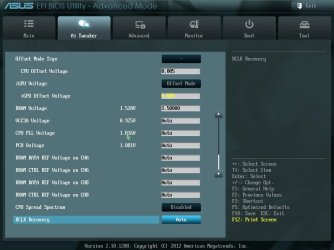
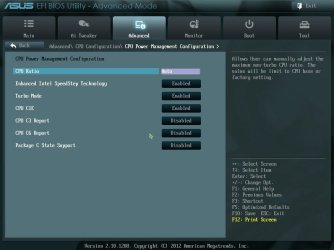
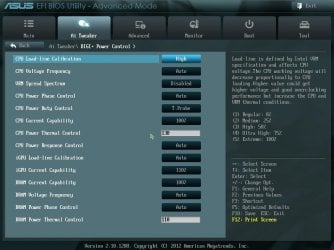
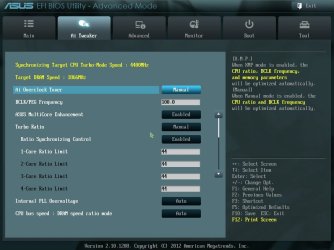
Here are some screenshots that show some of my BIOS settings for my Asus Sabertooth board.


Advanced Mode 1.jpgAdvanced Mode 2 - CPU Voltage.jpgAdvanced Mode 3.jpgCPU Power Management.jpgCPU Power Management Config.jpgDIGI+ Power Control.jpg
 

My Computer

Computer type
PC/Desktop
Computer Manufacturer/Model Number
Custom Built
OS
Windows 7 Professional 64bit SP1
CPU
Intel Core i5-3570K @ 4.5GHz
Motherboard
Asus Sabertooth Z77
Memory
Corsair Vengeance 16GB (4x4) @1866MHz CL 9-9-9-24 1T
Graphics Card(s)
EVGA GTX 750 Ti FTW
Sound Card
Onboard Audio
Monitor(s) Displays
Dell S2309W
Screen Resolution
1920x1080
Hard Drives
Samsung 830 128GB SSD - OS
(4) Seagate 5TB HDD
(1) Seagate 2TB HDD
PSU
Seasonic X750 80+ Gold Full Modular
Case
Antec Eleven Hundred Super Mid Tower
Cooling
Intel Liquid Cooler
Keyboard
Max Nighthawk X8 Mechanical keyboard
Mouse
Mionix Naos 7000
Internet Speed
50 Mbps Down / 10 Mbps Up
Antivirus
Microsoft Security Essentials/Malwarebytes Anti-Malware
Browser
Chrome/Firefox
Other Info
Klipsch ProMedia 2.1's
Asus RT-N66R Wireless Router
Should I change my Load Line Calibration, CPU Power Phase Control, and CPU Current Capability? Because right now my Load Line Calibration is set to auto, my CPU Power Phase control is set to extreme, and my CPU Current Capability is set to 140%.
 

My Computer

Computer Manufacturer/Model Number
Custom Build
OS
Windows 7 Home Premium x64
CPU
Intel i5-3570k
Motherboard
ASUS ROG Maximus V Gene
Memory
Gskill Ripjaws X Series 16G (4x4)
Graphics Card(s)
AMD R9 290X
Sound Card
Creative Sound Blaster X-Fi Titanium HD
Monitor(s) Displays
Dell U2412M x 3
Screen Resolution
6048x1200
Hard Drives
OCZ-VERTEX3 120GB (Boot drive)
Western Digital Black 1TB 7200RPM (Storage drive)
PSU
Cooler Master Silent Pro Gold 1000W
Case
Cooler Master HAF X
Cooling
XSPC Raystorm
Keyboard
Razer Blackwidow Ultimate (2013)
Mouse
Razer Ouroboros
Internet Speed
~50Mb/S down|~5Mb/S up
Did you try changing your voltage offset by .005? If so, what is your new voltage under load?
 

My Computer

Computer type
PC/Desktop
Computer Manufacturer/Model Number
Custom Built
OS
Windows 7 Professional 64bit SP1
CPU
Intel Core i5-3570K @ 4.5GHz
Motherboard
Asus Sabertooth Z77
Memory
Corsair Vengeance 16GB (4x4) @1866MHz CL 9-9-9-24 1T
Graphics Card(s)
EVGA GTX 750 Ti FTW
Sound Card
Onboard Audio
Monitor(s) Displays
Dell S2309W
Screen Resolution
1920x1080
Hard Drives
Samsung 830 128GB SSD - OS
(4) Seagate 5TB HDD
(1) Seagate 2TB HDD
PSU
Seasonic X750 80+ Gold Full Modular
Case
Antec Eleven Hundred Super Mid Tower
Cooling
Intel Liquid Cooler
Keyboard
Max Nighthawk X8 Mechanical keyboard
Mouse
Mionix Naos 7000
Internet Speed
50 Mbps Down / 10 Mbps Up
Antivirus
Microsoft Security Essentials/Malwarebytes Anti-Malware
Browser
Chrome/Firefox
Other Info
Klipsch ProMedia 2.1's
Asus RT-N66R Wireless Router
Back
Top