Overclock Pentium Dual Core E5500

gaz

Gaz
Member
VIP
Local time
5:29 AM
Messages
211
Hello,

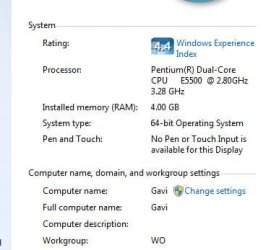
just wondering if this image is correct

my old processor was a celeron 2.0 GHZ which when i overclocked would read in properties @2.3 Ghz 2.3 Ghz

Now Iv'e overclocked my 2.8 Ghz Dual core E5500(2.8 Ghz)
and it says @2.8Ghz 3.28Ghz

I was wondering if what it is showng is correct??

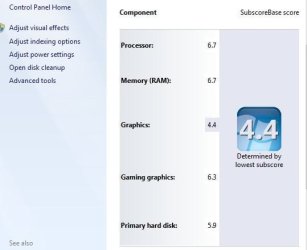
Also i have a Geforce GT 430 which seems to have dropped my desktop graphics WEI Score(score was 5 , now 4.4) but upped my gaming graphics (not a problem really)

sorry if its a lame question
 

Attachments
  • Capture1.JPG
    Capture1.JPG
    24.3 KB · Views: 62
  • Capture.JPG
    Capture.JPG
    26.1 KB · Views: 38

My Computer

Computer type
PC/Desktop
OS
Windows 7 X64 Bit
CPU
Intel(R) Core(TM)i7-4771 CPU @ 3.50GH
Motherboard
Asus Sabertooth Z87
Memory
Corsair 4x8 Vengeance (32GB)
Graphics Card(s)
NVIDIA GeForce GTX780
Monitor(s) Displays
LG
Screen Resolution
1920x1080
PSU
Corsair CX750
Case
Corsair 200 series
Cooling
H80i Liquid Cooler
Keyboard
Microsoft
Mouse
Microsoft
Internet Speed
good times-500-850 kbs bad times-50-100 kbs
It usually shows the stock clock speed follwed by the OC or actual speeds.
At least thats how mine always has.
Capture.JPG


Was 3.28Ghz what you had it set for in the bios? If so its normal.
 

My Computer

Computer Manufacturer/Model Number
Custom (Self Build)
OS
Windows 7 Home Premium 64bit
CPU
Intel Core i7 2700k
Motherboard
eVGA P67 SLI
Memory
8GB Mushkin Redline Ridgebacks @1866
Graphics Card(s)
EVGA GTX570 SC
Sound Card
XiFi Titanium HD
Monitor(s) Displays
LG W2453V
Screen Resolution
1920x1080
Hard Drives
Intel 320 80GB -- Intel X25-V 40GB --WD Black 1TB x2 -- WD Blue 640GB
PSU
Seasonic x750
Case
Corsair 600T SE White
Cooling
eVGA Superclocked CPU Cooler
Keyboard
Saitek Cyborg
Antivirus
Kaspersky
Browser
IE
Other Info
LG BD/DVD
As WM mentioned, it will show both the stock speed and the overclocked speed.

If 3.28ghz is your OC - it's correct. If not, the WEI sometimes has issues showing the correct info for OC clock speeds from the BIOS multiplier.
 

My Computer

Computer type
PC/Desktop
Computer Manufacturer/Model Number
Systems by SmartEyeball
OS
8 Pro x64
CPU
i7 3770K 4.6GHz
Motherboard
ASUS P8Z77 WS
Memory
16GB G.Skill Trident X 2666mhz
Graphics Card(s)
x2 EVGA 780 Ti Superclocked SLI
Sound Card
SB X-FI Surround 5.1 PRO USB / ATH-AD900 Headphones
Monitor(s) Displays
x3 Dell U2410 / 58" Samsung
Screen Resolution
5760*1200/ 1920*1200
Hard Drives
2x Intel 520 240GB (RAID 0) * 2x WD Caviar Blacks 2TB (RAID 0) * 2TB WD Caviar Black * Sony Optirac DVD
PSU
Silverstone Strider Evolution 1200W
Case
Thermaltake Level 10 GT Snow Edition
Cooling
Noctua NH-D14
Keyboard
Topre Realforce // Ducky Shine MX Black // Filco Ninja TKL
Mouse
Thermaltake Theron (Highly Recommended) + Razer Imperator
Antivirus
MSE
Browser
IE, FF, WaterFox
Other Info
GT Extreme V2 Sim Racing Cockpit + 40" LCD and K/B Mouse stand ▼
Fanatec CSR Elite Wheel + Clubsport V1 Pedals + CSR shifter/7G-H ▼Saitek X52 Pro ▼ TrackIR 5 Pro
Buttkicker v2 Seat Rumbler with Dedicated 5.1 and Sub Woofer attached to frame ▼
=
Bloody Big Grin
Take a look in BIOS for your clock speeds, it'll show the default and current clock in there.
 

My Computer

Computer Manufacturer/Model Number
Custom
OS
Windows 7 Ultimate 64 Bit
CPU
Intel Core i7 2600k 3.8GHz
Motherboard
Asus P8Z68-V Pro
Memory
Corsair Vengeance 16GB DDR3 1600Mhz
Graphics Card(s)
Asus NVIDIA GeForce GTX 680 - 2GB GDDR5
Sound Card
On Board
Monitor(s) Displays
LG DM2780D
Screen Resolution
1920 x 1080
Hard Drives
OCZ Vertex 4 240GB SATA-III SSD
OCZ Agility 3 240GB SATA-III SSD
WD 500 GB SATA-II HDD
Hitachi 500 GB SATA-II HDD
Hitachi 1 TB SATA-II HDD
Seagate Barracuda 2 TB SATA-III HDD
250GB External HD
PSU
Corsair TX650M PSU
Case
NZXT Phantom Full Tower Case - Black
Cooling
1 x Sickleflow, 2 x AF120 Quiet, 1 x 200mm Top, Corsair H70
Keyboard
Logitech G110
Mouse
Logitech G500
Internet Speed
80 Down / 20 Up
Don't you know what you overclocked it to??
 

My Computer

Computer type
PC/Desktop
Computer Manufacturer/Model Number
Home built (GeneO industries)/Model 4
OS
Windows 10 Pro. EFI boot partition, full EFI boot
CPU
i7 4770k 4.4GHz (44-44-43-43 turbo) @ 1.248V
Motherboard
ASUS Maximus VI Hero
Memory
16GB (8GBx2) @2200 MHz G.skill Sniper 10-11-10-30-1, 1.6V
Graphics Card(s)
MSI GTX 970 Gaming 4G
Sound Card
Onboard SupremeFX Audio
Monitor(s) Displays
NEC Spectraview 2490WUXi-SV
Screen Resolution
1920 x 1200
Hard Drives
Samsung 850 Pro 256GB (OS), Samsung 2x 128GB 840 Pro SSD in RAID0, 3x WD Blue 6Gb/s 1TB RAID0, WD 2TB Black external USB 3.0, 2TB WD20EARS Green external USB 3.0, 2x 500GB Seagate and 1 750 GB external USB, 1x 350GB external USB3
PSU
Seasonic X-850 (2012 KM3 model)
Case
Fractal Design Define R4
Cooling
NH-D14, NF-F12, NF-A15; NF-P14, NF-P12,NF-A14, S12A PWM
Keyboard
Cooler Master Storm Quickfire Rapid - Brown
Mouse
Logitech G602
Internet Speed
126.4 Mb/s down, 24.3 Mb/s up
Other Info
USB 3.0 x8 , SATA III x8, eSATA, USB 2.0 x6. Samsung DVD R/W drive.

WEI: CPU 7.8, Memory 7.9, Graphics 7.9, Disk 7.9
Thanks for replys and it all seems to be correct, yes i do know what i overclocked it to, by default it was 200Mhz and i changed it to 228 Mhz giving me the .48 Ghz more thanks
 

My Computer

Computer type
PC/Desktop
OS
Windows 7 X64 Bit
CPU
Intel(R) Core(TM)i7-4771 CPU @ 3.50GH
Motherboard
Asus Sabertooth Z87
Memory
Corsair 4x8 Vengeance (32GB)
Graphics Card(s)
NVIDIA GeForce GTX780
Monitor(s) Displays
LG
Screen Resolution
1920x1080
PSU
Corsair CX750
Case
Corsair 200 series
Cooling
H80i Liquid Cooler
Keyboard
Microsoft
Mouse
Microsoft
Internet Speed
good times-500-850 kbs bad times-50-100 kbs
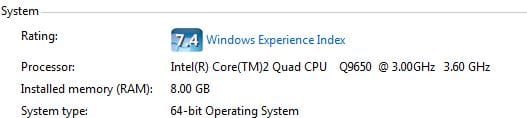
gaz, what multiplier was your Bios set at? i just checked mine and its running 200mh at 9X for a lowsy 1.8.
 

My Computer

OS
Windows 7 Enterprise 64bit
Back
Top