Overclocking GPU

VXER

█║▌│║▌
Member
VIP
Local time
6:54 PM
Messages
158
Hey
Need some help overclocking my card using Afterburner,so after i saw this
Gigabyte GeForce GTX 970 G1 Gaming review - Overclocking The Graphics Card
i gave it a try to change the numbers on the sliders but the thing is they will not save for example when i set the Core clock to 150+ as that web site says it stays on 147+ same thing with the mem clock,i've never done a OC myself so im pretty lost here with what to do..and i really wanna do this looking at the difference between the stock and overclocked one,..
 

My Computer

Computer type
PC/Desktop
Computer Manufacturer/Model Number
Custom Build
OS
Windows 7 Home Premium
CPU
Intel Core i7 4790
Motherboard
Asus MAXIMUS VII RANGER z97
Memory
Kingston HyperX Beast 16GB 2400Mhz
Graphics Card(s)
Gigabyte 970 4GB G1 GAMING
Monitor(s) Displays
LG 23 Cinema 3D 1080p
Screen Resolution
1920x1080 60Hz
Hard Drives
Samsung 840 EVO 250GB SSD / WD Blue 500GB HDD / Seagate 1TB HDD USB
PSU
EVGA SuperNova 850w G2 Gold
Case
Corsair 300R Custom
Cooling
Corsair Hydro H80i
Keyboard
Alienware TactX
Mouse
Alienware TactX
Antivirus
Bitdefender
Browser
Mozilla FireFox
Other Info
Razer Vespula
Man that is one nice rig you have! Try reinstalling afterburner, or maybe try another program like precision x, or firestorm.
 

My Computer

Computer type
PC/Desktop
Computer Manufacturer/Model Number
Dude Build
OS
Windows 10 Pro X64
CPU
Intel(R) Core(TM) i5-3570K CPU OC@ 4.5GHZ Turbo
Motherboard
MSI Z77A-G45 Gaming
Memory
8.00 GB DDR3 1600Mhz
Graphics Card(s)
MSI Gaming X GTX 1070
Sound Card
Realtek High Definition
Monitor(s) Displays
Dell S23O9W, HP L1710
Screen Resolution
DELL-1920 x 1080 HP-1280 x1024
Hard Drives
Crucial m4 256 SSD, WD 7200RPM 500GB WD 1TB
PSU
Seasonic X650 GOLD
Case
Zalman Z12
Cooling
Antec Kuhler 920
Keyboard
Logitech
Mouse
MSI DS100 Interceptor
Internet Speed
50 down and 5 up
Antivirus
MSE
Browser
Chrome, IE 11
Other Info
Logitech X-620 Speakers
Thanks mate :) gonna give precision x a try,afterburner is just not accepting the numbers that guru3d is using
 

My Computer

Computer type
PC/Desktop
Computer Manufacturer/Model Number
Custom Build
OS
Windows 7 Home Premium
CPU
Intel Core i7 4790
Motherboard
Asus MAXIMUS VII RANGER z97
Memory
Kingston HyperX Beast 16GB 2400Mhz
Graphics Card(s)
Gigabyte 970 4GB G1 GAMING
Monitor(s) Displays
LG 23 Cinema 3D 1080p
Screen Resolution
1920x1080 60Hz
Hard Drives
Samsung 840 EVO 250GB SSD / WD Blue 500GB HDD / Seagate 1TB HDD USB
PSU
EVGA SuperNova 850w G2 Gold
Case
Corsair 300R Custom
Cooling
Corsair Hydro H80i
Keyboard
Alienware TactX
Mouse
Alienware TactX
Antivirus
Bitdefender
Browser
Mozilla FireFox
Other Info
Razer Vespula

My Computer

Computer type
PC/Desktop
Computer Manufacturer/Model Number
Dude Build
OS
Windows 10 Pro X64
CPU
Intel(R) Core(TM) i5-3570K CPU OC@ 4.5GHZ Turbo
Motherboard
MSI Z77A-G45 Gaming
Memory
8.00 GB DDR3 1600Mhz
Graphics Card(s)
MSI Gaming X GTX 1070
Sound Card
Realtek High Definition
Monitor(s) Displays
Dell S23O9W, HP L1710
Screen Resolution
DELL-1920 x 1080 HP-1280 x1024
Hard Drives
Crucial m4 256 SSD, WD 7200RPM 500GB WD 1TB
PSU
Seasonic X650 GOLD
Case
Zalman Z12
Cooling
Antec Kuhler 920
Keyboard
Logitech
Mouse
MSI DS100 Interceptor
Internet Speed
50 down and 5 up
Antivirus
MSE
Browser
Chrome, IE 11
Other Info
Logitech X-620 Speakers
Hey
Need some help overclocking my card using Afterburner,so after i saw this
Gigabyte GeForce GTX 970 G1 Gaming review - Overclocking The Graphics Card
i gave it a try to change the numbers on the sliders but the thing is they will not save for example when i set the Core clock to 150+ as that web site says it stays on 147+ same thing with the mem clock,i've never done a OC myself so im pretty lost here with what to do..and i really wanna do this looking at the difference between the stock and overclocked one,..


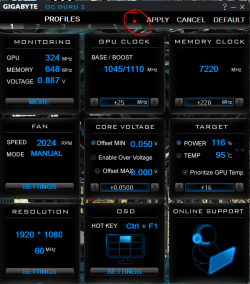
Using GIGABYTE OC GURU you have to lock it in and once you reboot you must hit the lock one more time but upon booting you will get a OC GURU message stating to go back to stock clocks if you click it, Don't click it or click the red X open up OC GURU and lock it again
 

Attachments

  • not locked.PNG
    not locked.PNG
    61.8 KB · Views: 2
  • locked.PNG
    locked.PNG
    62.8 KB · Views: 2

My Computer

Computer type
PC/Desktop
Computer Manufacturer/Model Number
CoreI7-6700K MrFingerIII Special Builds
OS
Windows 10 Home Premium 64bit sp1
CPU
Intel I7-6700K @ 4.6 Ghz 1.344 volts everyday OC
Motherboard
Asrock Fatality K6 Z170 Socket 1151
Memory
32GB G-Skill TridentZ 3200mhz 16-18-18-38 DDR4
Graphics Card(s)
Sli Gigabyte Windforce GTX 980 G1
Sound Card
AC97 Creative Rage Tactic 3D Headphones Bluetooth
Monitor(s) Displays
27" Asus ROG Swift PG278Q G-Sync 48" Vizio Smart HD TV
Screen Resolution
2560x1440p 27"- 48" Currently Gaming at 2560x1440p Res 2K
Hard Drives
250GB Samsung Evo840SSD Seagate baracuda 500 GB WD Mybook 500Gb 1TB Seagate Barracuda
PSU
HX1050w Corsair Silver 80plus certified crosfire/sli
Case
Enthod Pro Full Tower
Cooling
Corsair H110i GT 280 mm High Performance WaterBlock
Keyboard
Logitech wireless keyboard
Mouse
Logitech wireless mouse
Internet Speed
Cox Cable 100+ mb
Antivirus
WebRoot Spysweeper with Antivirus
Browser
IE-10, Chrome, Opera
Other Info
My Other Rig is a AMD FX8320E @4.6Ghz 16GB Ballistic Sport Ram
Mobo Asrock Fatality 990FX 120GB OCZ SSD 1TB Seagate Barracuda Corsair H75 Cooling PSU Corsair CX750
GPU GTX Gigabyte 970G1
Good info Tommy! When it gets it sorted I bet he gets some great benchmark scores :cool:
 

My Computer

Computer type
PC/Desktop
Computer Manufacturer/Model Number
Dude Build
OS
Windows 10 Pro X64
CPU
Intel(R) Core(TM) i5-3570K CPU OC@ 4.5GHZ Turbo
Motherboard
MSI Z77A-G45 Gaming
Memory
8.00 GB DDR3 1600Mhz
Graphics Card(s)
MSI Gaming X GTX 1070
Sound Card
Realtek High Definition
Monitor(s) Displays
Dell S23O9W, HP L1710
Screen Resolution
DELL-1920 x 1080 HP-1280 x1024
Hard Drives
Crucial m4 256 SSD, WD 7200RPM 500GB WD 1TB
PSU
Seasonic X650 GOLD
Case
Zalman Z12
Cooling
Antec Kuhler 920
Keyboard
Logitech
Mouse
MSI DS100 Interceptor
Internet Speed
50 down and 5 up
Antivirus
MSE
Browser
Chrome, IE 11
Other Info
Logitech X-620 Speakers
Good info Tommy! When it gets it sorted I bet he gets some great benchmark scores :cool:


Yea Doug it's pretty tricky how have you been mate ?

I've been working so much i have fallen off the forum wagon :o
 

My Computer

Computer type
PC/Desktop
Computer Manufacturer/Model Number
CoreI7-6700K MrFingerIII Special Builds
OS
Windows 10 Home Premium 64bit sp1
CPU
Intel I7-6700K @ 4.6 Ghz 1.344 volts everyday OC
Motherboard
Asrock Fatality K6 Z170 Socket 1151
Memory
32GB G-Skill TridentZ 3200mhz 16-18-18-38 DDR4
Graphics Card(s)
Sli Gigabyte Windforce GTX 980 G1
Sound Card
AC97 Creative Rage Tactic 3D Headphones Bluetooth
Monitor(s) Displays
27" Asus ROG Swift PG278Q G-Sync 48" Vizio Smart HD TV
Screen Resolution
2560x1440p 27"- 48" Currently Gaming at 2560x1440p Res 2K
Hard Drives
250GB Samsung Evo840SSD Seagate baracuda 500 GB WD Mybook 500Gb 1TB Seagate Barracuda
PSU
HX1050w Corsair Silver 80plus certified crosfire/sli
Case
Enthod Pro Full Tower
Cooling
Corsair H110i GT 280 mm High Performance WaterBlock
Keyboard
Logitech wireless keyboard
Mouse
Logitech wireless mouse
Internet Speed
Cox Cable 100+ mb
Antivirus
WebRoot Spysweeper with Antivirus
Browser
IE-10, Chrome, Opera
Other Info
My Other Rig is a AMD FX8320E @4.6Ghz 16GB Ballistic Sport Ram
Mobo Asrock Fatality 990FX 120GB OCZ SSD 1TB Seagate Barracuda Corsair H75 Cooling PSU Corsair CX750
GPU GTX Gigabyte 970G1
Good info Tommy! When it gets it sorted I bet he gets some great benchmark scores :cool:


Yea Doug it's pretty tricky how have you been mate ?

I've been working so much i have fallen off the forum wagon :o

Doing good. I really want the gpu he has, will get one eventually..probably the MSI to match my MB :cool:
 

My Computer

Computer type
PC/Desktop
Computer Manufacturer/Model Number
Dude Build
OS
Windows 10 Pro X64
CPU
Intel(R) Core(TM) i5-3570K CPU OC@ 4.5GHZ Turbo
Motherboard
MSI Z77A-G45 Gaming
Memory
8.00 GB DDR3 1600Mhz
Graphics Card(s)
MSI Gaming X GTX 1070
Sound Card
Realtek High Definition
Monitor(s) Displays
Dell S23O9W, HP L1710
Screen Resolution
DELL-1920 x 1080 HP-1280 x1024
Hard Drives
Crucial m4 256 SSD, WD 7200RPM 500GB WD 1TB
PSU
Seasonic X650 GOLD
Case
Zalman Z12
Cooling
Antec Kuhler 920
Keyboard
Logitech
Mouse
MSI DS100 Interceptor
Internet Speed
50 down and 5 up
Antivirus
MSE
Browser
Chrome, IE 11
Other Info
Logitech X-620 Speakers
It did not work with Precision x,the driver crashed but it went perfect with the GIGABYTE OC GURU but theres still something that's not adding up to me... i used the same sets from the overclock page(guru3d) but i did not get the same as they did with the Boost Clock they have it at 1516 when i applied the same amount i got 1479 same with the mem clock applying what they said but i have it 7510 when they have it on 8002,what im i missing here ? did i do something wrong ?
and heres a screenshot from GPUZ and GIGABYTE OC GURU,if you guys can take a look and see if its all fine and wont end up getting my card dead or something ....

untitled_by_mkiiix-d82g1m1.png


and thank you so much for the effort guys very appreciated.
 

My Computer

Computer type
PC/Desktop
Computer Manufacturer/Model Number
Custom Build
OS
Windows 7 Home Premium
CPU
Intel Core i7 4790
Motherboard
Asus MAXIMUS VII RANGER z97
Memory
Kingston HyperX Beast 16GB 2400Mhz
Graphics Card(s)
Gigabyte 970 4GB G1 GAMING
Monitor(s) Displays
LG 23 Cinema 3D 1080p
Screen Resolution
1920x1080 60Hz
Hard Drives
Samsung 840 EVO 250GB SSD / WD Blue 500GB HDD / Seagate 1TB HDD USB
PSU
EVGA SuperNova 850w G2 Gold
Case
Corsair 300R Custom
Cooling
Corsair Hydro H80i
Keyboard
Alienware TactX
Mouse
Alienware TactX
Antivirus
Bitdefender
Browser
Mozilla FireFox
Other Info
Razer Vespula
It did not work with Precision x,the driver crashed but it went perfect with the GIGABYTE OC GURU but theres still something that's not adding up to me... i used the same sets from the overclock page(guru3d) but i did not get the same as they did with the Boost Clock they have it at 1516 when i applied the same amount i got 1479 same with the mem clock applying what they said but i have it 7510 when they have it on 8002,what im i missing here ? did i do something wrong ?
and heres a screenshot from GPUZ and GIGABYTE OC GURU,if you guys can take a look and see if its all fine and wont end up getting my card dead or something ....

untitled_by_mkiiix-d82g1m1.png


and thank you so much for the effort guys very appreciated.


Not all cards will match the same clocks because the test cards have different Bios
Also take into count you might need to up the voltage to stablize it
 

My Computer

Computer type
PC/Desktop
Computer Manufacturer/Model Number
CoreI7-6700K MrFingerIII Special Builds
OS
Windows 10 Home Premium 64bit sp1
CPU
Intel I7-6700K @ 4.6 Ghz 1.344 volts everyday OC
Motherboard
Asrock Fatality K6 Z170 Socket 1151
Memory
32GB G-Skill TridentZ 3200mhz 16-18-18-38 DDR4
Graphics Card(s)
Sli Gigabyte Windforce GTX 980 G1
Sound Card
AC97 Creative Rage Tactic 3D Headphones Bluetooth
Monitor(s) Displays
27" Asus ROG Swift PG278Q G-Sync 48" Vizio Smart HD TV
Screen Resolution
2560x1440p 27"- 48" Currently Gaming at 2560x1440p Res 2K
Hard Drives
250GB Samsung Evo840SSD Seagate baracuda 500 GB WD Mybook 500Gb 1TB Seagate Barracuda
PSU
HX1050w Corsair Silver 80plus certified crosfire/sli
Case
Enthod Pro Full Tower
Cooling
Corsair H110i GT 280 mm High Performance WaterBlock
Keyboard
Logitech wireless keyboard
Mouse
Logitech wireless mouse
Internet Speed
Cox Cable 100+ mb
Antivirus
WebRoot Spysweeper with Antivirus
Browser
IE-10, Chrome, Opera
Other Info
My Other Rig is a AMD FX8320E @4.6Ghz 16GB Ballistic Sport Ram
Mobo Asrock Fatality 990FX 120GB OCZ SSD 1TB Seagate Barracuda Corsair H75 Cooling PSU Corsair CX750
GPU GTX Gigabyte 970G1
For gpu overclocking, I normally OC the core as much as possible on STOCK voltage. This ensures minimal gained heat and no voltage degration. For memory, I just oc a considerable amount. No touching voltages and not too high of a clock. My nenext step would be adding voltage. Idk about the new cards, but stock 780s are voltage limited to 1.2v which is nothing to worry about so as long as temps are under control. When u test for stability, use games that are not incredibly tataxing on the gpu. For me, bf4 would run all day at 1257mhz, but bioshock and similiar games were only stable at 1202mhz. The clocks and temps other people get will not be yours exactly.
 

My Computer

Computer type
PC/Desktop
Computer Manufacturer/Model Number
Weekend Warrior Rig
OS
Windows 10 Pro
CPU
Intel i7-3770K 4.4GHz
Motherboard
ASUS P8Z77-V Pro
Memory
8GB G.SKILL Ripjaws 1866 MHz
Graphics Card(s)
EVGA GTX 980 Classified
Monitor(s) Displays
Asus VH238H 23" 2ms
Screen Resolution
1920x1080
Hard Drives
Intel 330 120GB SSD /
WD Blue 1TB /
WD Black 500GB
PSU
Corsair CX750M
Case
NZXT H440
Cooling
Corsair H80i- CPU / Corsair H90- GPU
Keyboard
Logitech K360 LE
Mouse
Logitech G500
Antivirus
Avast
Browser
Chrome
Other Info
1200W 2.1 Surround Sound Audio
Last edited:

My Computer

Computer type
PC/Desktop
Computer Manufacturer/Model Number
Custom Build
OS
Windows 7 Home Premium
CPU
Intel Core i7 4790
Motherboard
Asus MAXIMUS VII RANGER z97
Memory
Kingston HyperX Beast 16GB 2400Mhz
Graphics Card(s)
Gigabyte 970 4GB G1 GAMING
Monitor(s) Displays
LG 23 Cinema 3D 1080p
Screen Resolution
1920x1080 60Hz
Hard Drives
Samsung 840 EVO 250GB SSD / WD Blue 500GB HDD / Seagate 1TB HDD USB
PSU
EVGA SuperNova 850w G2 Gold
Case
Corsair 300R Custom
Cooling
Corsair Hydro H80i
Keyboard
Alienware TactX
Mouse
Alienware TactX
Antivirus
Bitdefender
Browser
Mozilla FireFox
Other Info
Razer Vespula
Also, on my 780, adding voltage from stock to max only yielded a 3-4fps gain at 1080p. About a 40-50mhz gain. So for me, it wasn't worth the added heat, voltage degration, and noise.
 

My Computer

Computer type
PC/Desktop
Computer Manufacturer/Model Number
Weekend Warrior Rig
OS
Windows 10 Pro
CPU
Intel i7-3770K 4.4GHz
Motherboard
ASUS P8Z77-V Pro
Memory
8GB G.SKILL Ripjaws 1866 MHz
Graphics Card(s)
EVGA GTX 980 Classified
Monitor(s) Displays
Asus VH238H 23" 2ms
Screen Resolution
1920x1080
Hard Drives
Intel 330 120GB SSD /
WD Blue 1TB /
WD Black 500GB
PSU
Corsair CX750M
Case
NZXT H440
Cooling
Corsair H80i- CPU / Corsair H90- GPU
Keyboard
Logitech K360 LE
Mouse
Logitech G500
Antivirus
Avast
Browser
Chrome
Other Info
1200W 2.1 Surround Sound Audio
I need someone to tell me how to overclock this card correctly and without having it crashing,or at least pointing me out where i can get help with such things :(
 

My Computer

Computer type
PC/Desktop
Computer Manufacturer/Model Number
Custom Build
OS
Windows 7 Home Premium
CPU
Intel Core i7 4790
Motherboard
Asus MAXIMUS VII RANGER z97
Memory
Kingston HyperX Beast 16GB 2400Mhz
Graphics Card(s)
Gigabyte 970 4GB G1 GAMING
Monitor(s) Displays
LG 23 Cinema 3D 1080p
Screen Resolution
1920x1080 60Hz
Hard Drives
Samsung 840 EVO 250GB SSD / WD Blue 500GB HDD / Seagate 1TB HDD USB
PSU
EVGA SuperNova 850w G2 Gold
Case
Corsair 300R Custom
Cooling
Corsair Hydro H80i
Keyboard
Alienware TactX
Mouse
Alienware TactX
Antivirus
Bitdefender
Browser
Mozilla FireFox
Other Info
Razer Vespula

My Computer

Computer type
PC/Desktop
Computer Manufacturer/Model Number
Dude Build
OS
Windows 10 Pro X64
CPU
Intel(R) Core(TM) i5-3570K CPU OC@ 4.5GHZ Turbo
Motherboard
MSI Z77A-G45 Gaming
Memory
8.00 GB DDR3 1600Mhz
Graphics Card(s)
MSI Gaming X GTX 1070
Sound Card
Realtek High Definition
Monitor(s) Displays
Dell S23O9W, HP L1710
Screen Resolution
DELL-1920 x 1080 HP-1280 x1024
Hard Drives
Crucial m4 256 SSD, WD 7200RPM 500GB WD 1TB
PSU
Seasonic X650 GOLD
Case
Zalman Z12
Cooling
Antec Kuhler 920
Keyboard
Logitech
Mouse
MSI DS100 Interceptor
Internet Speed
50 down and 5 up
Antivirus
MSE
Browser
Chrome, IE 11
Other Info
Logitech X-620 Speakers
I think i've found out the problem (that's if what i think is what it is),whats going on here is that the clocks are getting much more in game which crashes the game, now this is what i have for the overclocks as seen in GPUZ base clock is 1328 and boost clock is 1429 but in game its 1580,wtf also the mem clock in GPUZ says 1789 and ingame i can see 3969..is this also doing the same thing ? or have i got this wrong ?

farcry3_d3d11_2014_10_13_16_36_23_652_by_mkiiix-d82p1yy.jpg

so is there something wrong with the clocks ? wellllllllllllllp :sick:

Dude:thanks man i took a look over there and did a thread but simply got no help.the game is FC3..thing is overclcoking this card can give me an extra 10 frames and some games even more,u feel me ?
 

My Computer

Computer type
PC/Desktop
Computer Manufacturer/Model Number
Custom Build
OS
Windows 7 Home Premium
CPU
Intel Core i7 4790
Motherboard
Asus MAXIMUS VII RANGER z97
Memory
Kingston HyperX Beast 16GB 2400Mhz
Graphics Card(s)
Gigabyte 970 4GB G1 GAMING
Monitor(s) Displays
LG 23 Cinema 3D 1080p
Screen Resolution
1920x1080 60Hz
Hard Drives
Samsung 840 EVO 250GB SSD / WD Blue 500GB HDD / Seagate 1TB HDD USB
PSU
EVGA SuperNova 850w G2 Gold
Case
Corsair 300R Custom
Cooling
Corsair Hydro H80i
Keyboard
Alienware TactX
Mouse
Alienware TactX
Antivirus
Bitdefender
Browser
Mozilla FireFox
Other Info
Razer Vespula
Yes, what you set the actual clocks to are not the in-game clocks. In game clocks are higher because of GPU boost 2.0
 

My Computer

Computer type
PC/Desktop
Computer Manufacturer/Model Number
Weekend Warrior Rig
OS
Windows 10 Pro
CPU
Intel i7-3770K 4.4GHz
Motherboard
ASUS P8Z77-V Pro
Memory
8GB G.SKILL Ripjaws 1866 MHz
Graphics Card(s)
EVGA GTX 980 Classified
Monitor(s) Displays
Asus VH238H 23" 2ms
Screen Resolution
1920x1080
Hard Drives
Intel 330 120GB SSD /
WD Blue 1TB /
WD Black 500GB
PSU
Corsair CX750M
Case
NZXT H440
Cooling
Corsair H80i- CPU / Corsair H90- GPU
Keyboard
Logitech K360 LE
Mouse
Logitech G500
Antivirus
Avast
Browser
Chrome
Other Info
1200W 2.1 Surround Sound Audio
So what can i do here ? what do i do to get this card on these clocks :
Core Clock 1328 MHz
Boost Clock: 1516 MHz
Memory Clock: 8002 MHz

...?

brb
 

My Computer

Computer type
PC/Desktop
Computer Manufacturer/Model Number
Custom Build
OS
Windows 7 Home Premium
CPU
Intel Core i7 4790
Motherboard
Asus MAXIMUS VII RANGER z97
Memory
Kingston HyperX Beast 16GB 2400Mhz
Graphics Card(s)
Gigabyte 970 4GB G1 GAMING
Monitor(s) Displays
LG 23 Cinema 3D 1080p
Screen Resolution
1920x1080 60Hz
Hard Drives
Samsung 840 EVO 250GB SSD / WD Blue 500GB HDD / Seagate 1TB HDD USB
PSU
EVGA SuperNova 850w G2 Gold
Case
Corsair 300R Custom
Cooling
Corsair Hydro H80i
Keyboard
Alienware TactX
Mouse
Alienware TactX
Antivirus
Bitdefender
Browser
Mozilla FireFox
Other Info
Razer Vespula
ok i dont mean this in a bad way, but get out of your mind that your card will be able to achieve the exact settings as another person's card. every single card is different.

so with that said, do this:

1) return everything to stock settings
2) turn up the core clock +100MHz in MSI Afterbuner
2a) Turn the power % limit up to max, and set tempature target at 80C.
2b) Set temperature as the priority.
3) hit apply
4) Run a series of 3 games for about 15 mins each. if there are no crashes or artifacts VVV
5) Keep turning up the core clock by 10MHz until it crashes or artifacts in game. after it does turn down the clock by 15MHz.
6) Turn the memory clock up to +300MHz in afterburner.
7) hit apply and enjoy your games.
8) If there is crashing or artifacting, keep turning down the clocks until there is no more crashing.

Keep temperatures below 80C, and dont touch voltage (Theres no need to).

The clocks you see in game are your ACTUAL clocks. what you see in GPUz is just base and boost clocks.
for instance, my GPUz says my boost clock is 1141MHz, but my ingame clock is 1202MHz.
 

My Computer

Computer type
PC/Desktop
Computer Manufacturer/Model Number
Weekend Warrior Rig
OS
Windows 10 Pro
CPU
Intel i7-3770K 4.4GHz
Motherboard
ASUS P8Z77-V Pro
Memory
8GB G.SKILL Ripjaws 1866 MHz
Graphics Card(s)
EVGA GTX 980 Classified
Monitor(s) Displays
Asus VH238H 23" 2ms
Screen Resolution
1920x1080
Hard Drives
Intel 330 120GB SSD /
WD Blue 1TB /
WD Black 500GB
PSU
Corsair CX750M
Case
NZXT H440
Cooling
Corsair H80i- CPU / Corsair H90- GPU
Keyboard
Logitech K360 LE
Mouse
Logitech G500
Antivirus
Avast
Browser
Chrome
Other Info
1200W 2.1 Surround Sound Audio
Thanks man,ill be doing all of this right away,just one question if the memory clock is 8002mhz how much should it show ingame ?
 

My Computer

Computer type
PC/Desktop
Computer Manufacturer/Model Number
Custom Build
OS
Windows 7 Home Premium
CPU
Intel Core i7 4790
Motherboard
Asus MAXIMUS VII RANGER z97
Memory
Kingston HyperX Beast 16GB 2400Mhz
Graphics Card(s)
Gigabyte 970 4GB G1 GAMING
Monitor(s) Displays
LG 23 Cinema 3D 1080p
Screen Resolution
1920x1080 60Hz
Hard Drives
Samsung 840 EVO 250GB SSD / WD Blue 500GB HDD / Seagate 1TB HDD USB
PSU
EVGA SuperNova 850w G2 Gold
Case
Corsair 300R Custom
Cooling
Corsair Hydro H80i
Keyboard
Alienware TactX
Mouse
Alienware TactX
Antivirus
Bitdefender
Browser
Mozilla FireFox
Other Info
Razer Vespula
Back
Top