Overheating

Brendan M

New member
Member
Local time
7:39 PM
Messages
44
Hi there, I am posting here as I think this might be a problem mainly caused by the case.

My system is as follows
OS; Windows 7 Ultimate
CPU; iNTEL cORE i7-920 2.67 GHz
Motherboard; Asus P6T Deluxe V2
Memory; Corsair XMS3 6GB
Graphics Card; Sapphire ATI HD5870
Hard Drive; 2 times Western Digital 1TB PSU; Corsair ATX 850W
Case; Cooler Master Sileo 500
Cooling; Zalman CNPS9900 LED

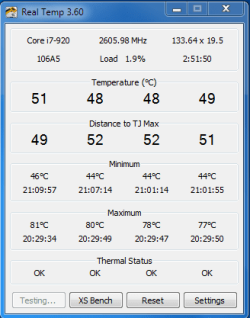
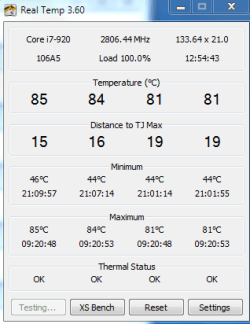
When I am running "real temp", I am getting unloaded temps around 48 to 52 degree's. If I run a stress test I regularly get into the low 80's. I ran prime 95 and saw a temp of 91. I then shut the test down.
If I run the computer with the side cover off, I get idle temps in the high 40's and stress tests get into the high 70's. The computer is in an airconditioned room.

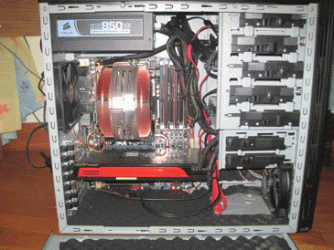
I have vacuumed out the vents. I have a small fan on the front pulling air in, a large cooling fan in the middle and a small fan at the rear pulling air out.

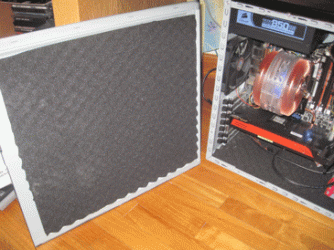
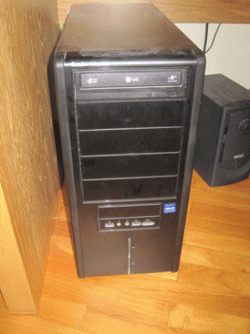
As you can see in the picture, the case is foam lined so this obviously doesn't help, but high temps with the side case off?

Please do help.
 

Attachments
  • IMG_3688.gif
    IMG_3688.gif
    60.3 KB · Views: 109
  • IMG_3695.gif
    IMG_3695.gif
    71.9 KB · Views: 33
  • IMG_3693.gif
    IMG_3693.gif
    78.9 KB · Views: 36
  • IMG_3696.gif
    IMG_3696.gif
    69.9 KB · Views: 19

My Computer

Computer type
PC/Desktop
OS
Windows 7 Ultimate
CPU
iNTEL i5 4440
Motherboard
Gigabyte Z97X-UD3H
Memory
32GB
Graphics Card(s)
MSI GTX 970
Hard Drives
1 times Samsung SSD 500 GB
2 times Western Digital 1TB
PSU
Corsair ATX 850W
Case
Cooler Master 690 Advanced
Cooling
Zalman CNPS9900 LED

My Computer

Computer type
PC/Desktop
Computer Manufacturer/Model Number
Dell XPS 420
OS
Windows 10, Home Clean Install
CPU
Intel Core2 processsor Q8200(2.33Ghz 1333FSB) Quad Core Tech
Motherboard
Dell
Memory
6 gb
Graphics Card(s)
ATI Radeon 256MB HD3650
Sound Card
Intergrated 7.1 Channel Audio
Monitor(s) Displays
Dell SP2009W 20"
Hard Drives
640 GB Serial ATA Hard drive
Cooling
Fan
Keyboard
Dell USB Keyboard
Mouse
Dell Premium Optical USB
Internet Speed
DSL 2.85
Did you build the PC yourself?

How much thermal paste did you use?

Is the cooler properly tensioned?

The case open temps are a little high, but not dangerously so. As you surmised the sound dampening foam doesn't help, nor does the lack of airflow.

Have you left the voltage setting on AUTO in the BIOS? If so what does CPU-Z report the load volts at?

Run the cooldown test function in Real Temp (which uses P95 anyway) to get the load voltage.
 

My Computer

Computer type
PC/Desktop
Computer Manufacturer/Model Number
Systems by SmartEyeball
OS
8 Pro x64
CPU
i7 3770K 4.6GHz
Motherboard
ASUS P8Z77 WS
Memory
16GB G.Skill Trident X 2666mhz
Graphics Card(s)
x2 EVGA 780 Ti Superclocked SLI
Sound Card
SB X-FI Surround 5.1 PRO USB / ATH-AD900 Headphones
Monitor(s) Displays
x3 Dell U2410 / 58" Samsung
Screen Resolution
5760*1200/ 1920*1200
Hard Drives
2x Intel 520 240GB (RAID 0) * 2x WD Caviar Blacks 2TB (RAID 0) * 2TB WD Caviar Black * Sony Optirac DVD
PSU
Silverstone Strider Evolution 1200W
Case
Thermaltake Level 10 GT Snow Edition
Cooling
Noctua NH-D14
Keyboard
Topre Realforce // Ducky Shine MX Black // Filco Ninja TKL
Mouse
Thermaltake Theron (Highly Recommended) + Razer Imperator
Antivirus
MSE
Browser
IE, FF, WaterFox
Other Info
GT Extreme V2 Sim Racing Cockpit + 40" LCD and K/B Mouse stand ▼
Fanatec CSR Elite Wheel + Clubsport V1 Pedals + CSR shifter/7G-H ▼Saitek X52 Pro ▼ TrackIR 5 Pro
Buttkicker v2 Seat Rumbler with Dedicated 5.1 and Sub Woofer attached to frame ▼
=
Bloody Big Grin
Looked at your link.
Case might be a small part but not the main problem unless you have the case cooling fans running at low RPM's. With those CPU temps usually the case fans are running at or near 100%.

Two things to check.
I'd think too much paste on CPU/cooler. It only takes enough to show a super thin gray coverage. Apply to CPU only.
Also the cooler can be sitting slightly crooked on CPU. I did that once my self. It looked and felt flat. When I pulled it off to check it the thermal paste was only touching on about half of the cooler.

Fan is not working properly on CPU cooler. This could be as simple as it just needs better RPM control. It isn't increasing properly with the rise of CPU temps.

Mike
 

My Computer

Computer Manufacturer/Model Number
Hopalong/ Godzilla
OS
Windows7 Pro 64bit SP-1; Windows XP Pro 32bit
CPU
Intel Core i7-870 Lynnfield 2.93GHz LGA 1156 95W Quad-Core
Motherboard
ASUS P7P55D-E PRO
Memory
8GB@1400MHz Crucial Ballistix DDR3-1600 4x2GB
Graphics Card(s)
ASUS ENGTX460 DirectCU/2DI/1GD5 1GB 256-bit GDDR5
Sound Card
VIA Onboard
Monitor(s) Displays
Asus VS248H-P 24"; Samsung SyncMaster 941BW 19"ws
Screen Resolution
1920x1080; 1440x900
Hard Drives
Samsung 830 120GB SSD
Intel 320 120GB SSD
Western Digital Caviar Black WD7501AALS 750GB 7200 RPM SATA 3.0Gb/s
Western Digital Caviar Black WD6401AALS 640GB 7200 RPM SATA 3.0Gb/s
PSU
COOLER MASTER Silent Pro RS850-AMBAJ3-US 850W Modular
Case
COOLER MASTER HAF 932 RC-932-KKN5-GP Black
Cooling
Scythe "Mugen-2 Rev.B" (2 ScytheKaze-Jyuni PWM fans)
Keyboard
Logitech K-320
Mouse
Kensington
Antivirus
Avast Inernet Suite
Browser
IE 9 ; Chrome
Hi
I would like to thank everyone for their replies. In answer to the questions asked.

I had a pc shop put the computer together to my specifications, which I got off the internet. I use the machine mainly for home video editing, photoshop and some gaming.

I have no idea how much thermal paste was used or if the cooling fan was positioned and tensioned properly.

I can only assume that the voltage setting in the bios is on auto, haven't checked. I will check and get back to you smarteyeball.

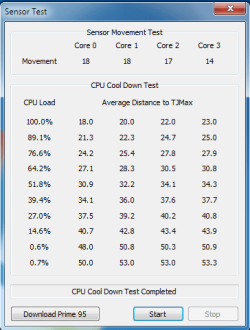
I did the cooldown test function in Real temp and I never saw the voltage go above 1.16V. I have no idea if this is good or bad.

So, I'm guessing I will need to purchase some thermal paste, remove the cooling fan, clean and reapply the paste and ensure fan is seated properly. How do I do this???
 

Attachments

  • sensortest.PNG
    sensortest.PNG
    11.4 KB · Views: 7
  • real temp.PNG
    real temp.PNG
    9.5 KB · Views: 7
  • CPUZ.png
    CPUZ.png
    19.9 KB · Views: 10

My Computer

Computer type
PC/Desktop
OS
Windows 7 Ultimate
CPU
iNTEL i5 4440
Motherboard
Gigabyte Z97X-UD3H
Memory
32GB
Graphics Card(s)
MSI GTX 970
Hard Drives
1 times Samsung SSD 500 GB
2 times Western Digital 1TB
PSU
Corsair ATX 850W
Case
Cooler Master 690 Advanced
Cooling
Zalman CNPS9900 LED
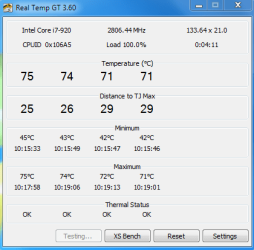
Max temps under load.
 

Attachments

  • very hot.PNG
    very hot.PNG
    9.1 KB · Views: 8

My Computer

Computer type
PC/Desktop
OS
Windows 7 Ultimate
CPU
iNTEL i5 4440
Motherboard
Gigabyte Z97X-UD3H
Memory
32GB
Graphics Card(s)
MSI GTX 970
Hard Drives
1 times Samsung SSD 500 GB
2 times Western Digital 1TB
PSU
Corsair ATX 850W
Case
Cooler Master 690 Advanced
Cooling
Zalman CNPS9900 LED
I did the cooldown test function in Real temp and I never saw the voltage go above 1.16V. I have no idea if this is good or bad.

1.16v is good. It means the BIOS is not overvolting on the AUTO setting (the more voltage, the more heat. 1.16v is nice and low)

So, I'm guessing I will need to purchase some thermal paste, remove the cooling fan, clean and reapply the paste and ensure fan is seated properly. How do I do this???

Not necessarily. Not yet at this stage anyway. (plenty of links/ tutorials if need be though)

However it could be a limitation of the cooler itself. They were good for 775/AM2, but they're not as effective for 1366. A quick google gives some mixed results.

With the A/C on - what is the ambient temp in the room ?

As hopalong mentioned, are the fans themselves ramping up?

Are those Real Temp Shots with the side still off?
 

My Computer

Computer type
PC/Desktop
Computer Manufacturer/Model Number
Systems by SmartEyeball
OS
8 Pro x64
CPU
i7 3770K 4.6GHz
Motherboard
ASUS P8Z77 WS
Memory
16GB G.Skill Trident X 2666mhz
Graphics Card(s)
x2 EVGA 780 Ti Superclocked SLI
Sound Card
SB X-FI Surround 5.1 PRO USB / ATH-AD900 Headphones
Monitor(s) Displays
x3 Dell U2410 / 58" Samsung
Screen Resolution
5760*1200/ 1920*1200
Hard Drives
2x Intel 520 240GB (RAID 0) * 2x WD Caviar Blacks 2TB (RAID 0) * 2TB WD Caviar Black * Sony Optirac DVD
PSU
Silverstone Strider Evolution 1200W
Case
Thermaltake Level 10 GT Snow Edition
Cooling
Noctua NH-D14
Keyboard
Topre Realforce // Ducky Shine MX Black // Filco Ninja TKL
Mouse
Thermaltake Theron (Highly Recommended) + Razer Imperator
Antivirus
MSE
Browser
IE, FF, WaterFox
Other Info
GT Extreme V2 Sim Racing Cockpit + 40" LCD and K/B Mouse stand ▼
Fanatec CSR Elite Wheel + Clubsport V1 Pedals + CSR shifter/7G-H ▼Saitek X52 Pro ▼ TrackIR 5 Pro
Buttkicker v2 Seat Rumbler with Dedicated 5.1 and Sub Woofer attached to frame ▼
=
Bloody Big Grin
Ambient temp in the room is around 22 degrees celcius.

Those temps are with the side on.

I didn't hear the fans ramp up, so to speak, during this test. However I have heard them ramp up from time to time.

I will run the test with the side off and post the temps.
 

My Computer

Computer type
PC/Desktop
OS
Windows 7 Ultimate
CPU
iNTEL i5 4440
Motherboard
Gigabyte Z97X-UD3H
Memory
32GB
Graphics Card(s)
MSI GTX 970
Hard Drives
1 times Samsung SSD 500 GB
2 times Western Digital 1TB
PSU
Corsair ATX 850W
Case
Cooler Master 690 Advanced
Cooling
Zalman CNPS9900 LED
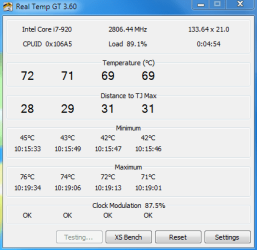
Second picture show max temp reached 76. This is with the side open.
The fans did ramp up somewhat.
 

Attachments

  • open.PNG
    open.PNG
    10.8 KB · Views: 5
  • open 2.PNG
    open 2.PNG
    10.5 KB · Views: 6

My Computer

Computer type
PC/Desktop
OS
Windows 7 Ultimate
CPU
iNTEL i5 4440
Motherboard
Gigabyte Z97X-UD3H
Memory
32GB
Graphics Card(s)
MSI GTX 970
Hard Drives
1 times Samsung SSD 500 GB
2 times Western Digital 1TB
PSU
Corsair ATX 850W
Case
Cooler Master 690 Advanced
Cooling
Zalman CNPS9900 LED
The min temps in those shots aren't bad with the side panel on. Even with a 22c ambient, I doubt much of that is making it's way into the case.

While you have the side off, to test the tension - just give the cooler a jiggle. If it feels sturdy (no wiggling) it's secure. But if there is any play in it, then you might want to give the screws a little tightening (do not overtighten. Stop at the first 'bite' of the screw)

Removing the plastic shroud may have a small impact on temps as well (at the cost of noise)

The fans ramping up are a positive sign that they are working fine.
 

My Computer

Computer type
PC/Desktop
Computer Manufacturer/Model Number
Systems by SmartEyeball
OS
8 Pro x64
CPU
i7 3770K 4.6GHz
Motherboard
ASUS P8Z77 WS
Memory
16GB G.Skill Trident X 2666mhz
Graphics Card(s)
x2 EVGA 780 Ti Superclocked SLI
Sound Card
SB X-FI Surround 5.1 PRO USB / ATH-AD900 Headphones
Monitor(s) Displays
x3 Dell U2410 / 58" Samsung
Screen Resolution
5760*1200/ 1920*1200
Hard Drives
2x Intel 520 240GB (RAID 0) * 2x WD Caviar Blacks 2TB (RAID 0) * 2TB WD Caviar Black * Sony Optirac DVD
PSU
Silverstone Strider Evolution 1200W
Case
Thermaltake Level 10 GT Snow Edition
Cooling
Noctua NH-D14
Keyboard
Topre Realforce // Ducky Shine MX Black // Filco Ninja TKL
Mouse
Thermaltake Theron (Highly Recommended) + Razer Imperator
Antivirus
MSE
Browser
IE, FF, WaterFox
Other Info
GT Extreme V2 Sim Racing Cockpit + 40" LCD and K/B Mouse stand ▼
Fanatec CSR Elite Wheel + Clubsport V1 Pedals + CSR shifter/7G-H ▼Saitek X52 Pro ▼ TrackIR 5 Pro
Buttkicker v2 Seat Rumbler with Dedicated 5.1 and Sub Woofer attached to frame ▼
=
Bloody Big Grin
HPIM0911.JPGFirst off the Zalman is designed to be used with the fan shroud removed so my first idea would be to remove CPU cooler and clean off the base plates first noticing if you got good coverage from the first seating. If you got good coverage of the thermal paste than reapply as before after removing the shroud. As long as before you have the CPU fan exhausting towards the rear case fan then just clean the fan blades on all case fans. Reassemble the system and watch temps. My opinion secondly is that the video card is stealing air flow to the CPU. I would run your GPU in a lower PCI-e card slot and allow better flow to all components. Lastly if after this step you still have high temps at the CPU then I would swap out both front and rear fans with a premium Noctura or Akasa fan set.
 

My Computer

Computer type
PC/Desktop
Computer Manufacturer/Model Number
A blend of brains, brawn and dumb luck.
OS
Windows 7 Ultimate 64
CPU
i7 3770k OC'd 4.6 @ 1.17v, also FX 8120 & i5 miniITX
Motherboard
MSI P67A-GD80 b3
Memory
32 gb G.Skill Sniper DDR3 10-12-12-31 @ 2133
Graphics Card(s)
XFX Radeon 7870 2GB DDR5
Sound Card
Sound Blaster Z Series Card
Monitor(s) Displays
(2) LG LED 23" 1920 x 1080 2ms Monitors via mini d-port
Screen Resolution
1680 X 1050 p
Hard Drives
Samsung 256 gb 830 SSD sata III
(1) 1 tb WD Black
(2) 1 tb Hitachi deskmates/sata II
(2) 1 tb WD green/sata II
(2) 3 tb Seagate Barracuda
(1) 120 gb OCZ Vertex SS
(1) Drobo 5N w/5 Seagate 3tb
PSU
EVGA modular 1000G2 80% gold rating & APC 1200 RS
Case
CoolerMaster Storm Styker
Cooling
7 case fans 140mm & 120mm, NZXT Kraken X60
Keyboard
(2) Logitech Illuminated Keyboards (1) usb (1) wireless
Mouse
Logitech G700 & T-BC21 - nano nx for the laptop
Internet Speed
Basic 120mbps down
Antivirus
Trend Micro Titanium Max Security & Malwarebytes Premium
Browser
Chrome and IE 10
Other Info
5 Noctua case fans + 3 Noctua in p/p on NZXT cooler
Integrated hot swap drive bays for 2.5" Drives
(2) Lite-on dvd/cd/Blu Ray optical 22X
Integrated fan controller and led on/off
HP Officejet Pro 8630 all-n-one
Hot-swappable 3.5" hard drive bay
Netgear Nighthawk router
Asus USB 3 & sata 6 PCIe card
Vantec IDE to sata adptr./Ultra sata adptr
Lenovo L420 i5 lappy with m sata
Drobo 5N advanced NAS
One other possible change would be to replace the CPU fan with either a corsair h50 using 2 fans or the h70 which comes with 2 fans, push/ pull configuration. This will reduce your CPU temp quite a bit and also force you to re-address the thermal paste possibility as well as the CPU fan seating possibility. I have an h50 and it lowered my CPU temp by 18c right off the bat.
 

My Computer

Computer Manufacturer/Model Number
Myself
OS
Windows 7 Home Premium x64
CPU
AMD Phenom II X6 1090T Black Edition
Motherboard
Asus Crosshair IV
Memory
8 Gb
Graphics Card(s)
XFX Radeon 5870
Sound Card
MB Sound w/Sound Blaster Xfi Platinum Drivers and Console
Monitor(s) Displays
HP w2207
Screen Resolution
1680 x 1050
Hard Drives
2 WD 600 Mg SATA 6G Raptors - No Raid
PSU
Corsair - Pro 850W
Case
Cooler Master HAF X
Cooling
Cooler Master H50 - Push/Pull
Keyboard
Thin Backlit Logitech
Mouse
Logitech G9x Laser - Wired
Internet Speed
12mb
The Zalman will do a good job at cooling though I tossed it for the H50 in push pull setup. The Zalman will do great as long as you not trying to OC to a large extent.
 

My Computer

Computer type
PC/Desktop
Computer Manufacturer/Model Number
A blend of brains, brawn and dumb luck.
OS
Windows 7 Ultimate 64
CPU
i7 3770k OC'd 4.6 @ 1.17v, also FX 8120 & i5 miniITX
Motherboard
MSI P67A-GD80 b3
Memory
32 gb G.Skill Sniper DDR3 10-12-12-31 @ 2133
Graphics Card(s)
XFX Radeon 7870 2GB DDR5
Sound Card
Sound Blaster Z Series Card
Monitor(s) Displays
(2) LG LED 23" 1920 x 1080 2ms Monitors via mini d-port
Screen Resolution
1680 X 1050 p
Hard Drives
Samsung 256 gb 830 SSD sata III
(1) 1 tb WD Black
(2) 1 tb Hitachi deskmates/sata II
(2) 1 tb WD green/sata II
(2) 3 tb Seagate Barracuda
(1) 120 gb OCZ Vertex SS
(1) Drobo 5N w/5 Seagate 3tb
PSU
EVGA modular 1000G2 80% gold rating & APC 1200 RS
Case
CoolerMaster Storm Styker
Cooling
7 case fans 140mm & 120mm, NZXT Kraken X60
Keyboard
(2) Logitech Illuminated Keyboards (1) usb (1) wireless
Mouse
Logitech G700 & T-BC21 - nano nx for the laptop
Internet Speed
Basic 120mbps down
Antivirus
Trend Micro Titanium Max Security & Malwarebytes Premium
Browser
Chrome and IE 10
Other Info
5 Noctua case fans + 3 Noctua in p/p on NZXT cooler
Integrated hot swap drive bays for 2.5" Drives
(2) Lite-on dvd/cd/Blu Ray optical 22X
Integrated fan controller and led on/off
HP Officejet Pro 8630 all-n-one
Hot-swappable 3.5" hard drive bay
Netgear Nighthawk router
Asus USB 3 & sata 6 PCIe card
Vantec IDE to sata adptr./Ultra sata adptr
Lenovo L420 i5 lappy with m sata
Drobo 5N advanced NAS
Problem solved. A new case, the coolermaster 690 advanced. Changed the rear fan for one with a greater airflow rate, added a side fan and another fan inside the case. It's situated in the drive bay area and basically pushes a lot of air towards my zalman cooler which then pushes air to the rear fan. I did remove the plastic shroud off the zalman
My pc now runs about 5 degrees cooler unloaded and when running prime 95 for 2 hours it never got over 71 degrees. I am now ready to think about overclocking.

Dumb question but which is the best thread to read on overclocking. I am a newbie to this and I want to be as careful as possible. Only looking for a mild overclock.
 

My Computer

Computer type
PC/Desktop
OS
Windows 7 Ultimate
CPU
iNTEL i5 4440
Motherboard
Gigabyte Z97X-UD3H
Memory
32GB
Graphics Card(s)
MSI GTX 970
Hard Drives
1 times Samsung SSD 500 GB
2 times Western Digital 1TB
PSU
Corsair ATX 850W
Case
Cooler Master 690 Advanced
Cooling
Zalman CNPS9900 LED
Best thread is "Overclocking and case modifications". Glad to hear your temps are running cooler for you. Your new case sound nice you should post some pic's for use to enjoy in the "Show us your Rig" post. Cheers !
 

My Computer

Computer type
PC/Desktop
Computer Manufacturer/Model Number
A blend of brains, brawn and dumb luck.
OS
Windows 7 Ultimate 64
CPU
i7 3770k OC'd 4.6 @ 1.17v, also FX 8120 & i5 miniITX
Motherboard
MSI P67A-GD80 b3
Memory
32 gb G.Skill Sniper DDR3 10-12-12-31 @ 2133
Graphics Card(s)
XFX Radeon 7870 2GB DDR5
Sound Card
Sound Blaster Z Series Card
Monitor(s) Displays
(2) LG LED 23" 1920 x 1080 2ms Monitors via mini d-port
Screen Resolution
1680 X 1050 p
Hard Drives
Samsung 256 gb 830 SSD sata III
(1) 1 tb WD Black
(2) 1 tb Hitachi deskmates/sata II
(2) 1 tb WD green/sata II
(2) 3 tb Seagate Barracuda
(1) 120 gb OCZ Vertex SS
(1) Drobo 5N w/5 Seagate 3tb
PSU
EVGA modular 1000G2 80% gold rating & APC 1200 RS
Case
CoolerMaster Storm Styker
Cooling
7 case fans 140mm & 120mm, NZXT Kraken X60
Keyboard
(2) Logitech Illuminated Keyboards (1) usb (1) wireless
Mouse
Logitech G700 & T-BC21 - nano nx for the laptop
Internet Speed
Basic 120mbps down
Antivirus
Trend Micro Titanium Max Security & Malwarebytes Premium
Browser
Chrome and IE 10
Other Info
5 Noctua case fans + 3 Noctua in p/p on NZXT cooler
Integrated hot swap drive bays for 2.5" Drives
(2) Lite-on dvd/cd/Blu Ray optical 22X
Integrated fan controller and led on/off
HP Officejet Pro 8630 all-n-one
Hot-swappable 3.5" hard drive bay
Netgear Nighthawk router
Asus USB 3 & sata 6 PCIe card
Vantec IDE to sata adptr./Ultra sata adptr
Lenovo L420 i5 lappy with m sata
Drobo 5N advanced NAS
Back
Top