The razor blade stuff is complete crap, and for the most part, the "too much paste" myth is as well. The truth is, if you have too much paste, it's going to squeeze out the sides when you put the fan on and clamp it down. The paste will be flattened out to the amount it needs to be unless you put HUGE globs on. Of course you don't want any coming out the sides, but you don't want a razor thin layer either...it's simply not enough. You want enough that the entire metal surface is covered AFTER compression...it's fairly easy to eyeball this and get it right if you think about it as you apply.
This is, of course, going to depend on the paste you buy and how well lapped your heatsink is... and whether it's slightly beveled or not.
As for less is better being crap, I respectfully disagree. The amount of paste applied has a direct impact on the transfer of heat. Paste isn't meant to be a conductor, it's only function is to fill in the microscopic holes left behind after the lapping process, so really, you only need very little. It's the heatsink's job to displace heat, not the paste's.
I use a very small amount... 1/3 grain of rice.. then I set the heatsink and give it a twist. After that I remove the heatsink and rub the paste in with my finger (rubber gloves, or saran wrap will do in a pinch). I do the same with the what's left behind on the core and call it a day.
I put about a pea size drop on there, spread it all around to where it covered the top of the CPU. That's what the videos on youtube said to do. I'm using Formula 5 Antec Paste.
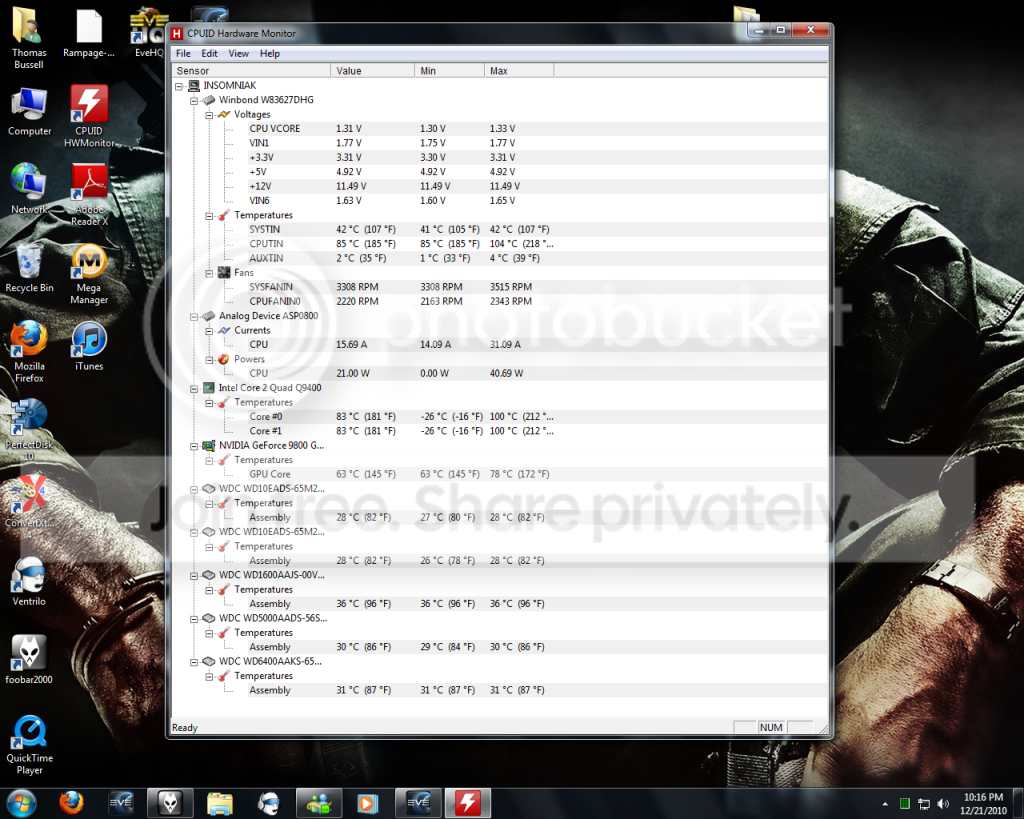
Unless my old eyes are deceiving me but those CPU voltages are just about maxed out...Maybe try winding them back to stock voltages and see if the heat problem goes....Then overclock to recommended settings for your system?
The screen was captured with EVE running. I think you're just seeing Speedstep kicked in.
Voltage range .85-1.3625v.
Did this system run fine for the year it's been built?
Did you monitor temps the whole time and this is a recent problem?
Did you add components over that course of the year like HDD's? (thereby changing airflow dramatically, possibly)?
Did this system run fine for the year it's been built?
It started acting up about 5 months ago. Temperatures started going up, didn't really think about it until my computer started crashing and not turning back on.
Did you monitor temps the whole time & this is a recent problem?
I didn't monitor temps the whole time it's been built, only recently. I installed a program (CPUID Hardware Monitor), and I was alarmed at the temperature's.
Did you add components over that course of the year like HDD's?
I did add 2 extra drives. I could take some of the hard drives out, I don't think I need 3TB of space when I'm barely using 1TB as it is.
What heatsink and fan do you have? What speed(s) does the fan operate?
Stock - 3rd party???
I agree with Fumz here re the amount of paste. Cleaning fan blades will only do so much.
All the other temps look fine. The CPU however looks like it's being overclocked and stess tested on a stock HSF.
What are it's idle temps? (unless thathey are it's idle temps

)
What heatsink & fan do I have?
The stock one that came with the CPU.
I will post another link of idle temperature's before I log off for the night.
Unless my old eyes are deceiving me but those CPU voltages are just about maxed out...Maybe try winding them back to stock voltages and see if the heat problem goes....Then overclock to recommended settings for your system?
To be very honest with you wilywombat, I'm not even sure how to tell if it's overclocked or not. When I built my system, I gave myself a little bit extra room on the power supply area. I wasn't going to get into hard core gaming and what not. EVE is the biggest game I play, and my 9800GTX+ rocks it's world like no other.
If my CPU Voltages are above normals, would you tell me how to change them? I've never overclocked anything.
I'll mention this now, should've been done earlier but It slipped my mind. When I click the "Clr_CMOS" button the back of my computer, it runs Windows & EVE at less than 120 degree's, when I don't click it, it runs idle at 180 degree's Fahrenheit. Give or take some temp.