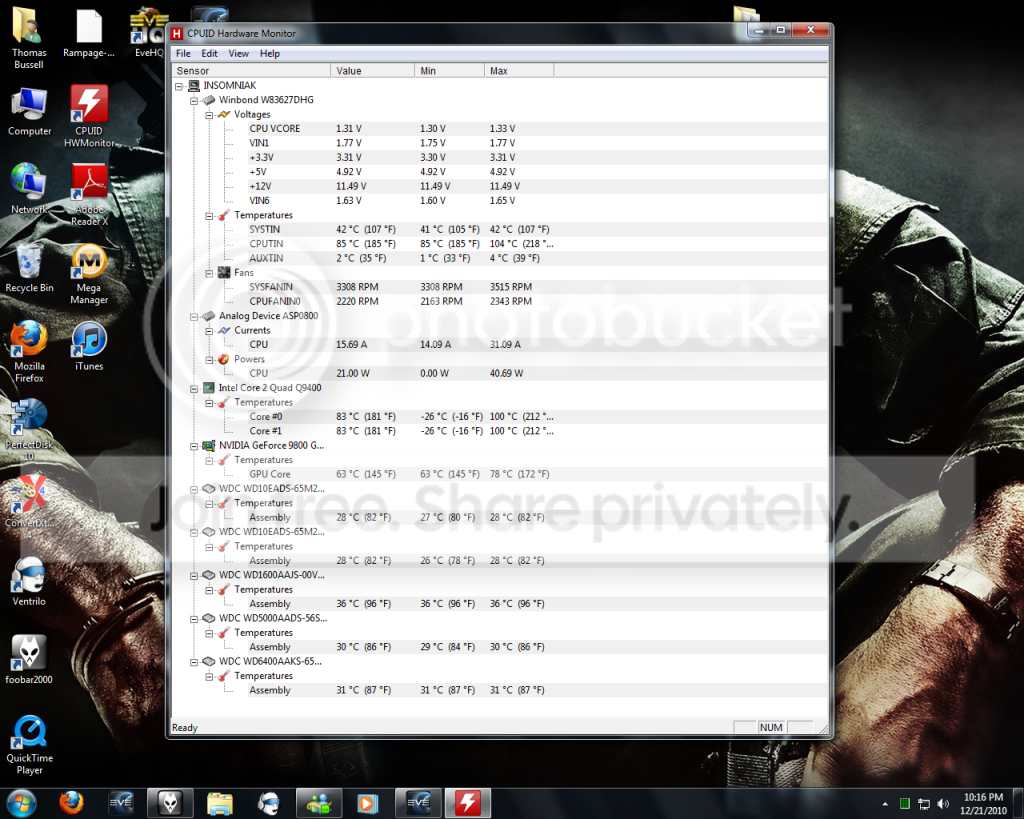
Overheating..

DreadStarX

New member
Member
VIP
Local time
5:55 AM
Messages
302
Location
Washington State
You can check my profile for my computer specs..

temp.png


That's the graphic of my problems. My computer overheats just doing basic things.

In this screenshot I have EVE Online running in the background, it overheats to above 210 degree's when I'm playing EVE. At 225 - 230 degree's it shuts down as a safety precaution. My computers only a year and few months old. I built it back in August of 2009, so as you can imagine, I'm pretty pissed off.

Anyone have any suggestions?

Things I've done already:

1. New Thermal Paste on the CPU & Heatsink.
2. dusted all the fans out.

After this, I'm not sure what to do. :(
 

My Computer

Computer type
PC/Desktop
Computer Manufacturer/Model Number
Custom Built
OS
Windows 8 64bit Professional
CPU
Intel Q9400 Quad Core 2.66Ghz
Motherboard
Gigabyte
Memory
G.Skill 4GB DDR3-1600
Graphics Card(s)
NVidia GeForce 560GTX
Sound Card
On-board
Monitor(s) Displays
24" LCD
Screen Resolution
1920x1080
Hard Drives
160GB WD
WD Caviar Black 640GB
WD 500GB
WD 1TB
WD 1TB
PSU
Cooler Master 1300W Silent Pro
Case
Sunbeam Transformer Black
Cooling
Fans
Keyboard
Logitech G15 (Original Screen + 18G Keys)
Mouse
Logitech MX518
Internet Speed
10mbit up/down Fiber Optic
Browser
FireFox / Chrome
Other Info
SF is amazing!

My Computer

Computer type
PC/Desktop
Computer Manufacturer/Model Number
Dell XPS 420
OS
Windows 10, Home Clean Install
CPU
Intel Core2 processsor Q8200(2.33Ghz 1333FSB) Quad Core Tech
Motherboard
Dell
Memory
6 gb
Graphics Card(s)
ATI Radeon 256MB HD3650
Sound Card
Intergrated 7.1 Channel Audio
Monitor(s) Displays
Dell SP2009W 20"
Hard Drives
640 GB Serial ATA Hard drive
Cooling
Fan
Keyboard
Dell USB Keyboard
Mouse
Dell Premium Optical USB
Internet Speed
DSL 2.85

My Computer

Computer type
PC/Desktop
Computer Manufacturer/Model Number
Custom Built
OS
Windows 8 64bit Professional
CPU
Intel Q9400 Quad Core 2.66Ghz
Motherboard
Gigabyte
Memory
G.Skill 4GB DDR3-1600
Graphics Card(s)
NVidia GeForce 560GTX
Sound Card
On-board
Monitor(s) Displays
24" LCD
Screen Resolution
1920x1080
Hard Drives
160GB WD
WD Caviar Black 640GB
WD 500GB
WD 1TB
WD 1TB
PSU
Cooler Master 1300W Silent Pro
Case
Sunbeam Transformer Black
Cooling
Fans
Keyboard
Logitech G15 (Original Screen + 18G Keys)
Mouse
Logitech MX518
Internet Speed
10mbit up/down Fiber Optic
Browser
FireFox / Chrome
Other Info
SF is amazing!
Too much compound can increase temperatures it only takes a small amount on the middle.
Try reseating the heatsink again.

Does it feel hot to touch, could be a dodgy sensor reporting incorrect temp.
 

My Computer

Computer Manufacturer/Model Number
Custom Build
OS
Windows 7 Ultimate x64
CPU
Phenom II X3 720 BE @3.2Ghz
Motherboard
ASRock A770DE AM3
Memory
4GB Corsair XMS2 DDR2-800
Graphics Card(s)
Nvidia GTS 250 512MB w/ Accelero Twin Turbo
Monitor(s) Displays
24" Benq LED G2420HDBL
Screen Resolution
1920x1080
Hard Drives
120GB Corsair Force3 SSD, 1TB [WD] Caviar
PSU
Earthwatts 380 w/ Noctua R8
Case
Antec 300
Cooling
AC Alpine 64
Keyboard
Microsoft 3000
Mouse
Microsoft 5000
Internet Speed
14MBit/sec
Other Info
Logitech Z520 Speakers
Wireless Xbox 360 GamePad
...Things I've done already:

1. New Thermal Paste on the CPU & Heatsink.
2. dusted all the fans out.
What heatsink and fan do you have? What speed(s) does the fan operate?
 

My Computer

OS
7 Ultimate x64
CPU
i5-2500k
Motherboard
Asus P8P67 Pro
Memory
8GB G.Skill Ripjaws X F3-12800CL7D-8GBXH 1866MHz 8-9-8-24
Graphics Card(s)
EVGA GTX 570 SC
Sound Card
X-Fi Titanium Fatality
Monitor(s) Displays
Samsung S27A550H 27" LED
Screen Resolution
1920x1080
Hard Drives
OCZ Vertex 3 120GB.
1TB Samsung F3.
2TB Samsung F4.
PSU
PC Power & Cooling Silencer 760
Case
Lian Li Lancool K62
Cooling
Thermalright Venomous X Black/Scythe S-Flex/Shin-Etsu X23
Keyboard
MS Natural Elite 4000 Ergonomic
Mouse
Logitech G500
Internet Speed
6MB/768
Other Info
Logitech Z-5500 505 watts.
D-Link DGL-4500.
Tripp-Lite Smart Pro 1500.
Too much compound can increase temperatures it only takes a small amount on the middle.
Try reseating the heatsink again.

Does it feel hot to touch, could be a dodgy sensor reporting incorrect temp.
It does feel hot, but i followed directions on the thermal paste container, and I watched a few youtube videos on how to properly apply thermal paste.


I'm just wondering if people can give me some advice on how to either fix this on my end or send my stuff in. ASUS has been giving me the run around, as with Intel, which is starting to piss me off. I just can't go out an buy new stuff, I'm jobless atm :(
 

My Computer

Computer type
PC/Desktop
Computer Manufacturer/Model Number
Custom Built
OS
Windows 8 64bit Professional
CPU
Intel Q9400 Quad Core 2.66Ghz
Motherboard
Gigabyte
Memory
G.Skill 4GB DDR3-1600
Graphics Card(s)
NVidia GeForce 560GTX
Sound Card
On-board
Monitor(s) Displays
24" LCD
Screen Resolution
1920x1080
Hard Drives
160GB WD
WD Caviar Black 640GB
WD 500GB
WD 1TB
WD 1TB
PSU
Cooler Master 1300W Silent Pro
Case
Sunbeam Transformer Black
Cooling
Fans
Keyboard
Logitech G15 (Original Screen + 18G Keys)
Mouse
Logitech MX518
Internet Speed
10mbit up/down Fiber Optic
Browser
FireFox / Chrome
Other Info
SF is amazing!
It really looks like the thermal paste issue, since the fans are going ok and presumably you are not overclocked.

AFAIK, I needed to use a razor blade or knife to apply a very thin layer of the paste. Some CPUs nowadays also come with a thin thermal pad. Maybe you can try obtaining a pad.

One more thought occurs - have you mounted the heatsink properly after applying the thermal paste?
 

My Computer

OS
Windows 7 x64
Unless my old eyes are deceiving me but those CPU voltages are just about maxed out...Maybe try winding them back to stock voltages and see if the heat problem goes....Then overclock to recommended settings for your system?
 

My Computer

OS
win7
Too much compound can increase temperatures it only takes a small amount on the middle.
Try reseating the heatsink again.

Does it feel hot to touch, could be a dodgy sensor reporting incorrect temp.
It does feel hot, but i followed directions on the thermal paste container, and I watched a few youtube videos on how to properly apply thermal paste.


I'm just wondering if people can give me some advice on how to either fix this on my end or send my stuff in. ASUS has been giving me the run around, as with Intel, which is starting to piss me off. I just can't go out an buy new stuff, I'm jobless atm :(

Fingers are not good at measuring temperature... it's a moisture thing... just because it doesn't "feel" hot, doesn't mean that it's not too hot. Clearly, looking at your HM temps, it's too hot.

My initial thoughts are that all those HD's are impeding your case airflow, but because your vid card isn't overly hot, I'm leaning towards too much thermal paste. What paste are you using? If you're using the good stuff, you only need an amount about equal to 1/3 a grain of white rice.

Of course, it could be your fan. You could have inadvertently blown dust into the rotor... which is why I asked if it was running at normal speed?

***edit***

vcore is just fine given you've got a game open and running.
 

My Computer

OS
7 Ultimate x64
CPU
i5-2500k
Motherboard
Asus P8P67 Pro
Memory
8GB G.Skill Ripjaws X F3-12800CL7D-8GBXH 1866MHz 8-9-8-24
Graphics Card(s)
EVGA GTX 570 SC
Sound Card
X-Fi Titanium Fatality
Monitor(s) Displays
Samsung S27A550H 27" LED
Screen Resolution
1920x1080
Hard Drives
OCZ Vertex 3 120GB.
1TB Samsung F3.
2TB Samsung F4.
PSU
PC Power & Cooling Silencer 760
Case
Lian Li Lancool K62
Cooling
Thermalright Venomous X Black/Scythe S-Flex/Shin-Etsu X23
Keyboard
MS Natural Elite 4000 Ergonomic
Mouse
Logitech G500
Internet Speed
6MB/768
Other Info
Logitech Z-5500 505 watts.
D-Link DGL-4500.
Tripp-Lite Smart Pro 1500.
It really looks like the thermal paste issue, since the fans are going ok and presumably you are not overclocked.

AFAIK, I needed to use a razor blade or knife to apply a very thin layer of the paste. Some CPUs nowadays also come with a thin thermal pad. Maybe you can try obtaining a pad.

One more thought occurs - have you mounted the heatsink properly after applying the thermal paste?

The razor blade stuff is complete crap, and for the most part, the "too much paste" myth is as well. The truth is, if you have too much paste, it's going to squeeze out the sides when you put the fan on and clamp it down. The paste will be flattened out to the amount it needs to be unless you put HUGE globs on. Of course you don't want any coming out the sides, but you don't want a razor thin layer either...it's simply not enough. You want enough that the entire metal surface is covered AFTER compression...it's fairly easy to eyeball this and get it right if you think about it as you apply.
 

My Computer

Computer Manufacturer/Model Number
Custom
OS
Windows 7 Ultimate RTM (Technet)
CPU
3.00 gigahertz Intel Core2 Duo E8400
Motherboard
ASUSTeK Computer INC. P5K/EPU Rev 1.xx
Memory
4GB
Graphics Card(s)
ATI Radeon X1950 Pro
Sound Card
Built in HD Audio
Monitor(s) Displays
22" Gateway LCD
Screen Resolution
1920 x 1200
Hard Drives
ST3160023A [Hard drive] (160.04 GB) -- drive 0, rev 8.01, ST3500630AS [Hard drive] (500.11 GB) -- drive 2, rev 3.AAK
ST3500630AS [Hard drive] (500.11 GB) -- drive 1, rev 3.AAK
Keyboard
Logitech G11
Mouse
Microsoft Wireless Laser Mouse 5000
Internet Speed
13.44 Mbps
The razor blade stuff is complete crap, and for the most part, the "too much paste" myth is as well. The truth is, if you have too much paste, it's going to squeeze out the sides when you put the fan on and clamp it down. The paste will be flattened out to the amount it needs to be unless you put HUGE globs on. Of course you don't want any coming out the sides, but you don't want a razor thin layer either...it's simply not enough. You want enough that the entire metal surface is covered AFTER compression...it's fairly easy to eyeball this and get it right if you think about it as you apply.

This is, of course, going to depend on the paste you buy and how well lapped your heatsink is... and whether it's slightly beveled or not.

As for less is better being crap, I respectfully disagree. The amount of paste applied has a direct impact on the transfer of heat. Paste isn't meant to be a conductor, it's only function is to fill in the microscopic holes left behind after the lapping process, so really, you only need very little. It's the heatsink's job to displace heat, not the paste's.

I use a very small amount... 1/3 grain of rice.. then I set the heatsink and give it a twist. After that I remove the heatsink and rub the paste in with my finger (rubber gloves, or saran wrap will do in a pinch). I do the same with the what's left behind on the core and call it a day.
 

My Computer

OS
7 Ultimate x64
CPU
i5-2500k
Motherboard
Asus P8P67 Pro
Memory
8GB G.Skill Ripjaws X F3-12800CL7D-8GBXH 1866MHz 8-9-8-24
Graphics Card(s)
EVGA GTX 570 SC
Sound Card
X-Fi Titanium Fatality
Monitor(s) Displays
Samsung S27A550H 27" LED
Screen Resolution
1920x1080
Hard Drives
OCZ Vertex 3 120GB.
1TB Samsung F3.
2TB Samsung F4.
PSU
PC Power & Cooling Silencer 760
Case
Lian Li Lancool K62
Cooling
Thermalright Venomous X Black/Scythe S-Flex/Shin-Etsu X23
Keyboard
MS Natural Elite 4000 Ergonomic
Mouse
Logitech G500
Internet Speed
6MB/768
Other Info
Logitech Z-5500 505 watts.
D-Link DGL-4500.
Tripp-Lite Smart Pro 1500.
Unless my old eyes are deceiving me but those CPU voltages are just about maxed out...Maybe try winding them back to stock voltages and see if the heat problem goes....Then overclock to recommended settings for your system?

The screen was captured with EVE running. I think you're just seeing Speedstep kicked in.
Voltage range .85-1.3625v.

Did this system run fine for the year it's been built?
Did you monitor temps the whole time and this is a recent problem?
Did you add components over that course of the year like HDD's? (thereby changing airflow dramatically, possibly)?

Fumz said:
This is, of course, going to depend on the paste you buy and how well lapped your heatsink is... and whether it's slightly beveled or not.

As for less is better being crap, I respectfully disagree. The amount of paste applied has a direct impact on the transfer of heat. Paste isn't meant to be a conductor, it's only function is to fill in the microscopic holes left behind after the lapping process, so really, you only need very little. It's the heatsink's job to displace heat, not the paste's.

I use a very small amount... 1/3 grain of rice.. then I set the heatsink and give it a twist. After that I remove the heatsink and rub the paste in with my finger (rubber gloves, or saran wrap will do in a pinch). I do the same with the what's left behind on the core and call it a day.

As for application, this!
 

My Computer

Computer Manufacturer/Model Number
Custom
OS
Windows 7 Ultimate x64
CPU
Intel i5-2500k
Motherboard
ASUS P8Z68-V Pro/GEN3
Memory
16GB
Graphics Card(s)
2x Radeon HD7970 Crossfire
Sound Card
On-Board / Logitech G930
Monitor(s) Displays
3x Dell u2412m
Screen Resolution
5760x1200
Hard Drives
Toshiba thns064gg2bbaa SSD
Seagate Barracuda 7200.12 ST31000528AS 1TB
Intel RST SSD caching enabled
PSU
Corsair AX850
Case
Corsair Obsidian 650D
Cooling
Corsair H100
Keyboard
Logitech Illuminated
Mouse
Logitech M510 Wireless
Internet Speed
1Mb/s
What heatsink and fan do you have? What speed(s) does the fan operate?

Stock - 3rd party???

I agree with Fumz here re the amount of paste. Cleaning fan blades will only do so much.

All the other temps look fine. The CPU however looks like it's being overclocked and stess tested on a stock HSF.


What are it's idle temps? (unless thathey are it's idle temps :zip: )
 

My Computer

Computer type
PC/Desktop
Computer Manufacturer/Model Number
Systems by SmartEyeball
OS
8 Pro x64
CPU
i7 3770K 4.6GHz
Motherboard
ASUS P8Z77 WS
Memory
16GB G.Skill Trident X 2666mhz
Graphics Card(s)
x2 EVGA 780 Ti Superclocked SLI
Sound Card
SB X-FI Surround 5.1 PRO USB / ATH-AD900 Headphones
Monitor(s) Displays
x3 Dell U2410 / 58" Samsung
Screen Resolution
5760*1200/ 1920*1200
Hard Drives
2x Intel 520 240GB (RAID 0) * 2x WD Caviar Blacks 2TB (RAID 0) * 2TB WD Caviar Black * Sony Optirac DVD
PSU
Silverstone Strider Evolution 1200W
Case
Thermaltake Level 10 GT Snow Edition
Cooling
Noctua NH-D14
Keyboard
Topre Realforce // Ducky Shine MX Black // Filco Ninja TKL
Mouse
Thermaltake Theron (Highly Recommended) + Razer Imperator
Antivirus
MSE
Browser
IE, FF, WaterFox
Other Info
GT Extreme V2 Sim Racing Cockpit + 40" LCD and K/B Mouse stand ▼
Fanatec CSR Elite Wheel + Clubsport V1 Pedals + CSR shifter/7G-H ▼Saitek X52 Pro ▼ TrackIR 5 Pro
Buttkicker v2 Seat Rumbler with Dedicated 5.1 and Sub Woofer attached to frame ▼
=
Bloody Big Grin
The razor blade stuff is complete crap, and for the most part, the "too much paste" myth is as well. The truth is, if you have too much paste, it's going to squeeze out the sides when you put the fan on and clamp it down. The paste will be flattened out to the amount it needs to be unless you put HUGE globs on. Of course you don't want any coming out the sides, but you don't want a razor thin layer either...it's simply not enough. You want enough that the entire metal surface is covered AFTER compression...it's fairly easy to eyeball this and get it right if you think about it as you apply.

This is, of course, going to depend on the paste you buy and how well lapped your heatsink is... and whether it's slightly beveled or not.

As for less is better being crap, I respectfully disagree. The amount of paste applied has a direct impact on the transfer of heat. Paste isn't meant to be a conductor, it's only function is to fill in the microscopic holes left behind after the lapping process, so really, you only need very little. It's the heatsink's job to displace heat, not the paste's.

I use a very small amount... 1/3 grain of rice.. then I set the heatsink and give it a twist. After that I remove the heatsink and rub the paste in with my finger (rubber gloves, or saran wrap will do in a pinch). I do the same with the what's left behind on the core and call it a day.

I put about a pea size drop on there, spread it all around to where it covered the top of the CPU. That's what the videos on youtube said to do. I'm using Formula 5 Antec Paste.

Unless my old eyes are deceiving me but those CPU voltages are just about maxed out...Maybe try winding them back to stock voltages and see if the heat problem goes....Then overclock to recommended settings for your system?

The screen was captured with EVE running. I think you're just seeing Speedstep kicked in.
Voltage range .85-1.3625v.

Did this system run fine for the year it's been built?
Did you monitor temps the whole time and this is a recent problem?
Did you add components over that course of the year like HDD's? (thereby changing airflow dramatically, possibly)?

Did this system run fine for the year it's been built?
It started acting up about 5 months ago. Temperatures started going up, didn't really think about it until my computer started crashing and not turning back on.

Did you monitor temps the whole time & this is a recent problem?
I didn't monitor temps the whole time it's been built, only recently. I installed a program (CPUID Hardware Monitor), and I was alarmed at the temperature's.

Did you add components over that course of the year like HDD's?

I did add 2 extra drives. I could take some of the hard drives out, I don't think I need 3TB of space when I'm barely using 1TB as it is.

What heatsink and fan do you have? What speed(s) does the fan operate?

Stock - 3rd party???

I agree with Fumz here re the amount of paste. Cleaning fan blades will only do so much.

All the other temps look fine. The CPU however looks like it's being overclocked and stess tested on a stock HSF.


What are it's idle temps? (unless thathey are it's idle temps :zip: )
What heatsink & fan do I have?

The stock one that came with the CPU.


I will post another link of idle temperature's before I log off for the night.

Unless my old eyes are deceiving me but those CPU voltages are just about maxed out...Maybe try winding them back to stock voltages and see if the heat problem goes....Then overclock to recommended settings for your system?

To be very honest with you wilywombat, I'm not even sure how to tell if it's overclocked or not. When I built my system, I gave myself a little bit extra room on the power supply area. I wasn't going to get into hard core gaming and what not. EVE is the biggest game I play, and my 9800GTX+ rocks it's world like no other.

If my CPU Voltages are above normals, would you tell me how to change them? I've never overclocked anything.

I'll mention this now, should've been done earlier but It slipped my mind. When I click the "Clr_CMOS" button the back of my computer, it runs Windows & EVE at less than 120 degree's, when I don't click it, it runs idle at 180 degree's Fahrenheit. Give or take some temp.

 

My Computer

Computer type
PC/Desktop
Computer Manufacturer/Model Number
Custom Built
OS
Windows 8 64bit Professional
CPU
Intel Q9400 Quad Core 2.66Ghz
Motherboard
Gigabyte
Memory
G.Skill 4GB DDR3-1600
Graphics Card(s)
NVidia GeForce 560GTX
Sound Card
On-board
Monitor(s) Displays
24" LCD
Screen Resolution
1920x1080
Hard Drives
160GB WD
WD Caviar Black 640GB
WD 500GB
WD 1TB
WD 1TB
PSU
Cooler Master 1300W Silent Pro
Case
Sunbeam Transformer Black
Cooling
Fans
Keyboard
Logitech G15 (Original Screen + 18G Keys)
Mouse
Logitech MX518
Internet Speed
10mbit up/down Fiber Optic
Browser
FireFox / Chrome
Other Info
SF is amazing!
The stock one that came with the CPU.

This is going to be your challenge.

Can you get a couple pics of your case setup? Since you said you're out of work at the moment, and can't go out and by stuff maybe we can help you with wire management, and general cooling ideas if we can see what we're workin with.
 

My Computer

Computer Manufacturer/Model Number
Custom
OS
Windows 7 Ultimate x64
CPU
Intel i5-2500k
Motherboard
ASUS P8Z68-V Pro/GEN3
Memory
16GB
Graphics Card(s)
2x Radeon HD7970 Crossfire
Sound Card
On-Board / Logitech G930
Monitor(s) Displays
3x Dell u2412m
Screen Resolution
5760x1200
Hard Drives
Toshiba thns064gg2bbaa SSD
Seagate Barracuda 7200.12 ST31000528AS 1TB
Intel RST SSD caching enabled
PSU
Corsair AX850
Case
Corsair Obsidian 650D
Cooling
Corsair H100
Keyboard
Logitech Illuminated
Mouse
Logitech M510 Wireless
Internet Speed
1Mb/s
The stock one that came with the CPU.
This is going to be your challenge.

Can you get a couple pics of your case setup? Since you said you're out of work at the moment, and can't go out and by stuff maybe we can help you with wire management, and general cooling ideas if we can see what we're workin with.


I will pull out my camera tomorrow, and take some pictures. I will post back here when I'm done.
 

My Computer

Computer type
PC/Desktop
Computer Manufacturer/Model Number
Custom Built
OS
Windows 8 64bit Professional
CPU
Intel Q9400 Quad Core 2.66Ghz
Motherboard
Gigabyte
Memory
G.Skill 4GB DDR3-1600
Graphics Card(s)
NVidia GeForce 560GTX
Sound Card
On-board
Monitor(s) Displays
24" LCD
Screen Resolution
1920x1080
Hard Drives
160GB WD
WD Caviar Black 640GB
WD 500GB
WD 1TB
WD 1TB
PSU
Cooler Master 1300W Silent Pro
Case
Sunbeam Transformer Black
Cooling
Fans
Keyboard
Logitech G15 (Original Screen + 18G Keys)
Mouse
Logitech MX518
Internet Speed
10mbit up/down Fiber Optic
Browser
FireFox / Chrome
Other Info
SF is amazing!
Here's when my computer is idle.


These temps are still high from what I've been told by a lot of people. Even my buddy who works in a Microsoft Server farm, said these temps were too high.

http://i218.photobucket.com/albums/cc58/Xandium/temp2.png


He said the average desktop on a 100% load shouldn't push past 150 - 160, Idle should be 90 - 110. That's also what my brothers computer is running at as well.
 

My Computer

Computer type
PC/Desktop
Computer Manufacturer/Model Number
Custom Built
OS
Windows 8 64bit Professional
CPU
Intel Q9400 Quad Core 2.66Ghz
Motherboard
Gigabyte
Memory
G.Skill 4GB DDR3-1600
Graphics Card(s)
NVidia GeForce 560GTX
Sound Card
On-board
Monitor(s) Displays
24" LCD
Screen Resolution
1920x1080
Hard Drives
160GB WD
WD Caviar Black 640GB
WD 500GB
WD 1TB
WD 1TB
PSU
Cooler Master 1300W Silent Pro
Case
Sunbeam Transformer Black
Cooling
Fans
Keyboard
Logitech G15 (Original Screen + 18G Keys)
Mouse
Logitech MX518
Internet Speed
10mbit up/down Fiber Optic
Browser
FireFox / Chrome
Other Info
SF is amazing!
I assumed from the readings in your jpeg that you were overclocking as all the CPU voltages are at the top of the min/max scale. If this is true then that could well be the reason your CPU is chucking out the heat. Maybe have a look around your BIOS settings for a "reset default settings" button to reset the voltages back to recommended stock voltages. The advice given above to replace the stock cooler is a good tip. You can then hunt for any one of a number of "overclocking forums" for advice on clocking your particular setup to get max benefit.
 

My Computer

OS
win7
WilyWombat said:
I assumed from the readings in your jpeg that you were overclocking as all the CPU voltages are at the top of the min/max scale

Normal operting range for Q9400.

Enhanced Intel SpeedStep® Technology

Enhanced Intel SpeedStep® Technology is an advanced means of enabling very high performance while also meeting the power-conservation needs of mobile systems. Conventional Intel SpeedStep Technology switches both voltage and frequency in tandem between high and low levels in response to processor load.
 

My Computer

Computer Manufacturer/Model Number
Custom
OS
Windows 7 Ultimate x64
CPU
Intel i5-2500k
Motherboard
ASUS P8Z68-V Pro/GEN3
Memory
16GB
Graphics Card(s)
2x Radeon HD7970 Crossfire
Sound Card
On-Board / Logitech G930
Monitor(s) Displays
3x Dell u2412m
Screen Resolution
5760x1200
Hard Drives
Toshiba thns064gg2bbaa SSD
Seagate Barracuda 7200.12 ST31000528AS 1TB
Intel RST SSD caching enabled
PSU
Corsair AX850
Case
Corsair Obsidian 650D
Cooling
Corsair H100
Keyboard
Logitech Illuminated
Mouse
Logitech M510 Wireless
Internet Speed
1Mb/s
Here's when my computer is idle.


These temps are still high from what I've been told by a lot of people. Even my buddy who works in a Microsoft Server farm, said these temps were too high.

http://i218.photobucket.com/albums/cc58/Xandium/temp2.png


He said the average desktop on a 100% load shouldn't push past 150 - 160, Idle should be 90 - 110. That's also what my brothers computer is running at as well.

The rise you have is really incredible... ~ 50C just gaming, or whatever you were doing? Something is amiss for sure. My guess? You eat very large peas.

Secondly, perhaps you should upgrade HW Monitor... I see a reported temp of -26, and we know that's not even close to being accurate... so first, lets get proper reporting.
 

My Computer

OS
7 Ultimate x64
CPU
i5-2500k
Motherboard
Asus P8P67 Pro
Memory
8GB G.Skill Ripjaws X F3-12800CL7D-8GBXH 1866MHz 8-9-8-24
Graphics Card(s)
EVGA GTX 570 SC
Sound Card
X-Fi Titanium Fatality
Monitor(s) Displays
Samsung S27A550H 27" LED
Screen Resolution
1920x1080
Hard Drives
OCZ Vertex 3 120GB.
1TB Samsung F3.
2TB Samsung F4.
PSU
PC Power & Cooling Silencer 760
Case
Lian Li Lancool K62
Cooling
Thermalright Venomous X Black/Scythe S-Flex/Shin-Etsu X23
Keyboard
MS Natural Elite 4000 Ergonomic
Mouse
Logitech G500
Internet Speed
6MB/768
Other Info
Logitech Z-5500 505 watts.
D-Link DGL-4500.
Tripp-Lite Smart Pro 1500.
Back
Top