Solved Ownership of C Drive (System Drive)

sereneione

New member
Local time
9:30 AM
Messages
16
Hello everyone.

I had some problems with my C drive a few days ago. Scanning the disk revealed multiple bad sectors, and the laptop took a full night to fix itself (it literally scanned the whole night long again and again until the bad sectors were no more). Anyway, it came right in the end, but I was denied access to the C drive. Completely. For example, I could access the files in My Documents folder and the like, but I could not copy them elsewhere. I am the only user of the computer, and my user account is that of an administrator.

So, I poked around the Internet to get some information, and I did a bit of reading about taking ownership and granting permissions. In hindsight, I guess I should have read just a little bit more before doing anything. Anyway, long story cut short, I took ownership of the entire C drive, including its subcontainers and objects, and gave myself full control permission settings.

Now, I no longer have problem accessing the drive and what not, but I am beginning to wonder if it is a good idea to retain this ownership. I would LOVE for the ownership and permissions to revert back to its original settings (when everything was working fine and the bad sectors have not yet appeared), except that I do not know what the original settings are. And unfortunately, I cannot do a System Restore because there are currently no restore points on the system (somehow they have all disappeared after that one night of disk scanning).

I've read from somewhere that by default, the owner of the C drive is TrustedInstaller. However, I've also read from another somewhere that the default owner of the C drive is SYSTEM. And then from somewhere else, it was YOUR_PC_NAME\Administrators as the default owner. Most of them said the one same thing though: not all of the folders/files in the C drive are owned by TrustedInstaller/SYSTEM/etc, therefore it is hard to say whether or not the ownership of the C drive should be TrustedInstaller/SYSTEM/etc.

I am hesitant to do anything further until I am absolutely sure that I will not be messing things up more than I already have. I mean, at the moment I am not having any problems from the ownership, but it has only been a couple of days, so I guess you can argue that something could still happen?

Please, what are all your thoughts on this matter? Should I:

1. Change the ownership of the C drive to TrustedInstaller, along with all the subcontainers and objects within it?
2. Leave the ownership of the C drive as it is, i.e. leave the owner as myself?
3. Take no chances and do a Repair Install?

Please advise.

Many thanks in advance.
 

My Computer My Computer

At a glance

Windows 7 Home Premium 64-bitIntel(R) Core(TM) i3-2350M CPU @ 2.30GHz4.00 GBAMD Radeon HD 7670M
Computer type
Laptop
Computer Manufacturer/Model Number
Toshiba Notebook Satellite L840
OS
Windows 7 Home Premium 64-bit
CPU
Intel(R) Core(TM) i3-2350M CPU @ 2.30GHz
Memory
4.00 GB
Graphics Card(s)
AMD Radeon HD 7670M
Monitor(s) Displays
Generic PnP Monitor
Screen Resolution
1366x768 with 32 bit color depth
Keyboard
Standard PS/2 Keyboard
Mouse
Synaptics PS/2 Port TouchPad
Antivirus
Microsoft Security Essentials
Browser
Google Chrome, Internet Explorer 11
I don't have answers for the questions but when I start seeing bad sectors and the number of them increases each time checkdisk is run I replace the HDD. Save what your data, anything you created and that exists nowhere else, soon.
 

My Computer My Computer

At a glance

Windows 7 Ultimate 64-bit, Windows 8.1 64-bit...
Computer type
PC/Desktop
Computer Manufacturer/Model Number
Customs, Dell, Gateway, HP, Toshiba, Acer, ASUS
OS
Windows 7 Ultimate 64-bit, Windows 8.1 64-bit, Mac OS X 10.10, Linux Mint 17, Windows 10 Pro TP
Keyboard
Microsoft
Mouse
Microsoft

My Computer My Computer

At a glance

Windows 10 Pro. 64/ version 1709 Windows 7 Pr...Intel i7-6800K @ 4.3Corsair Platinum 16 gig @2400EVGA GTX 1070 OC
Computer type
PC/Desktop
Computer Manufacturer/Model Number
Home made Desktop
OS
Windows 10 Pro. 64/ version 1709 Windows 7 Pro/64
CPU
Intel i7-6800K @ 4.3
Motherboard
ASUS X-99 Deluxe II
Memory
Corsair Platinum 16 gig @2400
Graphics Card(s)
EVGA GTX 1070 OC
Monitor(s) Displays
Asus 27" LED LCD/VE278Q
Screen Resolution
1920-1080 or 1280-720 HDMI
Hard Drives
INTEL SSD 730-240 Gb Sata 3.0/
PSU
EVGA Platium 1200W
Case
Phanteks Luxe Tempered Glass 8 fans/ one radiator
Cooling
XSPC/ Water Cooled CPU
Keyboard
Das 4 Professional
Mouse
Logitech M705/MX Anywhere 2-S
Internet Speed
100 mbits
Antivirus
Microsoft Security Essentials/ Malwarebytes Premium 3.0/ SAS
Browser
I.E. 11 default/Firefox/ ISP Time Warner Cable/Spectrum
Other Info
LG BluRay Burner/
Sound system-KLipsch-THX/
Icy Dock ssd Hot Swap bays.
You have a serious problem and I don't see any easy solutions.

It is true that the normal owner of the C: drive is TrustedInstaller. But, and this is very important, that only applies to the root and selected subfolders. Many subfolders have and require other owners.

Please, what are all your thoughts on this matter? Should I:

1. Change the ownership of the C drive to TrustedInstaller, along with all the subcontainers and objects within it?
2. Leave the ownership of the C drive as it is, i.e. leave the owner as myself?
3. Take no chances and do a Repair Install?

#1 Would be the worst possible. That would make things much worse.
#2 This would compromise security and probably have other problems as well.
#3 I don't know if this would do any good. It would not entirely solve the problem.

Taking ownership is easy but reverting the changes is another matter. Windows does not keep any kind of ownership history so all changes would need to be explicit. At the very least that would require a great deal of time.

The best solution would be to restore the drive from a recently created image backup. I am assuming this is not possible. Failing that the only real solution I can see is to backup all your data and do a clean install of the OS. As the drive had a large number of bad sectors that could mean the drive is failing and would need to be replaced.

Maybe someone has a less drastic solution. I don't feel qualified to suggest anything else.
 

My Computer My Computer

At a glance

Windows 7 Pro 64 bitXeon W35208 GBNvidia Geforce 210
Computer type
PC/Desktop
Computer Manufacturer/Model Number
HP
OS
Windows 7 Pro 64 bit
CPU
Xeon W3520
Memory
8 GB
Graphics Card(s)
Nvidia Geforce 210
System Image Backup

Hello again everyone. Thanks for your replies. Really appreciate it.

As a matter of fact, I DO have a recent system image backup. Perhaps I shall do that. I also have backup copies of the things that I treasure most in the C drive (as soon as I got access to it by changing the ownership), so I guess I've got nothing to lose. Just a lot of time.

I will post an update on this matter. In the meantime, please, feel free to share more thoughts and suggestions.

Thanks!
 

My Computer My Computer

At a glance

Windows 7 Home Premium 64-bitIntel(R) Core(TM) i3-2350M CPU @ 2.30GHz4.00 GBAMD Radeon HD 7670M
Computer type
Laptop
Computer Manufacturer/Model Number
Toshiba Notebook Satellite L840
OS
Windows 7 Home Premium 64-bit
CPU
Intel(R) Core(TM) i3-2350M CPU @ 2.30GHz
Memory
4.00 GB
Graphics Card(s)
AMD Radeon HD 7670M
Monitor(s) Displays
Generic PnP Monitor
Screen Resolution
1366x768 with 32 bit color depth
Keyboard
Standard PS/2 Keyboard
Mouse
Synaptics PS/2 Port TouchPad
Antivirus
Microsoft Security Essentials
Browser
Google Chrome, Internet Explorer 11
Update

Hello again everyone.

So I've restored the drive and everything is back with their rightful owners. But I think my hard disk is really dying on me. Either that, or some dodgy stuff (not picked up by Microsoft Security Essentials and Malwarebytes Anti-Malware) is running in the background causing significant lagging of the whole system.

Is there a program that can run while my laptop is running and then produces a report which tells me what is running in the background? Or, is the culprit actually Malwarebytes?

All suggestions welcome. In the meantime, thanks to everyone who helped with the ownership issue.
 

My Computer My Computer

At a glance

Windows 7 Home Premium 64-bitIntel(R) Core(TM) i3-2350M CPU @ 2.30GHz4.00 GBAMD Radeon HD 7670M
Computer type
Laptop
Computer Manufacturer/Model Number
Toshiba Notebook Satellite L840
OS
Windows 7 Home Premium 64-bit
CPU
Intel(R) Core(TM) i3-2350M CPU @ 2.30GHz
Memory
4.00 GB
Graphics Card(s)
AMD Radeon HD 7670M
Monitor(s) Displays
Generic PnP Monitor
Screen Resolution
1366x768 with 32 bit color depth
Keyboard
Standard PS/2 Keyboard
Mouse
Synaptics PS/2 Port TouchPad
Antivirus
Microsoft Security Essentials
Browser
Google Chrome, Internet Explorer 11

My Computer My Computer

At a glance

Windows 10 Pro. 64/ version 1709 Windows 7 Pr...Intel i7-6800K @ 4.3Corsair Platinum 16 gig @2400EVGA GTX 1070 OC
Computer type
PC/Desktop
Computer Manufacturer/Model Number
Home made Desktop
OS
Windows 10 Pro. 64/ version 1709 Windows 7 Pro/64
CPU
Intel i7-6800K @ 4.3
Motherboard
ASUS X-99 Deluxe II
Memory
Corsair Platinum 16 gig @2400
Graphics Card(s)
EVGA GTX 1070 OC
Monitor(s) Displays
Asus 27" LED LCD/VE278Q
Screen Resolution
1920-1080 or 1280-720 HDMI
Hard Drives
INTEL SSD 730-240 Gb Sata 3.0/
PSU
EVGA Platium 1200W
Case
Phanteks Luxe Tempered Glass 8 fans/ one radiator
Cooling
XSPC/ Water Cooled CPU
Keyboard
Das 4 Professional
Mouse
Logitech M705/MX Anywhere 2-S
Internet Speed
100 mbits
Antivirus
Microsoft Security Essentials/ Malwarebytes Premium 3.0/ SAS
Browser
I.E. 11 default/Firefox/ ISP Time Warner Cable/Spectrum
Other Info
LG BluRay Burner/
Sound system-KLipsch-THX/
Icy Dock ssd Hot Swap bays.
Startup

Hello Layback Bear.

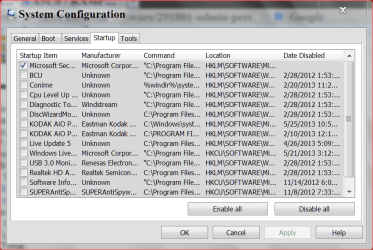
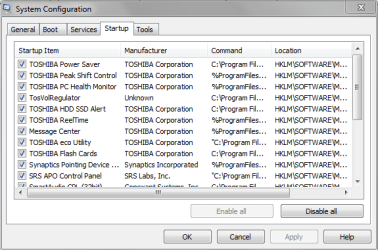
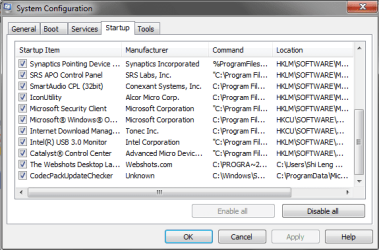
Here are the screenshots:

startup1.PNG
startup2.PNG

You don't think any of these would be the culprit... do you?
 

My Computer My Computer

At a glance

Windows 7 Home Premium 64-bitIntel(R) Core(TM) i3-2350M CPU @ 2.30GHz4.00 GBAMD Radeon HD 7670M
Computer type
Laptop
Computer Manufacturer/Model Number
Toshiba Notebook Satellite L840
OS
Windows 7 Home Premium 64-bit
CPU
Intel(R) Core(TM) i3-2350M CPU @ 2.30GHz
Memory
4.00 GB
Graphics Card(s)
AMD Radeon HD 7670M
Monitor(s) Displays
Generic PnP Monitor
Screen Resolution
1366x768 with 32 bit color depth
Keyboard
Standard PS/2 Keyboard
Mouse
Synaptics PS/2 Port TouchPad
Antivirus
Microsoft Security Essentials
Browser
Google Chrome, Internet Explorer 11

My Computer My Computer

At a glance

Windows 10 Pro. 64/ version 1709 Windows 7 Pr...Intel i7-6800K @ 4.3Corsair Platinum 16 gig @2400EVGA GTX 1070 OC
Computer type
PC/Desktop
Computer Manufacturer/Model Number
Home made Desktop
OS
Windows 10 Pro. 64/ version 1709 Windows 7 Pro/64
CPU
Intel i7-6800K @ 4.3
Motherboard
ASUS X-99 Deluxe II
Memory
Corsair Platinum 16 gig @2400
Graphics Card(s)
EVGA GTX 1070 OC
Monitor(s) Displays
Asus 27" LED LCD/VE278Q
Screen Resolution
1920-1080 or 1280-720 HDMI
Hard Drives
INTEL SSD 730-240 Gb Sata 3.0/
PSU
EVGA Platium 1200W
Case
Phanteks Luxe Tempered Glass 8 fans/ one radiator
Cooling
XSPC/ Water Cooled CPU
Keyboard
Das 4 Professional
Mouse
Logitech M705/MX Anywhere 2-S
Internet Speed
100 mbits
Antivirus
Microsoft Security Essentials/ Malwarebytes Premium 3.0/ SAS
Browser
I.E. 11 default/Firefox/ ISP Time Warner Cable/Spectrum
Other Info
LG BluRay Burner/
Sound system-KLipsch-THX/
Icy Dock ssd Hot Swap bays.
Hello.

I have disabled half of those entries. Still the same. It was never a problem until recently, so I don't think it's them.

Anyway, thanks all for your help. Really appreciate it. :)
 

My Computer My Computer

At a glance

Windows 7 Home Premium 64-bitIntel(R) Core(TM) i3-2350M CPU @ 2.30GHz4.00 GBAMD Radeon HD 7670M
Computer type
Laptop
Computer Manufacturer/Model Number
Toshiba Notebook Satellite L840
OS
Windows 7 Home Premium 64-bit
CPU
Intel(R) Core(TM) i3-2350M CPU @ 2.30GHz
Memory
4.00 GB
Graphics Card(s)
AMD Radeon HD 7670M
Monitor(s) Displays
Generic PnP Monitor
Screen Resolution
1366x768 with 32 bit color depth
Keyboard
Standard PS/2 Keyboard
Mouse
Synaptics PS/2 Port TouchPad
Antivirus
Microsoft Security Essentials
Browser
Google Chrome, Internet Explorer 11
Last edited:

My Computer My Computer

At a glance

Windows 7 Ultimate x64 SP1Intel Q6600 @ 2.6Ghz4Gb DDR2 Corsair Dominator @ 800Mhz 5-5-5-15EVGA 560 GTX SC FTW 1GB
Computer type
PC/Desktop
Computer Manufacturer/Model Number
Custom Build
OS
Windows 7 Ultimate x64 SP1
CPU
Intel Q6600 @ 2.6Ghz
Motherboard
Evga NF78-CK-132-A 3-Way SLI
Memory
4Gb DDR2 Corsair Dominator @ 800Mhz 5-5-5-15
Graphics Card(s)
EVGA 560 GTX SC FTW 1GB
Sound Card
Realtek HD 7.1 Audio, Plantronics GameCom780 7.1 Headset
Monitor(s) Displays
Dell S2409W
Screen Resolution
1920 x 1080
Hard Drives
SanDisk SDSSDHII-120G-G25 120GB SSD
Samsung 7200RPM 750Gb SATA
Samsung 850 EVO 120GB SSD
Western Digital Green 1TB 7200RPM
PSU
Xigmatek 750W Quad sli quad core 80% eff
Case
Antec 900 Gaming Case
Cooling
Zalman CNPS9700-NT NVIDIA Tritium
Keyboard
Logitech generic keyboard, MS wireless keyboard
Mouse
Razor Lachesis Banshee V2 Blue, 4000DPI, MS wireless mouse
Internet Speed
152Mb Virgin Media Fibre Optic
Antivirus
Microsoft Security Essentials
Browser
Google Chrome
Other Info
Wireless Gaming Receiver for Windows, Wireless Xbox 360 Pad
To layback bear

That is not true what you said. I have had Win 7 Ult 64 bit since it came out. I did take over the entire computer and took Trusted Installer out. I have not have any trouble since. Pia
 

My Computer My Computer

At a glance

WIN 7 ULT 64 BIT2G
Computer type
PC/Desktop
Computer Manufacturer/Model Number
DELL
OS
WIN 7 ULT 64 BIT
Memory
2G
If one is having bad sectors reports, HDTune, HardDisk Sentinel, or anything similar can give SMART reports that "tell" how far or how close HDD failure is likely. Best to replace HDD, re-image everything onto new HDD from the backup external device.
 
Last edited:

My Computer My Computer

At a glance

Windows 7 Professional 64-bitDesktop i5; Acers i5 & i7desktop 16GB; 1 Acer 8GB & 1 Acer 16GB
Computer type
PC/Desktop
Computer Manufacturer/Model Number
Antec desktop; Acer Aspire laptops
OS
Windows 7 Professional 64-bit
CPU
Desktop i5; Acers i5 & i7
Memory
desktop 16GB; 1 Acer 8GB & 1 Acer 16GB
Hard Drives
1TB split into 2 equal partitions [OS and data] usable by RJS
Internet Speed
AT&T DSL
Browser
FF, GChrome, msIE
Other Info
Windows 7 Firewall, Emsisoft AM/AV, MSE [scan-only], SpywareBlaster, Ruiware/BillP combine
Back
Top