
Tirelipimpon
New member
- Local time
- 1:14 PM
- Messages
- 2
Hello everyone! I've had quite a disturbing problem with my page/swap file recently. First, the story: my computer just roasted after some hardware failure (I suspected something around the motherboard or power). I sent it back to the Asus support team, they quickly changed the mainboard and bam! Not even a week later I got the old nag back. They had already made a clean reinstall of Windows 7 and I just started downloading everything again (2 years worth of Windows updates, deleting McAfee, getting back that good old Kaspersky, Net Framework 4.5.2, Spybot, blablabla&bla).
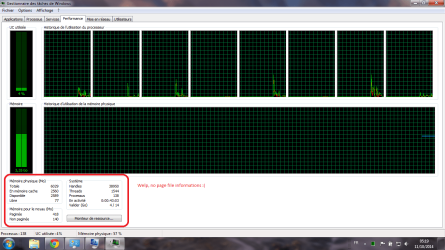
Here came the little issue, after several reboots and updates installed I thought it was time to set up the page file (a tweak that worked like a charm before having to send the PC to support to enhance its reactivity). So Computer>Properties>Advanced System Settings>Advanced>Performance>Settings>Advanced>Virtual Memory>Change. Between C: and D:, I choose the former, click customize and set the recommended 9043 min/max. Apply, okay, and such. I reboot. I open the task manager aaaand well, I'll let you take a look at the screens I attached to this post.
First of all, which one is the liar? Cause if the page file is indeed working and I just can't see it in the task manager well no biggie, it's not worth bothering you. But otherwise well.. I'd be most obliged if someone had some idea to help me get it back. By advance, many thanks!
(As a side not, I tried putting the page file in D: too, even in both, and with different or same sizes, also managed automatically, bleh, nothing worked. To be honest I wasted my whole evening -and night- on it without finding any working solution my self or online.).
Here came the little issue, after several reboots and updates installed I thought it was time to set up the page file (a tweak that worked like a charm before having to send the PC to support to enhance its reactivity). So Computer>Properties>Advanced System Settings>Advanced>Performance>Settings>Advanced>Virtual Memory>Change. Between C: and D:, I choose the former, click customize and set the recommended 9043 min/max. Apply, okay, and such. I reboot. I open the task manager aaaand well, I'll let you take a look at the screens I attached to this post.
First of all, which one is the liar? Cause if the page file is indeed working and I just can't see it in the task manager well no biggie, it's not worth bothering you. But otherwise well.. I'd be most obliged if someone had some idea to help me get it back. By advance, many thanks!
(As a side not, I tried putting the page file in D: too, even in both, and with different or same sizes, also managed automatically, bleh, nothing worked. To be honest I wasted my whole evening -and night- on it without finding any working solution my self or online.).
Attachments

My Computer
- Computer type
- Laptop
- Computer Manufacturer/Model Number
- Asus
- OS
- Windows 7 Home Premium x64
- CPU
- Intel Core i7 - 3610QM, 2,3GHz
- Memory
- 6GB
- Graphics Card(s)
- NVIDIA GeForce GT 630M
- Hard Drives
- 750GB
- Antivirus
- Kaspersky 2015
- Browser
- Chrome


