Pagefile help

The OP mentioned things slowed down.

As with any updates,I made a system image then updated with this months updates (all of them incl. optional)
After, a reboot was required.

I noticed at the next start up (at least on my machine) That it was using a consistant 20-24%, of CPU use (even though all start up apps were loaded) with some HD activity for a couple minutes after that first reboot.
(odd because mine is usually is ready once the desktop comes up, with everything loaded, in about 5 seconds)

During this time, some things (such as Zune,WMP,IE etc) took just a second longer to open than normal. it was obvious something was running in the background using not only CPU but some disk use as well.

Upon further inspection, it appeared it was the NetFramework optimization task running.

It took less than a couple minutes on my SSD, and all was normal again. Even after further reboots.

So it must have been something in the update configuring afterwards, and Im now just curious if the OP experienced the same thing.

Anyone else notice it after the update and 1st reboot?
 

My Computer

Computer Manufacturer/Model Number
Custom (Self Build)
OS
Windows 7 Home Premium 64bit
CPU
Intel Core i7 2700k
Motherboard
eVGA P67 SLI
Memory
8GB Mushkin Redline Ridgebacks @1866
Graphics Card(s)
EVGA GTX570 SC
Sound Card
XiFi Titanium HD
Monitor(s) Displays
LG W2453V
Screen Resolution
1920x1080
Hard Drives
Intel 320 80GB -- Intel X25-V 40GB --WD Black 1TB x2 -- WD Blue 640GB
PSU
Seasonic x750
Case
Corsair 600T SE White
Cooling
eVGA Superclocked CPU Cooler
Keyboard
Saitek Cyborg
Antivirus
Kaspersky
Browser
IE
Other Info
LG BD/DVD
... it appeared it was the NetFramework optimization task running...
I had three different .Net items listed in Task Mangler for several minutes. The weird thing is that the entries in the Description column would blink on and off. Like you, mine went away after a few minutes.
 

My Computer

Computer Manufacturer/Model Number
Self
OS
Main - Windows 7 Pro SP1 64-Bit; 2nd - Windows Server 2008 R2
CPU
Main - Core i7 2600K; 2nd - Core i7 920
Motherboard
Main - Asus P8Z68-V Pro/Gen3; 2nd - Gigabyte GA-EX58-UDR3
Memory
Main - 16GB Corsair Vengeance; 2nd - 12GB Corsair Vengeance
Graphics Card(s)
Main - XFX Radeon 6870 1GB; 2nd - XFX Radeon 4870 1GB
Sound Card
Both: Onboard Realtek Azalia
Monitor(s) Displays
Main - Hann 25" + I-INC 25" + Acer 23"; 2nd - Upgrading Soon
Screen Resolution
Main - 1920x1080 (All Three Monitors); 2nd - Upgrading Soon
Hard Drives
Main - (1) Crucial M4 128GB (Boot)
Main - (1) Seagate 2TB 64MB Cache (Data)
Main - (1) Seagate 2TB 64MB Cache (Data Backup)
2nd - (1) Intel X25-M SSD 80GB (Boot)
2nd - (3) Seagate 1TB 32MB Cache (Data Backup)
2nd - (1) Seagate 320GB (Because)
PSU
Main - OCZ 600W Modular; 2nd - OCZ 600W
Case
Main - Thermaltake Element G; 2nd - NZXT something or other
Cooling
Main - Corsair H80; 2nd - Prolimatech Megahalems
Keyboard
Main - Razer Reclusa; 2nd - Old MS Keyboard
Mouse
Main - Logitech MX Revolution; 2nd - Old MS Mouse
Internet Speed
20Mbps Time-Warner Cable
Yes you're right of course guys. It could well have been a number of things. At the time though, frustration set in and being it's my only day off this week and looking forward to perfecting Fallout 3 and finally relaxing infront of it, I got quite upset with my PC deciding it had other ideas.

Apologies if I sounded stubborn or pissy. I will ofcourse, bear this in mind in the future and definately make consistent backups (including complete backup of Vanilla FO3)

Wishmaster - That anti-stutter plugin. I googled it, is it this? Fallout Stutter Remover at Fallout 3 Nexus - Fallout 3 mods and community

If not, could you possibly link me to a download of it?


Many thanks.
 

My Computer

Computer Manufacturer/Model Number
Custom
OS
Windows 7 Professional
CPU
AMD Phenom II Ture Triple Core 720 2.80GHz
Motherboard
ASUS M4N82 Deluxe nForce 980a SLI
Memory
4GB DDR2
Graphics Card(s)
Gainward(GS) Nvidia GEforce GTX260 & BFG Nv. GEforce GTX 260
Sound Card
Creative Labs Fatal1ty Sound Blaster X-Fi Gamer Edition
Monitor(s) Displays
Standard Flatscreen 19" Del PnP Monitor
Hard Drives
Hitachi HDT721010sla360 1TB 7200rpm SATA
Samsung HD501LJ 500GB 7200rpm SATA
PSU
BFG 800W ES-800 PSU Quad 12V
Case
iCute Jet Turbine ATX PC Case
Cooling
Alpenföhn Nordwand CPU Cooler
Keyboard
Microsoft Wireless MultiMedia Keyboard 1.1
Mouse
Logitech MX620 Cordless Laser Mouse
Internet Speed
4Gb

My Computer

Computer Manufacturer/Model Number
Self
OS
Main - Windows 7 Pro SP1 64-Bit; 2nd - Windows Server 2008 R2
CPU
Main - Core i7 2600K; 2nd - Core i7 920
Motherboard
Main - Asus P8Z68-V Pro/Gen3; 2nd - Gigabyte GA-EX58-UDR3
Memory
Main - 16GB Corsair Vengeance; 2nd - 12GB Corsair Vengeance
Graphics Card(s)
Main - XFX Radeon 6870 1GB; 2nd - XFX Radeon 4870 1GB
Sound Card
Both: Onboard Realtek Azalia
Monitor(s) Displays
Main - Hann 25" + I-INC 25" + Acer 23"; 2nd - Upgrading Soon
Screen Resolution
Main - 1920x1080 (All Three Monitors); 2nd - Upgrading Soon
Hard Drives
Main - (1) Crucial M4 128GB (Boot)
Main - (1) Seagate 2TB 64MB Cache (Data)
Main - (1) Seagate 2TB 64MB Cache (Data Backup)
2nd - (1) Intel X25-M SSD 80GB (Boot)
2nd - (3) Seagate 1TB 32MB Cache (Data Backup)
2nd - (1) Seagate 320GB (Because)
PSU
Main - OCZ 600W Modular; 2nd - OCZ 600W
Case
Main - Thermaltake Element G; 2nd - NZXT something or other
Cooling
Main - Corsair H80; 2nd - Prolimatech Megahalems
Keyboard
Main - Razer Reclusa; 2nd - Old MS Keyboard
Mouse
Main - Logitech MX Revolution; 2nd - Old MS Mouse
Internet Speed
20Mbps Time-Warner Cable
Yes you're right of course guys. It could well have been a number of things. At the time though, frustration set in and being it's my only day off this week and looking forward to perfecting Fallout 3 and finally relaxing infront of it, I got quite upset with my PC deciding it had other ideas.

Apologies if I sounded stubborn or pissy. I will ofcourse, bear this in mind in the future and definately make consistent backups (including complete backup of Vanilla FO3)

Wishmaster - That anti-stutter plugin. I googled it, is it this? Fallout Stutter Remover at Fallout 3 Nexus - Fallout 3 mods and community

If not, could you possibly link me to a download of it?


Many thanks.

No worries, totally understand. We've all had those days.

That is in fact the one I was referuing to.

It doesnt work as well as Oblivions, but does help a great deal IMO.
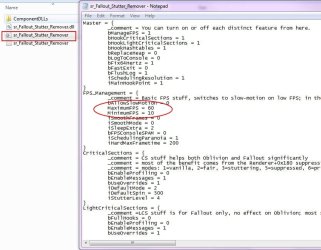
I cant remember if it was in the proper folder strcture when downloaded or not, but just in case you are unfamiliar with FOSE plug ins:
Install FOSE as you normally would, in the FO3 directory where the FOE.exe is

then inside the Data folder you should have a folder < fose/plugins/ (plug in contents)> which should be a folder (component dlls) and 3 other items inside the plugins folder.. (Actually I think the read mes explain it as well but just in case)

The only thing, you may want to edit the FPS .ini just a bit.
See my snip where I circled.
I found this setting to work out quite well on my machine.
 

Attachments

  • foseplugin.JPG
    foseplugin.JPG
    65.3 KB · Views: 6

My Computer

Computer Manufacturer/Model Number
Custom (Self Build)
OS
Windows 7 Home Premium 64bit
CPU
Intel Core i7 2700k
Motherboard
eVGA P67 SLI
Memory
8GB Mushkin Redline Ridgebacks @1866
Graphics Card(s)
EVGA GTX570 SC
Sound Card
XiFi Titanium HD
Monitor(s) Displays
LG W2453V
Screen Resolution
1920x1080
Hard Drives
Intel 320 80GB -- Intel X25-V 40GB --WD Black 1TB x2 -- WD Blue 640GB
PSU
Seasonic x750
Case
Corsair 600T SE White
Cooling
eVGA Superclocked CPU Cooler
Keyboard
Saitek Cyborg
Antivirus
Kaspersky
Browser
IE
Other Info
LG BD/DVD
Thanks again Wishmaster. Sorry for the late reply, been working all week. I'm off this weekend so I'm now going to try implementing all the tips you guys have offered. I'll let you know how things go.

Really apprefciate your time and effort guys. Thanks alot :)

Keep your fingers crossed for me heh heh/
 
Last edited:

My Computer

Computer Manufacturer/Model Number
Custom
OS
Windows 7 Professional
CPU
AMD Phenom II Ture Triple Core 720 2.80GHz
Motherboard
ASUS M4N82 Deluxe nForce 980a SLI
Memory
4GB DDR2
Graphics Card(s)
Gainward(GS) Nvidia GEforce GTX260 & BFG Nv. GEforce GTX 260
Sound Card
Creative Labs Fatal1ty Sound Blaster X-Fi Gamer Edition
Monitor(s) Displays
Standard Flatscreen 19" Del PnP Monitor
Hard Drives
Hitachi HDT721010sla360 1TB 7200rpm SATA
Samsung HD501LJ 500GB 7200rpm SATA
PSU
BFG 800W ES-800 PSU Quad 12V
Case
iCute Jet Turbine ATX PC Case
Cooling
Alpenföhn Nordwand CPU Cooler
Keyboard
Microsoft Wireless MultiMedia Keyboard 1.1
Mouse
Logitech MX620 Cordless Laser Mouse
Internet Speed
4Gb
Back
Top