
Pagefile, Temporary Int Files, Temp files reset after update

TanyaC

New member
Guru
Local time
3:52 AM
Messages
782
Location
Melbourne, Australia
Hello,

I have a system with 32gb DDR3-2400, a 256GB SSD and a couple of spinners. I have set up 4gb of the RAM to be used as another RAMdisk using the softperfect software. This problem has been going on for some time, but has been more of a problem since I started using the RAMdisk. Not because the RAMdisk itself isn't working well, because the stuff that is stored there keeps getting reset.

I have pretty much identified that when updates are installed through windows update (either from Microsoft update or from my WSUS server), the following are reset to defaults

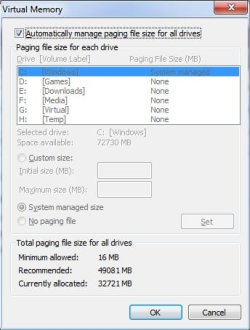
1. Pagefile is automatically managed and stored on the C: drive and is set to 32gb
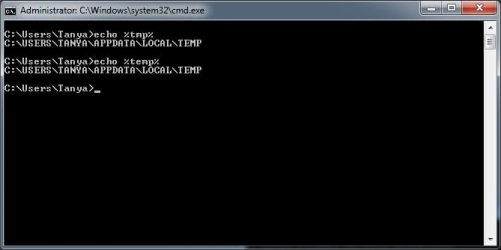
2. The TEMP and TMP environment variables are reset to the C:\users default location
3. The temporary Internet Files location is reset to the default C:\users... location

There may be others that I have not discovered.

I have manually set my swap file to 1024/2048 on the D:\ drive (a spinner), on the belief that it should rarely if ever be needed with a system equipped with 32GB of RAM. I'm certainly not inclined to waste 32GB of space on my SSD for an unused object.

I have placed the TMP/TEMP files, cookies and Temporary Internet files on the RAMdisk to squeeze a little extra performance out of the system. (Yes, I know, I'm not really getting much benefit).

Photoshop and a few other programs also use the RAMdisk as a scratch disk, and were the main reason I set it up in the first place.

This is becoming a real pain when it gets reset as I have to manually change everything again.

Anyone know a way to make windows leave settings at what I set them, instead of having it continually reset the values to what it wants? I'd prefer to have it my way. I know there will be proponents of "leave things as windows wants it".
 

My Computer My Computer

Computer type
PC/Desktop
Computer Manufacturer/Model Number
Home Made
OS
Linux Mint 17 Cinnamon | Win 7 Ult x64
CPU
Intel I7-3770K @ 4.2ghz
Motherboard
ASRock Extreme 4
Memory
32GB G-Skill C10Q
Graphics Card(s)
EVGA GTX 670 2GB SC
Sound Card
Creative Fatality ExtremeGamer
Monitor(s) Displays
LG E2742V x 2
Screen Resolution
1920x1080
Hard Drives
256GB Vertex 4 SSD
2TB Seagate ST2000DM001
1TB Seagate ST1000DM003
PSU
Corsair HX 650
Case
HAF 932 advanced
Cooling
Corsair H100i liquid cooler
Keyboard
Logitech Wireless
Mouse
Logitech Wireless
Internet Speed
OptusNet NBN 100/40
Antivirus
Malwarebytes
Browser
Firefox 30
Other Info
Router: Sagemcom F@st 3846 Crippled by Optus.
Sounds like the ramdisk is not saving or updating its contents? Try another brand liek Dataram, works great for me.
 

My Computer My Computer

Computer type
PC/Desktop
OS
Microsoft Windows 10 Professional / Windows 7 Professional
CPU
Intel i5-3570
Motherboard
Lenovo Mahobay
Memory
16GB DDR3
Graphics Card(s)
AMD Radeon HD 7850 2GB
Sound Card
(1) Realtek HD Audio (2) AMD HD Audio
Monitor(s) Displays
LG LS192WS
Screen Resolution
1440 x 900 @ 32bit color
Hard Drives
(1) SUV300S37A/120G (2) ST3500413AS SATA Disk Device AHCI mode enabled.
PSU
Corsair HX620
Case
Thermaltake V4 Black Edition
Cooling
Cooler Master Hyper 212 + Artic Silver 5 on CPU/GPU
Keyboard
Dell SK-8115
Mouse
Razer Copperhead with MAPED mat (awesome!)
Internet Speed
100 Mbps up/down
Browser
Chrome
Sounds like the ramdisk is not saving or updating its contents? Try another brand liek Dataram, works great for me.

Thanks for your response and recommendation.

Sorry, with all due respect, the problem is not the ramdisk. It does save it's contents properly.

The problem has been occuring long before I installed the RAMDisk.

This typically happens whenever Windows updates are installed, whether directly from Microsoft update or via my WSUS server.

thanks
 

My Computer My Computer

Computer type
PC/Desktop
Computer Manufacturer/Model Number
Home Made
OS
Linux Mint 17 Cinnamon | Win 7 Ult x64
CPU
Intel I7-3770K @ 4.2ghz
Motherboard
ASRock Extreme 4
Memory
32GB G-Skill C10Q
Graphics Card(s)
EVGA GTX 670 2GB SC
Sound Card
Creative Fatality ExtremeGamer
Monitor(s) Displays
LG E2742V x 2
Screen Resolution
1920x1080
Hard Drives
256GB Vertex 4 SSD
2TB Seagate ST2000DM001
1TB Seagate ST1000DM003
PSU
Corsair HX 650
Case
HAF 932 advanced
Cooling
Corsair H100i liquid cooler
Keyboard
Logitech Wireless
Mouse
Logitech Wireless
Internet Speed
OptusNet NBN 100/40
Antivirus
Malwarebytes
Browser
Firefox 30
Other Info
Router: Sagemcom F@st 3846 Crippled by Optus.
The problem has been occuring long before I installed the RAMDisk.

This typically happens whenever Windows updates are installed, whether directly from Microsoft update or via my WSUS server.

Hi,

I've never heard of that before. Perhaps its the installation itself? I suggest posting an MGADIAG report and also running SURT so we can try find out the cause.

http://www.sevenforums.com/windows-...ne-activation-issue-posting-instructions.html
http://www.sevenforums.com/windows-...4840-windows-update-posting-instructions.html

Regards,
Golden
 

My Computer My Computer

Computer type
PC/Desktop
Computer Manufacturer/Model Number
Golden Mk. I.4
OS
Windows 10 Pro x64 ; Xubuntu x64
CPU
Intel i7 860 @ 2.80 GHz O/C'ed to 4.0GHz
Motherboard
Gigabyte P55A-UD3R Rev.1. Award BIOS F13
Memory
16GB Corsair Vengance DDR3 @ 661 MHz Dual Channel (9-9-9-24)
Graphics Card(s)
EVGA NVidia GTX 560 1024MB
Sound Card
Realtek Integrated
Monitor(s) Displays
Dual Samsung SyncMaster 2494HS
Screen Resolution
1920*1080 and 1920*1080
Hard Drives
1*Samsung 840 EVO 120GB SSD;
1*OCZ Vertex 2 60GB SSD;
2*Samsung F3 SpinPoint 1TB in RAID0;
1*Samsung F1 SpinPoint 1TB;
2*Western Digital 1TB External USB 3.0
1*Western Digital 500GB External USB 3.0
1*Seagate 500GB External USB 2.0
PSU
Thermaltake ToughPower QFan 750W
Case
Thermaltake Element S VK60001W2Z
Cooling
Corsair H60 Water Cooling, 2*230mm and 2*80mm case fans
Keyboard
Logitech G110
Mouse
Logitech MX518
Hi,

Yes it is very strange. Of course, reinstalling windows from scratch was one of the firs things I tried. I think I've done that three times now. I also turned off updates for just over a month, and the problem never once happened during that time. But as soon as I turned on updates, and updates were installed, the system defaulted things back.

Please note that updates are not failing, at least not that I can see.

Anyway..

Code:
Diagnostic Report (1.9.0027.0):
-----------------------------------------
Windows Validation Data-->
Validation Code: 0
Cached Online Validation Code: N/A, hr = 0xc004f012
Windows Product Key: *****-*****-VWHG7-F262M-GW2D3
Windows Product Key Hash: qXrtiLjQi6bYGI36AFHnuN57rRk=
Windows Product ID: 00426-069-0527356-86109
Windows Product ID Type: 5
Windows License Type: Retail
Windows OS version: 6.1.7601.2.00010100.1.0.001
ID: {13071E8B-857C-4AC5-B613-9779B02CB87C}(1)
Is Admin: Yes
TestCab: 0x0
LegitcheckControl ActiveX: N/A, hr = 0x80070002
Signed By: N/A, hr = 0x80070002
Product Name: Windows 7 Ultimate
Architecture: 0x00000009
Build lab: 7601.win7sp1_gdr.130104-1431
TTS Error: 
Validation Diagnostic: 
Resolution Status: N/A
Vista WgaER Data-->
ThreatID(s): N/A, hr = 0x80070002
Version: N/A, hr = 0x80070002
Windows XP Notifications Data-->
Cached Result: N/A, hr = 0x80070002
File Exists: No
Version: N/A, hr = 0x80070002
WgaTray.exe Signed By: N/A, hr = 0x80070002
WgaLogon.dll Signed By: N/A, hr = 0x80070002
OGA Notifications Data-->
Cached Result: N/A, hr = 0x80070002
Version: N/A, hr = 0x80070002
OGAExec.exe Signed By: N/A, hr = 0x80070002
OGAAddin.dll Signed By: N/A, hr = 0x80070002
OGA Data-->
Office Status: 109 N/A
OGA Version: N/A, 0x80070002
Signed By: N/A, hr = 0x80070002
Office Diagnostics: 025D1FF3-364-80041010_025D1FF3-229-80041010_025D1FF3-230-1_025D1FF3-517-80040154_025D1FF3-237-80040154_025D1FF3-238-2_025D1FF3-244-80070002_025D1FF3-258-3
Browser Data-->
Proxy settings: N/A
User Agent: Mozilla/4.0 (compatible; MSIE 8.0; Win32)
Default Browser: C:\Program Files (x86)\Internet Explorer\iexplore.exe
Download signed ActiveX controls: Prompt
Download unsigned ActiveX controls: Disabled
Run ActiveX controls and plug-ins: Allowed
Initialize and script ActiveX controls not marked as safe: Disabled
Allow scripting of Internet Explorer Webbrowser control: Disabled
Active scripting: Allowed
Script ActiveX controls marked as safe for scripting: Allowed
File Scan Data-->
File Mismatch: C:\Windows\system32\wat\watadminsvc.exe[Hr = 0x80070003]
File Mismatch: C:\Windows\system32\wat\npwatweb.dll[Hr = 0x80070003]
File Mismatch: C:\Windows\system32\wat\watux.exe[Hr = 0x80070003]
File Mismatch: C:\Windows\system32\wat\watweb.dll[Hr = 0x80070003]
Other data-->
Office Details: <GenuineResults><MachineData><UGUID>{13071E8B-857C-4AC5-B613-9779B02CB87C}</UGUID><Version>1.9.0027.0</Version><OS>6.1.7601.2.00010100.1.0.001</OS><Architecture>x64</Architecture><PKey>*****-*****-*****-*****-GW2D3</PKey><PID>00426-069-0527356-86109</PID><PIDType>5</PIDType><SID>S-1-5-21-1847784453-2083549321-2778332978</SID><SYSTEM><Manufacturer>To Be Filled By O.E.M.</Manufacturer><Model>To Be Filled By O.E.M.</Model></SYSTEM><BIOS><Manufacturer>American Megatrends Inc.</Manufacturer><Version>P2.30</Version><SMBIOSVersion major="2" minor="7"/><Date>20120921000000.000000+000</Date></BIOS><HWID>4D8A3907018400FE</HWID><UserLCID>0C09</UserLCID><SystemLCID>0409</SystemLCID><TimeZone>AUS Eastern Standard Time(GMT+10:00)</TimeZone><iJoin>0</iJoin><SBID><stat>3</stat><msppid></msppid><name></name><model></model></SBID><OEM/><GANotification/></MachineData><Software><Office><Result>109</Result><Products/><Applications/></Office></Software></GenuineResults>  
Spsys.log Content: 0x80070002
Licensing Data-->
Software licensing service version: 6.1.7601.17514
Name: Windows(R) 7, Ultimate edition
Description: Windows Operating System - Windows(R) 7, RETAIL channel
Activation ID: a0cde89c-3304-4157-b61c-c8ad785d1fad
Application ID: 55c92734-d682-4d71-983e-d6ec3f16059f
Extended PID: 00426-00172-069-052735-00-3081-7601.0000-0112013
Installation ID: 003084261162667464702666453211237920168274817660508251
Processor Certificate URL: [URL]http://go.microsoft.com/fwlink/?LinkID=88338[/URL]
Machine Certificate URL: [URL]http://go.microsoft.com/fwlink/?LinkID=88339[/URL]
Use License URL: [URL]http://go.microsoft.com/fwlink/?LinkID=88341[/URL]
Product Key Certificate URL: [URL]http://go.microsoft.com/fwlink/?LinkID=88340[/URL]
Partial Product Key: GW2D3
License Status: Licensed
Remaining Windows rearm count: 3
Trusted time: 21/02/2013 07:39:48
Windows Activation Technologies-->
HrOffline: 0x00000000
HrOnline: N/A
HealthStatus: 0x0000000000000000
Event Time Stamp: N/A
ActiveX: Not Registered - 0x80040154
Admin Service: Not Registered - 0x80040154
HealthStatus Bitmask Output:
 
HWID Data-->
HWID Hash Current: PAAAAAMABAABAAEAAQACAAAAAwABAAEAhFEmUc2OQeh3FhLCdMTo7cK/bHech7L7wHzkLmC5coq+QZZj
OEM Activation 1.0 Data-->
N/A
OEM Activation 2.0 Data-->
BIOS valid for OA 2.0: yes, but no SLIC table
Windows marker version: N/A
OEMID and OEMTableID Consistent: N/A
BIOS Information: 
  ACPI Table Name OEMID Value OEMTableID Value
  APIC   ALASKA  A M I
  FACP   ALASKA  A M I
  HPET   ALASKA  A M I
  MCFG   ALASKA  A M I
  FPDT   ALASKA  A M I
  SSDT   Intel_  AoacTabl
  AAFT   ALASKA  OEMAAFT 
  SSDT   Intel_  AoacTabl
  SSDT   Intel_  AoacTabl
  SSDT   Intel_  AoacTabl
  BGRT   ALASKA  A M I
 

My Computer My Computer

Computer type
PC/Desktop
Computer Manufacturer/Model Number
Home Made
OS
Linux Mint 17 Cinnamon | Win 7 Ult x64
CPU
Intel I7-3770K @ 4.2ghz
Motherboard
ASRock Extreme 4
Memory
32GB G-Skill C10Q
Graphics Card(s)
EVGA GTX 670 2GB SC
Sound Card
Creative Fatality ExtremeGamer
Monitor(s) Displays
LG E2742V x 2
Screen Resolution
1920x1080
Hard Drives
256GB Vertex 4 SSD
2TB Seagate ST2000DM001
1TB Seagate ST1000DM003
PSU
Corsair HX 650
Case
HAF 932 advanced
Cooling
Corsair H100i liquid cooler
Keyboard
Logitech Wireless
Mouse
Logitech Wireless
Internet Speed
OptusNet NBN 100/40
Antivirus
Malwarebytes
Browser
Firefox 30
Other Info
Router: Sagemcom F@st 3846 Crippled by Optus.
Hi,

Back online at last, after spending the last several weeks moving house.

Has anyone had an opportunity to look at this issue and offer and advice or assistance?

Thanks
Tanya
 

My Computer My Computer

Computer type
PC/Desktop
Computer Manufacturer/Model Number
Home Made
OS
Linux Mint 17 Cinnamon | Win 7 Ult x64
CPU
Intel I7-3770K @ 4.2ghz
Motherboard
ASRock Extreme 4
Memory
32GB G-Skill C10Q
Graphics Card(s)
EVGA GTX 670 2GB SC
Sound Card
Creative Fatality ExtremeGamer
Monitor(s) Displays
LG E2742V x 2
Screen Resolution
1920x1080
Hard Drives
256GB Vertex 4 SSD
2TB Seagate ST2000DM001
1TB Seagate ST1000DM003
PSU
Corsair HX 650
Case
HAF 932 advanced
Cooling
Corsair H100i liquid cooler
Keyboard
Logitech Wireless
Mouse
Logitech Wireless
Internet Speed
OptusNet NBN 100/40
Antivirus
Malwarebytes
Browser
Firefox 30
Other Info
Router: Sagemcom F@st 3846 Crippled by Optus.
Please downloadand save the CheckSUR tool from http://support.microsoft.com/kb/947821

(you'll need tolook in the details for Windows 7, downloading from the Microsoft DownloadCenter)


Run it - The toolcan take anywhere from 5 mins to a couple of hours to run (or 'Install')depending on how much it has to do, and may exit silently - it may appear tofreeze for most of that time, but be patient.

The result islogged in the C:\Windows\Logs\CBS\CheckSUR.log file - and an archive …\checksur.persist.log file


Then zip theCheckSUR.log and attach it to your reply


My Computer My Computer

Computer type
Laptop
Computer Manufacturer/Model Number
Asus K52F or Lenovo B51-80
OS
Win 7 x64 Home Premium (and x86 VirtualBox VM)/Win10
CPU
i3 370M/i7 6500U
Motherboard
Asus/Lenovo
Memory
8GB - finally :)/8GB
Graphics Card(s)
it's an i3, dude!/dual Intel&nVidia
Sound Card
onboard
Monitor(s) Displays
15.6" built-in
Screen Resolution
1366x768/1920x1080
Hard Drives
750GB Seagate internal
Sundry external drives attached to other computers on the local network
1TB SSD on the Lenovo
PSU
n/a
Internet Speed
as much as I can get - usually on a dongle/phone, so <1MB/s
Antivirus
MSE/Defender
Browser
IE11/12/Edge/Chrome/FF(if I must)
Hi,

Attached is the log file as requested.

Tanya
 

Attachments

My Computer My Computer

Computer type
PC/Desktop
Computer Manufacturer/Model Number
Home Made
OS
Linux Mint 17 Cinnamon | Win 7 Ult x64
CPU
Intel I7-3770K @ 4.2ghz
Motherboard
ASRock Extreme 4
Memory
32GB G-Skill C10Q
Graphics Card(s)
EVGA GTX 670 2GB SC
Sound Card
Creative Fatality ExtremeGamer
Monitor(s) Displays
LG E2742V x 2
Screen Resolution
1920x1080
Hard Drives
256GB Vertex 4 SSD
2TB Seagate ST2000DM001
1TB Seagate ST1000DM003
PSU
Corsair HX 650
Case
HAF 932 advanced
Cooling
Corsair H100i liquid cooler
Keyboard
Logitech Wireless
Mouse
Logitech Wireless
Internet Speed
OptusNet NBN 100/40
Antivirus
Malwarebytes
Browser
Firefox 30
Other Info
Router: Sagemcom F@st 3846 Crippled by Optus.
The CheckSUR result is clear - and at 50 seconds, it rates as possibly the quickest scan I've ever seen!

All I can think of is that the RAMDrive is being unloaded out-of-sequence on shutdown, and this is causing problems on the subsequent reboot.
Have you checked the Event Viewer to see what's logged at such times?
I'm assuming that a normal restart doesn't affect the settings.
 

My Computer My Computer

Computer type
Laptop
Computer Manufacturer/Model Number
Asus K52F or Lenovo B51-80
OS
Win 7 x64 Home Premium (and x86 VirtualBox VM)/Win10
CPU
i3 370M/i7 6500U
Motherboard
Asus/Lenovo
Memory
8GB - finally :)/8GB
Graphics Card(s)
it's an i3, dude!/dual Intel&nVidia
Sound Card
onboard
Monitor(s) Displays
15.6" built-in
Screen Resolution
1366x768/1920x1080
Hard Drives
750GB Seagate internal
Sundry external drives attached to other computers on the local network
1TB SSD on the Lenovo
PSU
n/a
Internet Speed
as much as I can get - usually on a dongle/phone, so <1MB/s
Antivirus
MSE/Defender
Browser
IE11/12/Edge/Chrome/FF(if I must)
The CheckSUR result is clear - and at 50 seconds, it rates as possibly the quickest scan I've ever seen!

All I can think of is that the RAMDrive is being unloaded out-of-sequence on shutdown, and this is causing problems on the subsequent reboot.
Have you checked the Event Viewer to see what's logged at such times?
I'm assuming that a normal restart doesn't affect the settings.

The problem existed before I intalled the RAMDrive. I mentioned it was installed for completeness only.

No, a normal restart does not effect the settings. The system has a shutdown task too, and that doesn't cause any problems.

The event viewer shows what you would expect; No errors.

It's not just the files on the ramdrive that are affected. The swap file is moved from my C: drive (ssd), to my D:\ drive (spinner). It's set to 1024/2048, and I have 32gb of memory intalled. When the problem occurs the custom pagefile settings are defaulted back to "system managed" and on C: drive.

It's not every update that causes the problem. I guess I will have to manually intall updates for a while and see if I can nail down what "type" of update is the culprit.

Tanya
 

My Computer My Computer

Computer type
PC/Desktop
Computer Manufacturer/Model Number
Home Made
OS
Linux Mint 17 Cinnamon | Win 7 Ult x64
CPU
Intel I7-3770K @ 4.2ghz
Motherboard
ASRock Extreme 4
Memory
32GB G-Skill C10Q
Graphics Card(s)
EVGA GTX 670 2GB SC
Sound Card
Creative Fatality ExtremeGamer
Monitor(s) Displays
LG E2742V x 2
Screen Resolution
1920x1080
Hard Drives
256GB Vertex 4 SSD
2TB Seagate ST2000DM001
1TB Seagate ST1000DM003
PSU
Corsair HX 650
Case
HAF 932 advanced
Cooling
Corsair H100i liquid cooler
Keyboard
Logitech Wireless
Mouse
Logitech Wireless
Internet Speed
OptusNet NBN 100/40
Antivirus
Malwarebytes
Browser
Firefox 30
Other Info
Router: Sagemcom F@st 3846 Crippled by Optus.
Problem surfaces again..

Hi, Well, I've been installing updates manually for the past couple of months trying to track down this problem. Today I caught it. The pagefile was on D:\ @ 1024/2048. The TEMP and TMP variables did point to the RAMDrive on H:\. After the update, these had reverted to the defaults as documented in the original post... See attached Screen shots.

I think it's safe to discount the Office updates. All the office updates have never caused this problem from the ones I have tested. The malicious software removal tool has likewise never been seen to cause a problem.

That leaves me with 2813347, 2808735, 2799926 and 2813170.

I'll try a system restore and now install those one by one..

Edit: Well, that didn't help. The problem didn't recur after one by one installs :confused:

Temp internet files is not an issue anymore as I have dumped IE and gone to Firefox.
 

Attachments

  • sf1.jpg
    sf1.jpg
    45.3 KB · Views: 1
  • sf2.jpg
    sf2.jpg
    129.1 KB · Views: 0
  • sf3.jpg
    sf3.jpg
    29.2 KB · Views: 0
Last edited:

My Computer My Computer

Computer type
PC/Desktop
Computer Manufacturer/Model Number
Home Made
OS
Linux Mint 17 Cinnamon | Win 7 Ult x64
CPU
Intel I7-3770K @ 4.2ghz
Motherboard
ASRock Extreme 4
Memory
32GB G-Skill C10Q
Graphics Card(s)
EVGA GTX 670 2GB SC
Sound Card
Creative Fatality ExtremeGamer
Monitor(s) Displays
LG E2742V x 2
Screen Resolution
1920x1080
Hard Drives
256GB Vertex 4 SSD
2TB Seagate ST2000DM001
1TB Seagate ST1000DM003
PSU
Corsair HX 650
Case
HAF 932 advanced
Cooling
Corsair H100i liquid cooler
Keyboard
Logitech Wireless
Mouse
Logitech Wireless
Internet Speed
OptusNet NBN 100/40
Antivirus
Malwarebytes
Browser
Firefox 30
Other Info
Router: Sagemcom F@st 3846 Crippled by Optus.
Back
Top