
Pages not automatically numbering in ms 2007

And yes, I am aware of the whole page break and the need for sections. That is not the problem. The problem is that the number is only appearing on one page, and not the rest of them.

Hello lou99 -

I need to see the breaks at that part of your file. Please provide a screen shot:

  • Display in Outline view
  • Scroll so the last page of the first section displays at the top

(sample image)
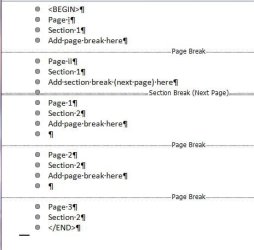
OutlineMode.JPG

Regards,
GEWB
 

My Computer My Computer

At a glance

Linux Mint / XP / Win7 Home, Pro, Ultimate / ...
Computer type
PC/Desktop
Computer Manufacturer/Model Number
(7 different computers booting up to 10 systems)
OS
Linux Mint / XP / Win7 Home, Pro, Ultimate / Win8.1 / Win10
Other Info
Four desktops, two laptops, one notebook and one tablet
Hello lou99 -

OK, here's what I would like you to do (this assumes the page numbering is in the footer).

Using a COPY of your file:

  1. Go to the first page of the section where you see the field {pagemergeformat} then
  2. Select that field and
  3. DELETE it
  4. Exit the footer

On the first page where you want the new page numbering:

  1. Enter the footer
  2. Header and Footer Tools > Current Position > [style]
  3. Select page number (if not already selected)
  4. Unlink from previous section
  5. Right-click page number, select Format Page Numbers...
  6. Select Number format from drop list
  7. Set Page numbering > Start at: to 1 in the spin box
  8. Click OK
  9. Exit footer
Did this help, make worse or no change?

The desired result is the page number field gets changed to:
{ PAGE \* MERGEFORMAT }

Regards,
GEWB
 

My Computer My Computer

At a glance

Linux Mint / XP / Win7 Home, Pro, Ultimate / ...
Computer type
PC/Desktop
Computer Manufacturer/Model Number
(7 different computers booting up to 10 systems)
OS
Linux Mint / XP / Win7 Home, Pro, Ultimate / Win8.1 / Win10
Other Info
Four desktops, two laptops, one notebook and one tablet
gewb--what is a PM? (sorry)
 

My Computer My Computer

At a glance

windows 7
OS
windows 7
gewb--what is a PM? (sorry)

PM = Private Message

Click on my user name and select Send a private message to GEWB. It will show up in my forum mail box.

If you would like me to work on your file, send me your email address in the private message - I'll reply to your email address, sending my email address. Then ZIP up your file and attach it to your reply email - I'll see what I can do to fix the numbering issue.

Regards,
GEWB
 

My Computer My Computer

At a glance

Linux Mint / XP / Win7 Home, Pro, Ultimate / ...
Computer type
PC/Desktop
Computer Manufacturer/Model Number
(7 different computers booting up to 10 systems)
OS
Linux Mint / XP / Win7 Home, Pro, Ultimate / Win8.1 / Win10
Other Info
Four desktops, two laptops, one notebook and one tablet
Hello lou99 -

Check your email.

Regards,
GEWB
 

My Computer My Computer

At a glance

Linux Mint / XP / Win7 Home, Pro, Ultimate / ...
Computer type
PC/Desktop
Computer Manufacturer/Model Number
(7 different computers booting up to 10 systems)
OS
Linux Mint / XP / Win7 Home, Pro, Ultimate / Win8.1 / Win10
Other Info
Four desktops, two laptops, one notebook and one tablet
Thank you everyone for all your replies. I so appreciate the time you took to help me with this. After weeks of struggling with this, GEWB (AKA from hereon in as "my hero") figured it out for me. My "insert page number at current location" was putting it in an area that did not fall in the footer area (although it certainly looked like it.) Thanks again. Best forum!!!!
 

My Computer My Computer

At a glance

windows 7
OS
windows 7
Kudos to GEWB!

If you would like to give him some +rep, just click the scales at the top-right corner.

Thank you for your kind comments about WSF and thanks for letting us know how things turned out.
 

My Computer My Computer

At a glance

Windows 7 Ultimate SP1 64-BitIntel Core i7 870 @ 2.93GHz8Gb Dual-Channel DDR3 @ 664MHznVidia GeForce GTX 460 1024MB dedicated RAM
Computer Manufacturer/Model Number
HP Pavilion Elite 495UK
OS
Windows 7 Ultimate SP1 64-Bit
CPU
Intel Core i7 870 @ 2.93GHz
Motherboard
MSI 2A9C (CPU1)
Memory
8Gb Dual-Channel DDR3 @ 664MHz
Graphics Card(s)
nVidia GeForce GTX 460 1024MB dedicated RAM
Sound Card
Realtek HD Audio
Monitor(s) Displays
HP2310i
Screen Resolution
1920 x 1080
Hard Drives
1x1954GB Hitachi HDS22020ALA 330 (RAID), 1x1954GB Hitachi External for backup and storage
PSU
460W
Case
HP Elite
Cooling
Air cooled
Keyboard
Logitech K750 solar-powered keyboard
Mouse
Logitech Wireless M180 mouse
Internet Speed
2Mb
Other Info
Pure Avanti Flow Internet Radio with iPod Dock, 64Gb iPod, HP USB Speakers, Sony MDR-V500 Headphones, Sony Vaio F-Series Laptop
will do!
 

My Computer My Computer

At a glance

windows 7
OS
windows 7
Back
Top