partition hard drive in Windows 7 home basic Without Formatting

hiba24

Banned
Local time
1:06 AM
Messages
15
I've hp laptop windows 7 home basic with 3 drives :

C: 445 GB
D: Recovery 15.6 GB
E: HP_Tools 3.95

i wanna divide the 'C' , used shrink i got "212987" MB then used the "New simple volume wizard " after pressing finish i got the msg
The operation you selected will convert the selected basic disk to dynamic disk. if you convert the disk t dynamic , you will not be able to start installed operating systems from any volume on the disk (except the current boot volume). are you sure ?

when i press yes i got error msg
" Dynamic disk are not supported by this operating system or server configuration . dynamic disk are not supported on clusters.

can you help plz i dont wanna format plz advise me
 

My Computer My Computer

OS
windows 7 home basic
Thank your lucky stars that it did not convert to dynamic.

Dynamic disks are a pain and to be avoided except in unusual circumstances.

You need to make an extended partition from that shrunken space without going to dynamic.

Post a picture of Windows Disk Management so we can see what is going on with your partitions.
 

My Computer My Computer

Computer type
PC/Desktop
Computer Manufacturer/Model Number
Ignatz Special; 4 speed manual gearbox; factory air conditioning; one of one
OS
Windows 7 Home Premium SP1, 64-bit
CPU
Intel Skylake i5-6600K, not overclocked
Motherboard
AsRock Z170M Extreme 4, micro ATX
Memory
8 GB HyperX DDR4-2666 (2 x 4 GB)
Graphics Card(s)
none; graphics are integrated on CPU
Sound Card
onboard: Realtek ALC1150; external: USB Behringer UF0-202
Monitor(s) Displays
Dell S2340M 23 inch IPS
Screen Resolution
1600 x 900
Hard Drives
System: Crucial MX100 series SSD, 128 GB;
Data: Samsung Spinpoint 103SJ, 1 TB;
Backup: WD Caviar Green WD30EZRX-00D8PB0, 3 TB
PSU
Rosewill SilentNight 500 watt fanless, semi-modular
Case
Antec Solo II
Cooling
Noctua NH-U12S; Noctua F12 intake, Noctua S12A exhaust
Keyboard
Microsoft 200 6JH-00001 USB
Mouse
Dell or Microsoft optical wired; USB
Antivirus
Microsoft Security Essentials and Malwarebytes Premium
Browser
Pale Moon
Other Info
All fans PWM; speeds at idle: CPU circa 500 rpm; intake circa 600 rpm; exhaust circa 600 rpm; CPU temps 27 idle and 47 C load in a warm room (27 C/81 F) when running Intel Extreme Tuning Utility stress test.
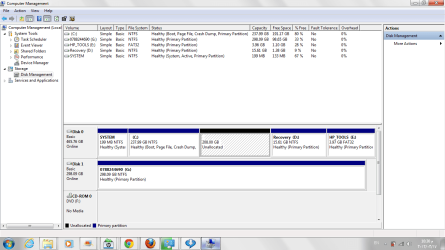
i attached a pic for current disk mgm i wanna use the unallocated space to be my new drive what should i do now ????
 

Attachments

  • disk mgmt.png
    disk mgmt.png
    22.8 KB · Views: 911

My Computer My Computer

OS
windows 7 home basic

My Computer My Computer

Computer Manufacturer/Model Number
HP, Dell, Gateway, Toshiba - 4 laptops and 2 desktops
OS
Vista, Windows7, Mint Mate, Zorin, Windows 8
CPU
from 1.6GHz Duo to i7
Monitor(s) Displays
2x HP w2207
Hard Drives
5x HDD, 7x SSD, 12x Externals
Keyboard
with trackball - no mices
Mouse
Trackball mice
Internet Speed
DSL 6000
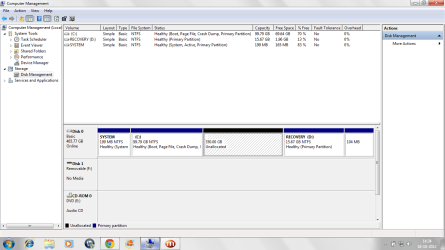
i attached another image ..... what should be my nxt step ??
 

Attachments

  • disk_mangment.png
    disk_mangment.png
    44.4 KB · Views: 681

My Computer My Computer

OS
windows 7 home basic
You can also create an extended partition directly using the Diskpart command from a command prompt.

But WHS's method of using Partition Wizard might be easier.

You are a victim of having too many partitions---unfortunately, HP shipped the thing to you with 4 partitions and you are therefore forced to use an extended partition.

If you had only 1 or 2 partitions to begin with, you could easily create another without having to create an extended partition.
 

My Computer My Computer

Computer type
PC/Desktop
Computer Manufacturer/Model Number
Ignatz Special; 4 speed manual gearbox; factory air conditioning; one of one
OS
Windows 7 Home Premium SP1, 64-bit
CPU
Intel Skylake i5-6600K, not overclocked
Motherboard
AsRock Z170M Extreme 4, micro ATX
Memory
8 GB HyperX DDR4-2666 (2 x 4 GB)
Graphics Card(s)
none; graphics are integrated on CPU
Sound Card
onboard: Realtek ALC1150; external: USB Behringer UF0-202
Monitor(s) Displays
Dell S2340M 23 inch IPS
Screen Resolution
1600 x 900
Hard Drives
System: Crucial MX100 series SSD, 128 GB;
Data: Samsung Spinpoint 103SJ, 1 TB;
Backup: WD Caviar Green WD30EZRX-00D8PB0, 3 TB
PSU
Rosewill SilentNight 500 watt fanless, semi-modular
Case
Antec Solo II
Cooling
Noctua NH-U12S; Noctua F12 intake, Noctua S12A exhaust
Keyboard
Microsoft 200 6JH-00001 USB
Mouse
Dell or Microsoft optical wired; USB
Antivirus
Microsoft Security Essentials and Malwarebytes Premium
Browser
Pale Moon
Other Info
All fans PWM; speeds at idle: CPU circa 500 rpm; intake circa 600 rpm; exhaust circa 600 rpm; CPU temps 27 idle and 47 C load in a warm room (27 C/81 F) when running Intel Extreme Tuning Utility stress test.
hi lsn i'm still confused if u still can help plz WHS i went to that link downloaded the last entry burned that to the CD but this didnt run so what should i do ???

so ignatzatsonic whats the Diskpart command ????
 

My Computer My Computer

OS
windows 7 home basic
Did you boot with this CD - you have to change the boot order in the BIOS to boot from CD. Then you have to watch the screen because shortly after the CD starts spinning it aks you to "Press any key" - else it will not boot from CD and go back to your OS.
 

My Computer My Computer

Computer Manufacturer/Model Number
HP, Dell, Gateway, Toshiba - 4 laptops and 2 desktops
OS
Vista, Windows7, Mint Mate, Zorin, Windows 8
CPU
from 1.6GHz Duo to i7
Monitor(s) Displays
2x HP w2207
Hard Drives
5x HDD, 7x SSD, 12x Externals
Keyboard
with trackball - no mices
Mouse
Trackball mice
Internet Speed
DSL 6000
thnx thnx problem is solved i got my new drive 207 GB that is great
 

My Computer My Computer

OS
windows 7 home basic
Well, that is good news. Glad we could help.
 

My Computer My Computer

Computer Manufacturer/Model Number
HP, Dell, Gateway, Toshiba - 4 laptops and 2 desktops
OS
Vista, Windows7, Mint Mate, Zorin, Windows 8
CPU
from 1.6GHz Duo to i7
Monitor(s) Displays
2x HP w2207
Hard Drives
5x HDD, 7x SSD, 12x Externals
Keyboard
with trackball - no mices
Mouse
Trackball mice
Internet Speed
DSL 6000
can i ask for an advise i divided my c drive from 445 GB to 5 drives including C as below :
'C' :70.4
'G' :111
'H' :55.7
'I' :105
'J' :102

some people said this will kill my hard drive , is that true ????
 

My Computer My Computer

OS
windows 7 home basic
Nah, no problem as long as you do not have more than 3 primary partitions - check in Disk Management.

I question the wisdom of that many partitions though. If you use them to store data, make 1 big data partitions and subdivide that by folders for the different types of data. That is much more flexible.
 

My Computer My Computer

Computer Manufacturer/Model Number
HP, Dell, Gateway, Toshiba - 4 laptops and 2 desktops
OS
Vista, Windows7, Mint Mate, Zorin, Windows 8
CPU
from 1.6GHz Duo to i7
Monitor(s) Displays
2x HP w2207
Hard Drives
5x HDD, 7x SSD, 12x Externals
Keyboard
with trackball - no mices
Mouse
Trackball mice
Internet Speed
DSL 6000
great i've only 2 primary the mentioned above all of them are logical to store (music , pics, one of them for programs 'c" for windows so every thing will be normal ? and my hard drive will not die soon
 

My Computer My Computer

OS
windows 7 home basic
Looks fine to me. But again, why did you move the programs off the C: partition and why would you have seperate partitions for music and pictures. What's wrong with folders in one big partition.

Anyhow, there is no threat to the life of your disk - at least not from the number of partitions.
 

My Computer My Computer

Computer Manufacturer/Model Number
HP, Dell, Gateway, Toshiba - 4 laptops and 2 desktops
OS
Vista, Windows7, Mint Mate, Zorin, Windows 8
CPU
from 1.6GHz Duo to i7
Monitor(s) Displays
2x HP w2207
Hard Drives
5x HDD, 7x SSD, 12x Externals
Keyboard
with trackball - no mices
Mouse
Trackball mice
Internet Speed
DSL 6000
i didn't move programs from C these my designing programs but as you know more drives every thing will be more clear :) anyway thanks for help
 

My Computer My Computer

OS
windows 7 home basic
The current disk partition software is not being detected by Ms utility tool for creating a bootable Cd/Flash drive.?? plz help..thnks..
 

My Computer My Computer

OS
windows 7 Ultimate 64bit
CPU
Intel Core i5 3rd generation
Memory
4GB
Graphics Card(s)
1GB nvidia
The current disk partition software is not being detected by Ms utility tool for creating a bootable Cd/Flash drive.?? plz help..thnks..
I suggest you open your own thread for your problem. This is a very old thread on a different subject and you are liable not to get a lot of attention.

And give a few more details describing your problem. From what you posted here, it is not very clear.
 

My Computer My Computer

Computer Manufacturer/Model Number
HP, Dell, Gateway, Toshiba - 4 laptops and 2 desktops
OS
Vista, Windows7, Mint Mate, Zorin, Windows 8
CPU
from 1.6GHz Duo to i7
Monitor(s) Displays
2x HP w2207
Hard Drives
5x HDD, 7x SSD, 12x Externals
Keyboard
with trackball - no mices
Mouse
Trackball mice
Internet Speed
DSL 6000
I'm late to the party, but another option would be to burn your recovery discs, then delete the Recovery partition. It makes no sense to me to store your recovery method on the same physical drive. I know this is a common practice of OEM systems, but that's one of several reasons why most of us wipe out our drives and perform a fresh install on OEM systems.
 

My Computer My Computer

OS
Windows 7 Ultimate x64 SP1
CPU
Intel Core i7-2600
Motherboard
Gigabyte GA-P67A-UD3P-B3
Memory
12 GB Patriot Extreme DDR3-1333
Graphics Card(s)
Nvidia GTX 470
Monitor(s) Displays
Dell UltraSharp 2209WA
Hard Drives
OCZ Agility3 240 GB, WD5001AALS, WD7501AALS
PSU
OCZ ModStream 700W
Case
CoolerMaster HAF 912 Advanced
Cooling
CoolerMaster Hyper 212 Plus
The current disk partition software is not being detected by Ms utility tool for creating a bootable Cd/Flash drive.?? plz help..thnks..
I suggest you open your own thread for your problem. This is a very old thread on a different subject and you are liable not to get a lot of attention.

And give a few more details describing your problem. From what you posted here, it is not very clear.


Here is my thread, http://www.sevenforums.com/general-...-create-partition-win7-home-basic-64-bit.html

Can u plz Help After reading it??
Thnks..
 

My Computer My Computer

OS
windows 7 Ultimate 64bit
CPU
Intel Core i5 3rd generation
Memory
4GB
Graphics Card(s)
1GB nvidia
Same problem

I do have a same problem & gone through all conversation,just tell me 1 thing i have to boot with this "Free Download Magic Partition Manager Software - Partition Wizard Online (last entry on the webpage)" B4 or after shrink of c drive.
here a screenshot of disk management.
 

Attachments

  • Untitled.png
    Untitled.png
    38.7 KB · Views: 7

My Computer My Computer

OS
Windows 7 Home Basic 64bit.
Back
Top