
Partition Hard-Drive without format?

I'm afraid this is rather difficult without offending the thread starter, but you either haven't been understanding what Karl has been telling you or you are choosing to ignore him.

The recovery partition is used to restore your computer to its factory state i.e. exactly how it was when you first bought the computer. If you delete the recovery partition and you haven't got any recovery discs you can't recover to the factory state, which means you would have to buy a set of HP recovery discs or a Windows 7 DVD.

A restore from a system image backup restores your computer to the state it was in at the time you created your backup.

If you decide to keep the HP Recovery and HP Tools partitions you can only increase the number of partitions by creating logical partitions in your C drive.

This tutorial explains how to create a system image backup.

http://www.sevenforums.com/tutorials/663-backup-complete-computer-create-image-backup.html

This one shows you how to partition your hard drive.

http://www.sevenforums.com/tutorials/93322-partition-wizard-use-bootable-cd.html

ImgBurn is an excellent, free ISO burner.

http://www.imgburn.com/
 

My Computer

Computer Manufacturer/Model Number
HP Pavilion Elite 495UK
OS
Windows 7 Ultimate SP1 64-Bit
CPU
Intel Core i7 870 @ 2.93GHz
Motherboard
MSI 2A9C (CPU1)
Memory
8Gb Dual-Channel DDR3 @ 664MHz
Graphics Card(s)
nVidia GeForce GTX 460 1024MB dedicated RAM
Sound Card
Realtek HD Audio
Monitor(s) Displays
HP2310i
Screen Resolution
1920 x 1080
Hard Drives
1x1954GB Hitachi HDS22020ALA 330 (RAID), 1x1954GB Hitachi External for backup and storage
PSU
460W
Case
HP Elite
Cooling
Air cooled
Keyboard
Logitech K750 solar-powered keyboard
Mouse
Logitech Wireless M180 mouse
Internet Speed
2Mb
Other Info
Pure Avanti Flow Internet Radio with iPod Dock, 64Gb iPod, HP USB Speakers, Sony MDR-V500 Headphones, Sony Vaio F-Series Laptop
I'm afraid this is rather difficult without offending the thread starter, but you either haven't been understanding what Karl has been telling you or you are choosing to ignore him.

The recovery partition is used to restore your computer to its factory state i.e. exactly how it was when you first bought the computer. If you delete the recovery partition and you haven't got any recovery discs you can't recover to the factory state, which means you would have to buy a set of HP recovery discs or a Windows 7 DVD.

A restore from a system image backup restores your computer to the state it was in at the time you created your backup.

If you decide to keep the HP Recovery and HP Tools partitions you can only increase the number of partitions by creating logical partitions in your C drive. This tutorial explains how to create a system image backup.

http://www.sevenforums.com/tutorials/663-backup-complete-computer-create-image-backup.html

I wasn't intending to ignore him. Since, I am new to all this Win 7 things, it was a little confusing. That's it. I thank Karl for this help and replies he gave.
Actually, I just run out of blank DVD to put by back-up in and that's why looking if I had an alternative.
 

My Computer

OS
Windows 7
Cloud,
Theoretically one can use DVDs for backup.
Practically this is problematic, costly, and time-consuming.

Best is an external usb drive. For the small amount of data which you have a 200 gb external usb would suffice. You can probaly get even a 500 gm for $50.
 

My Computer

Computer Manufacturer/Model Number
Toshiba Satellite S875D-S7239 laptop
OS
MS Windows 7 Ultimate SP1 64-bit
CPU
AMD A10-4600M
Motherboard
AMD Pumori (Socket FT1)
Memory
6.00 GB Dual-Channel DDR3 @ 798MHz (11-11-12-28)
Graphics Card(s)
AMD Radeon HD 7660G
Sound Card
High Definition Audio Device
Monitor(s) Displays
Generic PnP Monitor (1600x900@60Hz)
Screen Resolution
1600x900@60Hz
Hard Drives
SSD 119GB Corsair CSSD-V128GB2 ATA Device
Keyboard
Standard PS/2 Keyboard
Mouse
HP Wireless Optical Mobile Mouse Model FHA-3410
Internet Speed
What the local pub, local coffee shop offers.
Other Info
Optical Drive:MATSHITA BD-CMB UJ160B ATA Device


Also have an Asus ha1002xp netbook with Win 7 Ultimate installed.
I'm afraid this is rather difficult without offending the thread starter, but you either haven't been understanding what Karl has been telling you or you are choosing to ignore him.

The recovery partition is used to restore your computer to its factory state i.e. exactly how it was when you first bought the computer. If you delete the recovery partition and you haven't got any recovery discs you can't recover to the factory state, which means you would have to buy a set of HP recovery discs or a Windows 7 DVD.

A restore from a system image backup restores your computer to the state it was in at the time you created your backup.

If you decide to keep the HP Recovery and HP Tools partitions you can only increase the number of partitions by creating logical partitions in your C drive. This tutorial explains how to create a system image backup.

http://www.sevenforums.com/tutorials/663-backup-complete-computer-create-image-backup.html

I wasn't intending to ignore him. Since, I am new to all this Win 7 things, it was a little confusing. That's it. I thank Karl for this help and replies he gave.
Actually, I just run out of blank DVD to put by back-up in and that's why looking if I had an alternative.

In that case, check my edited comment for the extra links I included for you.

As you have a set of HP recovery discs it means you can recover to the factory state if you needed to.

I would now be inclined to delete the HP Recovery and HP Tools, and then create a new partition using the resultant unallocated space.

Before you create your new partitions, you could reduce the C partition to around 150 GB to give you extra space for your new partitions.
 

My Computer

Computer Manufacturer/Model Number
HP Pavilion Elite 495UK
OS
Windows 7 Ultimate SP1 64-Bit
CPU
Intel Core i7 870 @ 2.93GHz
Motherboard
MSI 2A9C (CPU1)
Memory
8Gb Dual-Channel DDR3 @ 664MHz
Graphics Card(s)
nVidia GeForce GTX 460 1024MB dedicated RAM
Sound Card
Realtek HD Audio
Monitor(s) Displays
HP2310i
Screen Resolution
1920 x 1080
Hard Drives
1x1954GB Hitachi HDS22020ALA 330 (RAID), 1x1954GB Hitachi External for backup and storage
PSU
460W
Case
HP Elite
Cooling
Air cooled
Keyboard
Logitech K750 solar-powered keyboard
Mouse
Logitech Wireless M180 mouse
Internet Speed
2Mb
Other Info
Pure Avanti Flow Internet Radio with iPod Dock, 64Gb iPod, HP USB Speakers, Sony MDR-V500 Headphones, Sony Vaio F-Series Laptop
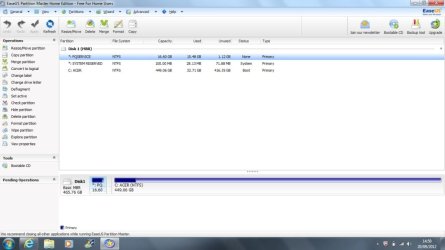
By partitioning I meant, creating more drives, like Drive E: and Drive I: while keeping the Drive C: for windows only.

Why do you need more partitions?
 

My Computer

OS
ME/XP/Vista/Win7
Hi, need little help. How should I partition my hard drive without effecting the recovery partition.
 

Attachments

  • system.jpg
    system.jpg
    89.6 KB · Views: 6

My Computer

OS
windows home premium 64
Back
Top