Solved Partition Hidden/inacessible.

SliKz

New member
Local time
8:13 AM
Messages
26
Partition Hidden/inacessible


First things first: I already now what my problem is: my partition doesn't have a letter assigned.

But my second problem is that I CANT assign a letter to that partition.

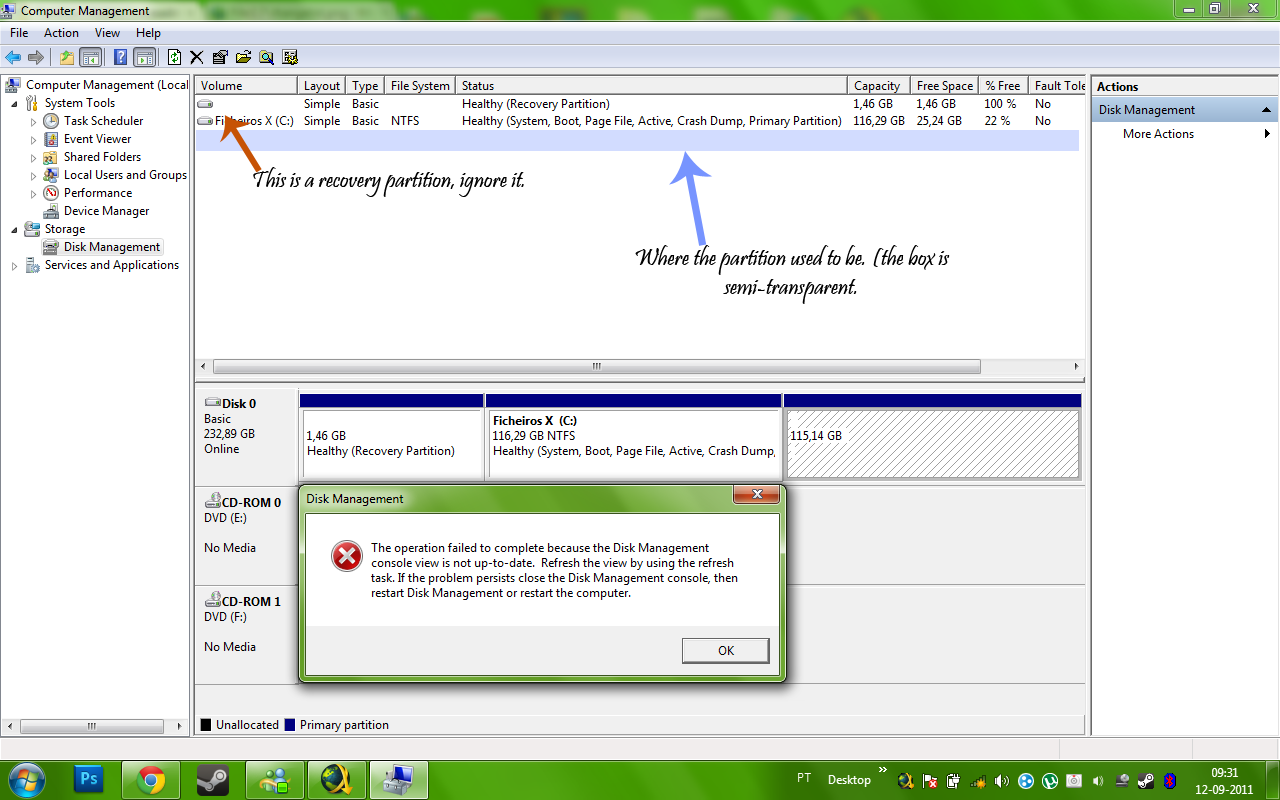
Here is what it looks like when I go to Computer -> Manage -> Disk Management and try to assign a letter to the partition.

Y7Jjr.png


I've tried using EASEUS Partition Manager but it gives me an error.

Please help me, that half of my hard drive is where I keep my HUGE files

I just need help to change that drive letter.

SOLVED!

THE SOLUTION: Deleting the drive with EASEUS partition manager and recreate it. YOU WILL LOOSE ALL YOUR DATA IF YOU DO THIS!!
 
Last edited:

My Computer

Computer type
Laptop
Computer Manufacturer/Model Number
Toshiba Satellite A300
OS
Windows Ultimate x64
CPU
Intel Core 2 Duo P8400
Memory
4GB
Graphics Card(s)
Ati Mobility Radeon HD 3400 Series
Monitor(s) Displays
Generic PnP Monotor
Hard Drives
500gb
Internet Speed
ADSL
Browser
Opera
Other Info
Laptop
Hi Slikz. Did the partition have a drive letter previously? Did you do what the error message said?
You covered the disk section of the Management window, we can't see what is under it.:confused:
 

My Computer

Computer type
PC/Desktop
Computer Manufacturer/Model Number
Home Built Desktop By DataTech
OS
Windows 7 Ultimate X64 SP1
CPU
Intel i5-2550K, Differing ~4.4-4.8GHz No built in GPU
Motherboard
ASUS P8Z68-V PRO/GEN3
Memory
16GB G.Skill Sniper 1866MHz @ 2133MHz 2x8GB
Graphics Card(s)
ASUS GTX650TIB-DC2OC-2GD5, (650TI Boost)
Sound Card
Onboard Realtek 5-1
Monitor(s) Displays
Samsung P2570HD
Screen Resolution
1920x1080
Hard Drives
Samsung 840 Pro 256GB SSD for OS, 500GB Seagate Constellation (Enterprise drive) for Data
PSU
Corsair HX650W
Case
Inwin Dragon Rider
Cooling
Hyper 212 EVO w/two Noctua fans, push-pull, @1300 RPM
Keyboard
E-Z Eyes, bright yellow keys with large characters
Mouse
steelseries SENSEI Laser Pro Gaming
Internet Speed
48-51Mbs Mbs down, 11 Mbs up Xfinity Cable
Antivirus
Norton Internet Security 2013
Browser
IE 10, Opera, Pale Moon if needed
Other Info
4 case fans, LG BluRay-RE, ASUS DVD-RW, Mr. Fusion power supply, 1.21 gigawatts.
Yes it did the drive letter was D:

And the error is that pop-up window.
 

My Computer

Computer type
Laptop
Computer Manufacturer/Model Number
Toshiba Satellite A300
OS
Windows Ultimate x64
CPU
Intel Core 2 Duo P8400
Memory
4GB
Graphics Card(s)
Ati Mobility Radeon HD 3400 Series
Monitor(s) Displays
Generic PnP Monotor
Hard Drives
500gb
Internet Speed
ADSL
Browser
Opera
Other Info
Laptop
Yes I see the error window, it is covering the disk pane, move it out of the way or post your disk management without it to let someone see it. There are instructions in the error, did you follow them?
What did you do just before the drive letter disappeared?

If you have a restore point, go back to before the issues occurred. http://www.sevenforums.com/tutorials/700-system-restore.html#post4405
 

My Computer

Computer type
PC/Desktop
Computer Manufacturer/Model Number
Home Built Desktop By DataTech
OS
Windows 7 Ultimate X64 SP1
CPU
Intel i5-2550K, Differing ~4.4-4.8GHz No built in GPU
Motherboard
ASUS P8Z68-V PRO/GEN3
Memory
16GB G.Skill Sniper 1866MHz @ 2133MHz 2x8GB
Graphics Card(s)
ASUS GTX650TIB-DC2OC-2GD5, (650TI Boost)
Sound Card
Onboard Realtek 5-1
Monitor(s) Displays
Samsung P2570HD
Screen Resolution
1920x1080
Hard Drives
Samsung 840 Pro 256GB SSD for OS, 500GB Seagate Constellation (Enterprise drive) for Data
PSU
Corsair HX650W
Case
Inwin Dragon Rider
Cooling
Hyper 212 EVO w/two Noctua fans, push-pull, @1300 RPM
Keyboard
E-Z Eyes, bright yellow keys with large characters
Mouse
steelseries SENSEI Laser Pro Gaming
Internet Speed
48-51Mbs Mbs down, 11 Mbs up Xfinity Cable
Antivirus
Norton Internet Security 2013
Browser
IE 10, Opera, Pale Moon if needed
Other Info
4 case fans, LG BluRay-RE, ASUS DVD-RW, Mr. Fusion power supply, 1.21 gigawatts.
Uhh, seems that I forgot to put that in the post. I do have a restore point, actually two, but they are too actuall, they wont solve my problem. I used to have bigger ones but they just disappeared. I think it has something to do with the amount of space on the disc I save for the restore points.

The instructions on the error say that I should reboot my computer. I did that several times, didn't work.

About the picture here, I hope this will clarify everithing.

5dT38.png


About what I was doing when the partition disappeared:I was messing with the format tools of my external hard drive. It has 1.5 TB and it was formatted in NTSF(something like that) and it needed to be formatted in WBFS. But for it to be formatted to WBFS it needed to be formatted in FAT. So I created a partition in the External Hard Drive and formatted it to FAT. But then oh-oh error, the blue screen of death and the PC crashed. I rebooted and everithing seemed to be fine, the External HDD was formatted in WBFS and everithing was working fine. Except that my D: drive was missing! :(
 

My Computer

Computer type
Laptop
Computer Manufacturer/Model Number
Toshiba Satellite A300
OS
Windows Ultimate x64
CPU
Intel Core 2 Duo P8400
Memory
4GB
Graphics Card(s)
Ati Mobility Radeon HD 3400 Series
Monitor(s) Displays
Generic PnP Monotor
Hard Drives
500gb
Internet Speed
ADSL
Browser
Opera
Other Info
Laptop
So you did try a restore or you are assuming it won't work?

What drive do you save restore points on? Did you try the Refresh View as in the error message?
I think what happened is you formatted your D:\ partition and lost your data since there are no attributes in it.
 

My Computer

Computer type
PC/Desktop
Computer Manufacturer/Model Number
Home Built Desktop By DataTech
OS
Windows 7 Ultimate X64 SP1
CPU
Intel i5-2550K, Differing ~4.4-4.8GHz No built in GPU
Motherboard
ASUS P8Z68-V PRO/GEN3
Memory
16GB G.Skill Sniper 1866MHz @ 2133MHz 2x8GB
Graphics Card(s)
ASUS GTX650TIB-DC2OC-2GD5, (650TI Boost)
Sound Card
Onboard Realtek 5-1
Monitor(s) Displays
Samsung P2570HD
Screen Resolution
1920x1080
Hard Drives
Samsung 840 Pro 256GB SSD for OS, 500GB Seagate Constellation (Enterprise drive) for Data
PSU
Corsair HX650W
Case
Inwin Dragon Rider
Cooling
Hyper 212 EVO w/two Noctua fans, push-pull, @1300 RPM
Keyboard
E-Z Eyes, bright yellow keys with large characters
Mouse
steelseries SENSEI Laser Pro Gaming
Internet Speed
48-51Mbs Mbs down, 11 Mbs up Xfinity Cable
Antivirus
Norton Internet Security 2013
Browser
IE 10, Opera, Pale Moon if needed
Other Info
4 case fans, LG BluRay-RE, ASUS DVD-RW, Mr. Fusion power supply, 1.21 gigawatts.
100 percent free space
 

My Computer

Computer type
PC/Desktop
Computer Manufacturer/Model Number
Home made Desktop
OS
Windows 10 Pro. 64/ version 1709 Windows 7 Pro/64
CPU
Intel i7-6800K @ 4.3
Motherboard
ASUS X-99 Deluxe II
Memory
Corsair Platinum 16 gig @2400
Graphics Card(s)
EVGA GTX 1070 OC
Monitor(s) Displays
Asus 27" LED LCD/VE278Q
Screen Resolution
1920-1080 or 1280-720 HDMI
Hard Drives
INTEL SSD 730-240 Gb Sata 3.0/
PSU
EVGA Platium 1200W
Case
Phanteks Luxe Tempered Glass 8 fans/ one radiator
Cooling
XSPC/ Water Cooled CPU
Keyboard
Das 4 Professional
Mouse
Logitech M705/MX Anywhere 2-S
Internet Speed
100 mbits
Antivirus
Microsoft Security Essentials/ Malwarebytes Premium 3.0/ SAS
Browser
I.E. 11 default/Firefox/ ISP Time Warner Cable/Spectrum
Other Info
LG BluRay Burner/
Sound system-KLipsch-THX/
Icy Dock ssd Hot Swap bays.
It looks like when you were trying to format your external drive to FAT, your D: drive partition is corrupted and hence you lost the drive letter also.

Now you need to be careful and not play with that partition, otherwise you will loose everything in that partition. Don't use any partition managers on this partition.

Download Easeus Partition Recovery and Easeus Data Recovery Wizard from Easeus website (or any similar recovery tools), and use these tools to recover maximum data from this corrupted partition and copy it to an external HDD. If you are not confident try to take help of an expert near you.

Once you recover as much data as possible, you need to remove that partition and recreate a new partition, format it to NTFS and copy back the recovered data to it.
 

My Computer

Computer Manufacturer/Model Number
Toshiba Satellite P775-S7232
OS
MS Windows 7 Ultimate 64-bit SP1
CPU
i5-2410M 2.3GHz (2.9GHz Turbo-Boost) Sandy Bridge 32nm
Motherboard
Toshiba PHRAA ver. PSBY1U-00F003
Memory
4GB+4GB Samsung DDR3 PC3-10700 (1333 MHz)
Graphics Card(s)
Video Intel(R) HD Graphics Family, 1696MB available memory
Sound Card
Realtek High Definition Audio version=6.0.1.6323
Monitor(s) Displays
17.3 " Trubrite TFT LCD, LED Backlit
Screen Resolution
1600x900 32 bit, Native support for 720P content
Hard Drives
TOSHIBA MK6476GSXN
580.614 [GB] partitioned C: 80GB and D: 500GB with hidden recovery partitons.

Spare bay for 2nd HDD but no SATA connector :-(
PSU
Toshiba AC/DC Adapter
Case
Notebook
Cooling
Built-in Fan
Keyboard
Premium Raised Tile keyboard
Mouse
Logitech M215 wireless mouse
Internet Speed
Not fast enough
Other Info
Built-in Harman Kardon speakers with Dolby Advanced Audio, Waves MaxxAudio® 3. HDMI, 1xUSB3+3xUSB2 ports, WebCam, Battery life 4hrs 11mins, 4GB Readyboost SDHC card, WD My Book Essential Ext HDDs 2 TB, 2x1TB, My Passport SE 1TB and WDTV 1st Gen for Multimedia playing on a Sony Wega 32" LCD.
Recent addition to my toys are Asus Transformer Pad TF300T with 32GB onboard sd card + 32GB microsd card.
The OP has already tried Easeus
 

My Computer

Computer type
PC/Desktop
Computer Manufacturer/Model Number
Home Built Desktop By DataTech
OS
Windows 7 Ultimate X64 SP1
CPU
Intel i5-2550K, Differing ~4.4-4.8GHz No built in GPU
Motherboard
ASUS P8Z68-V PRO/GEN3
Memory
16GB G.Skill Sniper 1866MHz @ 2133MHz 2x8GB
Graphics Card(s)
ASUS GTX650TIB-DC2OC-2GD5, (650TI Boost)
Sound Card
Onboard Realtek 5-1
Monitor(s) Displays
Samsung P2570HD
Screen Resolution
1920x1080
Hard Drives
Samsung 840 Pro 256GB SSD for OS, 500GB Seagate Constellation (Enterprise drive) for Data
PSU
Corsair HX650W
Case
Inwin Dragon Rider
Cooling
Hyper 212 EVO w/two Noctua fans, push-pull, @1300 RPM
Keyboard
E-Z Eyes, bright yellow keys with large characters
Mouse
steelseries SENSEI Laser Pro Gaming
Internet Speed
48-51Mbs Mbs down, 11 Mbs up Xfinity Cable
Antivirus
Norton Internet Security 2013
Browser
IE 10, Opera, Pale Moon if needed
Other Info
4 case fans, LG BluRay-RE, ASUS DVD-RW, Mr. Fusion power supply, 1.21 gigawatts.
I've tried system restore, it just isnt old enough
 

My Computer

Computer type
Laptop
Computer Manufacturer/Model Number
Toshiba Satellite A300
OS
Windows Ultimate x64
CPU
Intel Core 2 Duo P8400
Memory
4GB
Graphics Card(s)
Ati Mobility Radeon HD 3400 Series
Monitor(s) Displays
Generic PnP Monotor
Hard Drives
500gb
Internet Speed
ADSL
Browser
Opera
Other Info
Laptop
Update: Good news!! The drive is back!

However there are bad news: I lost all the data! But I can redownload it again, no big deal.

I deleted the partition and recreated it.
 

My Computer

Computer type
Laptop
Computer Manufacturer/Model Number
Toshiba Satellite A300
OS
Windows Ultimate x64
CPU
Intel Core 2 Duo P8400
Memory
4GB
Graphics Card(s)
Ati Mobility Radeon HD 3400 Series
Monitor(s) Displays
Generic PnP Monotor
Hard Drives
500gb
Internet Speed
ADSL
Browser
Opera
Other Info
Laptop
SliKz has tried Easeus Partition Manager which is used to create, manage, delete partitions. But this program can not recover the lost partitions.

Easeus Partition Recovery is a free partition recovery program which is different from Easeus Partition Manager. This program is used to recover lost or deleted partitions. It can solve the partition loss problems including partition deleted by accident, partitions lost due to virus attack, partitioning error or any other problems under Windows both 32 bit and 64 bit operating systems. Moreover, EASEUS Partition Recovery can recover lost and deleted partitions on MBR (Master Boot Record) basic disk from IDE disk, ATA disk, SATA disk, and SCSI disk. It works with FAT12, FAT16, FAT32, NTFS, NTFS5, EXT2 and EXT3 file system.

For the sake of this post:
----------------------------
I have made a test on a windows 7 virtual machine with 2x20GB partitions on VMWare Workstation. Both partitions have test files.

I have formatted the first partition and before the format is completed, I have rebooted the system which made the partition inaccesible. I have tried the Easeus Partition Recovery program on this partition and it has failed to recover the partition and also the test files in the partition.

Now in the second partition, I have deleted the partition which made the space into unallocated space. I have again tried the Easeus Partition Recovery program on the unallocated space and this time the program has successfully recovered the partition with the test files intact.

So there is no harm in trying the Easeus Partition Recovery program on the damaged partition. If SliKz is lucky, he may recover all his data.

Oops! I have posted this message without seeing SliKz's latest post. Any way I have posted my findings which may be used in future by others with similar problems....
 
Last edited:

My Computer

Computer Manufacturer/Model Number
Toshiba Satellite P775-S7232
OS
MS Windows 7 Ultimate 64-bit SP1
CPU
i5-2410M 2.3GHz (2.9GHz Turbo-Boost) Sandy Bridge 32nm
Motherboard
Toshiba PHRAA ver. PSBY1U-00F003
Memory
4GB+4GB Samsung DDR3 PC3-10700 (1333 MHz)
Graphics Card(s)
Video Intel(R) HD Graphics Family, 1696MB available memory
Sound Card
Realtek High Definition Audio version=6.0.1.6323
Monitor(s) Displays
17.3 " Trubrite TFT LCD, LED Backlit
Screen Resolution
1600x900 32 bit, Native support for 720P content
Hard Drives
TOSHIBA MK6476GSXN
580.614 [GB] partitioned C: 80GB and D: 500GB with hidden recovery partitons.

Spare bay for 2nd HDD but no SATA connector :-(
PSU
Toshiba AC/DC Adapter
Case
Notebook
Cooling
Built-in Fan
Keyboard
Premium Raised Tile keyboard
Mouse
Logitech M215 wireless mouse
Internet Speed
Not fast enough
Other Info
Built-in Harman Kardon speakers with Dolby Advanced Audio, Waves MaxxAudio® 3. HDMI, 1xUSB3+3xUSB2 ports, WebCam, Battery life 4hrs 11mins, 4GB Readyboost SDHC card, WD My Book Essential Ext HDDs 2 TB, 2x1TB, My Passport SE 1TB and WDTV 1st Gen for Multimedia playing on a Sony Wega 32" LCD.
Recent addition to my toys are Asus Transformer Pad TF300T with 32GB onboard sd card + 32GB microsd card.
Good news SliKz, but you could still try rraod's suggestion to see if your files are recoverable. Can't hurt, and you can access the partition now.
 

My Computer

Computer type
PC/Desktop
Computer Manufacturer/Model Number
Home Built Desktop By DataTech
OS
Windows 7 Ultimate X64 SP1
CPU
Intel i5-2550K, Differing ~4.4-4.8GHz No built in GPU
Motherboard
ASUS P8Z68-V PRO/GEN3
Memory
16GB G.Skill Sniper 1866MHz @ 2133MHz 2x8GB
Graphics Card(s)
ASUS GTX650TIB-DC2OC-2GD5, (650TI Boost)
Sound Card
Onboard Realtek 5-1
Monitor(s) Displays
Samsung P2570HD
Screen Resolution
1920x1080
Hard Drives
Samsung 840 Pro 256GB SSD for OS, 500GB Seagate Constellation (Enterprise drive) for Data
PSU
Corsair HX650W
Case
Inwin Dragon Rider
Cooling
Hyper 212 EVO w/two Noctua fans, push-pull, @1300 RPM
Keyboard
E-Z Eyes, bright yellow keys with large characters
Mouse
steelseries SENSEI Laser Pro Gaming
Internet Speed
48-51Mbs Mbs down, 11 Mbs up Xfinity Cable
Antivirus
Norton Internet Security 2013
Browser
IE 10, Opera, Pale Moon if needed
Other Info
4 case fans, LG BluRay-RE, ASUS DVD-RW, Mr. Fusion power supply, 1.21 gigawatts.
Back
Top