Partition - Mark as Active

How to Mark a Partition as Active in Windows 7

Contents


   Information
Marking a partition as active on a basic disk means that the computer will use the loader (an operating system tool) on that partition to start the operating system.


At various times the need to mark a partition as active arises. This will show you two ways of doing so.
   Note

  • You must be logged on as an administrator to mark a partition as active.
  • You can't make a logical drive or an extended partition active. Only a primary partition can be made active.
  • There can be only one active partition per physical hard disk.
  • If you have multiple hard disks installed on your computer, it's possible for each hard disk to have a partition set as active. However, the active partition on the first hard disk that your computer's BIOS detects is the one that will start the computer.
   Warning
Do not mark a partition as active if it doesn't contain the loader for an operating system. Doing so will make your computer unbootable.

If you disable the Disk Defragmenter service, then you will get the error below when you try to do anything in Disk Management. If you get this error, then make sure that the Disk Defragmenter service is set to only Manual.
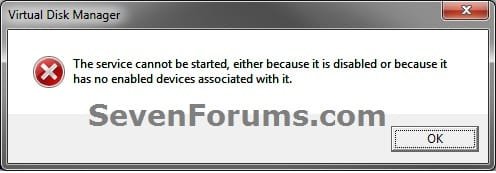
Error.jpg


METHOD ONE

Mark as Active in Disk Management

1. Type diskmgmt.msc into the start menu, and press enter.

2. Right click on the partition you want to mark as active, and select Mark Partition as Active.
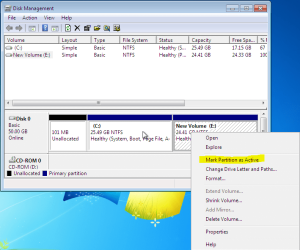
Capture.PNG
That's it!

If you can't boot into Windows, use method 2.


METHOD TWO

Mark as Active in Command Prompt

1. Boot into your Windows 7 installation or repair disc.

   Tip
If you don't have a Windows 7 installation DVD, you can Create a Repair Disc.


2. When you get to the language screen, press Shift+F10.


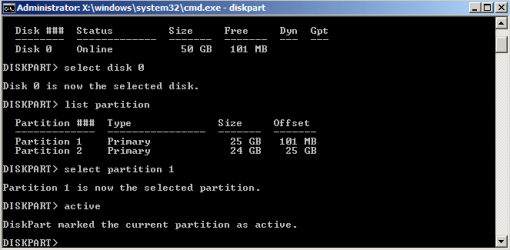
3. Enter diskpart, then list disk after diskpart is loaded.


4. Enter select disk [number of the disk the partition is on].


5. Enter list partition, followed by select partition [partition number].


6. Type active.Capture1.PNG
There you go! You can now close the command prompt and reboot your computer.
   Tip
You can also use this method from within Windows. Type cmd into the start menu and press enter.


METHOD THREE

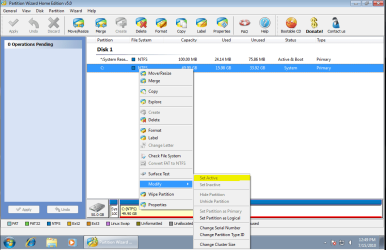
Mark as Active in Partition Wizard

1. Download a copy of the Partition Wizard Bootable CD.

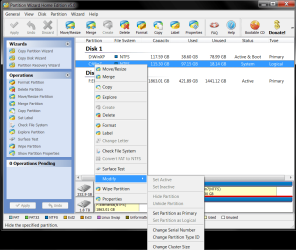
2. Boot it up, right-click on the partition, and select Modify>Set Active.
PWIZ.PNG


Last edited by a moderator:
Thanks, unfortunately it did not work in my case and in fact MiniTools Partition Wizard is what caused the boot problem in the first place, an installed copy never succeeded in a reboot to copy the partition. FWIW a Paragon rescue disk saw the partition as invalid, although GParted identified it as NTFS.
 

My Computer

OS
Home Premium 64bit
Thanks, unfortunately it did not work in my case and in fact MiniTools Partition Wizard is what caused the boot problem in the first place, an installed copy never succeeded in a reboot to copy the partition. FWIW a Paragon rescue disk saw the partition as invalid, although GParted identified it as NTFS.
Doesn't really explain enough of the background to your problem.
I've found the miniTools (installed) version fine for smaller jobs eg. setting partitions active etc. But for anything substantial, particularly partition moves, you should use the Bootable version, with the Windows OS out of the way. Apart from much greater flexibility, the bootable PW has proven more accurate at times in reporting accurate partition information compared with Windows Disk Management.
 

My Computer

Computer type
PC/Desktop
Computer Manufacturer/Model Number
Own build
OS
Windows 7x64 Home Premium SP1
CPU
Intel i7 2600k
Motherboard
ASUS P8Z68 Deluxe
Memory
G.Skill Ripjaws (DDR3-1600) 2x4GB
Graphics Card(s)
Nvidia GeForce GTS 450; Intel HD Graphics 3000(GT2+)
Monitor(s) Displays
Dell Ultrasharp IPS panel U2311H, Samsung SyncMaster P2350
Screen Resolution
1920x1080
Hard Drives
Samsung 850 Pro SSD 256GB, Samsung SSD 840 120GB, Seagates 1TB Barracuda ST31000528AS x2
PSU
Seasonic M12II 520W
Case
Lian Li Lancool PC-K60
Cooling
Case: 1x120mm, 3x140mm CPU: Hyper 212+
Keyboard
Logitech MK520 (wireless)
Mouse
Logitech MK520
Internet Speed
6-7 Mbps
Antivirus
Norton Security Premium, Malwarebytes on 2 (MSE on 3rd PC)
Browser
FireFox
Other Info
Audio: Logitech Z523 2.1
Thanks, unfortunately it did not work in my case and in fact MiniTools Partition Wizard is what caused the boot problem in the first place, an installed copy never succeeded in a reboot to copy the partition. FWIW a Paragon rescue disk saw the partition as invalid, although GParted identified it as NTFS.
Doesn't really explain enough of the background to your problem.
I've found the miniTools (installed) version fine for smaller jobs eg. setting partitions active etc. But for anything substantial, particularly partition moves, you should use the Bootable version, with the Windows OS out of the way. Apart from much greater flexibility, the bootable PW has proven more accurate at times in reporting accurate partition information compared with Windows Disk Management.

Well my particular problem is OT to this thread anyway, and there is always more info whether relevant or not.

What you said applies to everything anyway, and yet I've used an installed copy of similar programs if not PW itself to copy partition fine for XP. What I don't understand is why a simple reboot for partition copy has created a situation where the straight forward boot fixes of different utilities will not work.
 

My Computer

OS
Home Premium 64bit
My friend has Ubuntu on a seperate Harddrive and wants to uninstall but doesn't have the Internet or a Startup repair Disk so He was wondering that if he marks his Windows Drive as Active will it get rid of the GRUB Bootloader?

Josh
 

My Computer

Computer type
PC/Desktop
Computer Manufacturer/Model Number
Custom Built
OS
Windows 7 Professional x64 SP1 ; Windows Server 2012 R2 Standard
CPU
Intel Core i5 2400 @ 3.10GHz
Motherboard
Foxconn H67MP-S/-V/H67MP
Memory
8.0GB DDR3 @ 665MHz (2GBx4)
Graphics Card(s)
AMD Radeon HD 6870
Sound Card
Realtek High Definition Audio
Monitor(s) Displays
AOC 2243W & SMB1930NW
Screen Resolution
1440x900 & 1920x1080
Hard Drives
977GB Seagate ST31000524AS ATA Drive (SATA)
250GB WD iSCSI attached Drive
PSU
750W Gaming PSU
Case
Novatech Night
Cooling
Fan
Keyboard
Dell Standard PS/2 Keyboard
Mouse
R.A.T 07 Gaming Mouse
Internet Speed
Download: 10 Mbps Ping: 30ms Upload: 0.81 Mbps
Browser
Google Chrome
Other Info
Optiarc DVD RW AD-5260S ATA Device
Thanks, unfortunately it did not work in my case and in fact MiniTools Partition Wizard is what caused the boot problem in the first place, an installed copy never succeeded in a reboot to copy the partition. FWIW a Paragon rescue disk saw the partition as invalid, although GParted identified it as NTFS.
Doesn't really explain enough of the background to your problem.
I've found the miniTools (installed) version fine for smaller jobs eg. setting partitions active etc. But for anything substantial, particularly partition moves, you should use the Bootable version, with the Windows OS out of the way. Apart from much greater flexibility, the bootable PW has proven more accurate at times in reporting accurate partition information compared with Windows Disk Management.

What you said applies to everything anyway, and yet I've used an installed copy of similar programs if not PW itself to copy partition fine for XP.
My comments apply to everything :confused:
If you don't want to take the advice re bootable PW don't take it.

If other installed programs work then use them.

This is a Windows 7 forum not an XP forum.
 

My Computer

Computer type
PC/Desktop
Computer Manufacturer/Model Number
Own build
OS
Windows 7x64 Home Premium SP1
CPU
Intel i7 2600k
Motherboard
ASUS P8Z68 Deluxe
Memory
G.Skill Ripjaws (DDR3-1600) 2x4GB
Graphics Card(s)
Nvidia GeForce GTS 450; Intel HD Graphics 3000(GT2+)
Monitor(s) Displays
Dell Ultrasharp IPS panel U2311H, Samsung SyncMaster P2350
Screen Resolution
1920x1080
Hard Drives
Samsung 850 Pro SSD 256GB, Samsung SSD 840 120GB, Seagates 1TB Barracuda ST31000528AS x2
PSU
Seasonic M12II 520W
Case
Lian Li Lancool PC-K60
Cooling
Case: 1x120mm, 3x140mm CPU: Hyper 212+
Keyboard
Logitech MK520 (wireless)
Mouse
Logitech MK520
Internet Speed
6-7 Mbps
Antivirus
Norton Security Premium, Malwarebytes on 2 (MSE on 3rd PC)
Browser
FireFox
Other Info
Audio: Logitech Z523 2.1
Hi Josh,

I'm not sure where the GRUB is installed to. If it's on the same hard drive Ubuntu is installed on, you should be able to just disconnect the drive, mark the Windows partition as active (if it's not already so), and run a startup repair. It's possible a startup repair will be unnecessary, give it a try!

If simply marking the partition as active doesn't do the trick, a repair disc can easily be created. See both methods in this guide: http://www.sevenforums.com/tutorials/2083-system-repair-disc-create.html
 

My Computer

Computer Manufacturer/Model Number
Custom
OS
Windows 7 Professional x64
CPU
Intel i7 2600K OC'd @ 4620 MHz
Motherboard
Asus P8Z68-V Pro
Memory
16GB GSkill Sniper 2133 Mhz (4x4GB)
Graphics Card(s)
EVGA GeForce GTX 480 SuperClocked+
Sound Card
Realtek High Definition Audio
Monitor(s) Displays
2x Acer S273HLbmii 27"
Screen Resolution
2 x 1920x1080
Hard Drives
64GB Crucial M4 SSD

Storage: Hitachi 1TB 5400RPM, Samsung 1.5TB 5400RPM
PSU
Corsair HW Series 750w (modular)
Case
Cooler Master HAF 932 Advanced Blue Edition
Cooling
CM Hyper 212+ CPU cooler, 3x 230mm + 1x 140mm case fans
Keyboard
Logitech MK320 (wireless)
Mouse
Logitech MK320 (wireless)
Internet Speed
30 Mb/s : 2 Mb/s
Method not working.

Having severe difficulties getting any of the above (and other related) methods to work. A quick run-down of my partitions:

Hitachi is partitioned in two; C: houses Win7 and D: houses my old installation of WinXP.
WinXP is listed as System,Active (and Primary Partition); while Win7 is listed as Boot (and Logical).

Image2.png

When I come to try step one I immediately hit a hurdle; I have absolutely no option to set the partition as active. It's not greyed out, it simply doesn't even exist in the right-click context menu.


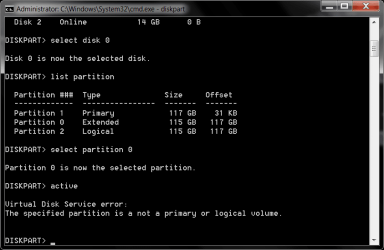
When I run diskpart and navigate down to the Hitachi, I am met with this.

Image1.png

Partition 1 is Windows XP
Partition 0 is Windows 7
Partition 2 is .... Wait- What? Three partitions?

Trying to set 0 as active nets me the message "Virtual Disk Service error: The specified partition is not a primary or logical volume." Ok. Balls.

Trying to set 2 as active brings further calamity: "The specified partition type is not valid for this operation." Well screw you then, computer.


The startup repair method was similarly unsuccessful, presumably because I had yet to flick the active status over to the Windows 7 partition.


I would love to say that I realise I'm doing something wrong, but being as I can't even perform step one I would hesitate to assume such. Perhaps someone on here can highlight what is causing my computer to be a complete hassle.

Thanks,
- Oxy
 

My Computer

Computer Manufacturer/Model Number
Custom
OS
Windows 7 Ultimate 64-bit
CPU
AMD Phenom II X4 955 Black OC'ed 4.0GHz
Motherboard
Asus M5A88-V EVO
Memory
8GB Mushkin Enhanced Silverline (2x4GB) 1333
Graphics Card(s)
XFX Radeon HD6870 1024MB GDDR5 OC'ed 945MHz; 1151MHz
Sound Card
Soundblaster X-Fi Xtreme PCIe
Monitor(s) Displays
32" Hannspree SE32LMNB
Screen Resolution
1920 x 1080
Hard Drives
250GB Hitachi Deskstar (OS); 2TB Western Digital Elements
PSU
650W XFX XXX Edition 80PLUS Bronze Modular
Case
Cougar 6GR1 Evolution
Cooling
Corsair H60 p/p 120mm; Zalman VF3000A; x4 120mm; x1 140mm
Keyboard
Logitech G510
Mouse
CM Storm Sentinel Advance Zero-G
Internet Speed
Not fast enough :I
Other Info
No matter what your specs, my PC is better.
Hello Oxy,

Using Partition Wizard, right-click on your C partition, and select Modify > Set Partition as Primary. You should then be able to mark it as Active. While you have Partition Wizard up and running, you might find it fastest just to use that.

Good luck, post back any questions you may have!
 

My Computer

Computer Manufacturer/Model Number
Custom
OS
Windows 7 Professional x64
CPU
Intel i7 2600K OC'd @ 4620 MHz
Motherboard
Asus P8Z68-V Pro
Memory
16GB GSkill Sniper 2133 Mhz (4x4GB)
Graphics Card(s)
EVGA GeForce GTX 480 SuperClocked+
Sound Card
Realtek High Definition Audio
Monitor(s) Displays
2x Acer S273HLbmii 27"
Screen Resolution
2 x 1920x1080
Hard Drives
64GB Crucial M4 SSD

Storage: Hitachi 1TB 5400RPM, Samsung 1.5TB 5400RPM
PSU
Corsair HW Series 750w (modular)
Case
Cooler Master HAF 932 Advanced Blue Edition
Cooling
CM Hyper 212+ CPU cooler, 3x 230mm + 1x 140mm case fans
Keyboard
Logitech MK320 (wireless)
Mouse
Logitech MK320 (wireless)
Internet Speed
30 Mb/s : 2 Mb/s
Unfortunately this doesn't work for me. I get the good ol' greyed out problem here.

Image3.png

Brief question because I don't have time to do it now (I'm already late for work! :D )
If I were to set the partition to primary and reboot (that's the part I don't have time for), would it then allow me to make the partition active once Windows restarted?
 

My Computer

Computer Manufacturer/Model Number
Custom
OS
Windows 7 Ultimate 64-bit
CPU
AMD Phenom II X4 955 Black OC'ed 4.0GHz
Motherboard
Asus M5A88-V EVO
Memory
8GB Mushkin Enhanced Silverline (2x4GB) 1333
Graphics Card(s)
XFX Radeon HD6870 1024MB GDDR5 OC'ed 945MHz; 1151MHz
Sound Card
Soundblaster X-Fi Xtreme PCIe
Monitor(s) Displays
32" Hannspree SE32LMNB
Screen Resolution
1920 x 1080
Hard Drives
250GB Hitachi Deskstar (OS); 2TB Western Digital Elements
PSU
650W XFX XXX Edition 80PLUS Bronze Modular
Case
Cougar 6GR1 Evolution
Cooling
Corsair H60 p/p 120mm; Zalman VF3000A; x4 120mm; x1 140mm
Keyboard
Logitech G510
Mouse
CM Storm Sentinel Advance Zero-G
Internet Speed
Not fast enough :I
Other Info
No matter what your specs, my PC is better.
Yes, you should be able to mark the partition as Active after you set it to primary. The one thing I am unclear on is whether or not you'll be able to do that to the main boot drive from Windows. Someone who does more of this kind of work than I do should be able to tell you, but all I can say is if it doesn't let you, boot into the recovery console and run the Diskpart commands.
 

My Computer

Computer Manufacturer/Model Number
Custom
OS
Windows 7 Professional x64
CPU
Intel i7 2600K OC'd @ 4620 MHz
Motherboard
Asus P8Z68-V Pro
Memory
16GB GSkill Sniper 2133 Mhz (4x4GB)
Graphics Card(s)
EVGA GeForce GTX 480 SuperClocked+
Sound Card
Realtek High Definition Audio
Monitor(s) Displays
2x Acer S273HLbmii 27"
Screen Resolution
2 x 1920x1080
Hard Drives
64GB Crucial M4 SSD

Storage: Hitachi 1TB 5400RPM, Samsung 1.5TB 5400RPM
PSU
Corsair HW Series 750w (modular)
Case
Cooler Master HAF 932 Advanced Blue Edition
Cooling
CM Hyper 212+ CPU cooler, 3x 230mm + 1x 140mm case fans
Keyboard
Logitech MK320 (wireless)
Mouse
Logitech MK320 (wireless)
Internet Speed
30 Mb/s : 2 Mb/s
I have now successfully rendered the Win7 partition as primary and the WinXP partition as Inactive. However, it still won't let me set the Win7 partition to Active, and I'm a little wary of rebooting to see if it will allow this as I have a feeling the machine will become unbootable once Windows shuts down.

It's so typical of my machine, of all the computers in the world, to throw up this kind of problem where so many others have managed to perform the exact same operation without flaw.
 

My Computer

Computer Manufacturer/Model Number
Custom
OS
Windows 7 Ultimate 64-bit
CPU
AMD Phenom II X4 955 Black OC'ed 4.0GHz
Motherboard
Asus M5A88-V EVO
Memory
8GB Mushkin Enhanced Silverline (2x4GB) 1333
Graphics Card(s)
XFX Radeon HD6870 1024MB GDDR5 OC'ed 945MHz; 1151MHz
Sound Card
Soundblaster X-Fi Xtreme PCIe
Monitor(s) Displays
32" Hannspree SE32LMNB
Screen Resolution
1920 x 1080
Hard Drives
250GB Hitachi Deskstar (OS); 2TB Western Digital Elements
PSU
650W XFX XXX Edition 80PLUS Bronze Modular
Case
Cougar 6GR1 Evolution
Cooling
Corsair H60 p/p 120mm; Zalman VF3000A; x4 120mm; x1 140mm
Keyboard
Logitech G510
Mouse
CM Storm Sentinel Advance Zero-G
Internet Speed
Not fast enough :I
Other Info
No matter what your specs, my PC is better.
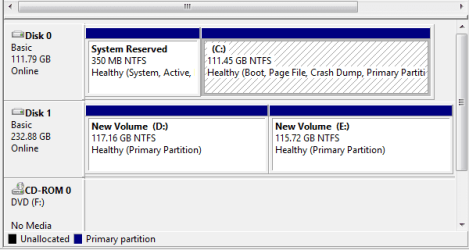
Doesn't Windows 7 require the 100MB system reserved partition in order to become the System, Active Primary Partition? I don't see it there in the disk management for C drive.
 

Attachments

  • active partitions.PNG
    active partitions.PNG
    17.3 KB · Views: 14,902

My Computer

Computer type
PC/Desktop
Computer Manufacturer/Model Number
Home built
OS
Windows 7 Ult, Windows 8.1 Pro,
CPU
Q9650-4.275GHz, E8600 4.5GHz, E6750-3.8GHz
Motherboard
Evga 780i FTW
Memory
G.Skill PC2 9600 1200Mhz 5 5 5 15 2T
Graphics Card(s)
GTX480
Sound Card
Asus Xonar D2
Monitor(s) Displays
HannsG
Screen Resolution
1680X1050
Hard Drives
GSkill Phoenix Pro 120GB SSD
PSU
ThermalTake Toughpower 1000Watt modular
Case
ThermalTake XaserV
Cooling
Xigmatek S1283
Keyboard
Logitech G15
Mouse
Logitech G9
Internet Speed
T1
Isn't it that partition called 'System Reserved'?

I also have some astonishing news. After screwing up my boot manager (I became impatient and attempted two steps in one boot), I actually succeeded in rendering Win7 as primary and active, and WinXP as logical and inactive, -all using pwhe-, then used the startup recovery three times technique which repaired the boot files to the Win7 partition. I've now wiped XP (goodbye, old friend...) and am in the midst of merging partitions using pwhe.

Currently sitting twiddling thumbs on my Android tablet waiting for the next thing to go wrong. And oh look, the Google+ app keeps crashing.
 

My Computer

Computer Manufacturer/Model Number
Custom
OS
Windows 7 Ultimate 64-bit
CPU
AMD Phenom II X4 955 Black OC'ed 4.0GHz
Motherboard
Asus M5A88-V EVO
Memory
8GB Mushkin Enhanced Silverline (2x4GB) 1333
Graphics Card(s)
XFX Radeon HD6870 1024MB GDDR5 OC'ed 945MHz; 1151MHz
Sound Card
Soundblaster X-Fi Xtreme PCIe
Monitor(s) Displays
32" Hannspree SE32LMNB
Screen Resolution
1920 x 1080
Hard Drives
250GB Hitachi Deskstar (OS); 2TB Western Digital Elements
PSU
650W XFX XXX Edition 80PLUS Bronze Modular
Case
Cougar 6GR1 Evolution
Cooling
Corsair H60 p/p 120mm; Zalman VF3000A; x4 120mm; x1 140mm
Keyboard
Logitech G510
Mouse
CM Storm Sentinel Advance Zero-G
Internet Speed
Not fast enough :I
Other Info
No matter what your specs, my PC is better.
Isn't it that partition called 'System Reserved'?

I also have some astonishing news. After screwing up my boot manager (I became impatient and attempted two steps in one boot), I actually succeeded in rendering Win7 as primary and active, and WinXP as logical and inactive, -all using pwhe-, then used the startup recovery three times technique which repaired the boot files to the Win7 partition. I've now wiped XP (goodbye, old friend...) and am in the midst of merging partitions using pwhe.

Currently sitting twiddling thumbs on my Android tablet waiting for the next thing to go wrong. And oh look, the Google+ app keeps crashing.


Yes it says system reserved and it also says Active, where the actual C drive doesn't say Active and only says Primary Partition. Can you tell if pwhe- added the system reserved partition?

I'm wondering why Windows wouldn't let you do that, hmmm.

As you found out, you can usually fix the boot manager, you can also fix it using the command prompt. bootrec /fixboot and bootrec /fixmbr.

http://www.sevenforums.com/tutorials/104341-bootmgr-missing-fix.html

Saying goodbye to XP was a welcome sight for me but that was years ago. :)
 

My Computer

Computer type
PC/Desktop
Computer Manufacturer/Model Number
Home built
OS
Windows 7 Ult, Windows 8.1 Pro,
CPU
Q9650-4.275GHz, E8600 4.5GHz, E6750-3.8GHz
Motherboard
Evga 780i FTW
Memory
G.Skill PC2 9600 1200Mhz 5 5 5 15 2T
Graphics Card(s)
GTX480
Sound Card
Asus Xonar D2
Monitor(s) Displays
HannsG
Screen Resolution
1680X1050
Hard Drives
GSkill Phoenix Pro 120GB SSD
PSU
ThermalTake Toughpower 1000Watt modular
Case
ThermalTake XaserV
Cooling
Xigmatek S1283
Keyboard
Logitech G15
Mouse
Logitech G9
Internet Speed
T1
True enough your actual Win partition should be System Active, as far as I understand it, but I'd cut my losses while I was ahead and just be thankful it's working :D

I'm genuinely sorry to have gotten rid of XP but I was hanging on to it out of sentimentality . That and because my friend won't make the leap' so when we want to lan it up on Sins of a Solar Empire I had to boot into XP. Well no more!
 

My Computer

Computer Manufacturer/Model Number
Custom
OS
Windows 7 Ultimate 64-bit
CPU
AMD Phenom II X4 955 Black OC'ed 4.0GHz
Motherboard
Asus M5A88-V EVO
Memory
8GB Mushkin Enhanced Silverline (2x4GB) 1333
Graphics Card(s)
XFX Radeon HD6870 1024MB GDDR5 OC'ed 945MHz; 1151MHz
Sound Card
Soundblaster X-Fi Xtreme PCIe
Monitor(s) Displays
32" Hannspree SE32LMNB
Screen Resolution
1920 x 1080
Hard Drives
250GB Hitachi Deskstar (OS); 2TB Western Digital Elements
PSU
650W XFX XXX Edition 80PLUS Bronze Modular
Case
Cougar 6GR1 Evolution
Cooling
Corsair H60 p/p 120mm; Zalman VF3000A; x4 120mm; x1 140mm
Keyboard
Logitech G510
Mouse
CM Storm Sentinel Advance Zero-G
Internet Speed
Not fast enough :I
Other Info
No matter what your specs, my PC is better.
"Do not mark a partition as active if it doesn't contain the loader for an operating system. Doing so will make your computer unbootable."

How do I know where the boot loader is located at?

Thanks
 

My Computer

OS
Windows 7 Professional 64bit
Hello herbun,

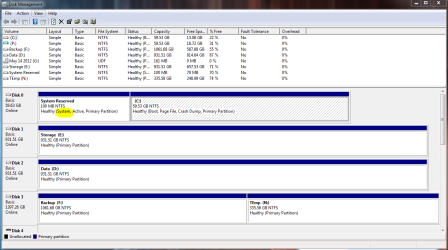
I'm sure there are other ways, but open Disk Management ("diskmgmt.msc" into the start menu), and look for the partition labled "System". That's your target. ;)

BTW - the warning up there is valid in most cases, yet there may be times where it is necessary to mark a non-System partition as Active, namely when you're about to create a new boot loader on another partition. Use with care.

Capture.PNG
 

My Computer

Computer Manufacturer/Model Number
Custom
OS
Windows 7 Professional x64
CPU
Intel i7 2600K OC'd @ 4620 MHz
Motherboard
Asus P8Z68-V Pro
Memory
16GB GSkill Sniper 2133 Mhz (4x4GB)
Graphics Card(s)
EVGA GeForce GTX 480 SuperClocked+
Sound Card
Realtek High Definition Audio
Monitor(s) Displays
2x Acer S273HLbmii 27"
Screen Resolution
2 x 1920x1080
Hard Drives
64GB Crucial M4 SSD

Storage: Hitachi 1TB 5400RPM, Samsung 1.5TB 5400RPM
PSU
Corsair HW Series 750w (modular)
Case
Cooler Master HAF 932 Advanced Blue Edition
Cooling
CM Hyper 212+ CPU cooler, 3x 230mm + 1x 140mm case fans
Keyboard
Logitech MK320 (wireless)
Mouse
Logitech MK320 (wireless)
Internet Speed
30 Mb/s : 2 Mb/s
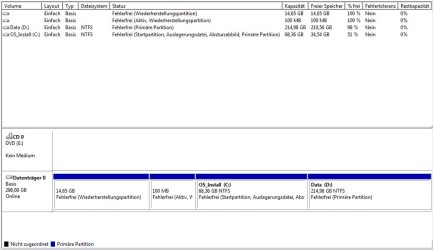
Thanks for your reply. I got a little problem though, there is no partition labeled as "System".

It's in german, however, another german version (win 7 prof) has also a partition called system.

Maybe its the second partition on "Datenträger 0", I can't see whats written there, but it *should* be the same as the status in the table above(as it is on the other german pc), and there I don't find "System" either. See attached image.

Edit:The 7 version I am talking about is home premium btw.
 

Attachments

  • partitions.jpg
    partitions.jpg
    256.3 KB · Views: 512

My Computer

OS
Windows 7 Professional 64bit
Back
Top